Kernel Employee Desktop Live Viewer: Watch and Record Company PCs from One Console
Kernel Employee Desktop Live Viewer is a Windows employee screen monitoring tool from KernelApps, $69 a year per monitored computer (or $10 a month), that shows the desktops of company PCs live in one console and records them as video for later review. It's for small and mid-sized businesses that need to supervise work on company computers, in the office or remote, and want screen recording rather than keystroke logging or web tracking.
Screen monitoring is a sensitive purchase. Used openly, on company machines, with a written policy, it settles disputes about what happened on a PC and protects confidential data. Used secretly, it can break privacy and employment law in many countries. This page covers both what the software does and what to sort out before you install it.
Quick facts
- Version: 25.0 (released September 2025; download dated October 6, 2025)
- Developer: KernelApps Pvt. Ltd. (Kernel Data Recovery), Noida, India
- Platform: Windows 11, 10, 8.1, 8, 7, Vista, XP and Windows Server 2022 back to 2003, 32- and 64-bit
- What it records: live screen views and AVI video recordings of each monitored desktop, including dual monitors
- Price: $69 per year or $10 per month for one user; packs for 5, 25 and 100 users; recurring subscriptions on the order page
- Trial: all features for 15 days
- Refund: 30-day money-back policy, limited to cases where the full version fails where the trial worked
What we checked: the download (86 MB zip, dated October 6, 2025) on the vendor's server, and the order page, which showed $69 a year for Kernel Employee Desktop Live Viewer - Single User License (Yearly Subscription), $10 a month for the Single User monthly plan, and the multi-user plans at the prices in the table below, all as recurring subscriptions, on November 17, 2026. We didn't deploy the agents on a network ourselves.
Download Free TrialBuy 1 User (Yearly)Buy 1 User (Monthly)
Overview
Kernel Employee Desktop Live Viewer has two parts. A server module on an admin PC installs a small recording agent on each computer you want to monitor and stores the recordings. A viewer console, which can run on any PC, shows the live desktops as a grid of thumbnails or opens past recordings. Setup is four steps on the home screen: Agent Configuration, Create Viewer Admin Account, Settings, and Login to Monitoring Console.
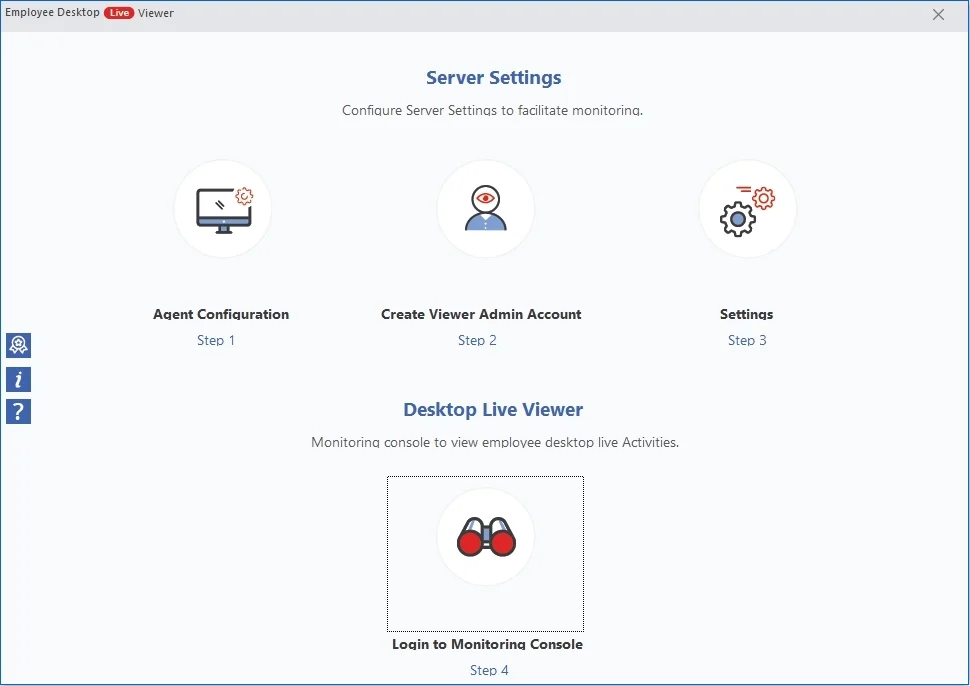
The server module home screen and its four setup steps.
Features
Three ways to deploy agents
Kernel Employee Desktop Live Viewer installs its agent remotely on domain or workgroup computers (add them by IP address, an IP range, a CSV list or by browsing the network), through Group Policy, or with a setup file you run on each PC. Installing remotely needs administrator credentials for the target computer, and a restart starts the recording.
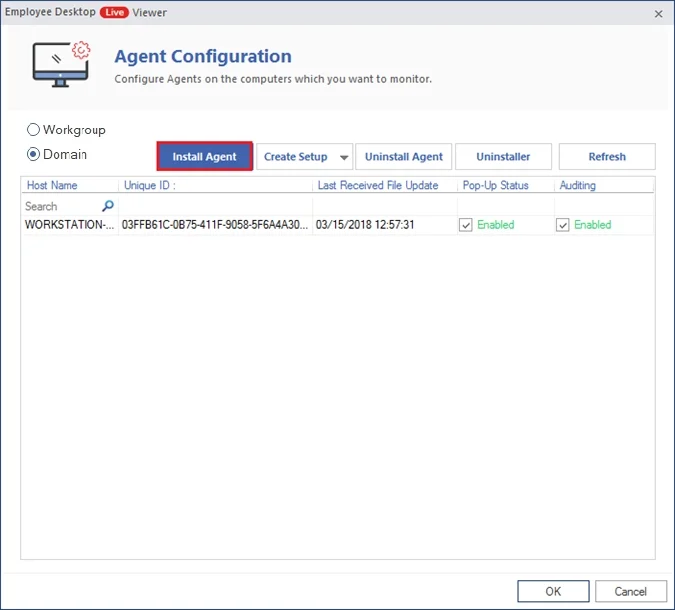
Agent Configuration: install, create a setup file, or uninstall agents; each monitored PC shows its pop-up and auditing status.
Live grid and recorded video
Kernel Employee Desktop Live Viewer shows every monitored desktop live in one thumbnail grid, and you can open any one to watch it full size, including both screens of a dual-monitor PC. It also records continuously, so you can search the recordings by date range and download the videos (AVI) instead of watching live.
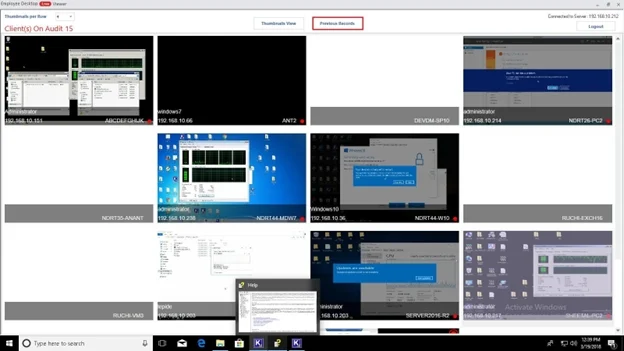
The viewer console with live thumbnails of the monitored desktops.
LAN, WAN and remote staff
Kernel Employee Desktop Live Viewer works across LAN and WAN connections, including remote workers' PCs reached through global IP addresses, according to the vendor, and laptops that move between networks. There's no limit in the software on how many computers you add; the licence sets how many you pay for.
Retention, quality and employee notifications
Kernel Employee Desktop Live Viewer's settings choose where recordings are stored, delete them automatically after a number of days or when free space runs low, set picture quality and frame rate, and configure a pop-up notification shown to employees at an interval you set, with a default message saying that activity is being recorded. Each agent's pop-up status can be on or off.
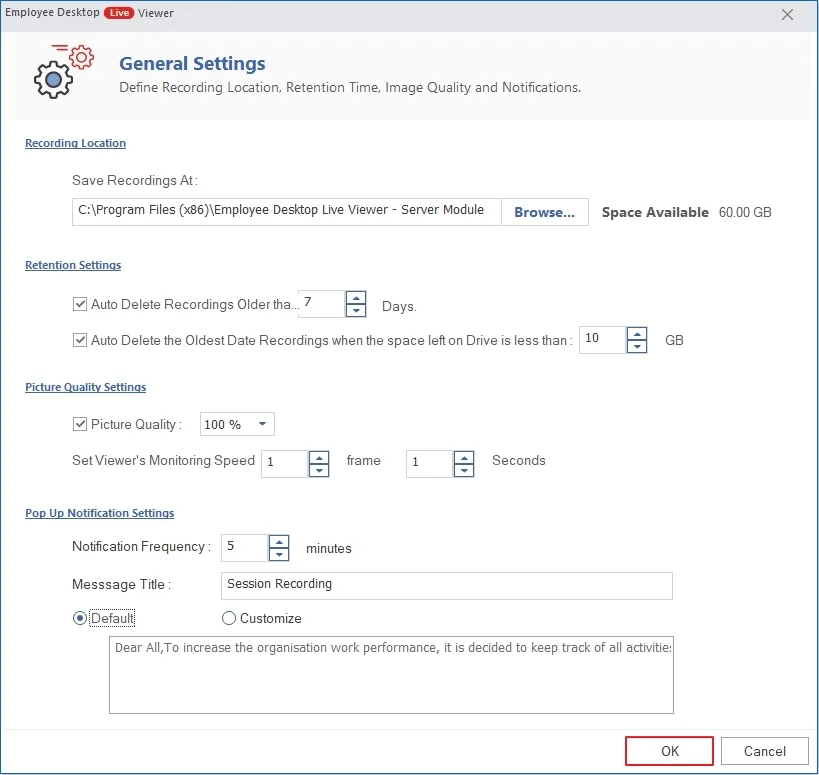
General Settings: storage, auto-delete rules, picture quality and the employee pop-up notification.
Delegated viewing and emergency actions
Kernel Employee Desktop Live Viewer lets the admin create viewer accounts and give each one rights to all or only some computers, so a team lead sees only their team. From the console you can send a warning message to a PC, or restart or shut it down. It can't change files on the employee's computer.
Benefits
- Evidence, not guesswork. A recording shows exactly what happened on a PC when data went missing or a customer complained.
- Remote supervision. Managers can see that home-based staff are working on company systems.
- Narrow by design. It records the screen only; there's no keylogger, so passwords typed aren't captured as text.
- Priced per PC. One computer for $69 a year, or monthly if you only need it for a project.
Real-World Uses
- A call centre or support desk reviewing screen recordings for training and quality checks.
- Protecting confidential data on PCs that handle customer or financial records, as part of a declared security policy.
- Supervising contractors who work on company machines for a fixed period, on a monthly plan.
- Investigating an incident by going back to the recording of the PC and the time in question.
Who It's For, and Who Should Skip It
It's for employers monitoring computers the business owns and administers, under a written monitoring policy that employees have been told about. Small IT teams on a Windows domain will find the deployment straightforward.
Skip it if you want to monitor a partner's, a family member's or anyone else's personal computer: doing that without consent is illegal in many places, and this isn't a parental control tool either. Skip it too if you need productivity analytics (app and website time reports, idle time, timesheets); this tool records screens and doesn't produce those reports. And Mac or Linux computers can't be monitored.
Usage Guide
- Download and unzip the trial on the admin PC, install the server module, and launch it.
- Step 1, Agent Configuration: choose Domain or Workgroup, click Install Agent, add computers by IP, IP range, CSV or browsing, enter admin credentials, and restart them. Or use Create Setup for Group Policy or manual installs.
- Step 2: create a viewer admin account, and further viewer accounts with rights to chosen computers.
- Step 3, Settings: set the recording folder, retention, picture quality and the employee pop-up notification.
- Step 4: log in to the monitoring console with the server's IP address and a viewer account, and choose Live Monitoring, or Previous Offline Monitoring to open recordings.
Before you buy: the legal side
- Tell people. In the EU and UK (GDPR), many US states, Canada, Australia and elsewhere, employers generally must inform staff about monitoring and have a legitimate reason for it. Take local legal advice before you deploy.
- The vendor markets it as invisible. The agent is hidden from the Start menu, Control Panel and Task Manager and can't be removed by the user. That's a product design choice, not a legal permission. Turning on the built-in pop-up notification, and putting monitoring in your written IT policy, is the safer way to run it.
- Company computers only. Installing the agent needs administrator rights on each PC, which you should only have on machines you own or manage.
- Recordings are personal data. Set a short retention period and limit who can view them.
Before you buy: the practical side
- These are subscriptions. The yearly and monthly plans renew automatically at checkout, unlike Kernel's one-off utility licences.
- Use the 15-day trial fully. It has every feature, so test deployment across your network and VPN before paying.
- Storage adds up. Continuous video from many PCs needs disk space; plan the retention settings.
- The refund policy is narrow. Kernel refunds when the full version gives different results from the trial, after support has tried to fix it, not for a change of mind.
Download Free TrialBuy 1 User (Yearly)Buy 1 User (Monthly)
Where it falls short
- Screens only. No application or website usage reports, no timesheets, no idle-time analytics.
- Windows only. No agents for macOS, Linux or mobile devices.
- Dated interface. The console screenshots on the vendor's site show an older Windows look, and recordings are AVI files.
- Remote PCs need reachable IPs. Monitoring home workers depends on network setup (global IPs or VPN) that the vendor's support may need to help with.
What Users Say
On the vendor's page
Kernel's page shows 4.9 out of 5 from 954 reviews, collected on its own site, so read it as the vendor's tally. The review it features, from Stetson Drouin: "Monitoring has become significantly more effective with this EDLV tool, providing an amazing user experience. The software's user interface is also commendably designed."
Trustpilot (KernelApps as a company)
KernelApps holds a 4.9 out of 5 TrustScore from 167 reviews on Trustpilot. None of the recent reviews names this product; they cover Kernel's email, Exchange and migration tools and mostly praise its support staff by name.
We found no independent hands-on review of Kernel Employee Desktop Live Viewer. Compared with the large employee-monitoring suites, it gets little press coverage, so the 15-day trial is the best way to judge it.
Comparisons
Screen recording vs full monitoring suites
Full employee-monitoring suites add app and website tracking, productivity scores, keystroke logging and timesheets, usually for a monthly fee per user. Kernel Employee Desktop Live Viewer does one thing, watch and record screens, for $69 a year per PC. If you need evidence of what happened on screen, it's enough; if you need productivity reports, it isn't.
Yearly vs monthly plans
For one PC, twelve months at $10 cost $120 against $69 for the yearly plan. Monthly only makes sense for short projects or a trial period with real users.
Editions and Pricing
A "user" is a monitored computer. Each Buy button orders that exact plan, and all plans renew automatically. The vendor states that support and maintenance are free for the life of the licence.
FAQs
Can employees see that Kernel Employee Desktop Live Viewer is running?
Not by default. Kernel Employee Desktop Live Viewer's agent is hidden from the Start menu, Control Panel and Task Manager. It can, however, show a pop-up notification to employees at a set interval, and in most countries you should tell staff about monitoring anyway.
Does it work for people working from home?
Yes. Kernel Employee Desktop Live Viewer works across LAN and WAN, and monitors remote computers through global IP addresses, according to the vendor. Test your own network setup during the trial.
Do I have to watch live?
No. Kernel Employee Desktop Live Viewer records all the time, so you can search recordings by date and download the AVI videos later.
Does it log keystrokes or websites?
No. Kernel Employee Desktop Live Viewer records the screen only. It doesn't log keystrokes or produce website and application usage reports.
Can someone other than the admin view the screens?
Yes. Kernel Employee Desktop Live Viewer lets the admin create viewer accounts, each limited to all or selected computers, and the viewer console can be installed on any PC.
How long is the trial?
Kernel Employee Desktop Live Viewer has a 15-day trial with every feature, including remote agent installation and recording.
Can I monitor Mac computers?
No. Kernel Employee Desktop Live Viewer runs on and monitors Windows PCs and Windows Server only.
System Requirements
- Windows 11, 10, 8.1, 8, 7, Vista, XP or Windows 365 (32- and 64-bit); Windows Server 2022, 2019, 2016, 2012 R2, 2012, 2008 R2, 2008, 2003 R2, 2003
- Intel Pentium compatible (x86, x64) processor
- 128 MB RAM minimum
- 100 MB of disk space for the software, plus storage for recordings
- Administrator credentials for the computers that receive the agent
Conclusion
Kernel Employee Desktop Live Viewer is worth $69 a year per PC for a business that needs a plain screen-recording record of what happens on its own Windows computers, without paying for a full productivity suite. Its strengths are simple per-PC pricing, easy domain deployment, live and recorded viewing in one console, and delegated viewing rights. Its limits are that it records screens and nothing more, covers Windows only, and is marketed for hidden monitoring that you shouldn't rely on legally: tell your staff and switch on the notification. Try all of it free for 15 days on a few PCs first.
Download Free TrialBuy 1 User (Yearly)Buy 1 User (Monthly)