AutoDWG DGN to DWG Converter Pro: Batch-Convert MicroStation Files to AutoCAD
AutoDWG DGN to DWG Converter Pro is a $340 Windows program that converts many MicroStation DGN V7 and V8 files, or a whole folder, into AutoCAD DWG or DXF in one batch, and can run from the command line. No AutoCAD or MicroStation is required, and it's a one-time purchase.
Quick facts
- Developer: AutoDWG
- Version: DGN to DWG Converter Pro 2026 (installer version 3.8)
- Platform: Windows (the user guide lists XP through Windows 8)
- Input: MicroStation DGN V7 and V8, single files, multiple files or folders
- Output: DWG or DXF, AutoCAD R14 to 2027 formats
- Automation: command line, callable from batch files or programs such as VB
- Price: $340 one-time for one user
- Trial: free, doesn't expire, watermarks its output
- What we checked: the Pro installer (dgn2dwgpro2026.msi, 14.7 MB, product version 3.8, dated October 21, 2025) downloaded from AutoDWG and the $340.00 USD one-time price on the order page, both on November 3, 2026. We didn't convert our own DGN files.
Before you buy
- Pro is only $45 more than Standard and adds batch and command-line conversion, so it's the better buy for anyone with more than a few files.
- Test with your own DGN files. AutoDWG only refunds within 15 days for technical faults its support can't fix.
Download Free TrialBuy Now
Overview
AutoDWG DGN to DWG Converter Pro does the same conversion as the Standard edition, mapping MicroStation colors, fonts, levels, line styles and references to DWG, but lets you select multiple DGN files or a complete folder and convert them in one go. Its command line lets a batch file, a scheduled task or your own program run conversions silently, without the dialog.
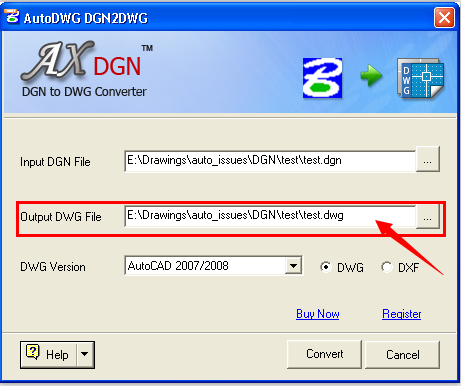
The DGN to DWG converter dialog (shown in its single-file mode): input DGN file, output DWG file, DWG version, and DWG or DXF.
Features
Batch conversion of files and folders
AutoDWG DGN to DWG Converter Pro converts several DGN files, or every DGN in a folder, in one run, all to the DWG or DXF version you choose.
Command-line automation
AutoDWG DGN to DWG Converter Pro can be launched from the command line, for example from a VB program or a DOS batch file, to convert DGN files silently without its interface.
DGN V7 and V8, R14 to 2027 output
AutoDWG DGN to DWG Converter Pro reads both MicroStation formats and writes any AutoCAD DWG or DXF version from R14 to 2027, without AutoCAD or MicroStation.
Who It's For, and Who Should Skip It
It's a good fit for AutoCAD-based engineering and surveying firms that receive whole DGN deliverables from agencies or partners, and for CAD managers who want DGN conversion in an automated workflow.
- Skip it if you convert one DGN now and then. Standard ($295) does single files, and recent AutoCAD can import DGN itself.
- Skip it if many users need it on a server. That's the $3,000 Server edition.
Usage Guide
- Install the Pro trial.
- Select the DGN files or folder to convert.
- Choose the output folder, the DWG version, and DWG or DXF.
- Click Convert, or put the converter's command line in a batch file to run it unattended.
- After buying, register the installed trial to remove the watermark.
Where it falls short
- Sparse documentation. AutoDWG's pages describe the command line but don't publish its switches, so expect to ask support.
- Old requirements list. The user guide stops at Windows 8, so confirm it runs on your PC with the trial.
- No independent reviews that we could find.
Editions and Pricing
| Edition | Price | Batch | Command line | Server install |
|---|
| Standard | $295 | No | No | No |
| Pro | $340 | Yes | Yes | No |
| Server | $3,000 | Yes | Yes | Yes |
FAQs
Can AutoDWG DGN to DWG Converter Pro convert a whole folder?
Yes. AutoDWG DGN to DWG Converter Pro lets you select multiple DGN files or a complete folder and convert them in one go.
Can I run it from a script?
Yes. AutoDWG DGN to DWG Converter Pro supports the command line, so it can be launched from a batch file or another program to convert without its interface.
Does it need MicroStation or AutoCAD?
No. AutoDWG DGN to DWG Converter Pro is stand-alone.
Is it a one-time purchase?
Yes. It costs $340 once with a year of updates.
System Requirements
- Windows (the user guide lists XP, Vista, 7 and 8)
- 1 GB of RAM or more
- 40 MB of free disk space
Conclusion
AutoDWG DGN to DWG Converter Pro is the edition to buy if MicroStation files arrive in sets: for $45 more than Standard you get batch conversion of whole folders and a command line for automation, with no AutoCAD or MicroStation needed. Run a sample of your own DGN files through the trial before buying.
Download Free TrialBuy Now