Short answer: buy AutoDWG DGN to DWG Converter Pro ($340 once) if DGN files reach you in sets, as whole project deliverables or folders, or if you want conversions to run from a script: it converts any number of files in one run and has a command line. Buy AutoDWG DGN to DWG Converter ($295 once) only if you convert one MicroStation drawing now and then and don't mind doing each file by hand. The $45 difference is small, and AutoDWG treats the two as separate products, so moving from Standard to Pro later means buying Pro at full price.
At a glance
| Fact | DGN to DWG Converter (Standard) | DGN to DWG Converter Pro |
|---|
| Price at checkout | $295.00 one-time | $340.00 one-time |
| License | Lifetime, one user, 1 year of free updates | Lifetime, one user, 1 year of free updates |
| Input | MicroStation DGN V7 and V8 | MicroStation DGN V7 and V8 |
| Output | DWG or DXF, AutoCAD R14 to 2027 | DWG or DXF, AutoCAD R14 to 2027 |
| Files per run | One | Many files, or a whole folder |
| Command line | ✗ | ✓ (dgn2dwgbatch.exe) |
| Needs AutoCAD or MicroStation | ✗ | ✗ |
| Platform | Windows | Windows |
| Free trial | ✓ no time limit, watermarked output | ✓ no time limit, watermarked output |
| Installer | dgn2dwg2026.msi, 14.7 MB | dgn2dwgpro2026.msi, 14.7 MB |
How we compared them
- Read AutoDWG's product page, the edition table on its order page, and the license, update, upgrade and refund pages in its support center.
- Read both PDF manuals: the DGN to DWG Converter User Guide and the Command Line User Guide, which covers the Pro edition's switches.
- Opened the checkout for each edition in US dollars and noted the price.
- Downloaded both trial installers and checked their size and date.
- Looked for independent user reviews of either edition.
- What we checked: the Standard installer (dgn2dwg2026.msi, 14,732,800 bytes) and the Pro installer (dgn2dwgpro2026.msi, 14,717,440 bytes), both dated October 21, 2025, and the prices on the order page, $295.00 for Standard and $340.00 for Pro, on November 3, 2026.
We compared features, prices, licenses and documentation. We didn't convert our own DGN files with either edition, so this article doesn't judge conversion quality on difficult drawings; the free trial is the way to check that on your own files.
AutoDWG DGN to DWG Converter: one file at a time
AutoDWG DGN to DWG Converter (Standard)
Price: $295 one-time, one user, one year of updates
Platform: Windows
Best for: AutoCAD users who get a single MicroStation drawing every so often from a surveyor, agency or partner firm
AutoDWG DGN to DWG Converter is a small, stand-alone dialog that turns one MicroStation DGN file (V7 or V8) into an AutoCAD DWG or DXF. You pick the input DGN file, check the output file name, choose the DWG version from R14 up to AutoCAD 2027, pick DWG or DXF, and click Convert. Neither AutoCAD nor MicroStation has to be installed, and AutoDWG says the converter maps colors, fonts, levels (as layers), line styles and external references for you.
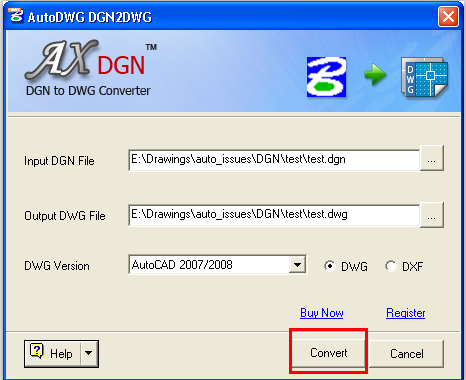
The Standard edition's dialog: one input DGN file, one output DWG file, the DWG version (AutoCAD 2007/2008 here), DWG or DXF, and the Convert button.
That single-file design is the whole difference from Pro. For one drawing it's quick and hard to get wrong. For a delivery of 40 sheets, it means 40 rounds of browse, check and Convert, with no way to queue them up.
What we like
- The simplest way to get one DGN into AutoCAD without MicroStation
- Reads both V7 and V8 DGN, writes DWG or DXF from R14 to 2027
- One-time price, and the license allows a second install (home and work, or desktop and laptop) for the same person
- The trial never expires, so you can test real files before paying
Watch out for
- One file per run: no batch, no folder, no command line
- $295 is a lot for a single-file converter, and only $45 less than Pro
- Moving up to Pro later isn't a discounted upgrade: AutoDWG sells them as separate products
- The user guide's requirements list stops at Windows 8 (AutoDWG's FAQ says it runs on 64-bit PCs)
What users say
We couldn't find independent user reviews or ratings of AutoDWG DGN to DWG Converter on the big review sites, for either edition. With only the vendor's own description to go on, the free trial is the review that counts: run a few of your own DGN files through it and check the levels, line styles, fonts and references in AutoCAD before you buy.
Download DGN to DWG Converter TrialBuy DGN to DWG Converter
AutoDWG DGN to DWG Converter Pro: batches and scripts
AutoDWG DGN to DWG Converter Pro
Price: $340 one-time, one user, one year of updates
Platform: Windows
Best for: engineering and surveying firms that receive whole DGN deliverables, and CAD managers who want conversion in an automated workflow
AutoDWG DGN to DWG Converter Pro does the same conversion as Standard, with the same DGN V7/V8 input and R14 to 2027 output, but its window is a file list. You add files with Add File(s) or a whole directory with Add Folder, choose whether each DWG goes next to its original DGN or into one output folder, set the version and DWG or DXF once, and convert the lot.
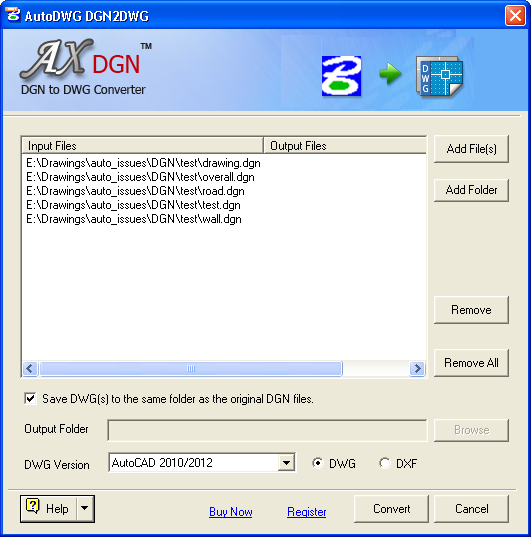
The Pro edition's window: five DGN files queued, Add File(s), Add Folder, Remove and Remove All, the option to save DWGs next to the original DGN files, and AutoCAD 2010/2012 as the DWG version.
The second Pro feature is the command line. The converter ships a dgn2dwgbatch.exe that converts without opening the window, so a batch file, a scheduled task or your own program can run it. AutoDWG's Command Line User Guide documents five switches: /F for one input file, /D for an input folder, /O for the output folder (leave it out to save next to the DGN), /T for DWG (0) or DXF (1), and /V for the output version. Each run also writes a log file next to the DGN that lists any external reference it couldn't find, which is handy when a deliverable arrives with missing reference files.
A note on the command-line guide
AutoDWG DGN to DWG Converter Pro's Command Line User Guide is dated 2015, and its /V list stops at AutoCAD 2010/2012 (the default is 2007/2008/2009), while the product page promises output up to AutoCAD 2027. If your script needs a newer DWG version, run dgn2dwgbatch.exe /? in the trial to see what your build offers, or ask AutoDWG's support, which answers trial users too.
What we like
- Converts a whole folder of DGN files in one run
- Command line with documented switches for unattended conversion
- Log file names any missing external references
- Only $45 more than Standard
Watch out for
- The command-line guide is old and its version list doesn't match the product page
- One user per license: several people converting on a shared server need the $3,000 Server edition
- The Windows XP-style window looks dated
- No independent reviews to check AutoDWG's claims against
Download DGN to DWG Converter Pro TrialBuy DGN to DWG Converter Pro
Conversion features: the same engine, a different workflow
AutoDWG DGN to DWG Converter and DGN to DWG Converter Pro convert the same way: AutoDWG's user guide says the Pro conversion steps are the same as Standard's, and the product page lists the same input (DGN V7 and V8), the same output (DWG or DXF, R14 to 2027) and the same handling of colors, fonts, layers, line styles and external references for both. AutoDWG's FAQ puts the whole difference in one line: Pro supports batch conversion and the command line, and Standard doesn't. So don't buy Pro expecting better drawings; buy it to save clicks.
Ease of use: Standard is simpler, Pro is faster from the second file on
AutoDWG DGN to DWG Converter (Standard) is the easier of the two for a single drawing: three fields and a Convert button. Pro's list window takes a moment longer to set up for one file, but from the second file on it wins, because the version, format and output folder are set once for the whole list. If you can picture yourself converting a project's sheets one by one, that's the sign you need Pro.
Price and licensing: $45 apart, and no cheap upgrade path
AutoDWG DGN to DWG Converter costs $295 and the Pro edition $340 at checkout, each a one-time payment for a lifetime license with one year of free updates. After that year the program keeps working; a later major version costs a renewal fee of 50% of the list price. One single-user license lets the same person install it on two computers they own (home and work, or a desktop and a laptop) and use one at a time.
What each edition costs (USD)
DGN to DWG Converter (Standard), price at checkout$295.00
DGN to DWG Converter Pro, price at checkout$340.00
Standard, renewal for a later major version (50% of list price)$147.50
Pro, renewal for a later major version (50% of list price)$170.00
Checkout prices checked on November 3, 2026. Renewal amounts are worked out from AutoDWG's upgrade policy (50% of the list price).
The catch is the upgrade. AutoDWG's upgrade policy says Standard and Pro are different products and moving from Standard to Pro isn't free, so a Standard owner who outgrows it pays $340 again, not the $45 difference. Its wrong-product policy offers a way out early on: if you buy the right product within 30 days of the wrong one and contact AutoDWG with both orders, it refunds the wrong one. Beyond that, AutoDWG doesn't refund a change of mind; it refunds only within 15 days of purchase, for a technical fault its support can't fix.
| Edition | Price | Batch | Command line | Server install |
|---|
| Standard | $295 | ✗ | ✗ | ✗ |
| Pro | $340 | ✓ | ✓ | ✗ |
| Server | $3,000 | ✓ | ✓ | ✓ |
The Server edition is for installing the converter on a server for several users. For one person at one PC, Pro has the same conversion features.
Support: the same for both
AutoDWG supports both editions the same way: free email support for trial and registered users, with replies promised within 24 hours on working days and 48 hours at weekends. Registered customers can also email a DGN file with their order ID, and AutoDWG will convert it and send the DWG back, which helps when a drawing won't convert cleanly on your own PC. Your registration code arrives by email within about 5 minutes of the order and registers the trial you already installed, so there's nothing to download again.
Which should you choose?
For most buyers, AutoDWG DGN to DWG Converter Pro is the better buy. DGN files rarely arrive one at a time on real projects, the $45 premium is about 15% of Standard's price, and there's no discounted way to move up later.
| Your situation | Pick | Why |
|---|
| A full project set or folder of DGN files from an agency or partner | Pro | Converts the whole folder in one run |
| Conversions as part of a nightly job, a script or your own program | Pro | Only Pro has dgn2dwgbatch.exe and its switches |
| One DGN drawing a few times a year, and the budget is tight | Standard | Does the same conversion for $45 less |
| You aren't sure how many files you'll get | Pro | Standard to Pro is a full-price second purchase |
| Several people converting on a shared server | Neither (Server edition) | Single-user licenses allow one user |
Who should skip each edition
- Skip AutoDWG DGN to DWG Converter (Standard) if you'll ever receive DGN files in batches; you'll end up buying Pro too.
- Skip AutoDWG DGN to DWG Converter Pro if you only need a one-off conversion: Standard costs less, and registered customers can ask AutoDWG to convert a difficult file for them.
- Skip both if you already run a recent AutoCAD and its built-in DGNIMPORT command handles your files; try that first.
- Skip both if you work on a Mac or need to turn DWG back into DGN: these are Windows-only, one-way converters.
What commonly goes wrong
- Buying Standard, then needing batch. The upgrade to Pro isn't free. If it happens, buy Pro within 30 days and ask AutoDWG to refund the Standard order under its wrong-product policy.
- Skipping the trial. AutoDWG doesn't refund a change of mind, only technical faults its support can't fix, within 15 days of purchase. The trial doesn't expire, so test levels, line styles, fonts and references on real project files first.
- Missing reference files. A DGN that references other DGN files needs them alongside it. Pro's command line writes a log listing any external reference it couldn't find.
- Expecting newer DWG versions from a script. The command-line guide lists output only up to AutoCAD 2010/2012, so check
dgn2dwgbatch.exe /? in the trial.
- Forgetting the watermark. Files converted with the trial carry a watermark. Register the installed trial with your code, then convert the final files again.
FAQs
What is the difference between AutoDWG DGN to DWG Converter and the Pro version?
AutoDWG DGN to DWG Converter Pro adds batch conversion (many files or a whole folder in one run) and a command line. The conversion itself, DGN V7 and V8 to DWG or DXF from R14 to AutoCAD 2027, is the same in both editions.
Can I upgrade AutoDWG DGN to DWG Converter Standard to Pro later?
Not at a discount. AutoDWG treats Standard and Pro as different products, so going from Standard to Pro means buying Pro for $340. Within 30 days of the Standard order, AutoDWG will refund the Standard purchase if you buy Pro and contact them with both orders.
Do I need MicroStation or AutoCAD to use AutoDWG DGN to DWG Converter?
No. Both editions of AutoDWG DGN to DWG Converter are stand-alone Windows programs that run without MicroStation or AutoCAD installed.
Is AutoDWG DGN to DWG Converter a subscription?
No. AutoDWG DGN to DWG Converter ($295) and the Pro edition ($340) are one-time purchases with a lifetime license and one year of free updates. A later major version costs 50% of the list price, and you can keep using the version you have without paying again.
Does the AutoDWG DGN to DWG Converter trial have limits?
Yes. The AutoDWG DGN to DWG Converter trial doesn't expire, but it puts a watermark on converted drawings. Entering the registration code in the installed trial removes the watermark.
Can AutoDWG DGN to DWG Converter Pro run from a batch file?
Yes. AutoDWG DGN to DWG Converter Pro includes dgn2dwgbatch.exe, which takes /F (input file), /D (input folder), /O (output folder), /T (DWG or DXF) and /V (output version), and converts without showing its window.
Can I install AutoDWG DGN to DWG Converter on two computers?
Yes, for one person. AutoDWG's single-user license allows an install on two computers owned by the licensee, such as a work PC and a home PC, as long as only one copy is in use at a time.
Does AutoDWG DGN to DWG Converter work on 64-bit Windows?
Yes. AutoDWG's FAQ says AutoDWG DGN to DWG Converter works on 64-bit computers, although the user guide's requirements list only names Windows XP, Vista, 7 and 8. Install the free trial to confirm it on your PC.