AutoDWG DGN to DWG Converter: Open MicroStation Drawings in AutoCAD Without MicroStation
AutoDWG DGN to DWG Converter is a $295 Windows program that converts MicroStation DGN V7 and V8 files into AutoCAD DWG or DXF, without AutoCAD or MicroStation installed. The Standard edition converts one file at a time, and it's a one-time purchase.
Civil engineering, transportation and government projects often still deliver drawings in MicroStation's DGN format. If your office runs AutoCAD, or any DWG-based CAD, you need those files as DWG before you can work on them.
Quick facts
- Developer: AutoDWG
- Version: DGN to DWG Converter 2026 (installer version 3.8)
- Platform: Windows (the user guide lists XP through Windows 8)
- Input: MicroStation DGN V7 and V8
- Output: DWG or DXF, AutoCAD R14 to 2027 formats
- Price: $295 one-time for one user. Pro ($340) adds batch conversion and a command line.
- Trial: free, doesn't expire, watermarks its output
- What we checked: the installer (dgn2dwg2026.msi, 14.7 MB, product version 3.8, dated October 21, 2025) downloaded from AutoDWG and the $295.00 USD one-time price on the order page, both on November 3, 2026. We didn't convert our own DGN files.
Before you buy
- Standard converts one file at a time. For more than a handful of DGN files, Pro's batch mode is worth the extra $45.
- Test real project files. Check levels, line styles and fonts in the trial. AutoDWG only refunds within 15 days for technical faults its support can't fix.
Download Free TrialBuy Now
Overview
AutoDWG DGN to DWG Converter is a small dialog: input DGN file, output DWG file, DWG version, DWG or DXF, and a Convert button. AutoDWG says it handles colors, fonts, layers, line styles and references for you, so the DWG looks like the DGN did in MicroStation.
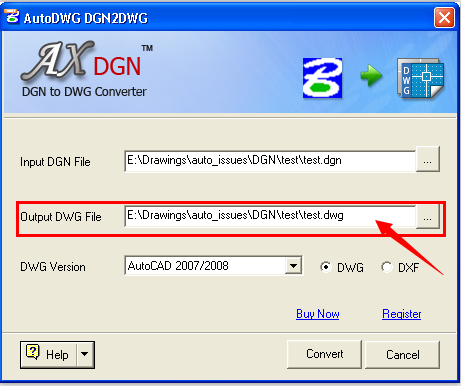
The DGN to DWG converter dialog: the input DGN file, the output DWG file, the DWG version list, and DWG or DXF.
Features
DGN V7 and V8 to DWG or DXF
AutoDWG DGN to DWG Converter reads both the older V7 and the current V8 DGN formats and writes DWG or DXF in any version from R14 to AutoCAD 2027.
Colors, fonts, levels and line styles handled
AutoDWG DGN to DWG Converter maps MicroStation colors, fonts, levels (as AutoCAD layers), line styles and references to their DWG equivalents automatically.
Stand-alone
AutoDWG DGN to DWG Converter needs neither AutoCAD nor MicroStation, so it runs on any office PC.
Who It's For, and Who Should Skip It
It's a good fit for AutoCAD users who occasionally receive MicroStation DGN files from agencies, surveyors or partner firms.
- Skip it if you receive many DGN files. Buy the Pro edition for batch conversion.
- Skip it if you have a recent AutoCAD. AutoCAD can import DGN files itself, so try that first.
Usage Guide
- Install the trial and open DGN to DWG Converter.
- Click the button next to Input DGN File and pick the file.
- Check or change the Output DWG File name.
- Choose the DWG version and DWG or DXF.
- Click Convert.
Where it falls short
- Expensive for a single-file tool. At $295, it costs more than AutoDWG's other converters.
- One file at a time in this edition.
- Old requirements list. The user guide's system requirements stop at Windows 8, so check it on your PC with the trial.
Editions and Pricing
| Edition | Price | Batch | Command line | Server install |
|---|
| Standard | $295 | No | No | No |
| Pro | $340 | Yes | Yes | No |
| Server | $3,000 | Yes | Yes | Yes |
FAQs
Does AutoDWG DGN to DWG Converter need MicroStation?
No. AutoDWG DGN to DWG Converter is stand-alone and needs neither MicroStation nor AutoCAD.
Which DGN versions does it read?
AutoDWG DGN to DWG Converter reads MicroStation DGN V7 and V8 files.
What's the difference between Standard and Pro?
Pro adds batch conversion of several files or a whole folder, and command-line operation. Standard converts one file at a time through the dialog.
Is it a one-time purchase?
Yes. AutoDWG DGN to DWG Converter costs $295 once with a year of updates.
System Requirements
- Windows (the user guide lists XP, Vista, 7 and 8)
- 1 GB of RAM or more
- 40 MB of free disk space
Conclusion
AutoDWG DGN to DWG Converter is worth $295 only if you get MicroStation files now and then and have no other way to read them: it's stand-alone and handles V7 and V8. Most buyers should spend the extra $45 on Pro for batch conversion, and anyone with a recent AutoCAD should try its built-in DGN import first.
Download Free TrialBuy Now