AutoDWG DWG to PDF Converter: Batch-Convert AutoCAD Drawings to PDF Without AutoCAD
AutoDWG DWG to PDF Converter is a $99 Windows program that turns DWG, DXF and DWF drawings into PDF files without AutoCAD, one at a time or a whole folder in one batch. It handles layouts, layers, pen widths and searchable text, and it's a one-time purchase.
PDF is how drawings get to clients, permit offices and site crews who don't have CAD. If you don't own AutoCAD, or you have a backlog of drawings to publish, a dedicated converter saves opening and plotting each file by hand.
Quick facts
- Developer: AutoDWG
- Version: DWG to PDF Converter 2026 (installer version 6.88)
- Platform: Windows 11, 10, 8, 7, Vista and XP, 32-bit or 64-bit
- Input: DWG, DXF and DWF from R14 to AutoCAD 2027
- Output: one PDF per drawing, one per layout, or all merged into a single PDF
- Price: $99 one-time ($89 each for 2-10 users). Pro ($129) adds custom watermarks.
- Trial: free, doesn't expire, watermarks the PDFs it creates
- What we checked: the installer (DWG2PDF2026.msi, 33.7 MB, product version 6.88, dated October 28, 2025) downloaded from AutoDWG and the $99.00 USD one-time price on the order page, both on November 3, 2026. We didn't convert our own drawings.
Before you buy
- Run your own drawings through the trial. Check fonts, line weights and page sizes on real files. AutoDWG only refunds within 15 days for a technical fault its support can't fix.
- Need your own watermark? Custom watermarks are Pro-only. Command-line automation needs the $990 Server edition.
- For occasional single files, AutoDWG's free online DWG to PDF converter may be enough, though it limits how many files you can convert a day.
Download Free TrialBuy Now
Overview
AutoDWG DWG to PDF Converter is a five-step wizard. You add files or a folder, set the output options, set pen widths, choose the output folder and layers to hide, and click Convert Now. It's built for turning many drawings into PDFs with consistent settings, and opens the output folder when it's done.
Features
Batch files or whole folders
AutoDWG DWG to PDF Converter converts a list of drawings, or every drawing in a folder, in one run, and lets you pick which layouts of each drawing to include. Output can be one PDF per drawing, one PDF per layout, or a single merged PDF with each drawing as a page.
Pen widths from your CTB file
AutoDWG DWG to PDF Converter loads an AutoCAD CTB plot style so line weights and colors come out as your office prints them, or uses the drawing's own line weights. You can also set each pen color's width by hand and print in color, black and white, or grayscale.
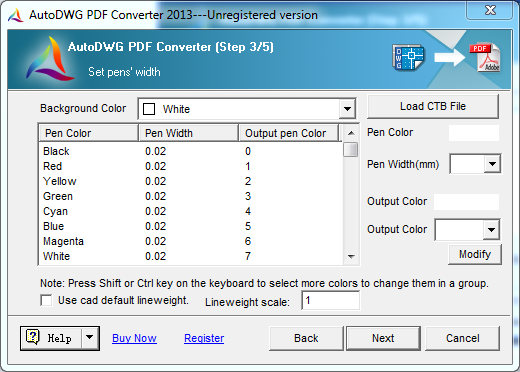
Step 3 of the wizard (an older version of the interface): pen widths and output colors per AutoCAD color, the background color, Load CTB File, and the lineweight scale.
Searchable text and smaller files
AutoDWG DWG to PDF Converter can keep TrueType text as real text, so people can search and copy it in the PDF. Turning off "Fill TTF Text" makes PDFs of text-heavy drawings much smaller. SHX font folders can be added if text comes out substituted.
Page size, resolution and hidden layers
AutoDWG DWG to PDF Converter uses each layout's own page setup when it can, or a standard or custom page size you define. Resolution is adjustable (300, 600 or 1200 DPI), and you can list layers, such as Defpoints, to switch off in every drawing of the batch.
PDF passwords and permissions
AutoDWG DWG to PDF Converter can encrypt the PDFs and restrict printing, copying and editing, useful when sending drawings outside the company.
Who It's For, and Who Should Skip It
It's a good fit for offices, contractors and document controllers who regularly publish sets of AutoCAD drawings to PDF and want consistent line weights and page sizes without AutoCAD.
- Skip it if you want your logo on every sheet. Buy the Pro edition.
- Skip it if you need to view or edit drawings too. DWGSee Pro ($98) views, edits and exports PDFs one drawing at a time.
- Skip it if you already have AutoCAD. AutoCAD's own Publish command batch-plots to PDF.
Usage Guide
- Install the trial and start the converter.
- Step 1: add files or a folder, and use Layout Set to choose layouts.
- Step 2: set the resolution, page size, output color and output type (per drawing, per layout or merged).
- Step 3: set pen widths or load a CTB file.
- Step 4: choose the output folder, layers to turn off, TrueType options and PDF encryption.
- Step 5: click Convert Now.
- After buying, enter the registration code in the installed trial to remove the watermark.
Where it falls short
- Batch settings are shared. One set of options applies to the whole batch, so test a few drawings before converting hundreds.
- Font substitutions. Drawings that use custom SHX fonts need those font folders added, or text can change.
- Dated wizard. The interface hasn't changed much in years.
Editions and Pricing
| Edition | Price | Custom watermark | Command line and server install |
|---|
| Standard | $99 | No | No |
| Pro | $129 | Yes | No |
| Server | $990 | Yes | Yes |
Every edition batch-converts and supports layouts, layers, CTB files, TrueType text and PDF permissions. Licenses are perpetual with a year of updates, and volume prices start at 2 users.
FAQs
Can AutoDWG DWG to PDF Converter merge drawings into one PDF?
Yes. AutoDWG DWG to PDF Converter's "Merge into single PDF" output type turns a batch of drawings into one PDF with a page per drawing. You can also create one PDF per layout.
Does AutoDWG DWG to PDF Converter need AutoCAD?
No. AutoDWG DWG to PDF Converter reads DWG, DXF and DWF files itself, from R14 to AutoCAD 2027.
Why is my PDF so large?
Drawings with lots of TrueType text produce big PDFs because the text is filled as solid shapes. Untick "Fill TTF Text" in step 4 of AutoDWG DWG to PDF Converter and the file gets much smaller.
Can I automate AutoDWG DWG to PDF Converter from a script?
Only with the Server edition, which adds command-line operation. The Standard and Pro editions are run through the wizard.
Is AutoDWG DWG to PDF Converter a subscription?
No. It's a one-time $99 purchase with a year of updates, and you keep using your version afterwards.
System Requirements
- Windows 11, 10, 8, 7, Vista or XP, 32-bit or 64-bit
- 1 GB of RAM or more
- 40 MB of free disk space
Conclusion
AutoDWG DWG to PDF Converter is worth $99 if you turn AutoCAD drawings into PDFs regularly and don't have AutoCAD: batch folders, CTB pen widths, merged sets and searchable text cover what a plotting office needs. Choose Pro if every PDF needs your own watermark. Check a few of your drawings in the trial first, because refunds are only for technical faults.
Download Free TrialBuy Now