DWGSee Pro: View, Edit and Publish AutoCAD Drawings to PDF for $98
DWGSee Pro is a $98 Windows DWG viewer and light editor from AutoDWG. It opens DWG, DXF and DWF files up to AutoCAD 2027 without AutoCAD, and adds what the cheaper Viewer edition lacks: publishing drawings to PDF (with layers) and images, copying drawings into Word, and drawing and modifying objects.
It's aimed at the people in between viewers and drafters: the project manager who marks up a plan and emails a PDF, the engineer who needs to fix a dimension, the estimator who pastes a detail into a report.
Quick facts
- Developer: AutoDWG
- Version: DWGSee Pro 2027 (installer version 6.645)
- Platform: Windows (the user guide lists XP through Windows 10)
- Files: opens DWG, DXF and DWF from R14 to AutoCAD 2027, saves to DWG or DXF in versions R14 to 2027
- Exports: PDF (single or merged, with markups and layers), JPG, PNG, BMP, GIF, TIFF
- Price: $98 one-time for one user
- Trial: free, with a limit on how many drawings you can save
- What we checked: the DWGSee Pro installer (DWGSeePro2027.msi, 41 MB, product version 6.645, dated October 15, 2026) downloaded from AutoDWG and the $98.00 USD one-time price on the order page, both on November 3, 2026. We didn't test it on our own drawings.
Before you buy
- It's a light editor, not full CAD. You can add and change lines, text, dimensions and layers, but there's no command line or heavy drafting toolset. That's DWGSee CAD ($198).
- Test your own files first. AutoDWG only refunds within 15 days for a technical fault its support can't fix.
- One year of updates is included. Optional yearly maintenance is sold separately.
Download Free TrialBuy Now
Overview
DWGSee Pro is the same small, fast program as DWGSee DWG Viewer with more features turned on. You get the viewer's thumbnail browser, measuring with snaps, markups, drawing compare, text search across folders and batch printing, plus PDF and image export under the File menu and Draw, Editor and Dimension menus for making changes.
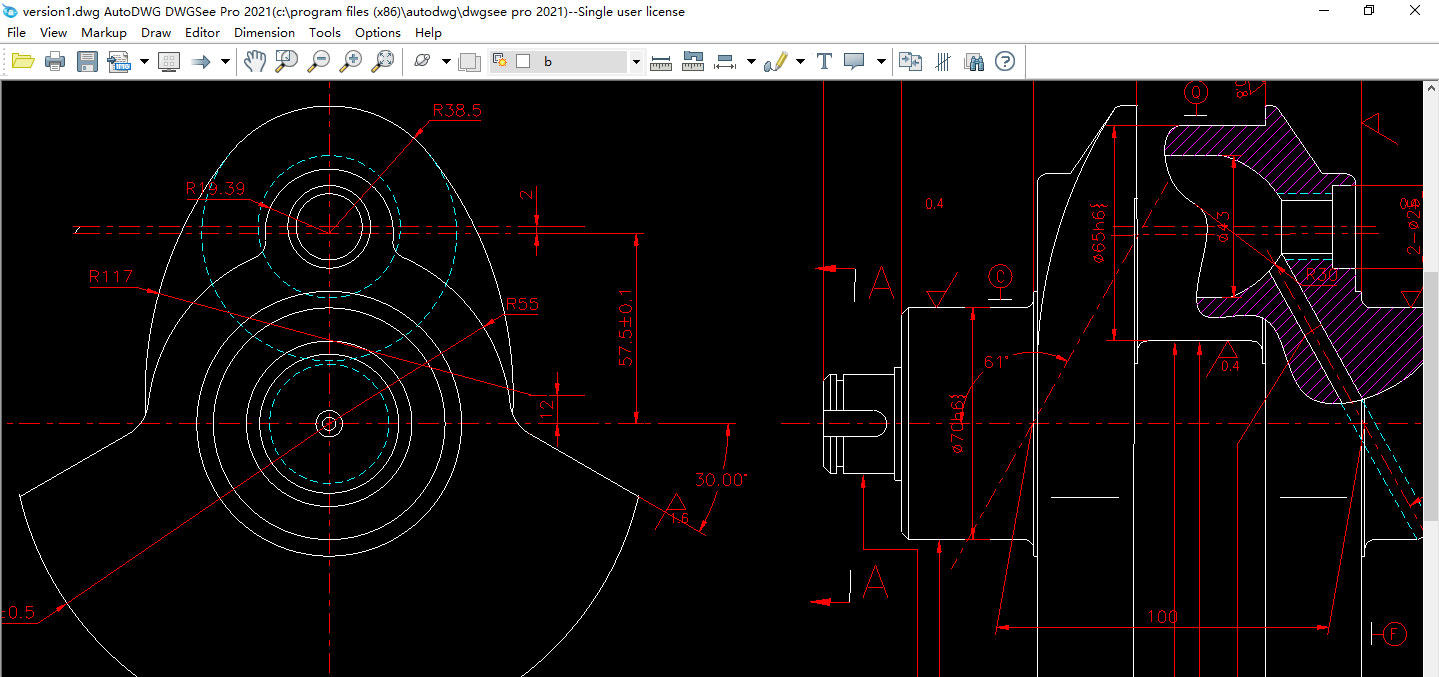
DWGSee Pro 2026 with a mechanical drawing open. The Draw, Editor and Dimension menus are what Pro adds to the Viewer edition.
Features
Publish to PDF with layers and markups
DWGSee Pro exports drawings to PDF, one PDF per drawing or several drawings merged into one file, with your markups included if you want them and with the drawing's layers kept as PDF layers. You set the page size, color and resolution, and linked Xrefs come out in the PDF too.
Export to images and copy to Word
DWGSee Pro saves drawings as JPG, PNG, BMP, GIF or TIFF for people without a DWG viewer, and copies a selected part of a drawing so you can paste it into Microsoft Word as a vector image that stays sharp when resized.
Draw and modify drawings
DWGSee Pro adds lines, polylines, circles, arcs and text to a drawing, edits text, lines, layers and block attributes, and changes object properties from a right-click menu. You can add dimensions and notes, or start a new drawing from a template.
Save to any AutoCAD version
DWGSee Pro saves drawings as DWG or DXF in any version from R14 to 2027, using AutoDWG's built-in converter, so you can send a file to someone stuck on an older AutoCAD.
Who It's For, and Who Should Skip It
It's a good fit for project managers, engineers, contractors and freelancers who review drawings, make small corrections and send PDFs, and want a one-time price instead of a CAD subscription.
- Skip it if you only look and print. DWGSee DWG Viewer does that for $69.
- Skip it if you draft whole drawings. DWGSee CAD or a full CAD program is the better tool.
- Skip it for 3D or AutoLISP work. DWGSee is a 2D tool without LISP.
Usage Guide: making a PDF set
- Install the trial (the same installer as DWGSee DWG Viewer) and open your drawing.
- Add markups if needed from the Markup menu.
- Click Export to PDF on the toolbar, or File > Export > Convert to PDF.
- Choose "Create individual PDF" or "Merge into a single PDF", and tick "Exporting with markup" to include your notes.
- Set the page size, output color and resolution, click Next, and the PDF is written.
Where it falls short
- 2D only. 3D models aren't its strength, and there's no AutoLISP.
- An old-fashioned interface. Its one Trustpilot reviewer says the UI looks like it's from 2010.
- No cloud or sharing features. You send files and PDFs yourself.
What Users Say
Trustpilot: Heideman Tony, freelance MEP draftsman (5 stars, June 18, 2026)
The one public review of DWGSee on Trustpilot comes from a freelancer who mostly views HVAC layouts:
"Opens DWG files fast — way faster than TrueView. Measurement and markup tools are accurate."
"Batch DWG→PDF conversion works flawlessly. No subscription. Runs smooth on my 8GB laptop."
"3D support is basically useless. No LISP. UI looks like it's from 2010. Desktop only — no cloud, no collaboration."
"But for 90% of what I need — open, view, markup, convert DWG — it does the job at 10% of the price. Hard to argue with that."
Editions and Pricing
| Edition | Price | PDF and image export | Editing |
|---|
| DWGSee DWG Viewer | $69 | No | No |
| DWGSee Pro | $98 | Yes, PDF with layers | Draw and modify |
| DWGSee CAD | $198 | Yes | Full 2D drafting with command line |
DWGSee Pro is also sold as a floating license for teams, from $780. All licenses are perpetual with a year of updates.
FAQs
Can DWGSee Pro merge several drawings into one PDF?
Yes. DWGSee Pro's PDF export has a "Merge into a single PDF" option, so a whole plan set can go out as one file, with or without your markups.
What's the difference between DWGSee Pro and DWGSee DWG Viewer?
DWGSee Pro adds PDF and image export, copying drawings into Word, and drawing and editing tools to everything the $69 Viewer does. Both use the same installer, and the license decides the edition.
Can DWGSee Pro replace AutoCAD?
For viewing, markups, small edits and PDFs, often yes. For drafting complete drawings, DWGSee CAD is AutoDWG's closer AutoCAD alternative, and neither handles 3D modeling or AutoLISP.
Is DWGSee Pro a one-time purchase?
Yes. DWGSee Pro costs $98 once and includes a year of updates. You can keep using your version after that.
System Requirements
- Windows (the user guide lists XP, Vista, 7, 8 and 10)
- 1 GB of RAM or more
- 40 MB of free disk space
Conclusion
DWGSee Pro is the DWGSee edition most people should buy: for $98, once, you get a fast DWG viewer that also makes PDFs with layers and handles small edits. Skip it only if you never share drawings (the $69 Viewer is enough) or if you draft full drawings (look at DWGSee CAD). Its weaknesses are an old-fashioned interface and no 3D.
Download Free TrialBuy Now