AutoDWG DWF to DWG Converter Pro: Get Editable AutoCAD Drawings Back from DWF Files
AutoDWG DWF to DWG Converter Pro is a $180 Windows program that converts Autodesk DWF files back into editable DWG or DXF drawings, in batches and without AutoCAD. It's a one-time purchase.
DWF is the compact format AutoCAD users publish for review. It's meant to be viewed, not edited, so when the original DWG is lost or a consultant only sent DWFs, you're stuck redrawing. This converter rebuilds the drawing from the DWF instead.
Quick facts
- Developer: AutoDWG
- Version: DWF to DWG Converter Pro 2023 (installer version 3.00)
- Platform: Windows (the user guide lists XP through Windows 10)
- Input: DWF, including multi-page DWF 6.0
- Output: DWG or DXF, AutoCAD R14 to 2023 formats, English or metric
- Price: $180 one-time ($162 each for 2-5 users)
- Trial: free, doesn't expire, watermarks its output
- What we checked: the installer (DWF2DWGPro2023.exe, 12.6 MB, file version 3.00, dated October 21, 2025) downloaded from AutoDWG and the $180.00 USD one-time price on the order page, both on November 3, 2026. We didn't convert our own files.
Before you buy
- The newest output format is AutoCAD 2023. That's fine for current AutoCAD, which opens 2018-format DWG files and later, but the program itself hasn't had a major release since then.
- A DWF converts only as well as it was published. Check a few of your files in the trial before buying. AutoDWG only refunds within 15 days for technical faults its support can't fix.
Download Free TrialBuy Now
Overview
AutoDWG DWF to DWG Converter Pro is a single batch window: add files or folders, choose the AutoCAD output version, DWG or DXF, English or metric units, and the output folder, then click Convert. It's stand-alone, unlike AutoDWG's older DWFin plug-in, which needed a full 32-bit AutoCAD 2012 or earlier.
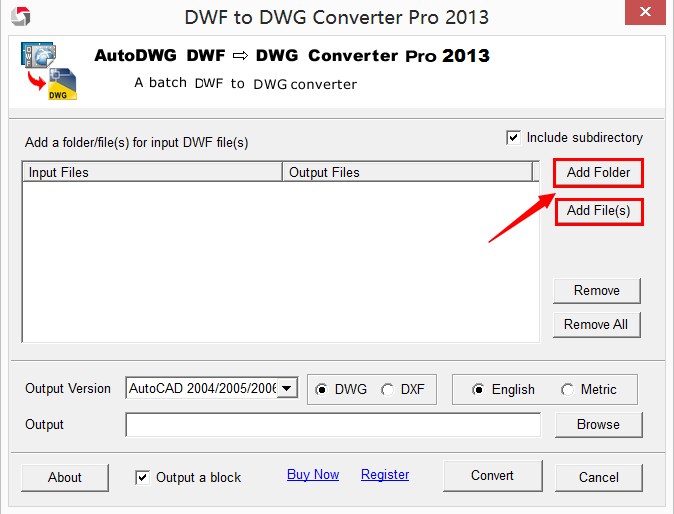
The converter (2013 interface): input files and folders with an Include subdirectory option, output version, DWG or DXF, English or Metric, and Output a block.
Features
All of AutoCAD's DWF elements
AutoDWG DWF to DWG Converter Pro supports every element AutoCAD writes when it plots to DWF, including TrueType text, arcs, ellipses and elliptical arcs, so they come back as the matching DWG objects rather than broken segments.
Layers and multi-page DWFs
AutoDWG DWF to DWG Converter Pro recreates the layers stored in a DWF and handles multi-page DWF 6.0 files. Images embedded in the DWF can be extracted too.
Folders and subfolders in one batch
AutoDWG DWF to DWG Converter Pro converts a whole folder, including subfolders, in one run, which helps when an entire project archive exists only as DWFs.
Who It's For, and Who Should Skip It
It's a good fit for anyone who needs to edit drawings that only exist as DWF: recovering old project archives, or working from a consultant's review set.
- Skip it if you have the original DWGs. Edit those instead.
- Skip it if your files are PDFs. AutoDWG PDF to DWG Converter handles those.
- Skip it if you only need to look at DWFs. DWGSee DWG Viewer opens DWF files.
Usage Guide
- Install the trial and start DWF to DWG Converter Pro.
- Click Add Folder or Add File(s), and tick Include subdirectory if needed.
- Choose the output version, DWG or DXF, and English or Metric.
- Browse to the output folder and click Convert.
- After buying, register the installed trial to remove the watermark.
Where it falls short
- Older product line. The current version is 2023, with output formats up to AutoCAD 2023.
- Only Pro is sold. There's no cheaper single-file edition any more.
- A dated interface. The window still looks like the 2013 release.
FAQs
Does AutoDWG DWF to DWG Converter Pro need AutoCAD?
No. AutoDWG DWF to DWG Converter Pro is stand-alone. Only AutoDWG's older DWFin plug-in required AutoCAD.
Does it keep layers?
Yes. AutoDWG DWF to DWG Converter Pro recreates the layers saved in the DWF file in the converted DWG.
Can it convert multi-page DWF files?
Yes. AutoDWG DWF to DWG Converter Pro supports the multi-page DWF 6.0 specification.
Is it a one-time purchase?
Yes. AutoDWG DWF to DWG Converter Pro costs $180 once with a year of updates.
System Requirements
- Windows (the user guide lists XP, Vista, 7, 8 and 10)
- 1 GB of RAM or more
- 40 MB of free disk space
Conclusion
AutoDWG DWF to DWG Converter Pro is worth $180 when DWF files are all you have and redrawing would take longer: it rebuilds arcs, text and layers, converts folders in one go, and needs no AutoCAD. Be aware it's an older product, last updated as the 2023 version, so try your own DWFs in the trial before buying.
Download Free TrialBuy Now