AutoDWG DWG DXF Converter Pro: Automate DWG, DXF and Version Conversion from the Command Line
AutoDWG DWG DXF Converter Pro is a $149 Windows converter for DWG to DXF, DXF to DWG and AutoCAD version changes (R12 to AutoCAD 2026) that also runs from the command line, so conversions can happen silently in scripts, scheduled jobs or your own software. No AutoCAD needed, one-time license.
Quick facts
- Developer: AutoDWG
- Version: DWG DXF Converter 2026 (installer version 4.81)
- Platform: Windows (the user guide lists XP through Windows 10), works on 64-bit Windows
- Command line: dwg2dxf.exe with input file or folder, output, conversion type, output version and subfolder switches
- Price: $149 one-time for one user. Server edition: $990.
- What we checked: the installer (dwg2dxf2026.msi, 16.2 MB, product version 4.81, dated October 21, 2025) downloaded from AutoDWG, the $149.00 USD Pro price and $990.00 USD Server price on the order page, all on November 3, 2026. We didn't run conversions ourselves.
Before you buy
- Pro only adds the command line. AutoDWG says Standard ($78) and Pro are the same program with different registration codes, so buy Pro only if you'll script conversions.
- Running it on a server for many users needs the Server edition.
- Refunds are only for technical faults support can't fix, within 15 days, so test with the trial first.
Download Free TrialBuy Now
Overview
AutoDWG DWG DXF Converter Pro gives you two ways to work. The window converts single files or whole folders and subfolders in a few clicks. The command line does the same without any window, which is what you want when drawings arrive in a shared folder every night, or when another application needs to hand off conversions.
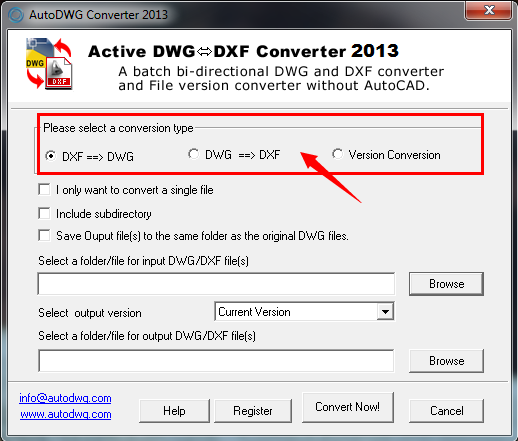
The converter window (2013 interface) with the three conversion types, single-file and subdirectory options, and input and output folders.
Features
Silent command-line conversion
AutoDWG DWG DXF Converter Pro's dwg2dxf.exe takes these switches:
/F input file, or /D input folder with /S to include subfolders/O output file or folder/T conversion type: DWG2DXF, DXF2DWG or Version/V output version, from R9 up, or the current version
For example, dwg2dxf.exe /D c:\Project1 /O c:\Folder1 /S /T DWG2DXF /V R2010 converts every DWG in a project folder and its subfolders to AutoCAD 2010 DXF files.
Everything in the Standard converter
AutoDWG DWG DXF Converter Pro also converts DWG to DXF, DXF to DWG and between AutoCAD versions from R12 to 2026 through its window, in batches of folders and subfolders.
Who It's For, and Who Should Skip It
It's a good fit for CAD managers, developers and IT staff who want DWG and DXF conversion built into a workflow: nightly batch jobs, document management systems, or a tool that exports DXF for CNC machines.
- Skip it if you convert by hand. The $78 Standard edition is the same program without the command line.
- Skip it if you're building conversion into your own application at scale. AutoDWG also sells a DWG DXF ActiveX SDK for developers.
Usage Guide: running a conversion from the command line
- Install the converter and register it with your Pro code.
- Open a Command Prompt and change to the installation folder (by default C:\Program Files\AutoDWG\Active DWG DXF Converter).
- Run
dwg2dxf.exe with the switches you need, for example /F c:\dwg\test.dxf /O c:\dwg\test.dwg /T DXF2DWG.
- Put the same command in a batch file or scheduled task to repeat it automatically.
Where it falls short
- The command-line guide is dated. Its list of output versions stops at R2013, older than the AutoCAD 2026 support the program itself advertises, so test the newest version switches.
- No viewer. You can't inspect drawings in the converter.
- Server use costs much more. Multi-user server installation needs the $990 Server edition.
Editions and Pricing
| Edition | Price | Command line | Server install for multiple users |
|---|
| Standard | $78 | No | No |
| Pro | $149 | Yes | No |
| Server | $990 | Yes | Yes |
Buy Pro ($149)Buy Server ($990)
FAQs
Can AutoDWG DWG DXF Converter Pro convert a whole folder from the command line?
Yes. AutoDWG DWG DXF Converter Pro's /D switch takes an input folder, /S includes its subfolders, and /O sets the output folder.
Do I need to reinstall to upgrade from Standard to Pro?
No. AutoDWG says Standard and Pro are the same program with different registration codes, so entering a Pro code in the installed copy adds the command line.
Does AutoDWG DWG DXF Converter Pro need AutoCAD?
No. It reads and writes DWG and DXF files itself.
Is AutoDWG DWG DXF Converter Pro a one-time purchase?
Yes. It costs $149 once with a year of updates.
System Requirements
- Windows (the user guide lists XP, Vista, 7, 8 and 10), 64-bit supported
- 1 GB of RAM or more
- 40 MB of free disk space
Conclusion
AutoDWG DWG DXF Converter Pro is worth $149 if you need DWG and DXF conversion to run unattended: the command line covers files, folders, conversion type and output version. If you'll only convert by hand, the $78 Standard edition is the same program for about half the price.
Download Free TrialBuy Now