AutoDWG PDF to DWG Converter Pro: Convert a Whole Folder of PDF Drawings to DWG in One Run
AutoDWG PDF to DWG Converter Pro is a $229 Windows program that batch-converts PDF drawings into editable AutoCAD DWG or DXF files: you add a list of PDFs, pick the output, and convert them all at once. It's the Stand-Alone converter plus a batch tool, sold as a perpetual single-user license.
Converting one PDF is a few clicks in any converter. Converting a 60-sheet drawing set from a consultant, one file at a time, eats an afternoon. Pro exists for the second job.
Quick facts
- Developer: AutoDWG
- Version: PDF to DWG Converter Pro 2026 (installer version 5.1)
- Platform: Windows 11, 10, 8, 7, Vista and XP
- Batch output: one DWG per PDF or one DWG per page, DWG or DXF, any AutoCAD file version you pick, one output folder
- Price: $229 one-time ($199 each for 2-5 users)
- Trial: free, doesn't expire, adds a watermark to converted drawings
- Updates: one year included, then a major-version upgrade costs 50% of the list price
- What we checked: the Pro installer (PDF2DWGPro2026.msi, 47.5 MB, product version 5.1, dated October 21, 2025) downloaded from AutoDWG and the $229.00 USD one-time price on the order page, both on November 3, 2026. We didn't run a batch conversion ourselves.
Before you buy
- Try a batch of your own PDFs first. AutoDWG only considers refunds within 15 days for a technical fault its support can't fix or work around within a month, not because the results disappointed you.
- Pro is a separate product from Stand-Alone. Upgrading from Stand-Alone later isn't free, so if you expect to convert sets of drawings, start with Pro.
- The license covers one user on one computer plus a second computer you own, one copy running at a time.
Download Free TrialBuy Now
Overview
AutoDWG PDF to DWG Converter Pro includes the Stand-Alone edition's conversion features, with its PDF preview, page ranges and scanned-image tracing, and adds "PDF to DWG Pro", a plain batch window: a list of input files, a few output options, and a Convert button.
The conversion engine is the same in both, so the quality is the same. What Pro saves is time: no opening, setting and saving each file by hand. As with any PDF to DWG converter, vector PDFs exported from CAD convert far better than scans.
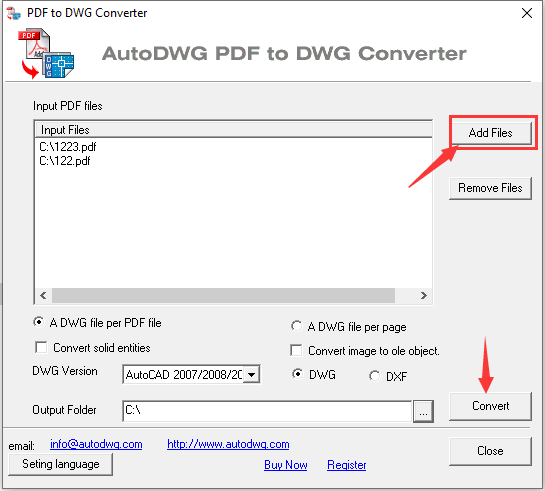
The Pro batch window: input PDFs added with Add Files, "A DWG file per PDF file" or "A DWG file per page", solid-entity and image options, the DWG version, DWG or DXF, and the output folder.
Features
Batch conversion of many PDFs
AutoDWG PDF to DWG Converter Pro converts a whole list of PDF files in one run. Click Add Files, select the PDFs (or remove the ones you don't want), choose the output folder and click Convert. Every file gets the same settings, so a drawing set comes out consistent.
One DWG per PDF, or one per page
AutoDWG PDF to DWG Converter Pro can write each PDF to a single DWG, or split a multi-page PDF into one DWG per page. The second option suits drawing sets bound into one PDF, where each sheet should become its own CAD file.
Output for any AutoCAD version
AutoDWG PDF to DWG Converter Pro saves the batch as DWG or DXF in the AutoCAD file version you choose, from the oldest formats up to AutoCAD 2027, with options to convert solid fills as solid entities and to bring raster images in as OLE objects.
Everything in the Stand-Alone converter
AutoDWG PDF to DWG Converter Pro includes the Stand-Alone features too: true arcs and circles instead of broken segments, searchable text, layers, solids and hatches, center-line or outline tracing of scanned PDFs, page ranges and metric or English units. Use it for the odd drawing that needs special settings.
Who It's For, and Who Should Skip It
It's a good fit for drafting offices, engineering firms and contractors who regularly receive full drawing sets as PDFs and need them in AutoCAD, and for anyone digitizing an archive of CAD-exported PDFs.
- Skip it if you convert a drawing now and then. The $130 Stand-Alone edition does the same conversion one file at a time.
- Skip it if your archive is mostly paper scans. Batch mode won't make a poor scan trace better. Tools built for scan cleanup do that job better.
- Skip it on a Mac. It's Windows-only.
Usage Guide
- Download and install the Pro trial (a 45 MB MSI).
- Open the "PDF to DWG Pro" shortcut.
- Click Add Files and select the PDFs to convert.
- Choose one DWG per PDF or one per page, the DWG version, and DWG or DXF.
- Pick the output folder and click Convert.
- After buying, enter the registration code in the installed trial to remove the watermark.
Where it falls short
- Scans still trace poorly when they're dirty or low-contrast. AutoDWG says scan quality decides the result, and reviewers single out poor-quality PDFs as the weak spot.
- Complex drawings can lose detail. DP Associates, a CAD conversion service, reports occasional missing pieces on drawings with many overlapping layers. In a batch, spot-check a few results before trusting the whole set.
- A basic, dated interface. The batch window has no per-file settings or preview.
What Users Say
TechRadar
TechRadar's roundup of PDF to AutoCAD converters by Daniel Blechynden (last updated January 13, 2025) named AutoDWG "The top choice for PDF to AutoCAD conversion", praising "Fast, accurate PDF to AutoCAD conversions". On batch work it noted that the free trial has no batch option and that "A Pro version is available which offers more features (including batch conversion)". Its reasons to avoid: "Paid licenses are quite expensive" and "Conversion of poor-quality PDFs is limited".
DP Associates
DP Associates, which sells PDF to DWG conversion as a service, credits AutoDWG's arc and circle recognition and its "Extremely simple, wizard-style interface", and notes that "Features like Batch Conversion and OCR for scanned documents are locked behind the more expensive Pro/Enterprise licenses."
Editions and Pricing
| Edition | Price | Batch conversion | License |
|---|
| Stand-Alone | $130 | No | Perpetual, single user |
| Pro | $229 ($199 each for 2-5 users, $179 for 6-10) | Yes | Perpetual, single user |
| Server | $396 per concurrent user (3-5 users) | Yes | Floating licenses on your network |
FAQs
Can the AutoDWG PDF to DWG Converter trial do batch conversion?
The AutoDWG PDF to DWG Converter Pro trial installs the batch tool, and the trial adds a watermark to its output until you register. TechRadar notes the free trial it tested had no batch option, so install the Pro trial specifically if batch mode is what you want to test.
Can AutoDWG PDF to DWG Converter Pro split a multi-page PDF into separate drawings?
Yes. AutoDWG PDF to DWG Converter Pro's batch window has an "A DWG file per page" option that writes every page of a PDF to its own DWG file.
Can I upgrade from Stand-Alone to Pro later?
Only by paying for it. AutoDWG treats the Pro and Stand-Alone versions as different products, so moving from one to the other isn't a free upgrade. Contact AutoDWG about upgrade pricing.
Is AutoDWG PDF to DWG Converter Pro a subscription?
No. AutoDWG PDF to DWG Converter Pro is a one-time $229 purchase with a year of updates. You keep using your version after that, and the next major version costs 50% of the list price if you want it.
Can a whole team share AutoDWG PDF to DWG Converter Pro?
Each Pro license is for one user. For a team, AutoDWG sells a Server edition with floating licenses: a set number of people can run it at the same time from your network's license pool.
System Requirements
- Windows 11, 10, 8, 7, Vista or XP (64-bit Windows is supported)
- 1 GB of RAM or more
- 40 MB of free disk space for the program, plus room for the converted drawings
Conclusion
AutoDWG PDF to DWG Converter Pro is worth the extra $99 over Stand-Alone only if you convert PDFs in bulk: then the batch window and per-page splitting save real hours, with the same accurate arcs, text and layers on vector PDFs. If you convert one drawing at a time, buy Stand-Alone instead. Either way, run a batch of your own PDFs through the trial first, because refunds are only for technical faults.
Download Free TrialBuy Now