Short answer
The best PDF to DWG converter for most Windows users is AutoDWG PDF to DWG Converter: $130 once, it rebuilds true arcs, editable text, layers and hatches from a vector PDF, can trace scanned drawings into lines, saves to any AutoCAD version up to 2027, and its trial never expires (it only watermarks the output). If you convert whole drawing sets, get AutoDWG PDF to DWG Converter Pro ($229) for its batch mode.
On a Mac, pdf2cad ($199, Windows and macOS) is the pick, but only for CAD-exported PDFs. Any PDF to DWG Converter ($180) and Aide PDF to DWG Converter ($176) are simpler batch converters with lifetime updates, and the Free Online PDF to DWG Converter handles a small PDF (3 MB, first 2 pages) for nothing.
At a glance
|
Price (1 user) |
Runs on |
Free trial |
Scanned PDFs to lines |
Batch |
AutoDWG PDF to DWG Converter
Best overall |
$130 once, 1 year of updates |
Windows |
Never expires, watermarks output |
✓ Center line or outline |
✗ |
AutoDWG PDF to DWG Converter Pro
Best for drawing sets |
$229 once, 1 year of updates |
Windows |
Never expires, watermarks output |
✓ Center line or outline |
✓ One DWG per PDF or per page |
pdf2cad
Best on a Mac |
$199 once, or $99 a year |
Windows 64-bit, macOS |
7 days, after a short form |
✗ Scan goes on a tracing layer |
✓ |
Any PDF to DWG Converter
Batch with lifetime updates |
$180 once, lifetime updates |
Windows |
30 uses |
✓ Center line or outline |
✓ Plus command line |
Aide PDF to DWG Converter
Simplest batch tool |
$176 once, lifetime updates |
Windows |
20 conversions |
✗ Extracts embedded images |
✓ |
Free Online PDF to DWG Converter
Best free |
Free |
Any browser |
3 MB, 2 files a day, first 2 pages |
✗ |
✗ |
How we picked
- We started from every PDF to DWG and PDF to CAD converter listed on our site and dropped the ones that are no longer sold. Sothink PDF to DWG Converter, for example, has disappeared from its maker's website.
- For each remaining tool we read the vendor's product, buy, download, help and refund pages, and noted the price for one user, the trial limits, the platforms and what happens to a scanned PDF.
- We downloaded the Windows installers and read their version numbers where the installer carries one, and checked each price on the order page or the vendor's buy page.
- We collected what independent reviewers say about each tool, including the complaints.
What we checked: the AutoDWG Stand-Alone installer (47.4 MB, dated October 15, 2026) and Pro installer (47.5 MB), the Any PDF to DWG Converter 2027 installer (4.5 MB) and the Aide PDF to DWG Converter installer (7.2 MB), plus the prices: $130.00 and $229.00 for AutoDWG on the order page, $180 for AnyDWG, $176 for Aide and $199 for pdf2cad v14 on the vendors' buy pages, and the online converter's limits, all on November 5, 2026. We compared features, prices and trial limits from the vendors' own documentation, and didn't run the same test drawing through every converter.
How to convert PDF to DWG: vector PDFs vs scanned PDFs
Every PDF to DWG converter does well or badly depending on one thing: what kind of PDF you have. Check that before you pick a tool or blame one.
- Vector PDFs were printed or exported from AutoCAD, Revit, MicroStation or another CAD or drawing program. The PDF still holds the actual lines, curves, fills and usually the text. A converter can turn those back into CAD objects almost one to one.
- Scanned (raster) PDFs came from a scanner, a photocopier or a phone camera. The page is a single picture made of pixels. There are no lines to extract, so a converter can only trace the picture, and the result is only as clean as the scan.
The quick test: open the PDF in any PDF reader and zoom in as far as it goes on a line or a dimension. If edges stay sharp, it's a vector PDF. If they turn jagged and blurry, it's a scan. If you can select and copy the text, that's another sign of a vector PDF.

The same detail of a floor plan, magnified: on the left from a scanned (raster) PDF with blurry, pixelated edges, on the right from a vector PDF with clean lines. Illustration from Visual Integrity, the maker of pdf2cad.
What usually converts well
- Lines and polylines from a vector PDF, with their line widths and colors
- Arcs and circles, in converters that rebuild them as true arcs instead of short segments
- Text set in TrueType fonts, which comes back as editable CAD text
- Layers, when the PDF was exported with layers
- Solid fills and hatches
What usually doesn't
- Scans: traced lines are wobbly and broken, and scanned text becomes shapes, not text
- Text drawn in CAD's SHX fonts, which a PDF stores as lines, so it arrives as geometry
- The original drawing scale: a PDF only knows its paper size, so you rescale against a known dimension
- Blocks, dimensions and other "smart" CAD objects: they come back as plain lines and text
- Hidden mask or white-out shapes some PDFs contain, which you delete by hand
So the honest expectation is this: a vector PDF gives you a drawing you can start editing in minutes, and a scan gives you a tracing to clean up. No converter on this page turns a coffee-stained scan into a clean CAD file.
Can AutoCAD convert a PDF to DWG by itself?
Yes, if you already have a current AutoCAD or AutoCAD LT: its PDFIMPORT command brings the vector content of a PDF page into your drawing. Autodesk's help says paths and curves come in as polylines, arcs and circles are rebuilt within a tolerance, solid fills become 2D solids or solid hatches, and TrueType text comes in as text. Text in SHX fonts arrives as geometry, and the separate PDFSHXTEXT command (Recognize SHX Text) tries to turn it back into text. Images in the PDF are saved as PNG files and attached as external references.
What PDFIMPORT doesn't do is vectorize a scan: a scanned PDF comes in as a picture to trace over. It also works one page at a time inside AutoCAD, so it needs an AutoCAD subscription on the PC doing the work. A stand-alone converter is the better tool when you don't own AutoCAD, when you need to hand DWG files to someone who does, when you convert many files at once, or when you need scans traced into lines.
1. AutoDWG PDF to DWG Converter: best PDF to DWG converter overall
AutoDWG PDF to DWG Converter (Stand-Alone) · $130 one-time, perpetual single-user license with a year of updates · Windows 11, 10, 8, 7 · version 2026 (5.1) · free trial that never expires but watermarks the output · Best for: anyone on Windows who gets drawings as PDFs and needs them back in AutoCAD, one file at a time.
AutoDWG PDF to DWG Converter is the most complete one-file-at-a-time converter here. You open a PDF, pick the AutoCAD file version (anything from R2.5 to 2027), DWG or DXF and metric or English units, choose all pages, the current page or a list like "2, 5-8", and click Convert. AutoDWG's "Smart Object Recognition" rebuilds curves as true arcs and circles rather than chains of tiny segments, and the converter keeps text editable, layers separate, and solids and hatches intact (or drops the fills if they get in your way).
Along with Any PDF to DWG Converter, it's one of only two products here (counting Pro as the same converter) that can trace a scanned PDF into CAD lines. On the Scanned Image tab you choose center line (one line down each stroke, best for line drawings) or outline, and the background color. The conversion runs on your PC, so client drawings are never uploaded.
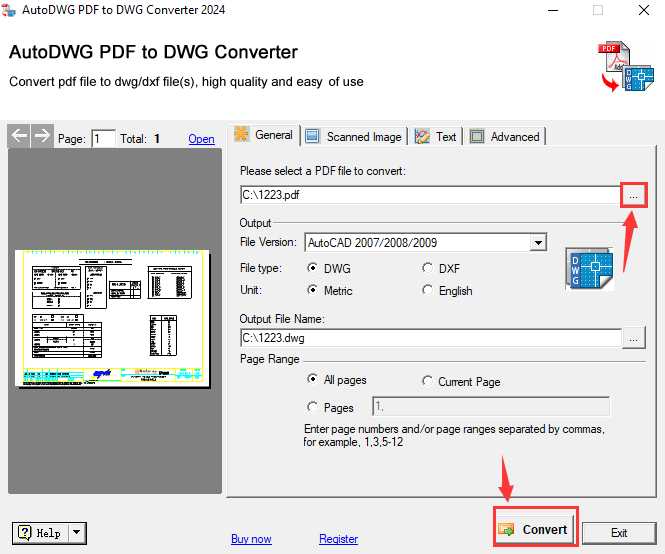
AutoDWG PDF to DWG Converter's General tab (2024 interface): the PDF to convert, the AutoCAD file version, DWG or DXF, metric or English units, the output file and the page range, with a preview of the PDF on the left.
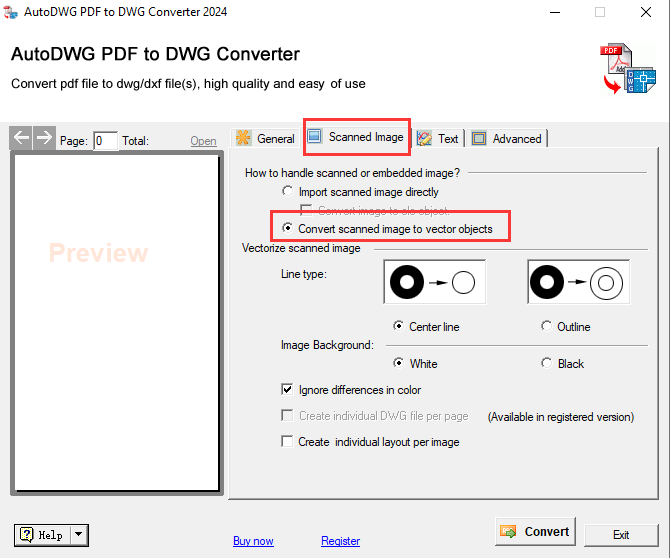
The Scanned Image tab (2024 interface), set to convert a scanned image to vector objects, with center line or outline tracing and the background color.
What we like
- True arcs and circles, editable text, layers and hatches from vector PDFs
- Traces scanned PDFs into center-line or outline vectors
- Saves to any AutoCAD version from R2.5 to 2027
- The trial never runs out, so you can test real drawings at your own pace
- Lowest price of the paid tools here, and runs offline
Watch out for
- No batch mode: that's the $229 Pro edition, and Pro is a separate product
- Refunds only for technical faults, within 15 days, not for disappointing results
- Updates for one year, then the next major version costs 50% of the list price
- Dated-looking window, Windows only
What reviewers say
TechRadar's roundup of PDF to AutoCAD converters (Daniel Blechynden, last updated January 13, 2025) put AutoDWG first: "In our experience, AutoDWG is the best PDF to AutoCAD converter you can download right now. It boasts a free trial, it's simple to use, and has a wide variety of output options." Its reasons to avoid: "Paid licenses are quite expensive" and "Conversion of poor-quality PDFs is limited".
DP Associates, which sells PDF to DWG conversion as a service, says it "focuses heavily on the "accuracy" of the conversion, particularly regarding how geometry is reconstructed. However, it can occasionally result in loss of some of the information contained in the original drawing," and that "Conversion of poor-quality raster PDFs is limited; it is much more effective on vector-based PDFs."
Download AutoDWG PDF to DWG Converter TrialBuy AutoDWG PDF to DWG Converter ($130)
2. AutoDWG PDF to DWG Converter Pro: best for converting whole drawing sets
AutoDWG PDF to DWG Converter Pro · $229 one-time ($199 each for 2-5 users) · Windows 11, 10, 8, 7 · version 2026 (5.1) · free trial that never expires but watermarks the output · Best for: drafting offices and contractors who receive 20, 50 or 100 sheets at a time.
AutoDWG PDF to DWG Converter Pro is the Stand-Alone converter plus a batch window. You click Add Files, select a folder's worth of PDFs, choose one DWG per PDF or one DWG per page (handy when a whole sheet set is bound into one PDF), pick the DWG version and DWG or DXF, and convert them all to one output folder. The engine is the same as Stand-Alone, so the quality is the same: what Pro saves is the clicks of opening, setting and saving each file.
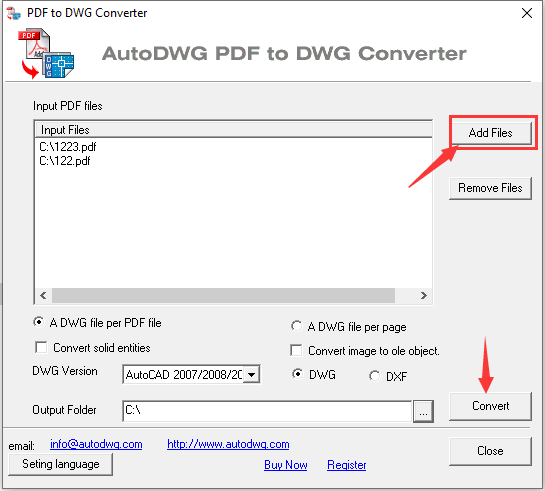
The Pro batch window: input PDFs added with Add Files, "A DWG file per PDF file" or "A DWG file per page", solid-entity and image options, the DWG version, DWG or DXF, and the output folder.
What we like
- Converts a whole list of PDFs with the same settings in one run
- Splits a multi-page PDF into one DWG per sheet
- Includes everything in Stand-Alone, scan tracing too
- Volume pricing, plus a Server edition with floating licenses for teams
Watch out for
- $99 more than Stand-Alone for the same conversion quality
- The batch window has no per-file settings or preview
- Same refund policy: technical faults only
- Batch mode won't make poor scans trace better
What reviewers say
TechRadar noted that the free trial it tested had no batch option and that "A Pro version is available which offers more features (including batch conversion)". DP Associates makes the same point from the buyer's side: "Features like Batch Conversion and OCR for scanned documents are locked behind the more expensive Pro/Enterprise licenses." If batch mode is what you want to test, install the Pro trial specifically.
Download AutoDWG PDF to DWG Converter Pro TrialBuy AutoDWG PDF to DWG Converter Pro ($229)
3. pdf2cad: best PDF to CAD converter on a Mac
pdf2cad by Visual Integrity · $199 perpetual license for version 14, or $99 a year as a subscription ($59 upgrade from an older version) · Windows 64-bit and macOS · 7-day evaluation · 30-day money-back guarantee · Best for: Mac users and anyone converting CAD-exported PDFs to DWG, DXF or HPGL.
pdf2cad is the only desktop converter here with a macOS version, and the one whose maker is most upfront about its limits. Visual Integrity says pdf2cad "requires computer-generated PDF files. Not for scanned or hand drawings." For a vector PDF, it extracts editable lines, arcs, layers, objects and text, and writes DWG, DXF or HPGL for AutoCAD, TurboCAD, MicroStation and other CAD programs. Version 14 added the option to merge a range of pages into one CAD file, new DWG and DXF line-weight options, control over fill and line colors, transparency for fills and images, and an automatic font-mapping engine.
A scanned page is a different story: pdf2cad produces an empty DWG or DXF with the scan attached as an image, to use as a tracing layer. If your PDFs are scans, pick AutoDWG or Any PDF to DWG Converter instead.
Testing it takes a little more effort than the others. You fill in a short form on Visual Integrity's site and the 7-day evaluation link arrives by email. In exchange, pdf2cad is the only paid tool here with a 30-day money-back guarantee: Visual Integrity refunds within 30 days of purchase if you tell them why it didn't work out. Visual Integrity doesn't show screenshots of the program window, only product artwork, so there's none here.
What we like
- Runs on macOS as well as Windows
- Layers, text and line weights carried over from vector PDFs
- DWG, DXF and HPGL output, plus merging a page range into one file
- 30-day money-back guarantee
- Choice of a perpetual license or a cheaper yearly subscription
Watch out for
- No scan tracing: scanned PDFs end up as an image on a tracing layer
- Only a 7-day evaluation, and you have to request it with a form
- Version 14, the current release, dates from September 2023
Request the pdf2cad evaluation
4. Any PDF to DWG Converter: batch conversion with lifetime updates
Any PDF to DWG Converter by AnyDWG Software · $180 one-time per computer, with lifetime free upgrades and support (site license $1,998) · Windows 11 back to 98, and Windows Server · version 2027, a 4.5 MB installer · trial limited to 30 uses · Best for: batch jobs on a budget, and automated conversion from a script.
Any PDF to DWG Converter is a no-frills batch converter: add PDF files or a whole folder (subfolders included), choose DWG or DXF and the AutoCAD file version, and click Convert Now. AnyDWG says it rebuilds lines, polylines, splines, hatches, circles and arcs, recognizes TrueType text and line widths, and keeps colors. It also converts scanned PDFs to vectors with the same center-line or outline tracing choice as AutoDWG, opens password-protected PDFs if you enter the password, and includes a command line for scripted conversion.
Its own help file is candid about the usual limits: the PDF doesn't store the original drawing scale, so you set a scale factor (1 to 10) or rescale in CAD; some text in a PDF is really vector outlines and stays that way; and mask layers come across and have to be deleted by hand.
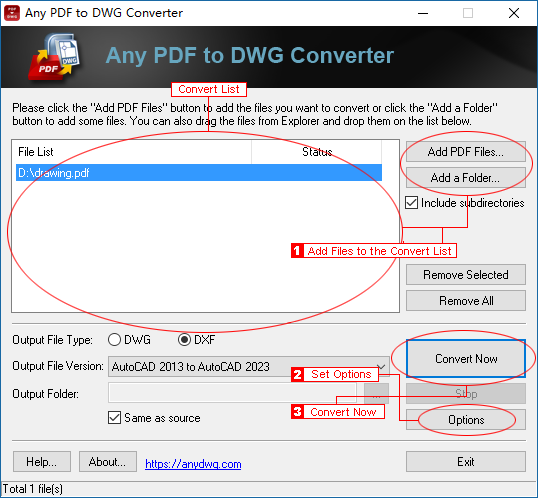
Any PDF to DWG Converter's main window, annotated by AnyDWG: the file list with Add PDF Files and Add a Folder, DWG or DXF output, the AutoCAD file version, the output folder, and the Options and Convert Now buttons.
What we like
- Batch conversion and scan tracing in one $180 license
- Lifetime free upgrades, no renewal
- Command line for automated jobs
- Handles password-protected PDFs
Watch out for
- One license per computer
- Only 30 trial uses, so test your hardest drawings first
- No preview: you see the result only in your CAD program
- TechRadar found output quality inconsistent
What reviewers say
TechRadar called AnyDWG a "Great pick for converting lots of files at once", listing "Fast, efficient PDF to AutoCAD conversion" and "Powerful batch conversion features" as reasons to buy, and "Could be expensive for occasional users" and "Output file quality not always consistent" as reasons to avoid.
Download Any PDF to DWG Converter Trial
5. Aide PDF to DWG Converter: the simplest batch converter
Aide PDF to DWG Converter by Aide CAD Systems · $176 one-time permanent license (shown as 40% off $293), lifetime free updates and license transfer · Windows 11 back to 95 · version 2023, a 7.2 MB installer · trial limited to 20 conversions · Best for: straightforward batch conversion of vector PDFs.
Aide PDF to DWG Converter is the plainest tool here: add PDF files or a folder, pick DWG or DXF and an output folder, click Convert. It converts every page of each PDF, outputs DWG and DXF from AutoCAD 2.5 up to AutoCAD 2026, and extracts the images embedded in a PDF along with the vectors. Aide doesn't claim to trace scans into lines, so treat it as a vector-PDF converter.
The license is generous: a permanent license with lifetime free updates, lifetime license transfer and lifetime technical support, and prices drop to $99 each at 11-20 licenses. The trial stops after 20 conversions, and Aide's FAQ warns that changing the system clock to stretch it makes it expire immediately.
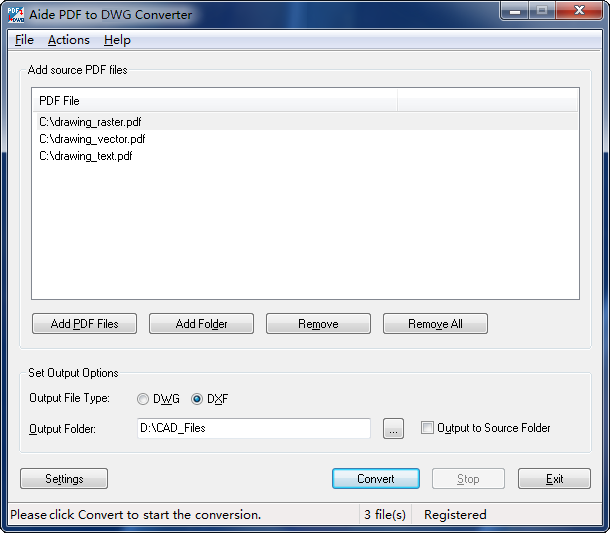
Aide PDF to DWG Converter with three PDFs queued (a raster, a vector and a text drawing), DXF selected as the output type, an output folder, and the Settings and Convert buttons.
What we like
- Very simple batch workflow
- Extracts embedded images from PDFs
- Lifetime updates and license transfer included
- Strong volume discounts
Watch out for
- No tracing of scanned PDFs into vectors
- Fewer documented options than AutoDWG: output type and folder, little else
- Only 20 trial conversions
- Windows only, with a basic interface
What reviewers say
TechRadar rated AideCAD "A fast Windows-only option", calling it "one of the oldest PDF to AutoCAD conversion programs" and praising "Fast PDF to AutoCAD conversion" and that it "enables the extraction and accurate conversion of embedded images from PDF files, something many competitor software ignore." Its reasons to avoid: "Simplistic user interface", "Confined to DWG/DXF outputs" and "Windows only".
Download Aide PDF to DWG Converter Trial
6. Free Online PDF to DWG Converter: best free option for a small file
Free Online PDF to DWG Converter by CADSoftTools · Free · any web browser, nothing to install · PDFs up to 3 MB, 2 files a day, only the first 2 pages of each file · Best for: converting one small vector drawing now and then.
The Free Online PDF to DWG Converter is a web page: drag a PDF onto it, and you download the DWG or have it emailed. It works from a Mac, Linux or a locked-down office PC as well as Windows. The limits are tight but clear: 3 MB per file, two files a day, and only the first two pages of each. CADSoftTools' own notes for the service say it doesn't vectorize raster images, so treat it as a tool for vector PDFs.
Two more things to weigh: your drawing is uploaded to someone else's server, which may break an NDA, and there are no settings to choose an AutoCAD version, units or layers. For anything past a quick one-off, the AutoDWG trial (unlimited, watermarked) is a better way to see what a full converter does with your file.

An older version of the converter form, as CADSoftTools pictures it (the live page now takes drag-and-drop and offers a download as well as email): choose a PDF of up to 3 MB, enter an email address, and Convert. The notes list the 3 MB size limit, the first 2 pages, 2 files a day and no vectorization of raster images.
What we like
- Free, with nothing to install
- Works on any operating system
- Good enough to check whether a PDF is worth converting at all
Watch out for
- 3 MB, first 2 pages, 2 files a day
- No scan tracing and no output settings
- Your file is uploaded to a third-party server
Open the Free Online PDF to DWG Converter
PDF to DWG converter prices compared
One-time price for one user (USD)
AutoDWG PDF to DWG Converter$130
Aide PDF to DWG Converter$176
Any PDF to DWG Converter$180
pdf2cad v14 (perpetual)$199
AutoDWG PDF to DWG Converter Pro$229
Prices checked on November 5, 2026: AutoDWG at checkout, the others on the vendors' buy pages. pdf2cad is also $99 a year as a subscription, and the Free Online PDF to DWG Converter costs nothing.
The cheapest license isn't automatically the cheapest to own. AutoDWG includes one year of updates and charges 50% of the list price for the next major version, while AnyDWG and Aide include lifetime upgrades. On the other hand, a perpetual license keeps working if you skip the upgrade, and the PDF format doesn't change much, so for most buyers the first year's feature set is what matters.
| Converter |
Price each for a small team |
Updates |
Refunds |
| AutoDWG PDF to DWG Converter |
$117 (2-5 users) |
1 year, then 50% of list for a new major version |
Technical faults only, within 15 days |
| AutoDWG PDF to DWG Converter Pro |
$199 (2-5 users) |
1 year, then 50% of list for a new major version |
Technical faults only, within 15 days |
| pdf2cad |
$199 each, or $99 a year |
Paid upgrade ($59) to a new version |
Within 30 days, any reason |
| Any PDF to DWG Converter |
$162 (2-4 licenses) |
Lifetime free upgrades |
Not stated on the buy page |
| Aide PDF to DWG Converter |
$153 (2-3 licenses) |
Lifetime free updates |
Not stated on the buy page |
Which PDF to DWG converter should you choose?
| Your situation |
Pick |
Why |
| Windows, a few PDFs a week, vector or scanned |
AutoDWG PDF to DWG Converter |
Best conversion options, scan tracing, lowest price, untimed trial |
| Whole drawing sets, dozens of files at once |
AutoDWG PDF to DWG Converter Pro |
Batch mode and one DWG per sheet, with AutoDWG's conversion quality |
| You work on a Mac |
pdf2cad |
The only desktop converter here with a macOS version, plus a 30-day refund |
| Batch jobs from a script or a server |
Any PDF to DWG Converter |
Command line, batch and scan tracing, lifetime upgrades |
| Simple batch conversion of CAD-exported PDFs |
Aide PDF to DWG Converter |
Easiest batch workflow, lifetime updates and license transfer |
| One small drawing, once |
Free Online PDF to DWG Converter |
Free and instant, if the file is under 3 MB and the drawing is on page 1 or 2 |
| You already pay for AutoCAD and convert the odd vector PDF |
AutoCAD's PDFIMPORT |
Already installed. Buy a converter when you need scans traced or batch work |
Who should skip each one
- AutoDWG PDF to DWG Converter: skip it if you're on a Mac, or if you convert folders of files (go straight to Pro, since moving up later isn't free).
- AutoDWG PDF to DWG Converter Pro: skip it if you convert one drawing at a time. Stand-Alone does the same conversion for $99 less.
- pdf2cad: skip it if most of your PDFs are scans. It won't trace them.
- Any PDF to DWG Converter: skip it if you want to fine-tune each conversion with a preview, or if one license per computer doesn't suit a mixed laptop-and-desktop setup.
- Aide PDF to DWG Converter: skip it if you receive scanned drawings, or want fine control over each conversion.
- Free Online PDF to DWG Converter: skip it for confidential drawings, files over 3 MB, or anything beyond the first two pages.
What commonly goes wrong
- Buying for scans without testing. Every vendor and every reviewer says the same thing: poor scans convert poorly. Run your worst scan through a trial before paying, and scan paper drawings clean, evenly lit and high-contrast.
- Expecting the right scale. A PDF only knows its paper size. After converting, measure a known dimension and scale the drawing to match. Any PDF to DWG Converter and pdf2cad have scale settings, but you still need to check.
- Text that won't edit. Text drawn in CAD's SHX fonts is stored in the PDF as lines, so every converter brings it back as lines, not text. Only TrueType text comes back as real text.
- Missing pieces in complex drawings. DP Associates reports that drawings with many overlapping layers can lose detail. Compare the DWG against the PDF before you rely on it, especially after a batch run.
- Saving to a version the recipient can't open. Pick the oldest AutoCAD version anyone on the project uses. All the desktop tools here can save older formats.
- Counting on a refund. AutoDWG only refunds technical faults, and AnyDWG and Aide don't state one on their buy pages. That's what the trials are for.
FAQs
What is the best PDF to DWG converter?
AutoDWG PDF to DWG Converter is the best PDF to DWG converter for most Windows users: $130 once, it rebuilds arcs, text, layers and hatches from vector PDFs, traces scans into lines, and saves to any AutoCAD version up to 2027. On a Mac, pdf2cad is the better choice for CAD-exported PDFs.
How do I convert a PDF to DWG without AutoCAD?
Use a stand-alone converter such as AutoDWG PDF to DWG Converter: open the PDF, choose DWG, the AutoCAD file version and the pages, and click Convert. None of the converters in this article need AutoCAD installed. You'll need some DWG-capable CAD program to edit the result, though.
Can a scanned PDF be converted to an editable AutoCAD drawing?
Partly. AutoDWG PDF to DWG Converter and Any PDF to DWG Converter trace a scanned PDF into center-line or outline vectors, which gives you editable lines to clean up, not a finished drawing. pdf2cad, Aide PDF to DWG Converter and AutoCAD's own PDFIMPORT bring a scan in only as an image to trace over by hand.
Is there a free PDF to CAD converter?
Yes. The Free Online PDF to DWG Converter from CADSoftTools is free, but limited to PDFs up to 3 MB, the first 2 pages and 2 files a day, with no scan tracing. AutoDWG PDF to DWG Converter's trial is also free and never expires, but it watermarks the drawings it produces.
What's the difference between PDF to DWG and PDF to DXF?
DWG is AutoCAD's native drawing format, and DXF is an exchange format that almost every CAD, CNC and laser-cutting program can import. AutoDWG, AnyDWG, Aide and pdf2cad all write both, so choose DWG for AutoCAD and DXF for other programs or cutting machines.
Which PDF to DWG converter works on a Mac?
pdf2cad is the only desktop converter in this article with a macOS version ($199, or $99 a year). The Free Online PDF to DWG Converter also works in a Mac's browser for small files. AutoDWG PDF to DWG Converter, Any PDF to DWG Converter and Aide PDF to DWG Converter are Windows programs.
Will the converted DWG keep the original layers and scale?
Layers yes, scale usually not. AutoDWG PDF to DWG Converter and pdf2cad keep the layers of a PDF that was exported with layers. No converter can recover the original drawing scale, because a PDF only stores its paper size, so you rescale in CAD against a known dimension.
Do I need the Pro version to convert many PDFs to DWG at once?
For AutoDWG, yes: batch conversion is only in AutoDWG PDF to DWG Converter Pro ($229). Any PDF to DWG Converter ($180), Aide PDF to DWG Converter ($176) and pdf2cad ($199) include batch conversion in their standard license.