AutoDWG DWG DXF Converter: Convert DWG to DXF, DXF to DWG and Old AutoCAD Versions in Batches
AutoDWG DWG DXF Converter is a $78 Windows program that converts DWG to DXF, DXF to DWG, and DWG or DXF files between AutoCAD versions (R12 up to AutoCAD 2026), a whole folder at a time and without AutoCAD. It's a one-time purchase.
The usual reason to buy it: someone sends you a drawing saved in a newer AutoCAD than yours, or your CNC, laser or GIS software only reads DXF. Converting a folder of files in one go beats opening and re-saving each one.
Quick facts
- Developer: AutoDWG (the program window calls it Active DWG DXF Converter)
- Version: DWG DXF Converter 2026 (installer version 4.81)
- Platform: Windows (the user guide lists XP through Windows 10), works on 64-bit Windows
- Conversions: DWG to DXF, DXF to DWG, and version conversion up or down, R12 to AutoCAD 2026
- Batch: single files, folders, and subfolders
- Price: $78 one-time for one user. Pro ($149) adds a command line.
- Download: 15.5 MB
- What we checked: the installer (dwg2dxf2026.msi, 16.2 MB, product version 4.81, dated October 21, 2025) downloaded from AutoDWG and the $78.00 USD one-time price on the order page, both on November 3, 2026. We didn't convert our own drawings.
Before you buy
- The trial saves a limited number of files. Use it to check that your drawings convert correctly, then register the same install.
- Want to automate conversions? Command-line use is Pro-only.
- Refunds are only for technical faults AutoDWG support can't fix, within 15 days.
Download Free TrialBuy Now
Overview
AutoDWG DWG DXF Converter is a single small window: choose the conversion type, pick the input folder (or a single file), choose the output AutoCAD version and folder, and click Convert Now. DWG is AutoCAD's native binary format; DXF is the exchange format most other CAD, CAM and GIS programs import. This tool moves files between the two, and between AutoCAD releases, without opening them.
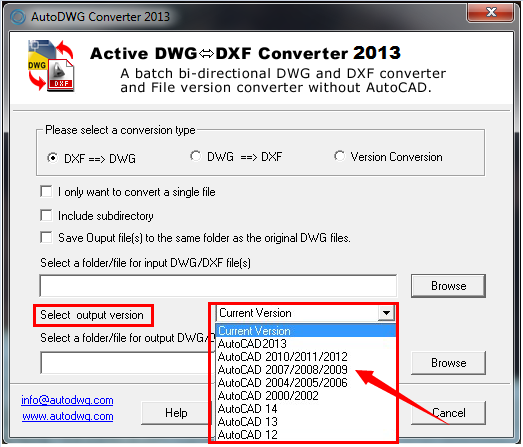
The converter (shown in its 2013 interface): DXF to DWG, DWG to DXF or version conversion, single-file and subdirectory options, and the output version list.
Features
DWG and DXF in both directions
AutoDWG DWG DXF Converter turns DWG drawings into DXF for programs that can't read DWG, and DXF files back into DWG for AutoCAD and DWG-based CAD software.
Downgrade or upgrade AutoCAD versions
AutoDWG DWG DXF Converter saves DWG and DXF files as an older or newer AutoCAD version, from R12 to 2026, so a drawing from the latest AutoCAD opens in an old seat or a legacy program.
Whole folders in one go
AutoDWG DWG DXF Converter processes every file in a folder, optionally including subfolders, and writes the results to an output folder or next to the originals.
Who It's For, and Who Should Skip It
It's a good fit for drafters, fabricators and CNC or laser shops who exchange files with people on different CAD software or AutoCAD versions.
- Skip it if you need to see or edit the drawings. DWGSee Pro ($98) views, edits and saves to other DWG versions one file at a time.
- Skip it if you have AutoCAD. AutoCAD's own Save As and DWG Convert tools do the same job.
- Skip it if you need scripting. Get Pro for the command line.
Usage Guide
- Choose the conversion type: DWG to DXF, DXF to DWG, or Version Conversion.
- Browse to the input folder, or tick "I only want to convert a single file", and tick "Include subdirectory" if needed.
- Pick the output version from the list (the default is the current version).
- Browse to the output folder, or save next to the originals.
- Click Convert Now.
Where it falls short
- No viewer. You can't look at a drawing before or after converting it in this program.
- Old-looking interface. The window hasn't changed much in a decade.
- Downgrading can lose new features. Saving to an old AutoCAD version can't keep objects that version didn't support, so check important drawings after converting down.
Editions and Pricing
| Edition | Price | Command line | Server install for multiple users |
|---|
| Standard | $78 | No | No |
| Pro | $149 | Yes | No |
| Server | $990 | Yes | Yes |
All editions convert in batches and support R12 to AutoCAD 2026. Licenses are perpetual with a year of updates.
FAQs
Can AutoDWG DWG DXF Converter open a newer DWG in an older AutoCAD?
Yes. AutoDWG DWG DXF Converter's Version Conversion saves DWG files as an older AutoCAD version, down to R12, so they open in older AutoCAD releases.
Is Active DWG DXF Converter the same program?
Yes. AutoDWG DWG DXF Converter's window is titled "Active DWG DXF Converter", the name older versions were listed under.
What's the difference between the Standard and Pro editions?
Only the command line. AutoDWG says Standard and Pro are the same program with different registration codes, and Pro can run conversions silently from the command line.
Is AutoDWG DWG DXF Converter a subscription?
No. It's a one-time $78 purchase with a year of updates.
System Requirements
- Windows (the user guide lists XP, Vista, 7, 8 and 10), 64-bit supported
- 1 GB of RAM or more
- 40 MB of free disk space
Conclusion
AutoDWG DWG DXF Converter is worth $78 if you regularly need DXF files for other software or older DWG versions for colleagues and clients, and don't have AutoCAD to do it: it converts whole folders in a few clicks. If you want to automate it, buy Pro. If you need to view or edit the drawings as well, DWGSee Pro is the better buy.
Download Free TrialBuy Now