Vovsoft XML to CSV Converter: Flatten XML Files into CSV or Excel, in Batches
XML to CSV Converter is a $19 Windows program from Vovsoft that converts XML files into CSV, XLS or XLSX spreadsheets, one or hundreds at a time, entirely offline. It finds the repeating records in each file and turns their tags and attributes into columns, so the data opens cleanly in Excel, Google Sheets or LibreOffice Calc. The $19 is a one-time lifetime license, and the free trial converts a limited number of files.
It's for office staff, analysts and developers who receive data as XML, such as product feeds, invoices, exports from business software or configuration files, and need it as a table without writing code.
Quick facts
- Version: 1.4, released May 5, 2026 (first released November 21, 2025)
- Developer: Vovsoft
- Platform: Windows 11, 10, 8/8.1, 7 and Vista, 32-bit and 64-bit. No Mac version
- Output: CSV with your choice of separator, XLS, XLSX
- Encoding: UTF-8 by default, other encodings selectable
- Batch: files and folders, by button or drag and drop
- Editions: installer (3.53 MB) and portable (2.21 MB), one license for both
- Price: $19, one-time payment, lifetime license with free updates
- Trial: converts a limited number of files, with a nag screen and for non-commercial use only
- What we checked: installer file version 1.4.0.0 (3,702,280 bytes) with a valid code signature, downloaded from the vendor on November 11, 2026, and $19.00 on the order page with no auto-renewal on November 11, 2026. We didn't convert XML files ourselves
Download Free TrialBuy Now
Overview
XML to CSV Converter has three buttons across the top, Add XML Files, Convert to CSV and Convert to XLS, a list of queued files, and below it the destination folder, the CSV separator and the encoding. Add files, pick a button, and the spreadsheets appear in the destination folder.
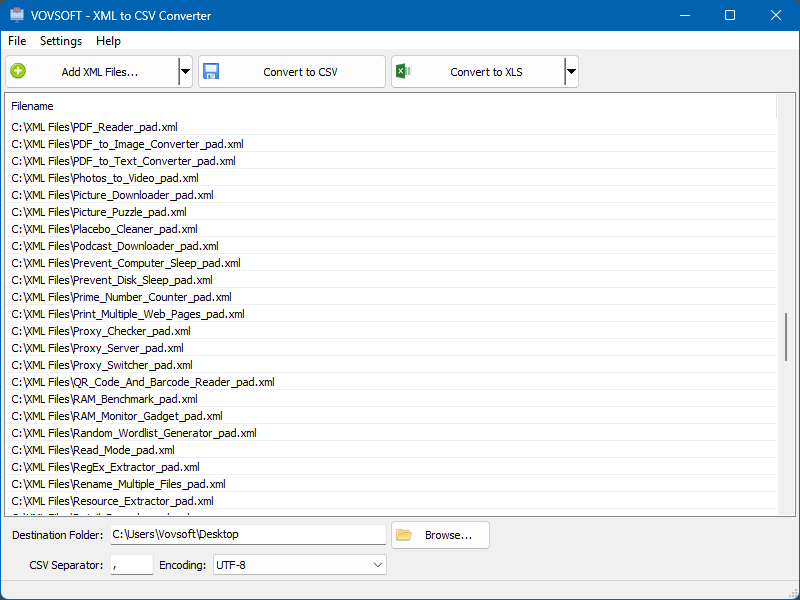
A long list of XML files queued for conversion, with the destination folder, a comma separator and UTF-8 encoding below.
Features
Finds the records automatically
XML to CSV Converter works out which part of the file holds the rows. Since version 1.4 it scans the whole XML tree and picks the element with the most identical children, such as the hundreds of <product> entries in a feed, and turns each one into a row, with its tags and attributes as columns. You don't write XPath or set up a mapping.
CSV your way, or straight to Excel
XML to CSV Converter writes CSV with the separator you choose, comma for most tools or semicolon for European Excel, in UTF-8 by default so accents and non-Latin text survive. Or skip CSV and save as XLS or XLSX for Excel directly.
Batch conversion and Aggressive Mode
XML to CSV Converter takes whole folders and converts every file in one click. For elements that would come out empty because they hold nested markup, the Export Raw XML for Empty Elements option (Aggressive Mode, added in version 1.2) puts their raw XML in the cell instead, so nothing silently disappears.
Offline, for confidential data
XML to CSV Converter converts on your PC. Invoices, customer lists or medical exports never go to an online converter's server.
Benefits
XML is easy for programs and hard for people. Once it's a spreadsheet you can sort, filter, total and chart it, or import it into another system that only takes CSV. XML to CSV Converter does that without Excel's XML import quirks or a script, and handles a folder of files as easily as one.
Real-World Uses
- Turning an e-commerce product feed into a spreadsheet to check prices and stock.
- Converting a month of XML invoices or orders from business software into one folder of CSVs for accounting.
- Flattening an XML export from an old system before importing it into a new one.
- Reviewing a batch of software PAD files or config files side by side in Excel.
- Giving non-technical colleagues XML data they can actually open.
Who It's For, and Who Should Skip It
XML to CSV Converter suits Windows users who regularly receive XML with a simple, repeating structure and want it in spreadsheets with no setup.
Skip it if your XML is deeply nested with several different record types you need as related tables: automatic flattening picks one repeating element, so a database tool or a script with XPath will serve you better. Excel's own XML import (Data, Get Data, From XML) is free and fine for an occasional single file. Developers can do this in a few lines of Python.
Usage Guide
- Download the installer or the portable edition and start XML to CSV Converter.
- Click Add XML Files, or drag files or folders into the list.
- Choose the destination folder, the CSV separator and the encoding.
- Click Convert to CSV, or Convert to XLS for Excel output.
- Open the results in your spreadsheet program.
Before you buy
The trial converts a limited number of files, shows a nag screen and is for personal use; the license converts unlimited files and allows work use. One license covers one person on any number of their own computers. Vovsoft's general policy is no refunds, since the trial comes first (it may refund an accidental order at its discretion, and PayPro Global has the final say on its orders), so check the trial's output on one of your own XML files, especially a complex one.
Where it falls short
- Automatic detection picks one repeating element; you can't choose a different one or map columns yourself.
- No CSV to XML direction.
- A young program, first released in November 2025, with little outside feedback yet.
What Users Say
On Vovsoft's site
XML to CSV Converter's product page has no ratings or comments yet, and we found no independent reviews.
With no track record, the trial is the only real test. Vovsoft has released five versions in its first six months, including the smarter record detection in version 1.4, which suggests active work on it.
Comparisons
XML to CSV Converter vs Excel's XML import
Excel's Get Data From XML is free and lets you pick which table to load, one file at a time, through Power Query. XML to CSV Converter is quicker for many files and needs no Power Query steps.
XML to CSV Converter vs online converters
Online XML converters are free for small files, but you upload the data and often hit size limits. XML to CSV Converter is offline, unlimited once licensed, and handles folders.
Editions and Pricing
| Option | Price | License | What you get |
|---|
| Trial | Free | Personal, non-commercial use | Limited number of files, nag screen |
| XML to CSV Converter license | $19 one time | Lifetime, commercial use allowed | Unlimited files, no nag screen, all future updates |
| Vovsoft Universal License | $99 one time | Lifetime | All 115+ Vovsoft programs |
The license key arrives by email right after payment. Prices include tax.
FAQs
Does XML to CSV Converter keep XML attributes?
Yes. XML to CSV Converter detects both tags and attributes and turns them into columns.
How do I get semicolon-separated CSV for European Excel?
Type a semicolon in XML to CSV Converter's CSV Separator box before converting, or convert straight to XLSX and avoid separators entirely.
Is my data uploaded anywhere?
No. XML to CSV Converter works offline, so XML files stay on your computer.
Is the $19 a subscription?
No. XML to CSV Converter's $19 is a one-time payment for a lifetime license with future updates. Nothing renews.
System Requirements
- Windows 11, 10, 8/8.1, 7 or Vista, 32-bit or 64-bit
- About 3.5 MB for the installer, or 2.2 MB for the portable edition
- English interface
Conclusion
XML to CSV Converter is worth $19 if XML files land on your desk regularly and you just want them as spreadsheets: it finds the records itself, handles folders, and works offline. The reason not to buy it: you can't steer which records it picks, so complex, multi-level XML may need Excel's Power Query or a script, and Excel's import is free for the odd single file. Test your own files in the trial before paying.
Download Free TrialBuy Now