Vovsoft VCF to XLS Converter: Turn a vCard Contacts File into an Excel Sheet
VCF to XLS Converter is a $19 Windows program from Vovsoft that converts vCard (.vcf) contact files, the kind iPhones, Android phones, iCloud, Google Contacts and Outlook export, into an Excel XLS or XLSX spreadsheet with one contact per row. It works offline and takes one or many VCF files at once. The $19 is a one-time lifetime license, and the free trial exports a limited number of contacts.
It's for anyone who has exported their address book as a .vcf file and found that Excel can't open it properly: you want a sortable list of names, numbers and emails to clean up, print, mail-merge or move to another system.
Quick facts
- Version: 3.2, released October 15, 2025
- Developer: Vovsoft
- Platform: Windows 11, 10, 8/8.1, 7, Vista and XP, 32-bit and 64-bit. No Mac version
- Input: one or more VCF files from iCloud, Google Contacts, Android or Outlook, read as UTF-8 or ANSI
- Output: XLS and XLSX, plus CSV formats including German Outlook
- Fields: full, first, middle and last name, phones, emails, address (also split into parts), birthday, organization, website, revision, notes
- Interface languages: English plus about 30 translations
- Editions: installer (3.83 MB) and portable (2.81 MB), one license for both
- Price: $19, one-time payment, lifetime license with free updates
- Trial: exports a limited number of contacts, with a nag screen and for non-commercial use only
- What we checked: installer file version 3.2.0.0 (4,025,192 bytes) with a valid code signature, downloaded from the vendor on November 11, 2026, and $19.00 on the order page with no auto-renewal on November 11, 2026. We didn't convert a contacts file ourselves
Download Free TrialBuy Now
Overview
VCF to XLS Converter is about as simple as software gets: a Load vCards from VCF file button that shows how many contacts it found, a UTF-8 or ANSI choice, Sort and Headers boxes, and an Export to File button where you pick Excel (XLS or XLSX) or a CSV format. A progress bar runs, and you open the result in Excel.
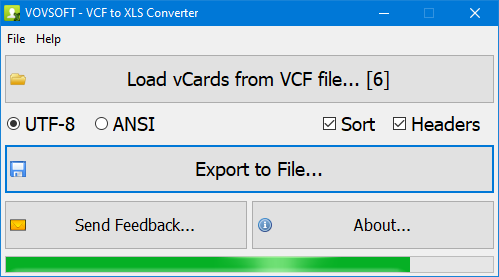
Six vCards loaded, UTF-8 encoding, Sort and Headers ticked, and the export finishing in the progress bar.
Features
Every contact as a row, every field as a column
VCF to XLS Converter puts each vCard on its own row with columns for full name and its first, middle and last parts, phone numbers, emails, address (since version 3.2 also split into separate address fields), birthday, organization, website, revision date and notes. With Headers ticked, the first row labels the columns, so the sheet is ready to filter.
Many VCF files, many sources
VCF to XLS Converter reads the VCF flavors iCloud, Google Contacts, Android and Outlook produce, and you can load several VCF files at once, including a folder of one-contact-per-file vCards that some phones and Outlook create, so they end up in one sheet. The load button shows the total number of vCards found, not files.
Accents and foreign scripts
VCF to XLS Converter reads UTF-8 and ANSI, with UTF-16 support listed too, so names in other alphabets or with accents come through intact if you pick the right encoding. Its own interface is available in about 30 languages.
Offline and private
VCF to XLS Converter does the conversion on your PC. Contact lists hold other people's phone numbers and addresses, and here none of it is uploaded to a website, unlike free online VCF converters.
Benefits
In a spreadsheet, a messy address book becomes manageable: sort to find duplicates, filter by company, fix typos in bulk, print a phone list, or use the sheet for a mail merge. It's also a readable backup. A .vcf file is fine for machines, but a person can check an Excel sheet at a glance, years later, without the phone it came from.
Real-World Uses
- Exporting iPhone contacts from iCloud as a VCF and turning them into an Excel list to clean up duplicates.
- Moving an old Windows Live Mail address book to a new email program via a spreadsheet, as one user did.
- Giving an office manager a printable staff phone list built from a shared VCF.
- Preparing a contact list for a mail merge or a CRM import.
- Keeping a readable backup of an Android phone's contacts before switching phones.
Who It's For, and Who Should Skip It
VCF to XLS Converter suits Windows users who have a VCF file and want it in Excel without fuss, especially with hundreds of contacts or several VCF files.
Skip it if your contacts are in Google Contacts: it exports a CSV that Excel opens, free. If you need CSV for an import rather than an Excel file, Vovsoft's VCF to CSV Converter is the closer fit, and to edit vCards directly, its VCF Editor. And for a handful of contacts, the trial may already be enough.
Usage Guide
- Export your contacts as a .vcf file from your phone, iCloud, Google Contacts or Outlook.
- Download the installer or the portable edition and start VCF to XLS Converter.
- Click Load vCards from VCF file and select one or more VCF files.
- Choose UTF-8 or ANSI, and tick Sort and Headers as you like.
- Click Export to File, choose Excel (XLS or XLSX) and save.
- Open the file in Excel.
Before you buy
The trial converts, but exports only a limited number of contacts; the license removes the cap and the nag screen and allows work use. One license covers one person on any number of their own computers. Vovsoft's general policy is no refunds, since the trial comes first (it may refund an accidental order at its discretion, and PayPro Global has the final say on its orders), so check the trial's output with your own file before buying.
Where it falls short
- One direction only: it can't turn an Excel sheet back into a VCF (Vovsoft sells CSV to VCF Converter for that).
- Contact photos aren't among the listed fields.
- No preview or editing before export; you fix things in Excel afterwards.
- Choosing the wrong encoding garbles accented names, so try UTF-8 first and ANSI if needed.
What Users Say
On Vovsoft's site
VCF to XLS Converter's product page shows 4.7 out of 5 from 6 ratings, with these comments:
"A great program. Just what I needed to transfer email contacts from "old" desktop Windows Live Mail to Mailbird on new laptop. Just finished importing the file and everything seems to be there and working well. THANK YOU." Anonymous User
"Downloaded Vovsoft VCF to XLS Converter. It did the job with just a few clicks. Best vcf2excel tool ever tried." Seymour
"Great application one of the best ever" Imran
"Good experience" Carlos Belchior
"The application's interface is minimalist and it provides just three main features that will allow users to first select their preferred vCards from VCF files, select the text formatting to either ANSI or UTF-8 and finally the output format and location." Andrei Verdeanu
The comments agree that it does one job quickly and simply, including a real move between email programs. They're short, and none mentions a problem; six ratings is a small sample, so the trial is the real test.
Comparisons
VCF to XLS Converter vs opening the VCF in Excel
Excel can open a .vcf as text, but you get the raw lines ("TEL;TYPE=CELL:...") stacked in one column, not a contact per row. VCF to XLS Converter does the parsing for you.
VCF to XLS Converter vs online VCF converters
Online converters are free for small files, but you upload everyone's numbers and addresses to a stranger's server, and many cap the file size. VCF to XLS Converter runs offline and handles several files at once.
Editions and Pricing
| Option | Price | License | What you get |
|---|
| Trial | Free | Personal, non-commercial use | Limited number of contacts exported, nag screen |
| VCF to XLS Converter license | $19 one time | Lifetime, commercial use allowed | Unlimited contacts, no nag screen, all future updates |
| Vovsoft Universal License | $99 one time | Lifetime | All 115+ Vovsoft programs |
The license key arrives by email right after payment. Prices include tax.
FAQs
How do I get my iPhone contacts into Excel with VCF to XLS Converter?
Export the contacts as a vCard from iCloud.com (select all, then export vCard), copy the .vcf file to your PC, load it in VCF to XLS Converter and export to XLSX.
Can VCF to XLS Converter merge several VCF files into one sheet?
Yes. VCF to XLS Converter loads multiple VCF files at once and exports all their contacts together.
Are my contacts uploaded anywhere?
No. VCF to XLS Converter converts on your computer and sends no contact information over the internet.
Is the $19 a subscription?
No. VCF to XLS Converter's $19 is a one-time payment for a lifetime license with future updates. Nothing renews.
Does it still run on Windows XP?
Yes. VCF to XLS Converter lists Windows XP through Windows 11, 32-bit and 64-bit, so it suits an old PC holding an old address book.
System Requirements
- Windows 11, 10, 8/8.1, 7, Vista or XP, 32-bit or 64-bit
- About 3.8 MB for the installer, or 2.8 MB for the portable edition
Conclusion
VCF to XLS Converter is worth $19 if you have a real address book in a .vcf file and want it as a clean Excel sheet, offline, in a minute: it splits names and addresses into columns and merges several files at once. The reason not to buy it: it's a one-way, one-job tool, and Google Contacts users can get a CSV free. Run your own file through the trial and check the columns before you pay.
Download Free TrialBuy Now