EssentialPIM Pro (now EPIM Pro): Email, Calendar, Tasks, Notes, Contacts and Passwords in One Windows App
EPIM Pro, the program long sold as EssentialPIM Pro, is a Windows personal information manager from Astonsoft that keeps your email, calendar, tasks, notes, contacts and passwords in one local, encrypted database. A perpetual license costs $79.95 (with one year of updates), or you can pay $39.95 a year; the core app is also free as EPIM Mail, and Pro has a fully working 30-day trial.
If you searched for the EssentialPIM Pro Lifetime License: that license, with lifetime updates, is no longer sold. Today's one-time "Perpetual License" keeps working forever but includes only one year of updates. Licenses bought earlier remain valid.
Quick facts
- Version: 26.7, released November 23, 2026
- Developer: Astonsoft (Tallinn, Estonia), making the program since 2004
- Platform: Windows 10 and 11, desktop or portable (from a USB drive), plus companion apps for Android and iPhone/iPad. No Mac or Linux version
- Editions: EPIM Mail (free, also for commercial use), EPIM Pro, EPIM Pro Business (shared team databases through the free EPIM Server)
- Price: EPIM Pro $79.95 one-time (1 year of updates) or $39.95 a year; Pro Business $159.95 one-time or $79.95 a year, per user
- Trial: 30 days, every Pro feature; afterwards you can drop to the free EPIM Mail and keep your data
- Guarantee: 30-day money-back guarantee on your first Pro or Pro Business purchase
- Security: AES-256 database encryption, PGP and S/MIME email encryption
- What we checked: the EPIMPro.exe installer downloaded from the vendor on November 27, 2026 (file version 26.7, 32.8 MB, digitally signed by EPIM Technologies Inc.), and the prices on the vendor's order page on November 27, 2026 (US): $79.95 perpetual and $39.95 a year for Pro. We didn't install it or test synchronization with Google or Microsoft 365.
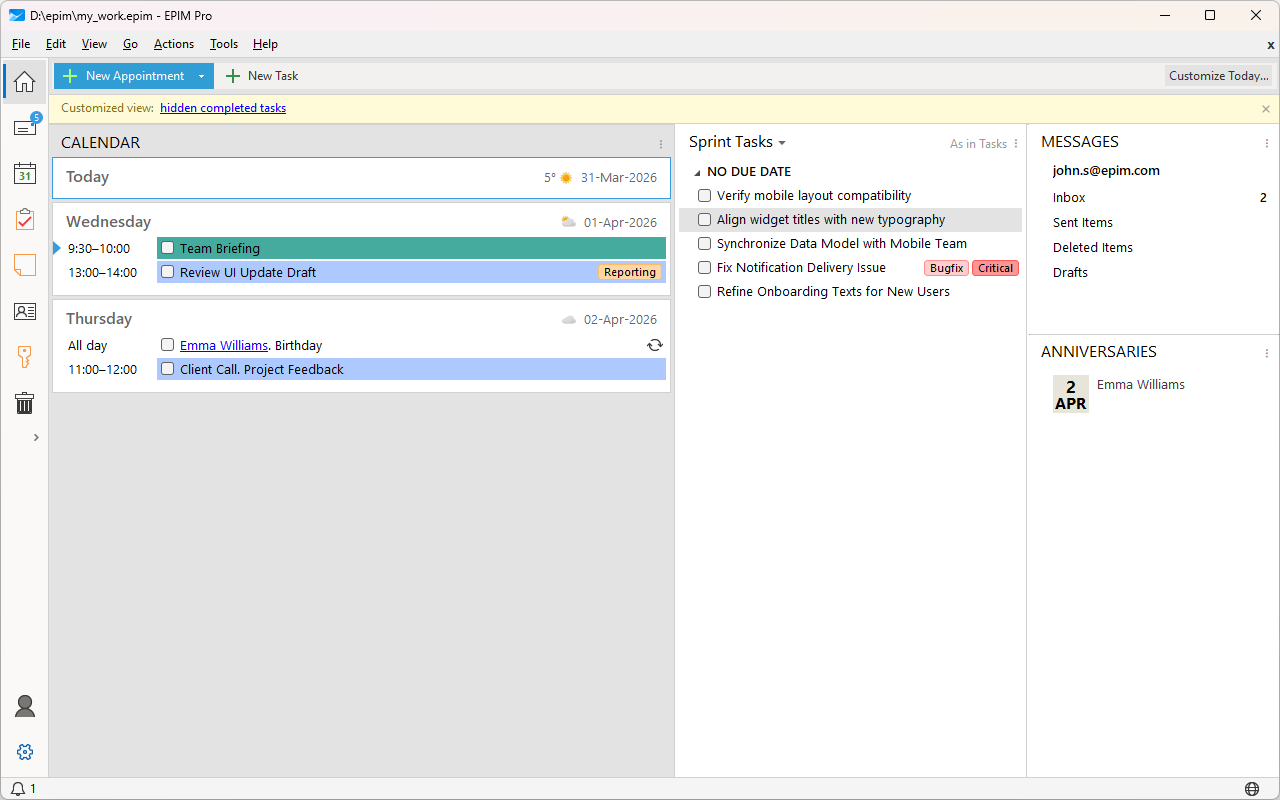
The Today view: upcoming appointments, a task list, mail folders and anniversaries on one screen, with the module bar down the left.
Download Free Trial
Overview
EssentialPIM has been around since 2004 and built a loyal following as an Outlook replacement: one program for mail, appointments, to-dos and notes, with your data in a file on your own PC rather than in someone's cloud. In September 2025 (version 12.5.1) it was renamed EPIM, the free edition became EPIM Mail, and in May 2026 the version numbers jumped from 12.5 to 26.0. Releases are frequent: 26.5 in September, 26.6 with an AI assistant in November, and 26.7 two weeks later.
On October 1, 2026 the vendor announced that EPIM and its intellectual property are "once again fully owned and developed by Astonsoft", that the same team keeps working on it, and that all existing licenses remain fully valid. If you're weighing a purchase after reading about a "new partnership" in reviews, that is the current state of things.
The free EPIM Mail already includes all six modules. Pro adds the things power users pay for: sync with Google, Microsoft 365 and iCloud, tags and cross-links between items, templates, item version history, an attachments manager, automatic backups and desktop sticky notes.
Features
A full email client for all your accounts
EPIM Pro's Mail module connects IMAP, POP3 and Microsoft Exchange accounts (Gmail, Outlook.com and iCloud Mail included), with a Unified Inbox, conversation view, message rules, adaptive spam filtering, templates, multiple signatures, scheduled sending and PGP, PGP/MIME and S/MIME encryption. Any message can be turned into a task, an appointment or a note that stays linked to the original email. Pro also translates incoming messages inside the app.
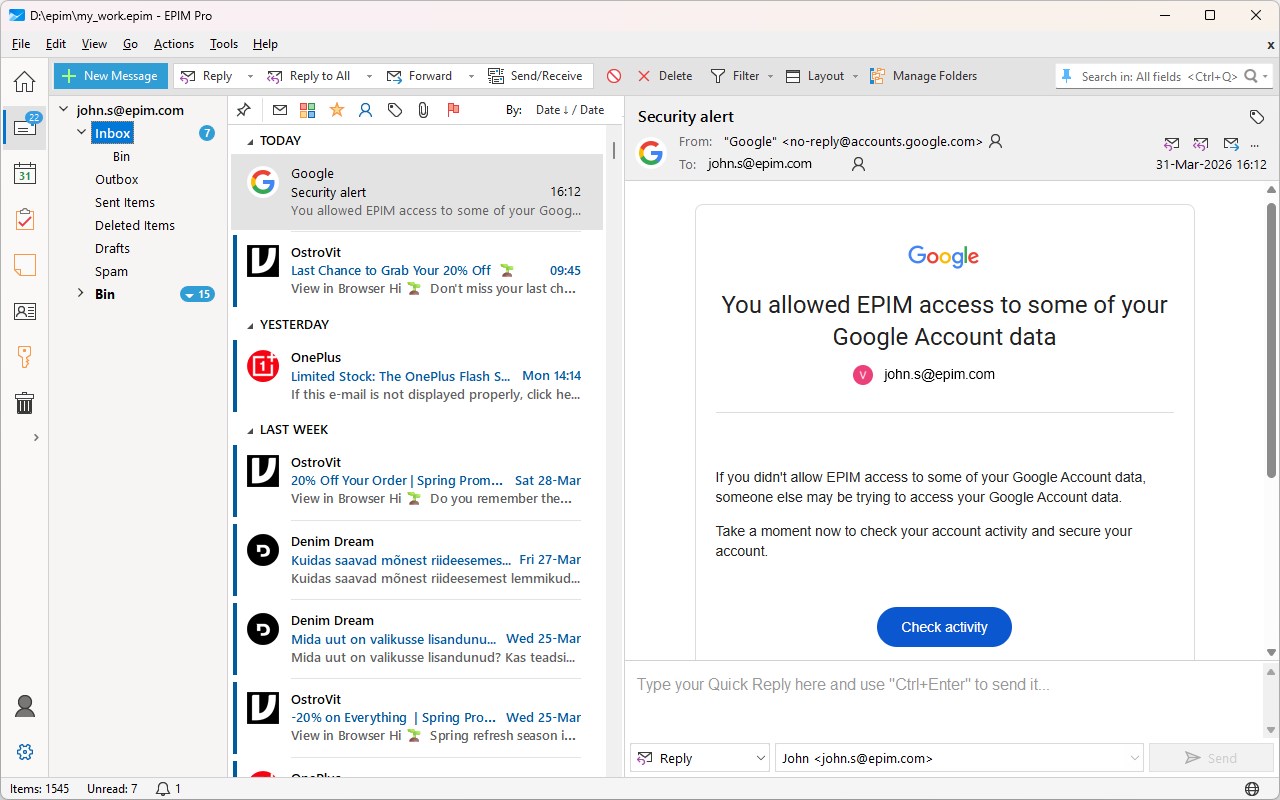
The Mail module: account folders, a message list grouped by date, and the reading pane with a Quick Reply box at the bottom.
A calendar with every view you'd expect
The EPIM calendar shows Day, Week, Week Agenda, Month, Year and Agenda views, keeps several calendars side by side, and puts your tasks in a sidebar next to the schedule. You get multiple reminders per event, online-meeting links for Zoom, Teams and Google Meet, and in Pro, event templates, iCal subscriptions and a weather forecast in the day headers.
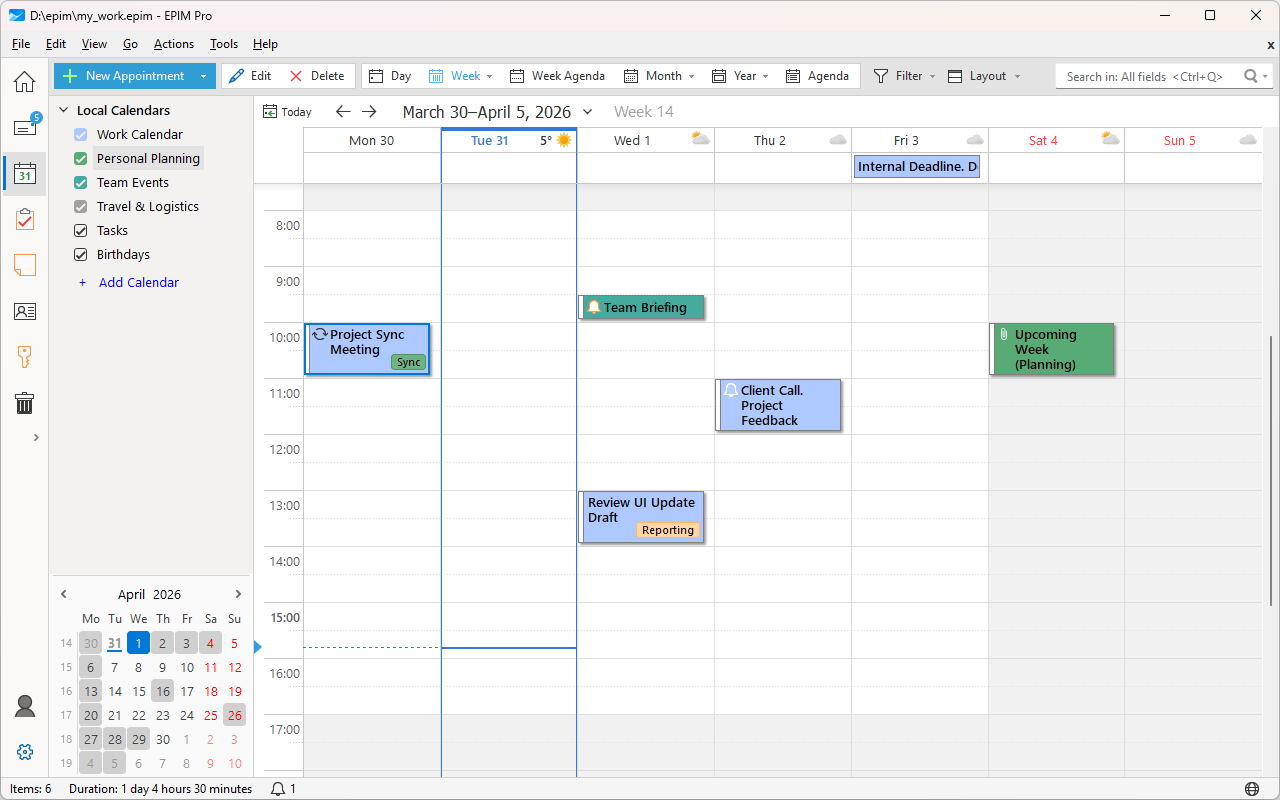
Week view with work, personal and team calendars, weather icons in the day headers and a mini calendar for navigation.
Tasks from a simple to-do list up to a Kanban board
EPIM's Tasks module nests tasks and subtasks as deep as you like and switches between Tree, Plain and Kanban views. Smart Lists (Important, Flagged, Completed) fill themselves, unfinished "floating" tasks roll forward to the next day, and recurring tasks handle routines. Pro adds custom fields and task templates. Tasks sync with Google Tasks, Microsoft To Do, Toodledo and CalDAV servers.
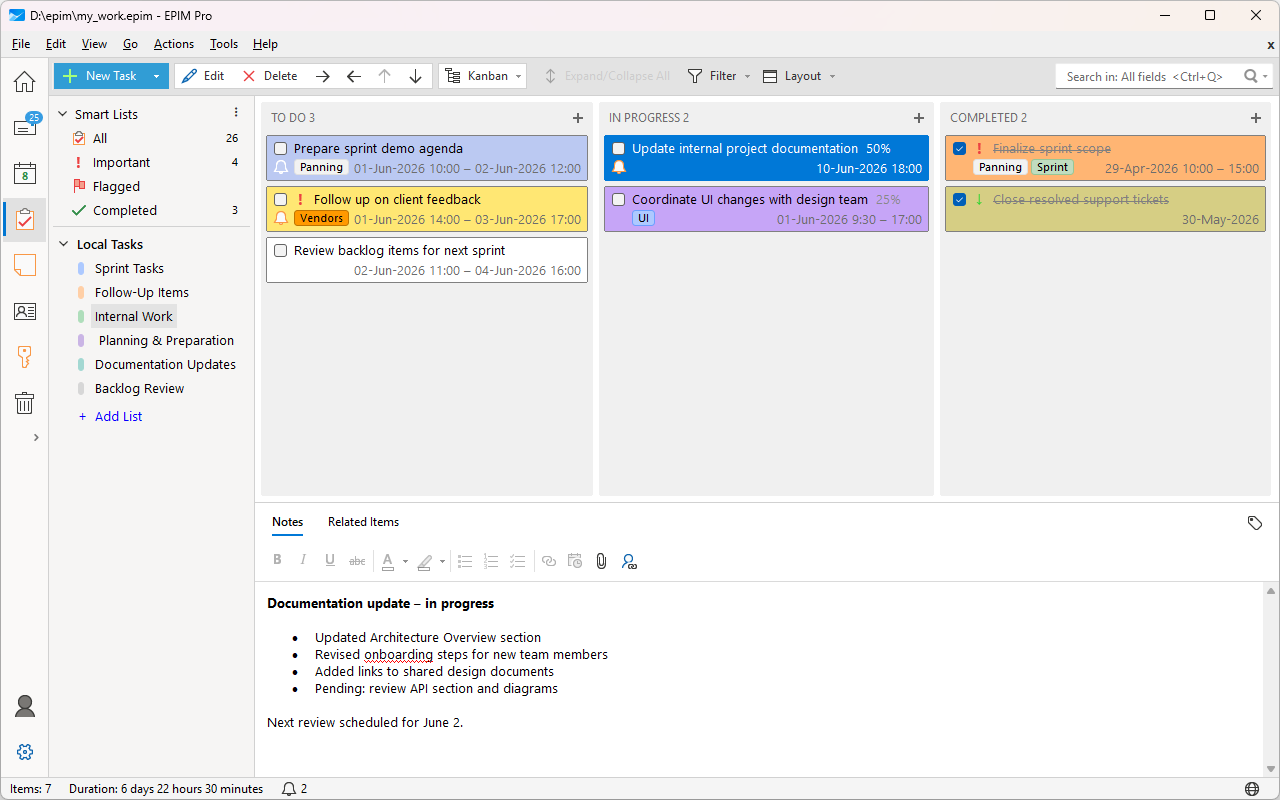
Tasks in Kanban view, with tags, progress percentages and a notes pane for the selected task.
Notes in a tree, in rich text or Markdown
EPIM's Notes module is an outliner: notes live in a multilevel tree, each note can have several tabs, and you write in rich text or Markdown with images, tables, drawings and links. Anchors jump around long notes, and since version 26.5 notes can carry reminders. Pro puts notes on the desktop as Sticky Notes and lets you attach files and link a note to related emails, tasks or contacts.
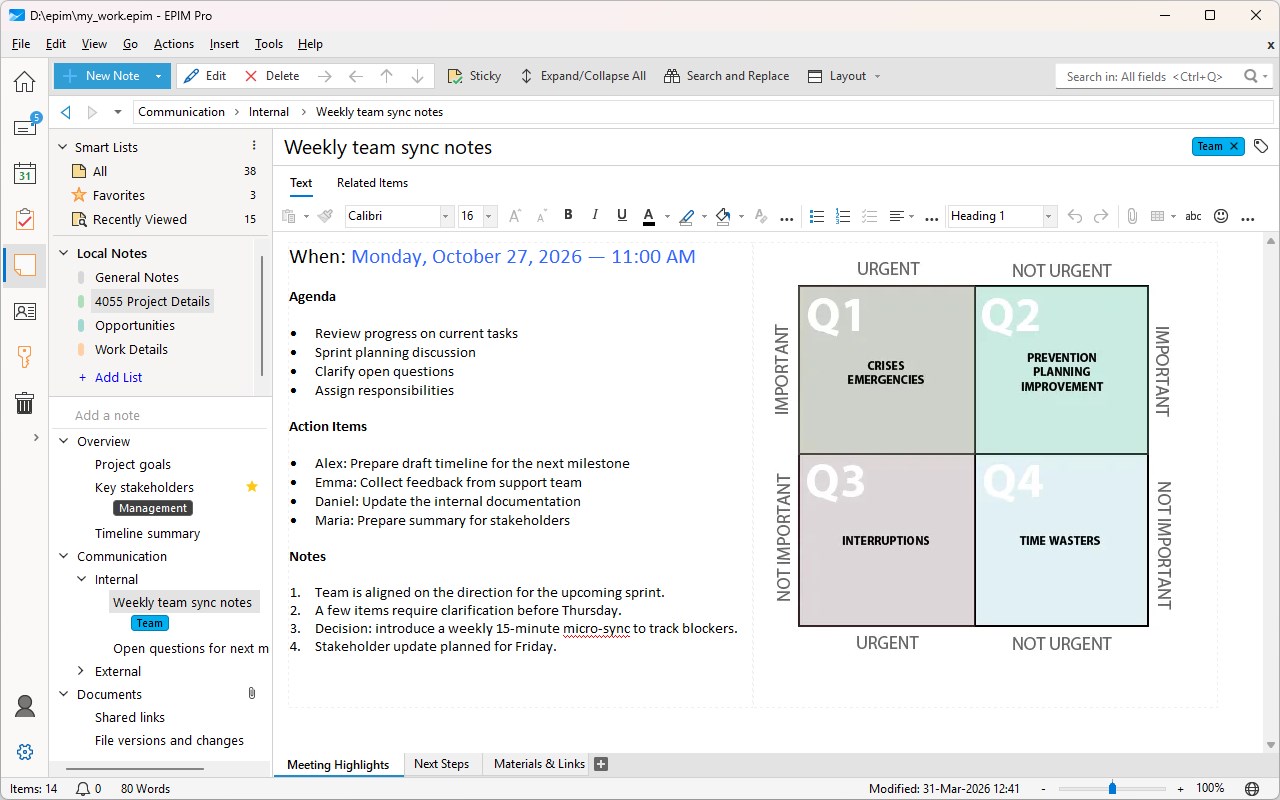
A meeting note in the Notes module: the note tree on the left, a formatting toolbar, an embedded image and tabs along the bottom.
Contacts and passwords in the same encrypted file
EPIM keeps contacts in multi-level groups with custom fields and the full email history for each person; Pro adds newsletters to a contact group and printing of labels and envelopes. The Passwords module stores logins in groups, generates strong passwords, fetches site icons and types logins into websites for you, all inside the same AES-256-encrypted database.
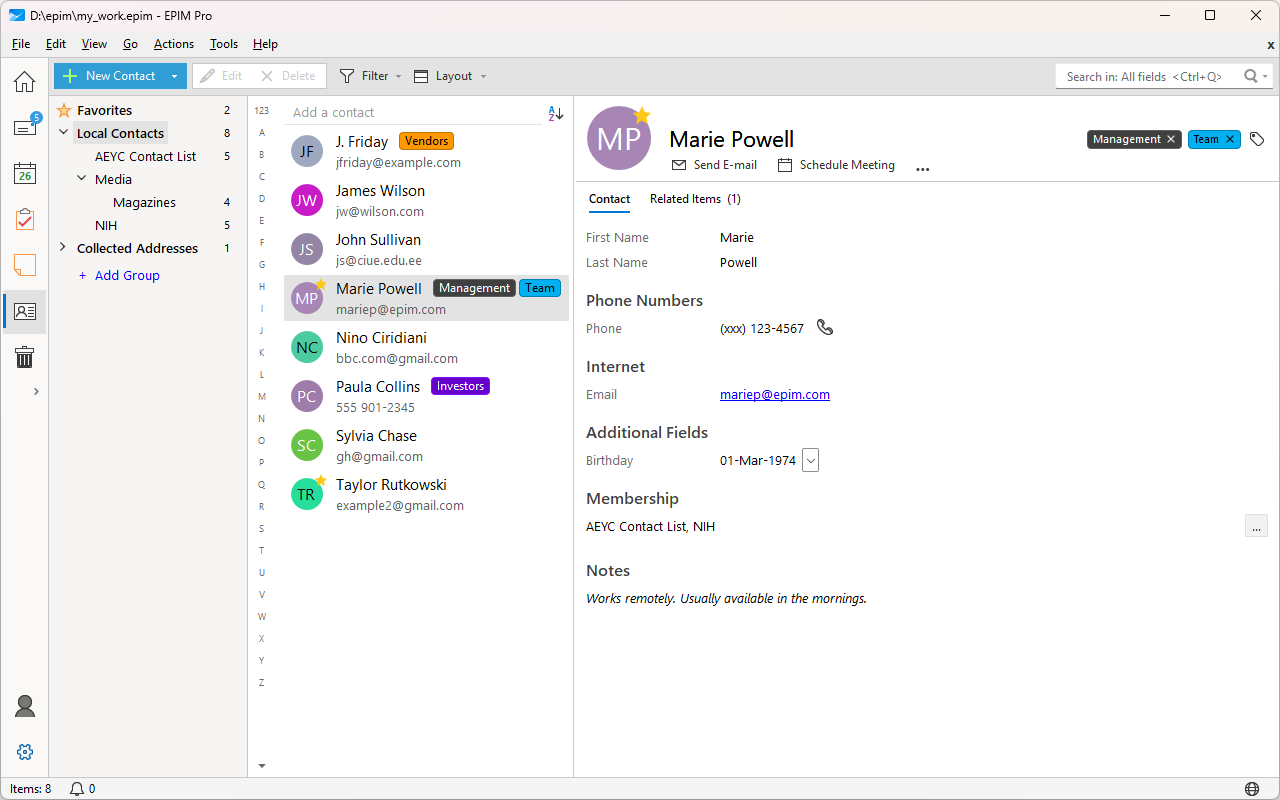
The Contacts module: groups on the left, tagged contacts in the middle and a contact card with "Send E-mail" and "Schedule Meeting" actions.
Sync with the services you already use
EPIM Pro syncs one-way or two-way with Google (mail, calendar, tasks, contacts, and notes and passwords through Google Drive), Microsoft 365 and Exchange, Outlook.com, iCloud, Nextcloud/ownCloud, CalDAV/CardDAV and Toodledo, on a schedule and in the background. The free EPIM Mail syncs calendars, tasks, notes, contacts and passwords only with the EPIM phone apps. EPIM Cloud is an optional extra ($19.95 a year or $2.99 a month, 14-day trial) for sync, automatic encrypted backup and browser access.
An AI assistant that works on your own data
EPIM 26.6 added the EPIM AI Connector, which lets the Claude Desktop or ChatGPT desktop app search and read your email, calendar, tasks, notes and contacts in plain language ("What do I have on my calendar this week?"). In EPIM Pro the assistant can also create tasks, events and notes and mark tasks done; EPIM Mail is read-only. It runs through a separate EPIM account whose permissions you set, and it can't edit or delete existing items.
Benefits
- One database instead of five apps. An email that becomes a task stays linked to it, and the contact card shows every message from that person.
- Your data stays on your PC. Everything works offline from a local encrypted file; cloud sync is your choice, service by service.
- It travels on a USB stick. The portable mode leaves nothing on the host computer, which few email clients offer.
- A free edition that isn't a demo. EPIM Mail has no ads or time limit and is allowed for commercial use, so you can switch back after the trial without losing anything.
Real-World Uses
- The Outlook refugee: a small-business owner moves mail, calendar and contacts off classic Outlook, keeps Microsoft 365 syncing, and gains notes and a password vault in the same window.
- The consultant on client PCs: runs EPIM portable from an encrypted USB drive, so the schedule and notes go everywhere without touching the client's machine.
- The note-hoarder: builds a project knowledge base in the notes tree, links each note to the emails and tasks it came from, and finds anything with the global search.
- The small office: installs the free EPIM Server and gives each person a Pro Business license to share calendars, tasks and contacts with per-user rights.
Who It's For, and Who Should Skip It
EPIM Pro suits Windows users who want everything personal in one offline program and like to configure things: custom fields, views, rules and templates. It's also a strong pick if privacy matters and you don't want your notes and passwords in a big tech cloud.
Skip it if you use a Mac or Linux (there's no version for either), if you want a simple, modern web app that looks the same on every device (the iPhone app doesn't have notes), or if you only need one of the six modules. A dedicated password manager or note app will do that one job with less to learn.
Usage Guide
- Install: run EPIMPro.exe and choose a normal install, or portable mode to put EPIM on a USB drive.
- Create or open a database: on first start, create a new database and set a password if you want it encrypted.
- Add your email: in Mail, add your IMAP, POP3 or Exchange accounts.
- Import the rest: bring in contacts and calendars from CSV, VCF or ICS files, or set up a sync with Google, Microsoft 365 or iCloud to pull them in.
- Connect your phone: install EPIM for Android or iOS and sync over Wi-Fi or EPIM Cloud.
- Set up backups: turn on automatic backup (Pro) before you rely on EPIM daily.
Before you buy
- The Lifetime License is gone. In January 2025 the vendor still sold a Lifetime License "with lifetime updates". Today the one-time purchase includes 1 year of updates; after that the program keeps working, and you can buy another year of updates for $39.95.
- Annual or perpetual? Two years of the $39.95 subscription equal the $79.95 perpetual license, which also gets you a year of updates. If you'll update every year anyway, the subscription and the perpetual license plus yearly extensions cost about the same.
- One license per person, not per PC. You can install EPIM Pro on every computer you personally use, such as a desktop and a laptop.
- Try the sync first. Sync is the most common complaint in reviews, so test your own Google or Microsoft account during the 30-day trial.
Where it falls short
- Synchronization isn't always smooth. Several Trustpilot reviews from 2022 to 2025 describe unreliable sync or duplicated records, and the release notes keep fixing sync issues (recurring tasks with EPIM Cloud, CalDAV and iCloud in 26.7).
- New builds sometimes bring bugs. Updates come every few weeks, and reviewers note that some introduce regressions; 26.7 alone fixed "several crashes reported by EPIM 26.6 users".
- A learning curve. The depth of options makes the interface dense; reviewers call it "a bit clunky" and warn of a "steep learning curve".
- Windows only. No Mac or Linux version, and the iPhone app covers calendars, tasks, contacts and passwords but not notes.
What Users Say
EPIM has a large, long-time user base and mostly strong ratings, with complaints that center on sync and stability. Trustpilot rates the company 4.3 out of 5 from 180 reviews (77% five-star, 7% one-star), the EPIM Pro app has 4.4 out of 5 from 9 ratings in the US Microsoft Store, and SoftwareSuggest shows 4.5 out of 5 from 12 reviews. The quotes below are short excerpts.
Praise on Trustpilot
- Hendrik (5 stars, May 2026), coming from Outlook: "Epim Pro is not only a full blow European alternative, but it really is also much faster than outlook."
- Alex (5 stars, July 2026): "I still consider it the best personal information manager available."
- BG (5 stars, June 2026): "Comprehensive and reliable App. It covers all your requirements of a PIM including tasks, notes etc"
- Mike Oliver (5 stars, May 2026), a free-edition user: "the fact I am still getting this facility for free is remarkable - Thank you EPIM."
- Keith Drury (5 stars, June 2020): "Came to Essential PIM 10 years ago, as a relief from MS Outlook."
Criticism on Trustpilot
- Greg (3 stars, December 2025): "They update the software regularly however at times these updates introduce bugs"
- TecHKnow (4 stars, July 2026): "Its a pity that there is a steep learning curve in using the software."
- A reviewer listed as "customer" (3 stars, June 2026), titled "I stay away from new builds": "With the new partnership they say they will honor the lifetime licenses but only time will tell how long that will last."
- Alex Schickel (1 star, January 2025): "The synchronisation is not reliable."
- Luis Porfírio (2 stars, December 2022), titled "Very bad synchronization", says each sync doubled or tripled the records.
On SoftwareSuggest
- Jay (5 stars, July 2021), "EssentialPim is a mature and reliable product.": "Support has always been great, making it a very reliable and stable software to use every day."
- Semaj (3 stars, July 2021), "Clunky, with a feel of the 1990's": "The interface is retrograde. Even simple entries in Today or Appointments require multiple repetitive inputs and choices." The same reviewer liked that "Your data is safe. There is a neat tag system for sorting data."
The pattern: people who settle into EPIM tend to stay for a decade and praise the all-in-one design, the speed compared with Outlook and the support replies. The complaints repeat too: sync with outside services that duplicates or misses items, occasional bugs in new versions, and an interface that takes time to learn. The vendor replies to most negative reviews.
Comparisons
EPIM Pro vs. the free EPIM Mail
Both have all six modules, desktop and portable modes, AES-256 encryption, PGP email and sync with the EPIM phone apps. Pro adds sync with Google, Microsoft 365 and iCloud, tags and cross-links, automatic backup, item version history, the attachments manager, sticky notes, custom fields and templates, label and envelope printing, newsletters, in-app translation and an AI assistant that can create items. If your mail and calendar live in Google or Microsoft 365, you need Pro.
EPIM Pro vs. Outlook and Thunderbird
Classic Outlook and Thunderbird handle mail, calendar and contacts well, but neither has a password vault, and their notes are basic. EPIM's own comparison also points to its portable version and its hierarchical notes. Outlook wins on deep Exchange and Teams integration in a company; Thunderbird is free and open source and runs on Mac and Linux.
Editions and Pricing
| Edition |
Price (November 27, 2026) |
Updates |
What it adds |
| EPIM Mail | Free | Free | All six modules, portable mode, phone app sync |
| EPIM Pro Perpetual License | $79.95 one-time | 1 year; extra year $39.95 | Cloud sync, backup, tags, cross-links, templates, sticky notes |
| EPIM Pro Subscription | $39.95 a year | While subscribed | Same features as the perpetual license |
| EPIM Pro Business Perpetual | $159.95 per user | 1 year; extra year $79.95 | Shared databases through the free EPIM Server, user rights |
| EPIM Pro Business Subscription | $79.95 per user a year | While subscribed | Same as Business perpetual |
Volume discounts apply to Business licenses. Through the Microsoft Store, EPIM Pro is sold as an annual subscription.
Alternatives worth comparing
Nothing else we list puts all six of EPIM's modules in one program, so these are honest picks for the single job you might need instead, all with their own reviews on our site:
Notes only: Vovsoft Tree Notes
A $19 one-time Windows outliner that keeps rich-text notes in a folder tree inside one local file, with no account or cloud. It's the closest thing to EPIM's Notes module on its own.
Read our Tree Notes review
Contacts only: Vovsoft Contact Manager
A $19 one-time offline address book for Windows with several address books, VCF and CSV import and export, and a portable edition.
Read our Contact Manager review
Desktop reminders: Vov Sticky Notes
Colored sticky notes with text, images or a small web page, plus pop-up reminders, for a $19 one-time license with free updates. A lighter take on EPIM Pro's Sticky Notes.
Read our Vov Sticky Notes review
Staying with Outlook: gSyncing
If you'd rather keep classic Outlook and only need it to talk to your phone, gSyncing ($34.99 a year) syncs Outlook calendars, contacts and tasks with a Google account, one-way or two-way.
Read our gSyncing review
Passwords on every device: RoboForm or NordPass
EPIM's password vault lives in its Windows database. A dedicated password manager fills logins in every browser and on Mac and phone too: RoboForm has a free plan for one device and Premium at $29.88 a year; NordPass has a free plan for one active device and Premium at $35.88 a year.
Read our RoboForm review · Read our NordPass review
FAQs
Can I still buy an EssentialPIM Pro Lifetime License?
No. EssentialPIM Pro's Lifetime License with lifetime updates is no longer on the price list. The closest option is the EPIM Pro Perpetual License at $79.95: you own that version forever, with one year of updates included and further years at $39.95 each.
Is my old EssentialPIM lifetime license still valid?
Yes, according to the vendor. In its October 1, 2026 ownership announcement, Astonsoft said all existing EPIM licenses "remain fully valid and continue to work exactly as before", and the same team keeps developing the program.
Is EssentialPIM the same as EPIM?
Yes. EssentialPIM was renamed EPIM in September 2025: EssentialPIM Pro is now EPIM Pro, and the free EssentialPIM became EPIM Mail.
Is there a free version of EPIM?
Yes. EPIM Mail is free with no ads or time limit, includes all six modules and is allowed for commercial use. It lacks Pro's cloud sync with Google, Microsoft 365 and iCloud, automatic backup, tags and cross-links. EPIM Mail and Pro share one database format, so you can move between them without losing data.
Does EPIM Pro run on a Mac?
No. EPIM Pro is Windows-only (Windows 10 and 11). There are companion apps for Android and iPhone/iPad that sync with the Windows program, but no desktop version for macOS or Linux.
Is there still a portable version of EssentialPIM?
Yes. The single EPIM installer offers both a normal and a portable installation. Portable EPIM runs from a USB drive, leaves no data or settings on the host computer, and can encrypt its database in case the drive is lost.
Can EPIM Pro sync with Outlook?
EPIM Pro syncs with Microsoft 365, Exchange and Outlook.com accounts, and with a locally installed classic Outlook.
What happens when the EPIM Pro trial ends?
After EPIM Pro's 30-day trial you can buy a subscription or perpetual license, or switch to the free EPIM Mail and keep using its features with the same data.
Is there an alternative to EssentialPIM?
For the full all-in-one package, the usual alternatives are classic Outlook and Thunderbird. If you only need part of what EssentialPIM does, single-purpose tools such as Tree Notes for notes, Contact Manager for contacts or RoboForm for passwords are simpler to learn.
System Requirements
- Windows 10 or Windows 11 (the Microsoft Store edition needs Windows 10 version 1607 or later, x64)
- About 33 MB for the installer
- Internet connection only for email, synchronization, EPIM Cloud and updates
- Optional: Android or iOS device for the companion apps; Claude Desktop or the ChatGPT desktop app for the AI assistant
Conclusion
EPIM Pro is still one of the most complete personal information managers for Windows, and it's actively developed: seven releases between September and November 2026, including a useful AI assistant. Buy it if you want mail, calendar, tasks, notes, contacts and passwords in one private, offline database and you need sync with Google or Microsoft 365. The $79.95 perpetual license is fair if you're happy to stay on one version for a while. Don't buy it for the old "lifetime updates" promise, which no longer exists, or if you need a Mac version. Start with the free EPIM Mail or the 30-day trial, and test your sync before you pay.
Download Free Trial