Vovsoft Contact Manager: A Simple Offline Address Book for Windows, with vCard Import and Export
Contact Manager is a $19 Windows address book from Vovsoft that keeps your contacts on your own PC, in as many address books as you like, and imports and exports them as VCF (vCard) and CSV files. It comes as an installer or a portable edition you can carry on a USB stick, and the $19 is a one-time lifetime license. The free trial can't export.
It's for people who want a contact list that doesn't live in a Google or Microsoft account, and a place to clean up and convert vCards between phones.
Quick facts
- Version: 2.3, released September 5, 2026
- Developer: Vovsoft
- Platform: Windows 11, 10, 8/8.1, 7 and Vista, 32-bit and 64-bit. No Mac or phone version
- Fields: first, middle and last name, birthday with age, address, organization, cell, home and work phone, five emails, website, photo, notes
- Import: VCF (several files at once) and CSV
- Export: VCF in a chosen vCard version, and CSV
- Interface languages: English and about 30 others
- Price: $19, one-time payment, lifetime license with free updates
- Trial: free, manages contacts but can't export them, for personal use
- What we checked: installer file version 2.3.0.0 (5,590,952 bytes) with a valid code signature, downloaded from the vendor on November 11, 2026, and $19.00 on the order page with no auto-renewal on November 11, 2026
Download Free TrialBuy Now
Overview
The window has two panels. On the left, a drop-down picks the address book (Business, Family or any you create), a search bar filters the list, and A to Z buttons jump to a letter, with a # button for names starting with a number. On the right is the selected contact's form, with Save and Delete underneath. The status bar shows how many contacts are displayed.
Everything is stored locally. There's no account, no sync and no cloud, which is the point for some people and a limitation for others.
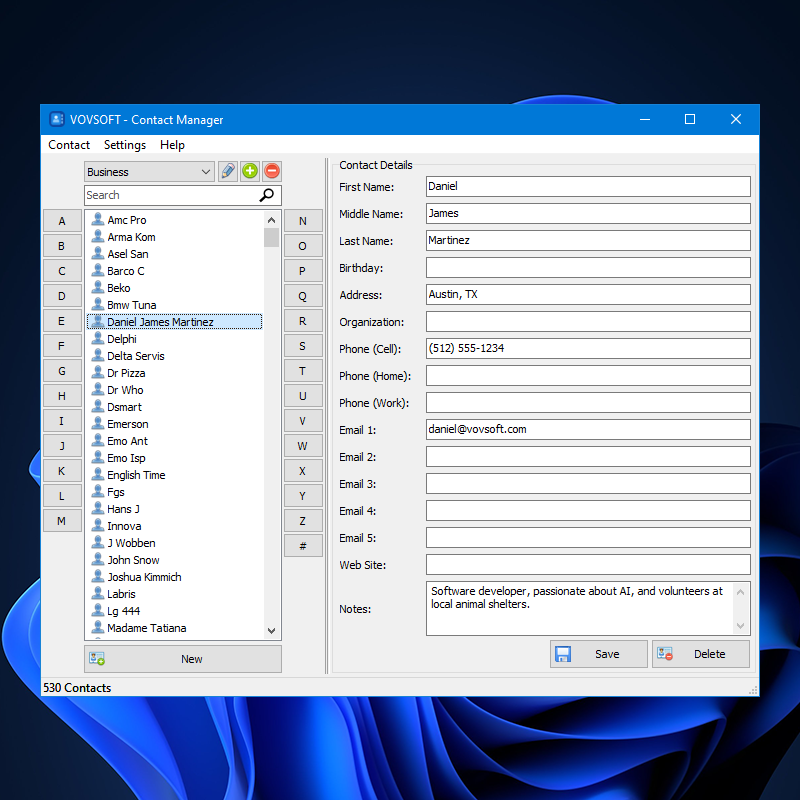
A Business address book with 530 contacts: the A to Z buttons and search bar on the left, the selected contact's fields on the right.
Features
Several address books
Contact Manager keeps separate address books, added and deleted with the buttons beside the drop-down, so work and family contacts don't mix. Version 2.1 added Delete Duplicates to clean a list after several imports.
VCF and CSV in both directions
Contact Manager imports many VCF files at once and CSV files, and exports to VCF or CSV. A VCF version setting, added with better vCard 4 support, helps when a phone or program is fussy about the version.
Photos, birthdays and notes
Contact Manager stores a photo for each contact, and since version 2.2 calculates a contact's age from the birthday. A notes box holds anything else.
Quick to search
Contact Manager's search bar handles accented characters since version 2.3, the list can be sorted by last name, and the letter buttons enlarge when clicked to show which letter you're on.
Real-World Uses
- Keeping a business contact list on a work PC that isn't tied to anyone's personal Google account.
- Merging the VCF exports of an old phone and a new one, deleting duplicates, and exporting one clean file.
- Carrying an address book on a USB stick with the portable edition.
- Turning a vCard backup into a CSV to open in Excel or a mailing tool.
- Keeping a family address book with birthdays and photos on the home PC.
Who It's For, and Who Should Skip It
Contact Manager suits people who want a plain, private address book on Windows, and anyone who regularly moves contacts between phones and programs as VCF and CSV files.
Skip it if you want your contacts on your phone and computer at the same time: there's no sync, so Google Contacts, iCloud or Outlook are better. It also has only one phone number per type, no categories beyond separate address books, and no password protection.
Usage Guide
- Download the installer or the portable edition and start Contact Manager.
- Pick an address book from the drop-down, or click the plus button to create one.
- Use the Contact menu to import VCF or CSV files, or click New to add a contact by hand.
- Fill in the fields, add a photo, and click Save.
- Use the search bar or the letter buttons to find people, and export to VCF or CSV when you need the list elsewhere.
Before you buy
The trial lets you build and edit an address book but not export it, so you can test importing your own VCF files first. One license covers one person on any number of their own computers. Vovsoft's general policy is no refunds once the key is delivered, since a free trial comes first (accidental orders are generally refunded, at its discretion, and PayPro Global has the final say on its orders).
Where it falls short
- One field each for cell, home and work phone: several numbers of the same type is the top request.
- Search covers names only, not company or other fields, and needs a click to start.
- No password protection, no merge of duplicates (only delete), no title or role field.
- It doesn't ask whether to save a modified contact, an open request, so remember to click Save.
- No sync with phones or online accounts: everything goes through VCF or CSV files.
What Users Say
On Vovsoft's site
Contact Manager's page shows 5.0 out of 5 from 2 ratings, with these English comments among others.
"The Contact Manager is a useful and simple tool for editing, archiving, and converting contacts. There's really nothing comparable on the software market." Manfred Krauser
"Quick resolution of a slow-down problem. Thanks." Patrick Boylan
On Trustpilot
One August 2026 Trustpilot review is about this program, 5 stars but written early:
"Although there software was easy to download install and use , I have barley had it a few days to fully test it" David Langley
Vovsoft as a company has a TrustScore of 4.6 out of 5 from 411 reviews, read through a summarizer, with users mostly describing its tools as simple and dependable.
What users want changed
The request list is long and shows steady use: several numbers per phone type (3 votes), dated notes, password security, merging duplicates, a save prompt, search as you type and search across company names (2 votes each). Photos, a split address field, Home, Cell and Work phone types, age from birthday and translations have all been added at users' request.
Comparisons
Contact Manager vs Google Contacts or Outlook
Google Contacts and Outlook are free and sync to your phone, with more fields and labels. Contact Manager is offline and private, with no account, but you move contacts by file rather than sync.
Contact Manager vs Vovsoft VCF Editor
VCF Editor opens and edits a VCF file itself. Contact Manager is an ongoing address book that imports and exports VCF and CSV.
Contact Manager vs a CRM
A CRM tracks deals, tasks and contact history for a team. Contact Manager is a single-user address book, with none of that and none of the cost.
Editions and Pricing
| Edition | Price | License | What you get |
|---|
| Trial | Free | Personal, non-commercial use | Address books, import, editing, no export |
| Licensed | $19 one-time | Lifetime | Export to VCF and CSV, commercial use, no nag screen or ads, lifetime free updates |
The installer and portable editions use the same key, sent by email right after payment. Vovsoft's $99 Universal License covers all of its desktop programs.
FAQs
Can Contact Manager import contacts from an iPhone or Android phone?
Yes, through a VCF file. Export your phone's contacts as a VCF (vCard) file, and Contact Manager imports it, several files at once if needed.
Does Contact Manager sync with Google Contacts or Outlook?
No. Contact Manager has no sync. You move contacts in and out as VCF or CSV files.
Can Contact Manager run from a USB stick?
Yes. Contact Manager comes as a portable edition that runs without installation, with the same license key as the installer.
Can Contact Manager store several mobile numbers for one person?
Not yet. Contact Manager has one field each for cell, home and work phone, and more numbers per type is its top user request.
Is my contact data in Contact Manager password protected?
No. Contact Manager stores contacts locally without a password, which is an open request, so protect the PC or folder yourself.
Is the Contact Manager license a subscription?
No. The $19 license is a one-time payment that never expires and includes future updates.
System Requirements
- Windows 11, 10, 8/8.1, 7 or Vista, 32-bit or 64-bit
- About 6 MB for the program, plus space for the address books and photos
Conclusion
Contact Manager is worth $19 if you want a private address book on your PC and regularly shuffle contacts between phones and programs as VCF or CSV. Simple multiple address books, vCard version control and active development are the reasons to buy it. The reason not to: there's no sync, one phone number per type and no password, so if your contacts need to be on your phone too, a free synced service does more.
Download Free TrialBuy Now