Cisdem ContactsMate for Mac: One Window for Every Address Book, With a Duplicate Cleaner Built In
Cisdem ContactsMate is a $49.99 one-time-purchase contact manager for the Mac that gathers contacts from Apple Contacts, iCloud, Google, Exchange, Outlook, Yahoo and AOL into one list, finds and merges duplicates, and exports everything to CSV, Excel, vCard and six other formats. It's for Mac users whose contacts are spread across several accounts and have turned into a mess of doubles and half-filled cards.
If you've ever searched for a colleague and found three cards with three different phone numbers, you already know the problem. Apple's Contacts app can merge obvious duplicates, but it won't tell you which cards have a blank name, a phone number full of letters, or an email address with no "@". ContactsMate scans for all of those and lets you fix them in one pass.
Quick facts
- Developer: Cisdem Inc.
- Version: 6.8.1 for Mac, released August 16, 2024
- Platform: macOS 10.11 El Capitan through macOS 26 Tahoe, Intel and Apple Silicon (a separate Windows version is sold on its own)
- Accounts it reads: Apple Contacts, iCloud, Google, Exchange, Outlook, Yahoo, AOL, plus CSV and vCard files
- Exports to: CSV, CSV (Outlook), vCard, Excel, TXT, Docx, HTML, Numbers and Pages
- Price: $49.99 for a lifetime license on one Mac; $29.99 a year as a subscription
- Trial: free download; the trial can import, edit, group and scan, but can't export, print, share or fix the problems it finds
- Guarantee: 30-day money-back guarantee
- What we checked: the Mac installer from Cisdem (cisdem-contactsmate.dmg, 6.4 MB, dated August 16, 2024, matching the 6.8.1 release notes), and the order page on November 4, 2026, which showed "Cisdem ContactsMate for Mac - Lifetime License" at $49.99 as a one-time purchase with no renewal. We didn't connect our own Google or iCloud accounts to it.
Before you buy
- The trial is a preview, not a cleanup. You can scan your contacts and see what ContactsMate finds, but the Fix and Export buttons only work after you activate a license.
- Back up first. Edits you save in ContactsMate are written straight back to Mac Contacts and to synced accounts, so export a vCard copy of your address book before you merge anything.
- Updates have slowed. The last release, 6.8.1, came out in August 2024 and fixed crashes. Cisdem's spec page lists macOS 26 Tahoe as supported, but there hasn't been a feature update in over two years.
- The Mac App Store copy is different. The App Store version is free to download with in-app subscriptions. The lifetime license sold here is for the version downloaded from Cisdem.
Download Free TrialBuy Now
Overview
ContactsMate looks like a darker, three-pane version of Apple's Contacts. On the left sit your sources: each Internet account with its groups, "On My Mac", iCloud, and a Trash folder, with tags listed underneath. The middle pane lists the cards in whatever you picked, and the right pane shows one card's details with quick buttons to message, call, start FaceTime or email. Across the top are the three buttons that matter: Import, Add Account and Scan.
Because it uses macOS's own Internet Accounts system, ContactsMate isn't a separate database you have to keep in step. Change a phone number in ContactsMate and the change lands in Mac Contacts and in the synced account. That's convenient, and it's also why a backup before a big merge is a good habit.
Features
Every account in one list
Cisdem ContactsMate loads Apple Contacts automatically each time it starts, and Add Account connects iCloud, Google, Exchange, Outlook, Yahoo and AOL through macOS's Internet Accounts panel. You can also import a CSV or vCard file straight into a chosen account or group, which is handy for a contact list someone emailed you as a spreadsheet.

Add Account opens the macOS Internet Accounts panel with iCloud, Exchange, Google, Yahoo and AOL; the sidebar behind it shows a Gmail account with its groups, On My Mac and an iCloud list of 5,770 contacts.
Groups, tags and fast search
Cisdem ContactsMate lets you sort cards into groups (Work, Family, a project name) and add tags that cut across groups, so one person can be both "Family" and "red" for this year's card list. Drag a batch of selected cards onto a group to file them. Search covers names with prefixes and suffixes, phone numbers, email addresses and the Note field, and groups sort themselves automatically.

Groups (Ungrouped, Work, Family, new, important) under a Gmail account, a tag list below, and a contact card with message, call, FaceTime and email buttons.
A scan that finds more than duplicates
Cisdem ContactsMate's Scan button checks the selected account for exact duplicates, cards sharing a phone number, email or address, and cards with problems: a blank or incomplete name, invalid characters (an email without "@", a phone number with letters), odd prefixes or suffixes, missing company info, empty notes. Each problem gets four choices: edit, merge, delete or ignore. You can fix one card at a time or press Fix All, and the merge screen shows the result before you confirm.
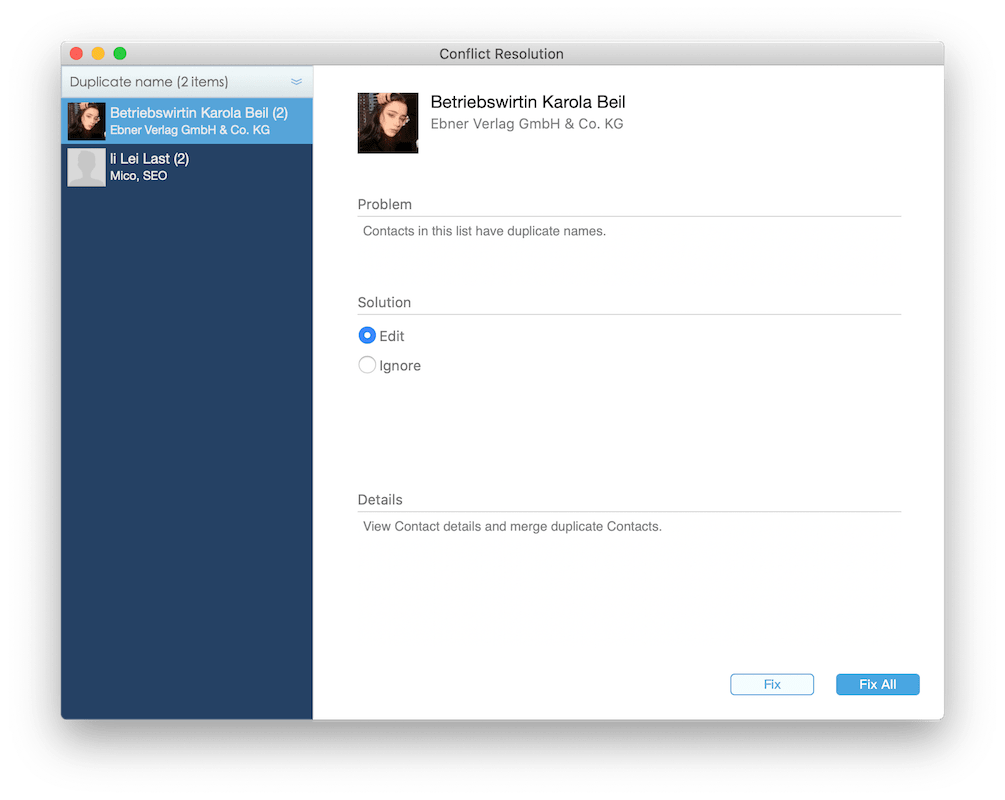
The Conflict Resolution window after a scan: two duplicate-name groups on the left, the problem and the Edit or Ignore solution on the right, and Fix or Fix All buttons.
Nine export formats, with custom fields
Cisdem ContactsMate exports selected cards, a whole group or an account to CSV, a CSV laid out for Outlook, vCard, Excel, TXT, Docx, HTML, Numbers or Pages. A Custom Fields option lets you pick exactly which fields go into the file, so a mailing list can carry just names and addresses. You can also print cards, share them through Mail or Messages, or email a whole group.
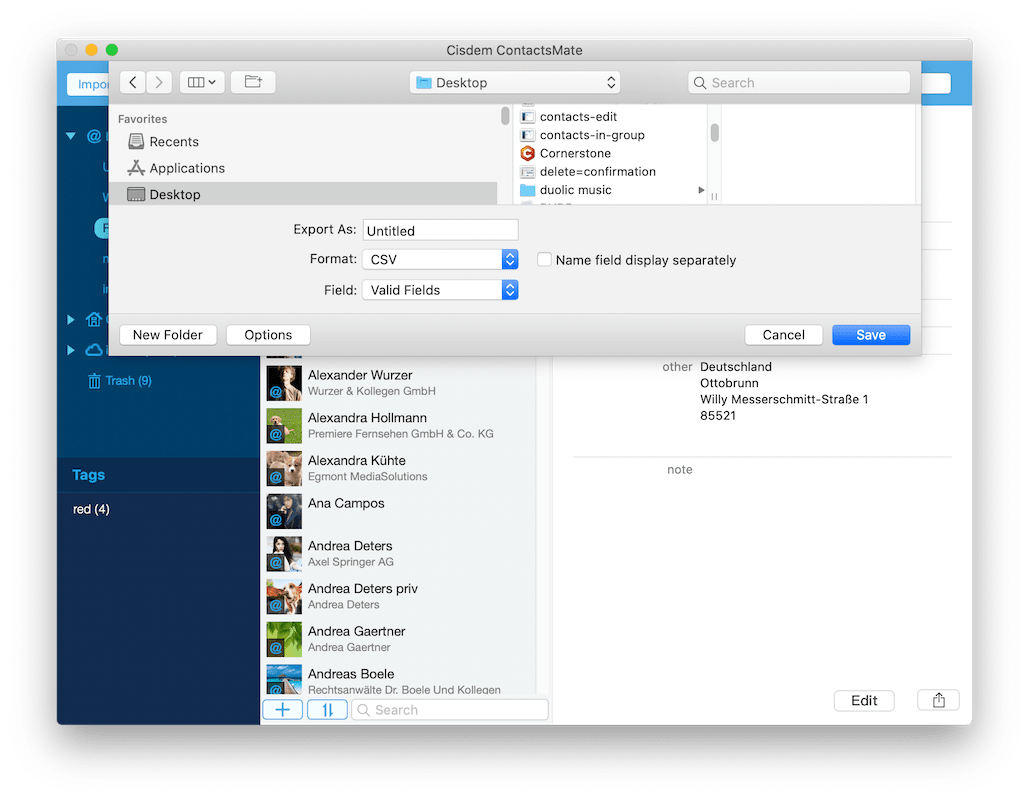
The export sheet: Format set to CSV, Field set to Valid Fields, and an option to split the name into separate columns.
A menu bar mini-version
Cisdem ContactsMate also puts a small contacts window in the Mac menu bar, so you can look someone up or add a card and then call, message, FaceTime or email them without opening the full app.
Benefits
- One place to check. You stop opening Gmail, Outlook and Contacts in turn to find the current number.
- Cleaner sync. Duplicates multiply every time two accounts sync with each other. Merging them once in ContactsMate stops the copies spreading to your iPhone and other devices.
- Your contacts in a file you control. An Excel or vCard export is a backup that doesn't depend on any one account staying open.
- Pay once. The lifetime license costs less than two years of the subscription.
Real-World Uses
- After switching phones or email providers: an old Outlook account and a new Gmail account both synced to the Mac leave you with two copies of everyone. One scan and a Fix All merges them.
- Holiday card list: tag the people you send cards to, export just that tag to Excel with name and address fields only, and feed it to a label printer or mail merge.
- Handing over a client list: export a group to CSV (Outlook) or vCard so a colleague on Windows can import it without reformatting.
- Tidying a small-business address book: find cards with no company, broken email addresses or numbers typed with letters before they bounce a newsletter.
Who It's For, and Who Should Skip It
It's a good fit if you keep contacts on a Mac across two or more accounts, have a few hundred to a few thousand cards, and want both a duplicate cleanup and an easy way to export. Freelancers and small-office users who manage client lists without a CRM get the most out of the groups, tags and export fields.
Skip it if you only need to merge a handful of duplicates once: Apple Contacts' own Card > Look for Duplicates does that for free. Teams that share a customer list should look at a proper CRM instead, since ContactsMate is a single-user desktop app with no shared database. And if you're on Windows, you need the separate ContactsMate for Windows, which doesn't connect to iCloud.
Usage Guide
- Install: download the DMG from Cisdem, drag Cisdem ContactsMate to Applications, and open it. Click OK when macOS asks for permission to access your contacts; your Apple Contacts load automatically.
- Back up: select All Contacts, right-click and export to vCard. Keep that file somewhere safe.
- Add accounts: click Add Account and sign in to Google, Exchange, Yahoo or the others in the Internet Accounts panel. Their contacts appear in the left sidebar.
- Activate: click the key icon at the top right and paste your license code. Fixing and exporting need this.
- Scan: highlight an account and click Scan. Review each duplicate or problem card, choose Edit, Merge, Delete or Ignore, or use Fix All and check the merge preview before you confirm.
- Organize and export: drag cards onto groups, add tags, then right-click a group or tag and choose Export. Pick a format and Custom Fields if you want only some columns.
Where it falls short
- No Facebook or Twitter contacts. ContactsMate relies on Apple's Internet Accounts, and Apple removed those integrations in macOS 10.14 Mojave, so they can't be added.
- It needs full access to your contacts. The app won't run without that permission. One App Store reviewer called refusing to run without it a "great downfall"; Cisdem's reply was that it syncs from Mac Contacts by design.
- Outlook CSV imports can throw an error. Cisdem's own FAQ says Outlook may show an error when importing a CSV from ContactsMate even though the contacts arrive, and suggests vCard or syncing through an Outlook account instead.
- Small quirks. A new line in the Note field needs Option+Return, and there's no dark mode, which one user on Cisdem's review page wished for.
What Users Say
Independent ratings are thin. The Mac App Store listing doesn't yet have enough ratings to show an average, and Capterra, GetApp and Software Advice list ContactsMate with no user reviews. What exists is below, with the source of each.
Mac App Store reviews
Four English reviews were shown on the US App Store listing (version 6.8.1). We read them through a page summarizer, so these are short excerpts:
- "Almost half of my contacts are duplicates, but it is really hard to manually clear them one by one." ... "It may take some time to figure it out, but after that, you will find that it is a fantastic product." (DannyQQ3, "Clear duplicate contacts", April 2021)
- "This application should not need access to my contacts in order to do so" ... "refusing to run in the absence of that permission is great downfall" (jeffro-kc, "Requires Access to Your Contacts", June 2023)
- "I've been looking for a contacts manager that actually makes exporting easy, and ContactsMate nails it." (Bobette Mellman, "Great export options!", September 2025)
- "The merge function in ContactsMate worked perfectly— it scanned everything, grouped possible duplicates," (Janaya Odelet, "Merged duplicate contacts in one go!", September 2025)
Press quotes collected by Cisdem
Cisdem's review page shows 4.8 out of 5 from 106 user reviews and quotes these editors (some wrote about the older version 3):
- "Cisdem ContactsMate is definitely very strong on finding problems...this app discovered somewhere between oodles and a slew of errors..." (William Gallagher, Macnn)
- "The utility automatically scans your address book and offers to merge contacts that match in terms of name, phone number, address, or e-mail." (Ioana Dumitrescu, Mac.informer)
- "Cisdem ContactsMate is a user-friendly Mac app. Quickly import your contacts and clean your database..." (Iulia Ivan, Softpedia)
- "It can sync contacts between Mac Contacts, iCloud, Google, Outlook and other places. Users can use it to export contacts to 8 different file types and import contacts from CSV files and vCard files." (Dennis Sellers, Apple World Today)
Reviews on Cisdem's own page
- "Good for merging duplicates and cleaning messy contacts. I wish the UI had a dark mode, but otherwise excellent." (Annie, "Solid App")
- "This app helped me clean up hundreds of duplicate contacts on my Mac. It even fixed messed-up emails and numbers. Super intuitive and fast." (Scott, "Finally Organized Contacts!")
- "I am not very technical, but Cisdem Contact Manager for Mac is easy to understand. The scan, review and merge steps are clear, and I never felt lost." (Hisana, "Simple enough that I actually use it regularly")
The recurring praise is for the duplicate scan and the export options. The complaints are the mandatory contacts permission and a learning curve at the start. Keep in mind that the vendor picks the quotes on its own page.
Comparisons
ContactsMate vs Apple Contacts
Apple Contacts is free and already on your Mac, and its Look for Duplicates command merges cards with the same name. ContactsMate goes further: it also catches cards that share a phone, email or address under different names, flags formatting errors, lets you choose edit, merge, delete or ignore per card, and exports to Excel, Numbers, Docx and other formats Apple Contacts doesn't offer. If duplicates are your only problem and they're exact, Apple's tool is enough.
ContactsMate for Mac vs ContactsMate for Windows
They're two separate products with separate licenses. The Windows version needs Windows 10 or later and can't connect to iCloud. If you use both systems, Cisdem's store sells a Mac + Windows bundle at $69.99.
Editions and Pricing
| License | 1 Mac | 2 Macs | 5 Macs | Term |
|---|
| Lifetime | $49.99 | $69.99 | $124.99 | One-time |
| Annual | $29.99 | $41.99 | $74.99 | Renews yearly |
| Business | $64.99 | $90.99 | $162.99 | One-time, for company use |
Prices are from the order page on November 4, 2026. The Buy Now button on this page opens the lifetime license for one Mac. Owners of another Cisdem product and academic users can ask Cisdem for a 30% discount.
FAQs
Is Cisdem ContactsMate a one-time purchase?
Cisdem ContactsMate's lifetime license is a one-time $49.99 payment for one Mac with no renewal. Cisdem also sells a $29.99 yearly subscription, and the Mac App Store version is subscription-only.
Does ContactsMate change the contacts on my iPhone?
Cisdem ContactsMate writes its changes to Mac Contacts and to the synced account, so if your iPhone syncs with the same iCloud or Google account, merged and edited cards show up there too after the next sync.
Can ContactsMate export contacts to Outlook?
Cisdem ContactsMate can export to a CSV laid out for Outlook or to vCard, which you can drag into Outlook. You can also add your Outlook account in ContactsMate and move contacts into it directly.
Does ContactsMate work on Apple Silicon Macs?
Cisdem ContactsMate runs on both Intel and Apple Silicon Macs, on macOS 10.11 El Capitan or later according to Cisdem's spec page.
Can I undo a merge in ContactsMate?
Cisdem ContactsMate shows the merged result for review before you confirm, asks a second time before deleting, and keeps a Trash folder in its sidebar. The safest undo is still your own vCard export from before the cleanup, which you can import again if a merge went wrong.
What if ContactsMate doesn't work for me?
Cisdem offers a 30-day money-back guarantee on ContactsMate licenses bought from its store.
System Requirements
- macOS 10.11 El Capitan, 10.12 Sierra, 10.13 High Sierra, 10.14 Mojave, 10.15 Catalina, 11 Big Sur, 12 Monterey, 13 Ventura, 14 Sonoma, 15 Sequoia or 26 Tahoe
- Intel or Apple Silicon processor
- 512 MB RAM or more
- 50 MB free disk space
- Imports CSV, VCF and vCard; exports CSV, CSV (Outlook), vCard, TXT, Docx, HTML, Excel, Numbers and Pages
Conclusion
Cisdem ContactsMate is worth $49.99 if your Mac pulls contacts from several accounts and the duplicates have got out of hand: the scan catches more than Apple's own tool, the merge is reviewable, and the export formats cover almost anything you'd hand to someone else. The one reason to buy it is that cleanup plus the Excel and vCard exports in one app you pay for once. The main reason to hold off is the pace of updates, with nothing new since August 2024, and a trial that shows you the problems but won't fix them. Run the trial scan first: if it finds a long list of doubles and broken cards, the license pays for itself in the first afternoon.
Download Free TrialBuy Now