Vovsoft Tree Notes: Offline Notes Organized in a Folder Tree
Tree Notes is a $19 Windows note-taking program from Vovsoft that keeps rich-text notes in a tree of folders and sub-notes, all stored in one file on your own PC, with no account and no cloud. The $19 is a one-time lifetime license, and there's a free trial.
It's for people who outgrew a pile of text files or sticky notes and want something like the old outliner notebooks, without signing up for an online service.
Quick facts
- Version: 3.6, released October 8, 2026
- Developer: Vovsoft
- Platform: Windows 11, 10, 8/8.1, 7 and Vista, 32-bit and 64-bit. No Mac, mobile or web version
- Storage: all notes in a single local file (.vtn), so a backup is one file copy
- Import and export: DOCX, HTML, RTF and TXT
- Editions: installer (5.34 MB) and portable (4.85 MB), one license for both
- Price: $19, one-time payment, lifetime license with free updates
- Trial: free to try, for personal, non-commercial use, with a nag screen
- What we checked: installer file version 3.6.0.0 (5,603,496 bytes) with a valid code signature, downloaded from the vendor on November 11, 2026, and $19.00 on the order page with no auto-renewal on November 11, 2026. We didn't import a large notebook
Download Free TrialBuy Now
Overview
The window has two panes. On the left is the tree: folders and notes you add, rename, move up and down, sort alphabetically and search. On the right is a rich-text editor with a formatting toolbar, font and size pickers, and a status bar that counts words and characters. Everything is saved in one notebook file you name yourself.
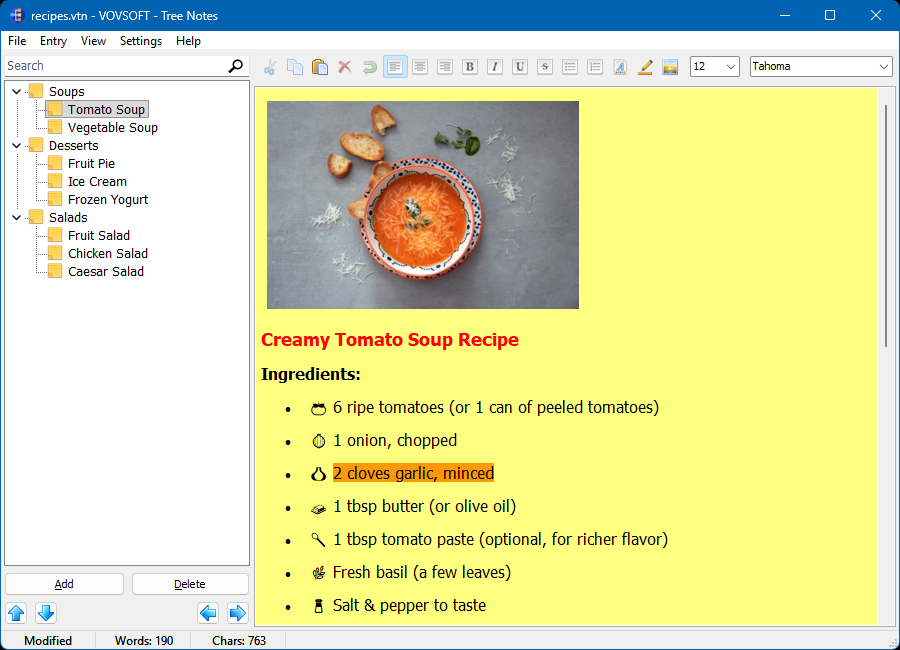
A recipes notebook: soups, desserts and salads in the tree, and a formatted recipe note with a picture, bullet list and highlighting on the right.
Vovsoft updates it often. Between May and October 2026 it gained a dark theme, auto-save on exit, paste as plain text, word wrap, a View menu, faster loading and saving, word and character counts, alphabetical sorting, multi-select and multi-delete, and, in version 3.6, a spell checker.
Features
A tree you shape yourself
Tree Notes lets you nest notes under folders as deep as you like, so a notebook can hold projects, clients, recipes or study topics with their own sub-pages. Arrow buttons under the tree move the selected note around, and the tree can be expanded, collapsed and sorted alphabetically.
Rich text, pictures and a spell checker
Tree Notes formats text with bold, italic, underline, strikethrough, bullet and numbered lists, alignment, fonts, colors and highlighting, and inserts JPG, PNG and BMP pictures into a note. The spell checker added in version 3.6 marks typos as you type.
Search across the notebook
Tree Notes has a search box above the tree that finds notes containing your words anywhere in the notebook.
Light, dark or automatic theme
Tree Notes has Light and Dark themes and an Automatic mode that follows the Windows setting.
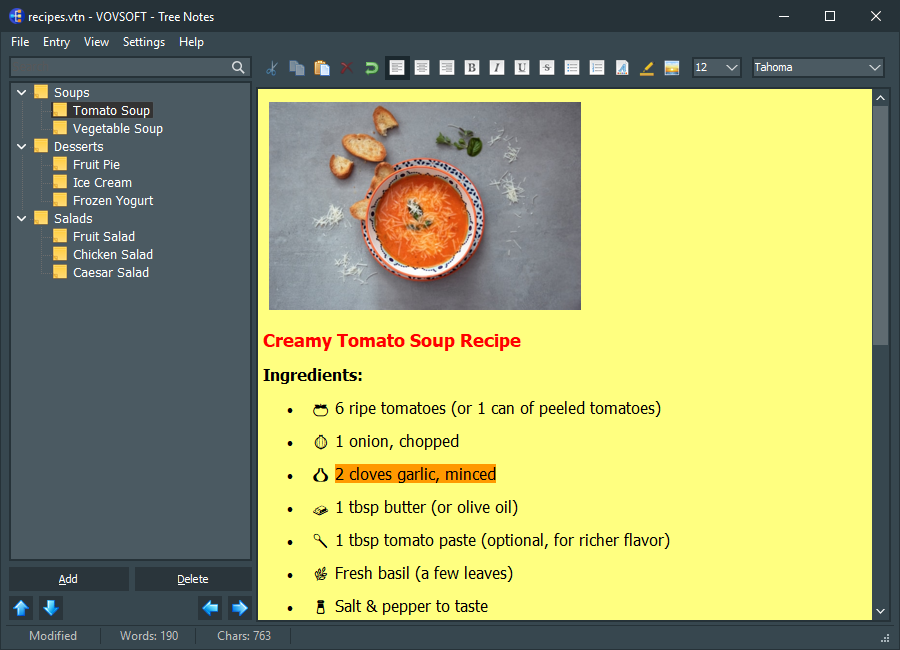
The same notebook with the dark theme. The note keeps its own yellow background.
Benefits
The selling point is privacy and simplicity. Nothing is uploaded, there's no account to lose, and the whole notebook is a single file you can copy to a USB stick or a backup drive. The portable edition can run from that same stick. For $19 once, you get an organizer that's been updated nearly every month in 2026.
Real-World Uses
- A writer keeps characters, places and chapter outlines as branches of one novel notebook.
- A support technician stores fixes and how-tos by customer, with screenshots pasted into each note.
- A student keeps one notebook per term, with a folder per course and a note per lecture.
- A home cook builds a recipe book with photos, sorted by soups, mains and desserts.
Who It's For, and Who Should Skip It
Tree Notes suits Windows users who want hierarchical notes that stay on their own computer, and who like a plain, fast program more than a feature-heavy workspace.
Skip it if you need your notes on a phone or on a Mac, or synced between devices automatically: it's Windows-only and has no sync of its own. It also has no password protection, no tags, no checklists and no PDF export yet, so people who rely on those should look at an app that has them.
Usage Guide
- Download the installer or the portable edition and start Tree Notes.
- Start a notebook and save it with the File menu, somewhere your backups reach.
- Click Add to create folders and notes, and use the arrow buttons to move them.
- Type in the right pane and format with the toolbar. Insert a picture with the image button.
- Use the search box to find a note, and File to export a note as DOCX, HTML, RTF or TXT.
Before you buy
Keep the notebook file inside a folder you back up, or copy it to a synced folder yourself if you want it on a second PC. One license covers one person on any number of their own computers. Vovsoft's general policy is no refunds once the key is delivered, since a free trial comes first (accidental orders are generally refunded, at its discretion, and PayPro Global has the final say on its orders).
Where it falls short
- No password protection or encryption for the notebook. It's one of the most requested features.
- No tags, checklists, tables, find and replace, Markdown export or PDF export. All are open requests.
- No mobile app and no built-in sync.
- Inserted pictures don't shrink when you resize the window, another open request.
What Users Say
On Vovsoft's site
Tree Notes' product page shows 4.8 out of 5 from 24 ratings, one of the best scores among Vovsoft's programs, with these comments.
"I finally found the notebook of my dreams! :) - Thank you!" Anonymous User
"Fair price. Easy to navigate and use to get organizing and documenting. Exactly what I was looking for. Thank you." Anonymous User
"Great software, with no issues encountered!" Richard Watts
On Trustpilot
Vovsoft has a TrustScore of about 4.6 out of 5 from 411 reviews, read through a summarizer. One reviewer wrote about Tree Notes: "I used Tree Notes 3 months as freeware, before I decide to purchase a full licence. It worth every cent of it's price."
People like the price and the speed. What they ask for, judging by the feature requests, is password protection, custom note icons, tags and more control over formatting.
Comparisons
Tree Notes vs OneNote and Notion
OneNote and Notion sync across devices and phones, and Notion adds databases and sharing, but both keep your notes in the cloud under an account. Tree Notes is offline, single-file and Windows-only, for a one-time $19.
Tree Notes vs Vovsoft Vov Sticky Notes
Vov Sticky Notes puts short notes and reminders on the desktop. Tree Notes is a notebook for longer, organized notes. Both come under Vovsoft's $99 Universal License.
Editions and Pricing
| Edition | Price | License | What you get |
|---|
| Trial | Free | Personal, non-commercial use | The full program, with a nag screen |
| Licensed | $19 one-time | Lifetime | Commercial use, no nag screen or ads, lifetime free updates |
The installer and portable editions use the same key, sent by email right after payment. Vovsoft's $99 Universal License covers all of its desktop programs.
FAQs
Does Tree Notes store my notes online?
No. Tree Notes keeps every note in one file on your computer and never uploads it. If you want the notebook on another PC, copy the file or keep it in a folder you sync yourself.
Can Tree Notes import my Word documents?
Yes. Tree Notes imports and exports DOCX, HTML, RTF and plain TXT notes.
Can I password-protect a Tree Notes notebook?
Not yet. Tree Notes has no password or encryption option, and it's one of the most requested features.
Is there a Tree Notes app for Android, iPhone or Mac?
No. Tree Notes is a Windows program only.
Can I run Tree Notes from a USB stick?
Yes. Tree Notes has a portable edition that runs without installing, and the same license key activates it.
Is the Tree Notes license a subscription?
No. The $19 license is a one-time payment that never expires and includes future updates.
System Requirements
- Windows 11, 10, 8/8.1, 7 or Vista, 32-bit or 64-bit
- About 6 MB of disk space for the program, plus your notebook file
Conclusion
Tree Notes is worth $19 if you want an offline, hierarchical notebook on Windows that's quick to learn and keeps everything in one file. The reason to buy it is a simple, private organizer that's improving month by month. The reason not to: no sync, no mobile app and no password protection, so anyone who needs notes on every device belongs with a cloud notebook.
Download Free TrialBuy Now