Vov Sticky Notes: Desktop Sticky Notes and Reminders for Windows
Vov Sticky Notes is a $19 Windows program that puts colored sticky notes on your desktop, with text, pictures or a small web page inside each note, plus pop-up reminders. The $19 is a one-time lifetime license with free updates, not a subscription, and there's a free trial and a portable edition.
If your monitor bezel is lined with paper post-its, or you keep a Notepad window open just to hold a phone number and a to-do list, this is the digital version of that habit: notes that sit where you can see them and a reminder that pops up over whatever you're doing.
Quick facts
- Version: 11.1, released October 16, 2026
- Developer: Vovsoft, the one-person software company of Fatih Ramazan Çıkan in Turkey
- Platform: Windows 11, 10, 8/8.1, 7 and Vista, 32-bit and 64-bit. No Mac, Linux or phone version
- Editions: installer (7.55 MB) and portable (6.86 MB), the same license for both
- Price: $19, one-time payment, lifetime license with free updates
- Trial: free and not time-limited, but with a nag screen, no themes, no sticker backup and no commercial use
- Refunds: no money-back guarantee; refunds are at the vendor's discretion, mainly for accidental orders
- What we checked: the installer we downloaded from vovsoft.com on November 8, 2026 is version 11.1.0.0, 7.55 MB, digitally signed by Fatih Ramazan Çıkan; the order page showed $19.00 with no auto-renewal on November 8, 2026. We didn't install or run the program.
Overview
Vov Sticky Notes lives in the Windows system tray. Double-click or right-click the tray icon and a new note opens as a small, resizable window that you can drag anywhere on the desktop, give its own color and keep on top of other windows. Each note shows the date and time it was created at the top, which turns out to be handy for "call the plumber back" kinds of notes.
It's been around a long time for a utility this size: the public version history goes back to version 4.4 in June 2018, with 59 releases listed, and the 11.x releases of September and October 2026 added reminder editing, keyboard shortcuts and more web-note controls. Vovsoft sells more than 100 small Windows programs, and this is one of its better known ones.
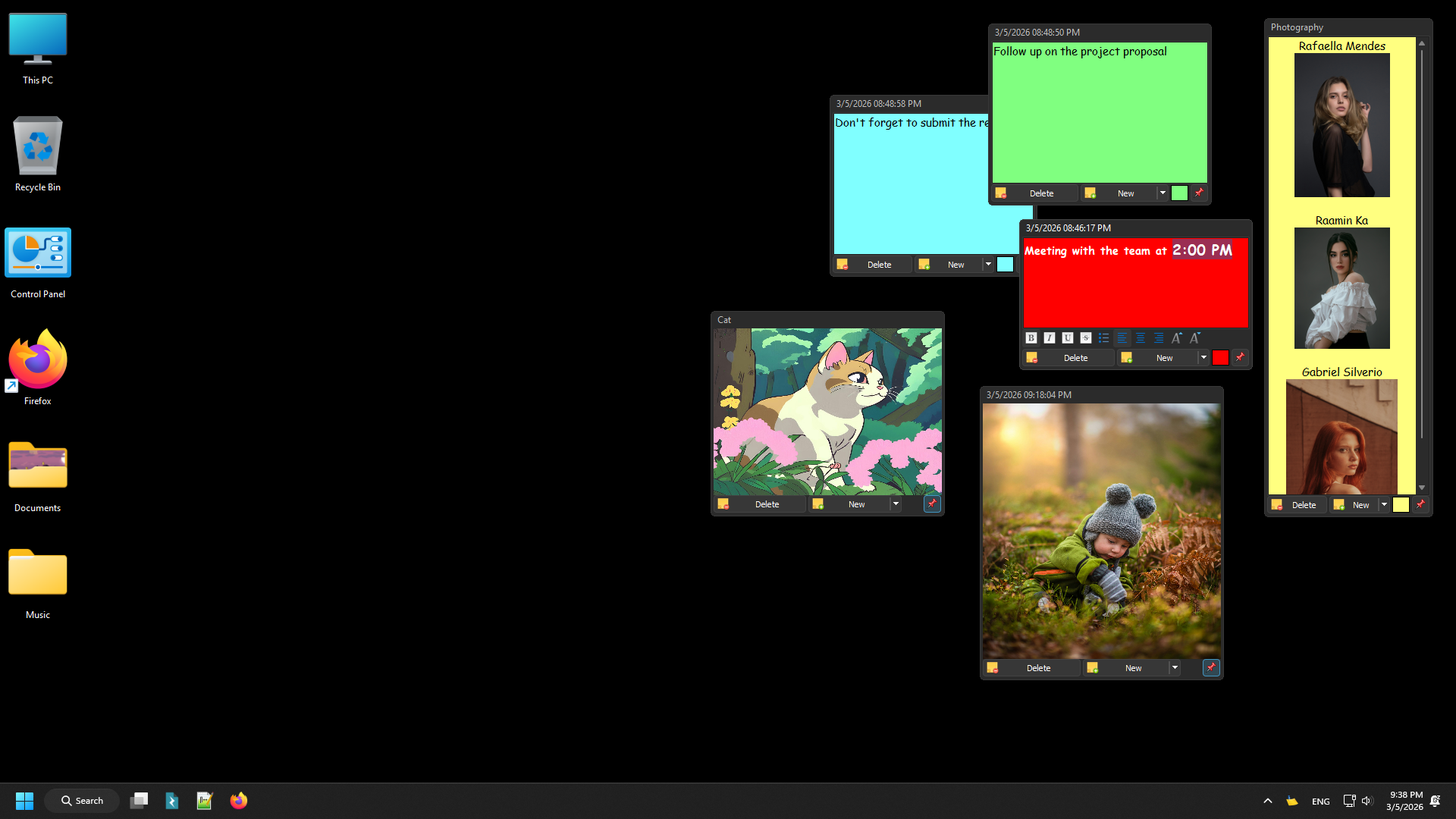
Colored text notes, a formatting toolbar, two image notes and a scrolling photo note on a Windows 11 desktop.
Features
Three kinds of notes: text, image and web page
Vov Sticky Notes gives you three note types. Text notes use a rich text editor with bold, italic, alignment, font sizes, text and background colors and bullet lists. Image notes take a screenshot pasted from the clipboard or a dragged PNG, JPG or animated GIF file, and since version 10.7 keep the picture's aspect ratio. Web browser notes open a URL inside the note window, with refresh, mute, zoom and hide controls added in the 10.8 to 11.1 releases.
Reminders that pop up on schedule
Vov Sticky Notes can show a reminder once or repeat it on a schedule: you pick the interval and type the message. Version 11.0 added "Edit Reminder", so you no longer have to delete and recreate one to change it. One buyer on the vendor's page says this pop-over behavior was the reason they picked it over other note apps.
A Notes Manager for finding and backing up notes
Vov Sticky Notes keeps every note in a Notes Manager window with a search box, a list of active and deleted stickers and your reminders. From there you can hide notes, export them to a file and import them again, save all notes as TXT files, or import TXT files as new notes. Notes are stored offline on your PC; there's no account and no cloud sync. Theme choice and the sticker backup feature need a license.

The Notes Manager lists active and deleted stickers and reminders, with Export to File, Import from File and Save All as TXT on the right-click menu.
Portable, multi-monitor and high-DPI ready
Vov Sticky Notes has a portable edition you can run from any folder or a USB stick, so your notes travel with you between PCs. Notes work across multiple monitors and scale properly on high-DPI displays, and the interface is translated into more than 30 languages.

A web browser note showing a stats page, beside text and image notes; the open menu has New, Delete, color changes and Stay on Top.
Who It's For, and Who Should Skip It
A good fit if you work on one Windows PC (or carry the portable edition) and want quick notes and nagging reminders that stay on screen, including pictures and a live web page, without signing up for anything. It suits people who find the built-in Windows Sticky Notes too plain, and anyone who'd rather pay $19 once than subscribe.
Skip it if you need your notes on your phone or on several computers at once: there's no cloud sync and no mobile app, so a synced note service fits you better. Mac users can't run it. And if you only jot down a line or two of plain text, the free Windows Sticky Notes app or the free trial may be all you need.
Usage Guide
- Download the installer or the portable edition from vovsoft.com and run it. If Windows shows "Windows protected your PC", Vovsoft's own download page tells you to click "More info", then "Run anyway".
- The program starts in the system tray. Right-click the tray icon and choose New Sticker (or press Alt+N).
- Type or paste your text, or paste an image. Use the note's "..." menu to change its background and text color or pin it with Stay on Top.
- For a reminder, choose New Reminder from the tray menu, set how often it repeats and type the message.
- Open the Notes Manager from the tray menu to search, hide, export or restore notes. To auto-start it with Windows, see Vovsoft's "How to Auto-Start Vov Sticky Notes" help page.
- After buying, enter your key with Edit License in the tray menu.
Before you buy
- Use the trial first. Vovsoft's refund policy says it generally doesn't give refunds, because the trial is there to evaluate the program; refunds are at its discretion, mostly for orders placed by accident.
- One license per person. Vovsoft's EULA lets one person use a license on all of their own computers, or several people use one shared workstation, but not both.
- Back up before you move PCs. Notes are stored locally, so use Export to File (or the licensed backup feature) before you reinstall Windows.
Download Free TrialBuy Now
Where it falls short
- Windows only, local only. No sync between devices, no phone app, no sharing notes with other people.
- Few independent reviews. Almost all the published opinions are on Vovsoft's own site, so there's little outside testing to lean on.
- Small fixes still turn up. The 2026 changelog fixed focus problems in note windows after the PC wakes from sleep and a bug where permanently deleted image notes left files on disk, so expect the occasional rough edge from a one-developer product (which also gets fixed quickly).
What Users Say
Vov Sticky Notes is rated 4.8 out of 5 from 26 reviews on Vovsoft's own product page. We found no independent editorial review of it; the comments below come from buyers on Vovsoft's site.
From users on vovsoft.com
"This is EXACTLY the type of sticky note app I've been seeking. I make a reminder and it pops on top of whatever I am doing to remind me it's time to do the task. Other apps didn't have the "pop-over" capability this does. It's great!" (L.A. Stevens)
"If you are not satisfied with the built in sticky notes, Vov Sticky Notes makes for a great alternative. The best part about Vov Sticky Notes is the amount of customizability it has. You can change the theme, fonts, and color. You can create notes with pictures, or just stick with text. There isn't any max character limit either." (Nathan Dantzler)
"Exactly what I was looking for - 'Real' post-its for the screen. Multiple colours. The ability to choose whether to keep on top. Re-sizable. And a bonus, the date of the note is automatically applied at the top. Frankly I can't think of a feature that needs adding. Well worth paying for." (BHarrison)
"Nice. I like the ability to create a quick note for myself without going to a larger program. My go to is/was notepad++. I really feel that i will use this when a few lines are the only things needed." (Romey)
"I grabbed the Vov Sticky Notes and it's a good program to jot a quick note to remember later. [...] I love all the customization available in this program." (Max Kohn)
The company on Trustpilot
Vovsoft as a company has a TrustScore of about 4.6 from roughly 410 Trustpilot reviews, 78% of them 5-star and 6% 1-star. Those reviews cover all of Vovsoft's programs and its support, not this one in particular; the low ones we saw were about other Vovsoft tools.
The common thread: people like the colors, the always-on-top option, the date stamp and above all the reminders that pop up over other windows. Nobody among these reviewers complains about stability, but the sample is small and published by the vendor, so treat it as a sign of what buyers value rather than a test.
Comparisons
Vov Sticky Notes vs the built-in Windows Sticky Notes
Windows' own Sticky Notes is free and syncs through your Microsoft account, which Vov Sticky Notes can't do. Vov Sticky Notes adds what the built-in app doesn't have: scheduled pop-up reminders, web page notes, a portable edition that needs no account, themes, and export to files and TXT. Pick Windows' app for sync, Vov Sticky Notes for reminders and offline control.
Editions and Pricing
| Option | Price | License term | What you get |
|---|
| Free trial | $0 | No time limit | Notes and reminders, with a nag screen; no themes, no backup, personal use only |
| Vov Sticky Notes license | $19 | One-time payment, lifetime, free updates | All features, themes, sticker backup, commercial use, no nag screen; installer and portable |
Vovsoft also sells a $99 Universal License that covers all of its 115+ programs, which only makes sense if you want several of them.
FAQs
Is Vov Sticky Notes a subscription?
No. Vov Sticky Notes costs $19 once. The license never expires and includes all future updates; the order page shows no auto-renewal.
Can I use one Vov Sticky Notes license on my laptop and desktop?
Yes, if you're the only user. Vovsoft's license allows one person to use the program on one or more of their own computers, and moving to a new PC doesn't require deactivating the old one. Using one key on many computers at the same time can get it revoked.
Does Vov Sticky Notes sync notes to my phone?
No. Vov Sticky Notes stores notes offline on the PC and has no cloud sync or mobile app. The portable edition on a USB stick is the way to carry notes between Windows PCs.
Can I use the free version of Vov Sticky Notes at work?
No. Vov Sticky Notes' trial doesn't allow commercial use; the $19 license does.
Can I recover a sticky note I deleted in Vov Sticky Notes?
Usually, yes. Vov Sticky Notes moves deleted notes to a Deleted list in the Notes Manager until you permanently delete them, and Vovsoft has a help page on recovering lost notes.
Does Vov Sticky Notes start with Windows?
Vov Sticky Notes can be set to auto-start; Vovsoft's help page "How to Auto-Start Vov Sticky Notes" explains how.
I lost my Vov Sticky Notes license key. How do I get it back?
Vovsoft's User Panel shows every license bought with your email address, so you can retrieve the key there.
System Requirements
- Windows 11, 10, 8/8.1, 7 or Vista, 32-bit or 64-bit
- About 8 MB of disk space (7.55 MB installer, 6.86 MB portable)
- Internet connection only for web browser notes and online license activation (offline activation is available)
Conclusion
Vov Sticky Notes is worth $19 if you want desktop notes that also remind you: the pop-up reminders, image and web notes, portable edition and lifetime license make it more useful than Windows' built-in notes for one-PC users, and a regularly updated product backs it. The reason not to buy is sync: if your notes need to follow you to a phone or a second machine, this isn't the tool. Try the free version first, since refunds aren't guaranteed.
Download Free TrialBuy Now