NordPass: A Simple Password Manager From the NordVPN Team
NordPass is a password manager that stores your logins, passkeys, cards and notes in an encrypted vault and fills them in for you on Windows, Mac, Linux, Android, iOS and in your browser. There's a free plan for one active device; Premium costs $35.88 a year at the regular price, and new subscribers paid $23.88 for the first year when we checked. Family covers 6 people.
If you reuse a handful of passwords everywhere, or keep them in a notebook or a spreadsheet, a password manager is the single biggest security upgrade you can make. NordPass aims to be the easy one: clean apps, autofill that mostly just works, and warnings when your details show up in a breach.
Quick facts
- Windows app version: 7.13.7 (installer dated November 24, 2026)
- Developer: Nordvpn S.A. (Nord Security)
- Platforms: Windows, macOS, Linux, Android, iOS, web vault, and extensions for Chrome, Firefox, Edge, Safari and Opera
- Encryption: XChaCha20, zero-knowledge design; desktop app and extension audited by Cure53
- Plans: Free, Premium (1 user), Family (6 users), plus business plans
- Price: Premium $35.88/year regular ($23.88 for the first year), Family $71.88/year regular ($44.28 for the first year)
- Guarantee: 30-day money-back on paid plans
- What we checked: the Windows installer (version 7.13.7, 124 MB) and the personal plan prices on NordPass's pricing page, on November 25, 2026. We didn't test autofill across sites.
Download Free VersionBuy Now
Overview
NordPass keeps everything in one searchable vault, split into categories: passwords, passkeys, secure notes, credit cards, personal info and shared items. Folders let you group things your own way, and a Tools section holds the password generator, Email Masking, Password Health and the Data Breach Scanner.
The browser extension does most of the daily work: it offers to save a login when you sign up somewhere, fills it in the next time, and generates a strong password on the spot. The desktop and phone apps sync the same vault, so a password saved on your laptop is on your phone a moment later (on a paid plan).
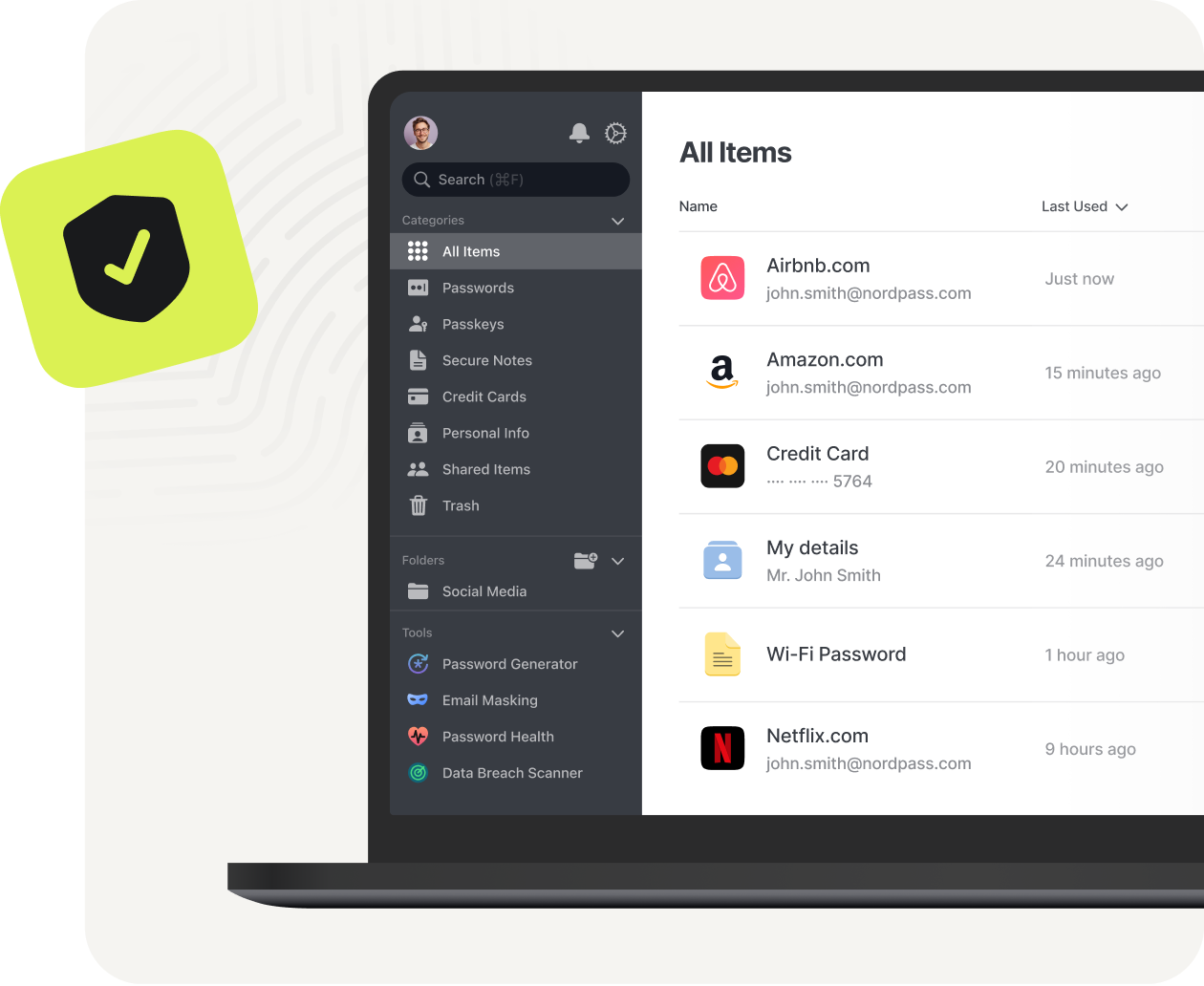
NordPass's own image of the desktop vault: All Items sorted by last use, with categories on the left and the Password Generator, Email Masking, Password Health and Data Breach Scanner tools below.
Features
Autosave and autofill
NordPass saves new logins as you create them and fills them in on later visits, in the browser and in phone apps. Credit cards and personal details live in the same vault, ready when a form asks for them.
Passkeys and a password generator
NordPass stores passkeys alongside passwords, so sites that support passwordless sign-in work across your devices. For everything else, the generator creates long random passwords and saves them straight into the vault.
Password Health
NordPass Premium checks your vault and lists weak, reused and old passwords, so you know which accounts to fix first. It's the fastest way to clean up after years of reusing the same few passwords.
Data Breach Scanner
NordPass Premium checks whether your email addresses and card details have appeared in known data breaches and alerts you when new ones show up, so you can change the affected passwords.
Email Masking
NordPass can create an artificial email address for newsletters and one-off sign-ups, so those services never learn your real address.
Secure sharing and file attachments
NordPass lets you share a login or note with another NordPass user without sending it in plain text, and Premium adds file attachments, handy for a scan of a passport or a recovery-code file kept with the account it belongs to.
Benefits
- One strong password per site without memorizing any of them.
- Early warning when your details turn up in a breach.
- Less spam through masked email addresses.
- Easy for non-technical family members: the apps are simple, and Family gives each of 6 people their own vault.
Real-World Uses
- Cleaning up reused passwords: import from your browser, open Password Health and change the reused ones one by one.
- Online shopping: keep card details in the vault instead of saving them on every store's site.
- A family: parents share the streaming and utility logins with teenagers through shared items, each person keeping a private vault.
- Newsletter sign-ups: use a masked address for every new service.
Who It's For, and Who Should Skip It
NordPass suits people who want an easy, good-looking password manager across Windows, Mac and phones, especially if they already use NordVPN (the NordVPN Complete plan includes NordPass). Families get good value from the 6-user plan.
Skip it if you want a fully free password manager that syncs across devices, since NordPass Free allows only one active device at a time. Power users who want features like a built-in authenticator code generator or self-hosting should look at other managers, and people on older or slow laptops should try the free version first (one reviewer below said it slowed their machine).
Usage Guide
- Download the Windows app with the download button and install it, or add the extension to your browser.
- Create a Nord Account, then set a master password. Write it down somewhere safe: NordPass can't read your vault.
- Import passwords from your browser or another password manager.
- Install the browser extension so NordPass can autosave and autofill.
- Open Password Health and fix the weak and reused passwords first.
- Upgrade to Premium with the Buy button to sync on all your devices and turn on the breach scanner.
Before you buy
- Intro prices renew higher. Premium was $23.88 for the first year on November 25, 2026 and $35.88 a year after that; Family $44.28, then $71.88.
- The 2-year plans included 3 extra months when we checked: $37.53 (Premium) or $67.23 (Family) for the first 27 months. The end of that offer isn't shown.
- Prices are shown without VAT; tax may be added at checkout.
- To stop a renewal, turn off auto-renew in your Nord Account well before the date: two Trustpilot reviewers below say they were charged after cancelling or switching plans.
Where it falls short
- Free plan is single-device: only one device can be logged in at a time.
- No authenticator in personal plans: NordPass's personal plan comparison lists the NordPass Authenticator as not included.
- Billing complaints: the worst Trustpilot reviews are about renewals and plan changes rather than the app itself.
- Performance: at least one user reported the desktop app slowing an older laptop.
What Users Say
Trustpilot: 3.9 out of 5 from 2,081 reviews
- Micael D, "Fast and helpful support" (November 17, 2026, 5 stars): "The communication was clear, the process was straightforward, and my issue was resolved"
- Matteo, "Excellent product and outstanding technical support" (August 25, 2026, 5 stars): "I had an excellent experience with NordPass, both with the product and, especially, with their technical support."
- Pål Andre Mostue, "Great support staff" (October 27, 2026, 5 stars): "Great support staff, safe and easy to use."
- Vee Ell, "Be very careful with this company" (November 9, 2026, 1 star): "Well, they didn't cancel or prorate the family and instead charged me for 3 years as a single user."
- beagle, "I canceled this program and was billed, anyway." (August 26, 2026, 1 star): "I canceled this program, but I am still being billed."
- Gary Bampkin, "Why did I bother?" (October 15, 2026, 1 star): "The whole package has slowed down my laptop to the point of being unusable."
App Store: 4.65 out of 5 from 13,331 ratings
The NordPass iPhone and iPad app (version 4.18.1, updated November 12, 2026) averages 4.65 stars on the US App Store.
The pattern: people like how simple NordPass is and rate its support well. The complaints cluster around billing (renewals, plan switches, cancellations) and, less often, performance on older PCs.
Comparisons
NordPass Free vs Premium
NordPass Free gives you autosave, autofill and the encrypted vault on one active device. Premium adds access on several devices at once, Password Health, the Data Breach Scanner, file attachments and Email Masking. If you use a phone and a computer, you'll want Premium.
NordPass on its own vs NordVPN Complete
NordVPN's Complete plan includes NordPass, a VPN, antivirus and 1 TB of cloud storage. If you want a VPN too, Complete is better value than buying both separately; if you only want a password manager, NordPass Premium is far cheaper.
Editions and Pricing
Personal plan prices from NordPass's pricing page on November 25, 2026, without VAT. The Buy button opens NordPass's offer page, where you choose the plan.
| Plan | Users | 1-year, first year | 1-year, regular | 2-year, first 27 months |
|---|
| Free | 1 | $0 | $0 | $0 |
| Premium | 1 | $23.88 | $35.88 | $37.53 |
| Family | 6 | $44.28 | $71.88 | $67.23 |
FAQs
Is NordPass free?
NordPass has a free plan with autosave, autofill and secure storage, limited to one active device at a time. Syncing across devices and the security tools need Premium.
Can NordPass import my passwords from Chrome or another manager?
Yes. NordPass imports passwords from browsers and other password managers, so you don't start from an empty vault.
What happens if I forget my NordPass master password?
NordPass uses a zero-knowledge design, so the company can't see your vault or your master password. Write the master password down and keep it somewhere safe.
Has NordPass been independently audited?
Yes. NordPass says the code, implementation and security of its desktop app and browser extension were audited by Cure53.
Is NordPass included with NordVPN?
NordPass is included in NordVPN's Complete and Prime plans. NordVPN Basic doesn't include it.
Can I get a refund on NordPass Premium?
NordPass Premium and Family come with a 30-day money-back guarantee.
System Requirements
- Windows 10 or Windows 11 desktop app (124 MB installer)
- Also macOS, Linux, Android and iOS apps, a web vault, and extensions for Chrome, Firefox, Edge, Safari and Opera
- A free Nord Account
Conclusion
NordPass is an easy, well-built password manager with modern encryption, passkey support, breach alerts and email masking, and at $23.88 for the first year Premium is cheap for what you get. It's a strong pick for people who want something simple across a computer and a phone, and Family is good value for households. The main reason to hesitate is billing: renewal prices rise, and a few users report charges after cancelling, so manage auto-renew carefully. Start with the free version to see if you like the apps, then move to Premium when you want it on every device.
Download Free VersionBuy Now