Vovsoft Document Manager: Find Every Word, Excel, PowerPoint and PDF File in One List
Document Manager is a $19 Windows program from Vovsoft that scans a folder and all its subfolders and lists every Word, Excel, PowerPoint or PDF file, or any file types you choose, in one sortable list. From there you open, rename, copy or delete them, or export the list to a text or CSV file. The $19 is a one-time lifetime license, and the free trial works fully for personal use.
It answers the question "where are all my documents?" after years of saving files wherever Word happened to put them.
Quick facts
- Version: 2.0, released September 16, 2024
- Developer: Vovsoft
- Platform: Windows 11, 10, 8/8.1, 7, Vista and XP, 32-bit and 64-bit. No Mac version
- Finds: Word, Excel, PowerPoint, PDF, all files, or custom extensions
- Columns: file name with path, size and date modified, all sortable
- Actions: open, rename, show in Explorer, copy files or names, Recycle Bin or permanent delete
- Export: the file list to TXT or CSV
- Price: $19, one-time payment, lifetime license with free updates
- Trial: free and fully working for personal use, with a nag screen
- What we checked: installer file version 2.0.0.0 (3,886,064 bytes) with a valid code signature, downloaded from the vendor on November 11, 2026, and $19.00 on the order page with no auto-renewal on November 11, 2026
Download Free TrialBuy Now
Overview
Pick a directory, or a whole drive, with Change, then click WORD, EXCEL, POWERPOINT, PDF, ALL or CUSTOM. Document Manager lists every matching file it finds, with its full path, size and date, and the status bar shows how many it found and how long the scan took. Click a column to sort, say, by date to find what you worked on last spring.
Checkboxes control whether subfolders are included, whether file sizes are calculated, whether icons are shown, and whether the starting path and file extensions are hidden to keep the list readable.
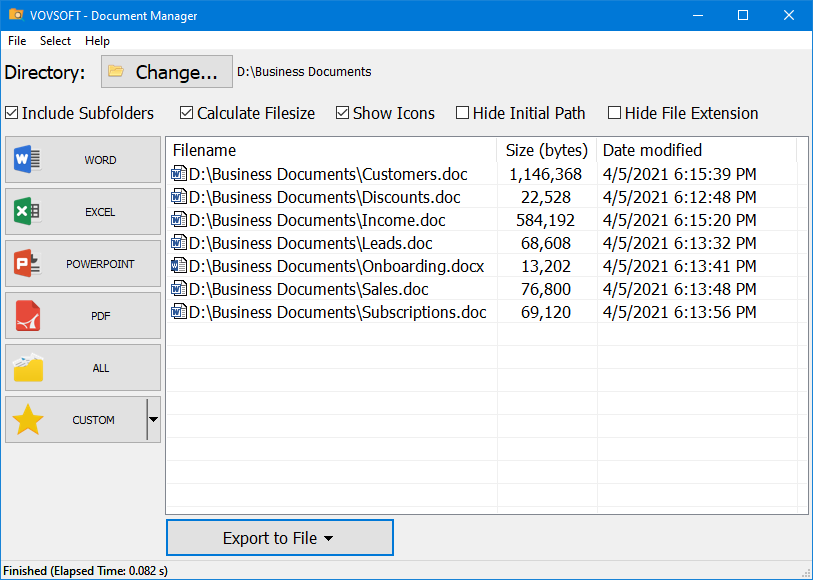
The WORD button pressed on a Business Documents folder: seven DOC and DOCX files with size and date modified, and buttons for Excel, PowerPoint, PDF, All and Custom.
Features
One click per document type
Document Manager's buttons cover the four Office and PDF types most people look for, and the Custom button takes any list of extensions, such as TXT and HTML, or CAD or e-book files.
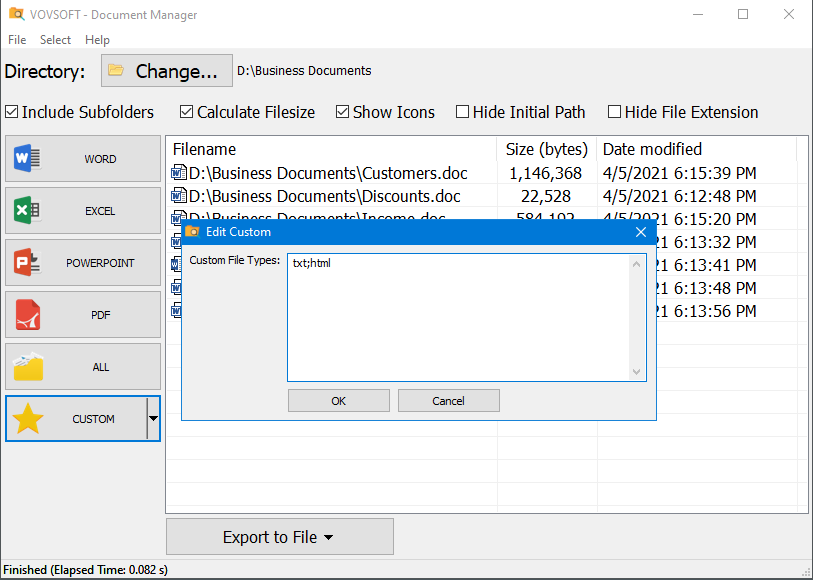
Edit Custom: here set to TXT and HTML files.
File actions without opening folders
Document Manager's right-click menu opens a file in its usual program, renames it (F2), shows it in Explorer, copies the files or just their names to the clipboard, and sends files to the Recycle Bin or deletes them permanently.
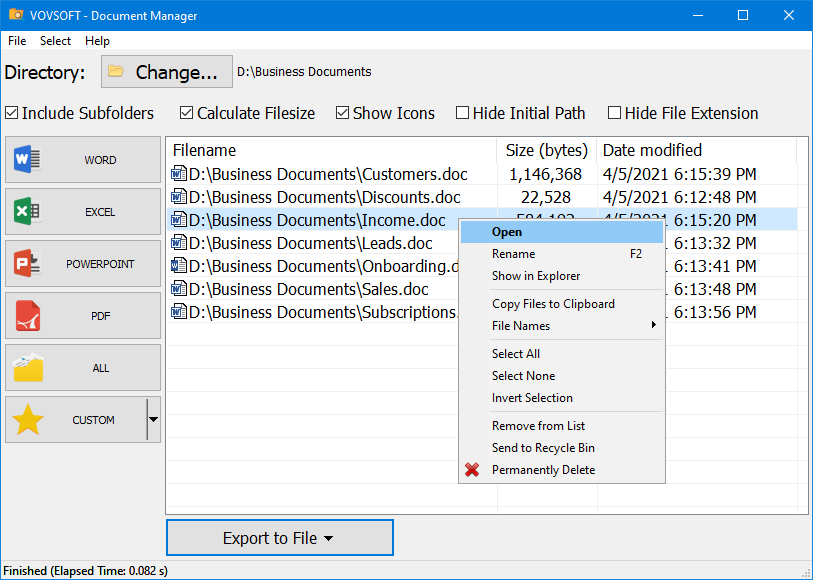
The right-click menu: Open, Rename, Show in Explorer, Copy Files to Clipboard, File Names, selection, Remove from List, Send to Recycle Bin and Permanently Delete.
Exportable lists
Document Manager exports the list to TXT or CSV, so you can keep an inventory of documents, open it in Excel, or hand someone a list of files to review.
Built for big drives
Document Manager 2.0 uses a virtual list that can show up to 100 million files, and earlier versions fixed long path problems, so a scan of a full drive or a file server share stays usable.
Real-World Uses
- Finding every document from 15 years of work scattered across a PC, with full paths.
- Gathering all PDFs on a drive before moving to a new computer.
- Making a CSV inventory of the Excel files on a shared folder.
- Sorting a client folder by date to find the latest version of a proposal.
- Clearing out old PowerPoint files to free space, straight from the list.
Who It's For, and Who Should Skip It
Document Manager suits office workers, small business owners and anyone with years of documents in no particular order who wants them listed by type.
Skip it if you need to search inside documents: it lists files by type, with no content search, no preview and no search bar to filter the list (all user requests). Windows Search or the free Everything finds files by name instantly, and a true document management system adds versions, tags and sharing.
Usage Guide
- Download the installer or the portable edition and start Document Manager.
- Click Change and choose the folder or drive to scan, and tick Include Subfolders.
- Click WORD, EXCEL, POWERPOINT, PDF or ALL, or set your own extensions under CUSTOM.
- Sort by name, size or date, and right-click files to open, rename, copy or delete them.
- Use Export to File to save the list as TXT or CSV.
Before you buy
The trial is fully working for personal use, with a reminder screen, so you can scan your own drive before paying, and work use needs a license. One license covers one person on any number of their own computers. Vovsoft's general policy is no refunds once the key is delivered, since a free trial comes first (accidental orders are generally refunded, at its discretion, and PayPro Global has the final say on its orders).
Where it falls short
- No search bar or filter within the results, and no document preview.
- Only one custom file type set, which isn't saved under its own name.
- No Copy or Move to another folder, and no tags or notes.
- The path and file name share one column, and the list can flicker during a scan.
- It hasn't had a new release since September 2024.
What Users Say
On Vovsoft's site
Document Manager's page shows 4.4 out of 5 from 7 ratings, with these English comments among others (several more are in German, French and Chinese).
"Doc Manager worth 10 Stars": "The company develops quite a number of very good and capable apps. My favorite, and worth 10 STARS is Document Manager! It has found every doc, spreadsheet and power-point, text file, etc. on my PC, and that covers 15 years of work. Found them all and their full path, so I can retrieve any, anytime. Fast, easy, intuitive." msalvatini
"Really helpful softwhere, put it use immediately, thank you for your work on needed specialised software." Ronald Coupe
"If you find yourself switching between Word documents, Excel spreadsheets and PowerPoint presentations then you may be a good candidate for the Vovsoft Document Manager application. Document Manager allows you to view, open and manage all your Microsoft Office and PDF files from one location." Cindy Thomas
What users want changed
The request list is long: a search bar, filtering the results, previews, custom buttons and editable documents lead with 3 votes each, followed by Copy and Move, saved custom types and saved directories, separate path and name columns, and a list that doesn't blink during scans. Counting the files found and translations were added.
Vovsoft as a company has a TrustScore of 4.6 out of 5 from 411 reviews on Trustpilot, read through a summarizer, with users mostly describing its tools as simple and dependable.
Comparisons
Document Manager vs Windows Search and Everything
Windows Search can search inside documents, and Everything finds any file by name in a second, both free. Document Manager is narrower: one click lists every file of a type, with sorting, bulk actions and CSV export.
Document Manager vs a document management system
Systems like M-Files or SharePoint store, version and share documents for a team, at a monthly price. Document Manager just finds and lists what's already on your disk.
Document Manager vs Vovsoft Filename Lister
Filename Lister exports a folder's file names in many formats. Document Manager is built around document types and acting on the files.
Editions and Pricing
| Edition | Price | License | What you get |
|---|
| Trial | Free | Personal, non-commercial use | All features, with a nag screen |
| Licensed | $19 one-time | Lifetime | Commercial use, no nag screen or ads, lifetime free updates |
The installer and portable editions use the same key, sent by email right after payment. Vovsoft's $99 Universal License covers all of its desktop programs.
FAQs
Can Document Manager search the text inside documents?
No. Document Manager lists files by type and sorts them by name, size or date. Use Windows Search or Vovsoft Search Text In Files to search inside files.
Can Document Manager scan a whole drive?
Yes. Document Manager scans any folder or drive you choose, with subfolders included, and can list up to 100 million files.
Does Document Manager move or reorganize my files?
No. Document Manager leaves files where they are. It can rename and delete them, but has no move command.
Can I list file types other than Office and PDF?
Yes. Document Manager's Custom button takes any extensions you type, such as TXT, HTML or RTF.
Is the Document Manager license a subscription?
No. The $19 license is a one-time payment that never expires and includes future updates.
System Requirements
- Windows 11, 10, 8/8.1, 7, Vista or XP, 32-bit or 64-bit
- About 4 MB of disk space
Conclusion
Document Manager is worth $19 if you want every document of a type on your PC in one list you can sort, act on and export, and especially if you'll use it at work. The reason to buy is that one-click, whole-drive inventory with bulk actions. The reason not to: it doesn't search inside files or filter the list, and hasn't been updated since 2024, so for finding a specific file the free Everything or Windows Search is quicker.
Download Free TrialBuy Now