Vovsoft CSV to VCF Converter: Turn an Excel or CSV Contact List into a vCard File
CSV to VCF Converter is a $19 Windows program from Vovsoft that turns a contact list in a CSV, TXT, XLS or XLSX file into a VCF (vCard) file you can import into an iPhone, an Android phone, Outlook, iCloud or Gmail. It works offline, and the $19 is a one-time lifetime license. The free trial converts a limited number of contacts.
It's the fix for a common job: you have hundreds of contacts in a spreadsheet, and your phone only takes vCards.
Quick facts
- Version: 3.6, released September 13, 2025
- Developer: Vovsoft
- Platform: Windows 11, 10, 8/8.1, 7, Vista and XP, 32-bit and 64-bit. No Mac version
- Input: CSV, TXT, XLS and XLSX
- Output: one VCF file with every contact, or one VCF file per contact
- vCard versions: selectable, 3.0 by default, with version 4 support
- Interface languages: English and about 30 others
- Price: $19, one-time payment, lifetime license with free updates
- Trial: free, exports a limited number of contacts, for personal use
- What we checked: installer file version 3.6.0.0 (3,919,488 bytes) with a valid code signature, downloaded from the vendor on November 11, 2026, and $19.00 on the order page with no auto-renewal on November 11, 2026
Download Free TrialBuy Now
Overview
CSV to VCF Converter has two modes. Simple Mode reads a file of names and phone numbers, which is all many people need. Advanced Mode shows a column for each vCard field: first, middle and last name, cell, home and work phone, email and work email, home and work address, organization, title, URL, birthday and notes. You drag the columns into the right order, check the rows, and click Export to VCF File.
The conversion runs on your PC, and no contact data is sent anywhere.

Simple Mode: a loaded file shown as two columns, Name and Phone Number, ready for Export to VCF File.
Features
Reads spreadsheets directly
CSV to VCF Converter opens CSV and TXT files with any separator you set, and Excel XLS and XLSX files without Excel installed. It strips CSV quotes, and a Create Sample CSV menu item gives you a template with the columns in the right order.
Advanced Mode maps every common contact field
CSV to VCF Converter's Advanced Mode covers 15 fields, from three phone numbers and two emails to addresses, job title, birthday and notes. Columns and rows can be moved by drag and drop, so a spreadsheet laid out differently can be matched without editing it in Excel.
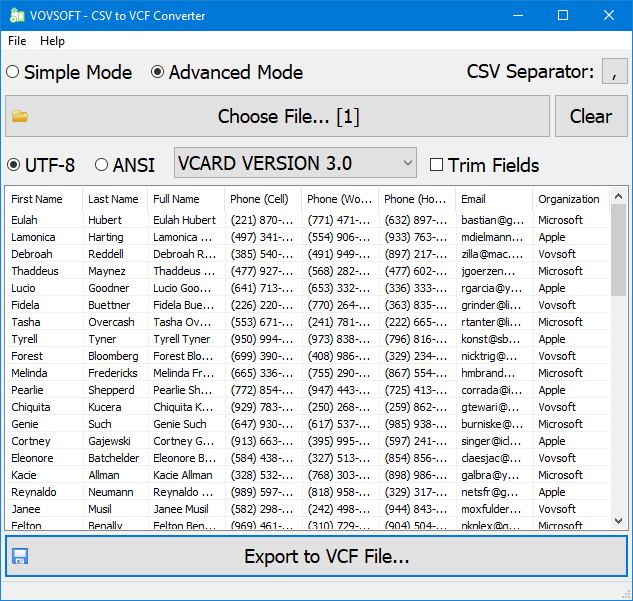
Advanced Mode: first, last and full name, three phone columns, email and organization, with UTF-8, vCard 3.0 and Trim Fields options above.
Compatibility settings for picky phones
CSV to VCF Converter lets you choose UTF-8 or ANSI encoding, the vCard version, and Trim Fields to strip stray spaces. The default vCard version moved from 2.1 to 3.0 for iCloud, version 4 support was improved in 2025, and Skip First Row leaves the header row out.
One file or one per contact
CSV to VCF Converter writes a single VCF file holding every contact, which most phones and Gmail import in one go, or, since version 3.5, a folder of individual VCF files, one per contact.
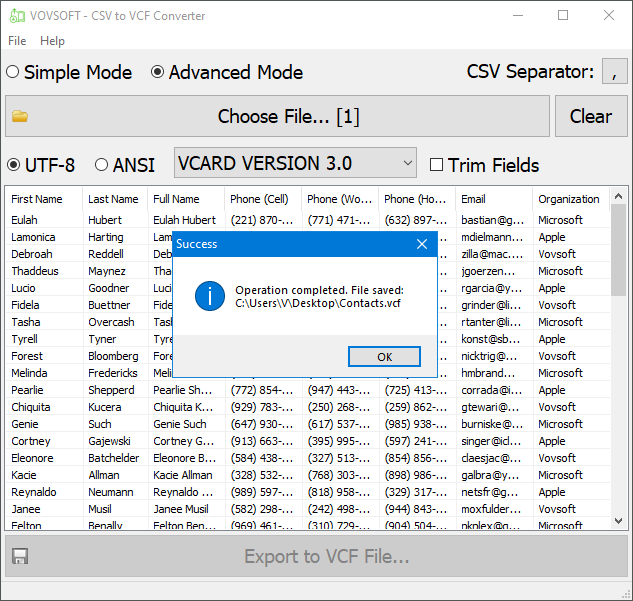
The export finished: one Contacts.vcf file saved to the desktop.
Real-World Uses
- Moving a few hundred customer phone numbers from an Excel sheet onto a new Android phone.
- Loading a staff directory into iPhones through iCloud.
- Turning a CRM's CSV export into vCards for Outlook.
- Sending each contact as a separate VCF file to a system that imports one card at a time.
- Rebuilding a phone book from a TXT list exported by an old phone or app.
Who It's For, and Who Should Skip It
CSV to VCF Converter suits anyone who keeps or receives contacts in a spreadsheet and needs them on a phone or in a mail program, especially in bulk and with more than name and phone.
Skip it if your contacts are already in Gmail or Outlook: both import CSV themselves and can export vCards for free. Google Contacts in particular reads a CSV with its own column names. On a Mac, use the Contacts app or another tool, since there's no Mac version.
Usage Guide
- Download the installer or the portable edition and start CSV to VCF Converter.
- Pick Simple Mode for names and phone numbers, or Advanced Mode for more fields.
- Set the CSV separator if it isn't a comma, then click Choose File and open your CSV, TXT, XLS or XLSX file.
- In Advanced Mode, drag the columns into the order the headings show, and set the encoding and vCard version.
- Click Export to VCF File, or use the File menu to export a folder of individual VCF files.
- Copy the VCF file to your phone or import it into Gmail, iCloud or Outlook.
Before you buy
The trial limits how many contacts it exports, so test it with a short list and check the result in your phone before buying. One license covers one person on any number of their own computers. Vovsoft's general policy is no refunds once the key is delivered, since a free trial comes first (accidental orders are generally refunded, at its discretion, and PayPro Global has the final say on its orders).
Where it falls short
- Columns are matched by position, not by heading name, so a file laid out differently needs columns dragged into place first.
- Fields outside the 15 it supports, such as a second address line or custom labels, aren't carried over.
- Simple Mode only takes a name and one phone number.
- One recent Trustpilot reviewer was unhappy with the results, so check a sample on your phone before converting a big list.
What Users Say
On Vovsoft's site
CSV to VCF Converter's page shows 4.5 out of 5 from 6 ratings, with these comments among others.
"A simple honest program that delivers." Leanne Coleman
"Good experience for using of csv to vcf converter time saving and helpful" Anonymous User
"The program is fine." Robert
"Dealing with contacts in an Outlook address book can sometimes be a bit cumbersome. This is one of the reason why many users prefer to make the changes and tweaks into a CSV format file, from within Excel. However, once the adjustments have been performed, a way to convert that CSV file to the Outlook-compatible, VCF (vCard) format is required. CSV to VCF Converter will provide such functionality." Andrei Verdeanu
On Trustpilot
Vovsoft as a company has a TrustScore of 4.6 out of 5 from 411 reviews, read through a summarizer. One October 2026 review there is about this program, and it's negative:
"CSV to VCF does a poor job. You need to start over on this one." A Trustpilot reviewer in the US, 1 star
It doesn't say what went wrong. The past complaints that show in the version history, missing rows and columns in some cases, an encoding issue and empty cells, were fixed in 2023 and 2024, and the feature request list has no open requests.
Comparisons
CSV to VCF Converter vs Gmail or Outlook import
Google Contacts and Outlook import CSV for free and can export vCards, but expect their own column names and need an account. CSV to VCF Converter takes your spreadsheet as it is, works offline, and gives you encoding and vCard version control.
CSV to VCF Converter vs online converters
Free online converters do the same job but need you to upload your contact list. CSV to VCF Converter keeps it on your PC.
CSV to VCF Converter vs Vovsoft VCF to CSV Converter
They're the two directions: VCF to CSV Converter turns vCards into a spreadsheet, this one turns a spreadsheet into vCards. Vovsoft's VCF Editor edits a VCF file directly.
Editions and Pricing
| Edition | Price | License | What you get |
|---|
| Trial | Free | Personal, non-commercial use | Converts a limited number of contacts |
| Licensed | $19 one-time | Lifetime | Unlimited contacts, commercial use, no nag screen or ads, lifetime free updates |
The installer and portable editions use the same key, sent by email right after payment. Vovsoft's $99 Universal License covers all of its desktop programs.
FAQs
Will contacts from CSV to VCF Converter import into an iPhone?
Yes. CSV to VCF Converter writes vCard 3.0 by default, the version iCloud expects, so you can import the VCF file through iCloud Contacts or open it on the iPhone.
Can CSV to VCF Converter convert Excel files without Excel installed?
Yes. CSV to VCF Converter reads XLS and XLSX files itself.
Does CSV to VCF Converter handle accented and non-Latin names?
Yes, with UTF-8 encoding selected, which is the default in Advanced Mode. ANSI is there for older software.
How many contacts can CSV to VCF Converter convert?
The licensed version has no limit. The trial exports a limited number, so it's for testing.
Can CSV to VCF Converter make one VCF file per contact?
Yes. Since version 3.5, CSV to VCF Converter can export a folder of individual VCF files as well as one combined file.
Is the CSV to VCF Converter license a subscription?
No. The $19 license is a one-time payment that never expires and includes future updates.
System Requirements
- Windows 11, 10, 8/8.1, 7, Vista or XP, 32-bit or 64-bit
- About 4 MB of disk space
Conclusion
CSV to VCF Converter is worth $19 if you need to get a real contact list, with several phones, emails and addresses per person, out of a spreadsheet and onto phones or into Outlook, without uploading it or fighting Google's column names. The reason to buy is the Advanced Mode field mapping with drag-and-drop columns. The reason not to: if your contacts are already in Gmail or Outlook, their free import and export does the job, and one recent reviewer wasn't happy with the output, so test the trial on your phone first.
Download Free TrialBuy Now