Vovsoft Text Statistics Analyzer: Word, Character and Phrase Frequencies for Any Text
Text Statistics Analyzer is a $19 Windows program from Vovsoft that counts how often every character, word, line and 2-, 3- and 4-word phrase appears in a text, with totals, unique counts and percentages. Paste text, load a file or a PDF, or run a batch of files. The $19 is a one-time lifetime license, and there's a free trial.
It's for writers chasing their pet words, teachers and students in linguistics, SEO writers checking phrase density, and anyone who wants hard numbers on a text instead of a word count.
Quick facts
- Version: 4.0, released August 20, 2026
- Developer: Vovsoft
- Platform: Windows 11, 10, 8/8.1, 7 and Vista, 64-bit only. No Mac version
- Input: pasted or typed text, text files, PDF files, batch processing
- Statistics: totals and unique counts; character, word and line frequency; 2-, 3- and 4-word phrases
- Interface languages: English plus about 30 translations, including French, German, Spanish, Russian, Arabic, Chinese and Japanese
- Editions: installer (6.63 MB) and portable (6.73 MB), one license for both
- Price: $19, one-time payment, lifetime license with free updates
- Trial: full analysis, but no CSV export or pie charts, a nag screen, and non-commercial use only
- What we checked: installer file version 4.0.0.0 (6,957,664 bytes) with a valid code signature, downloaded from the vendor on November 11, 2026, and $19.00 on the order page with no auto-renewal on November 11, 2026. We didn't analyze a text ourselves
Download Free TrialBuy Now
Overview
The main window is a text box with two buttons above it, Load Text From File and Analyze. You can also paste text in, read it and edit it before analyzing. Analyze opens a results window with tabs: General, Char Frequency, Word Frequency, Line Frequency, and 2-, 3- and 4-Word Phrases. Each list gives the item, its number of occurrences and, for characters, words and lines, its share in percent.
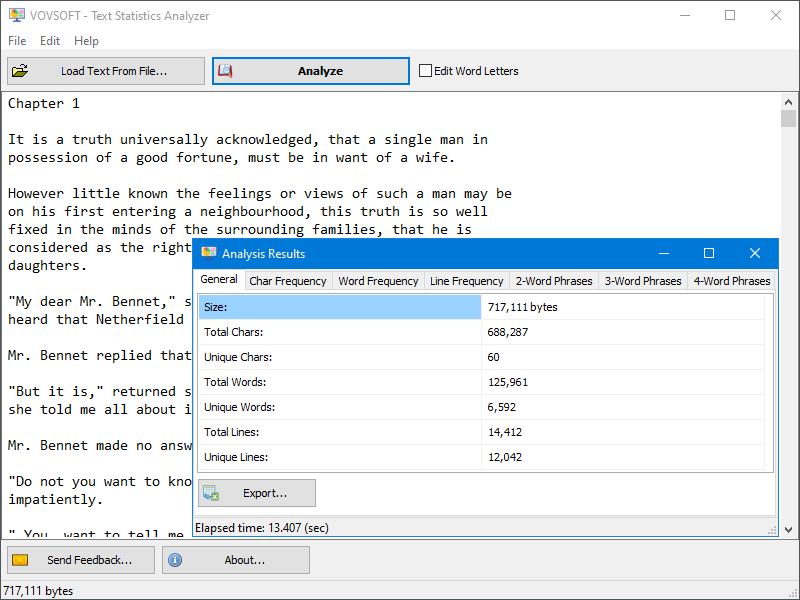
The General tab for a full novel (717,111 bytes): 688,287 characters, 125,961 words of which 6,592 unique, and 14,412 lines, analyzed in 13.4 seconds.
Features
Word frequency with percentages
Text Statistics Analyzer lists every word with its count and its percentage of all words, so you see at once that "very" makes up 0.4% of your draft or that one name dominates a chapter. Right-click a word in the results to see synonyms, handy when you've just found a word you overuse.
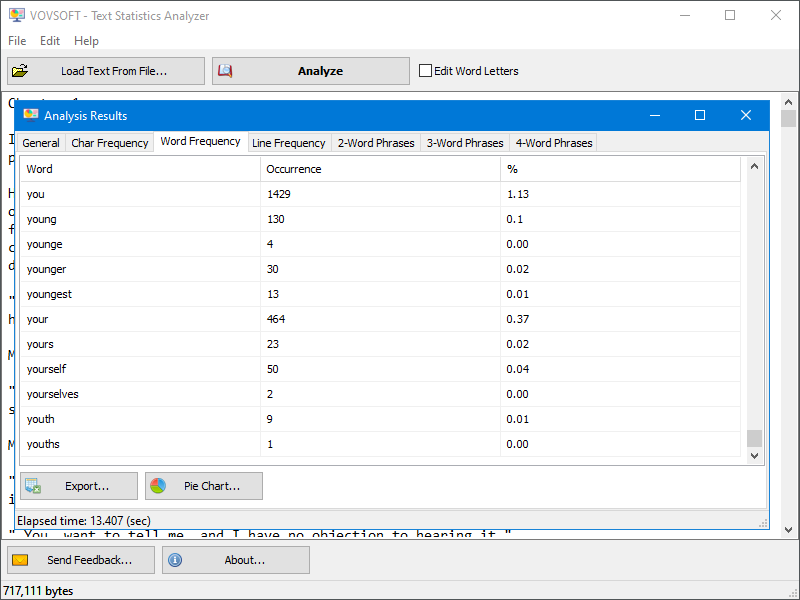
Word Frequency: "you" appears 1,429 times (1.13% of words), "your" 464 times, with Export and Pie Chart buttons below.
Two-, three- and four-word phrases
Text Statistics Analyzer counts repeated phrases of two, three and four words (n-grams), which single-word counters miss. That's where stock phrases and verbal tics show up, like "at the end of" or "in order to", and where SEO writers check how often a key phrase appears.
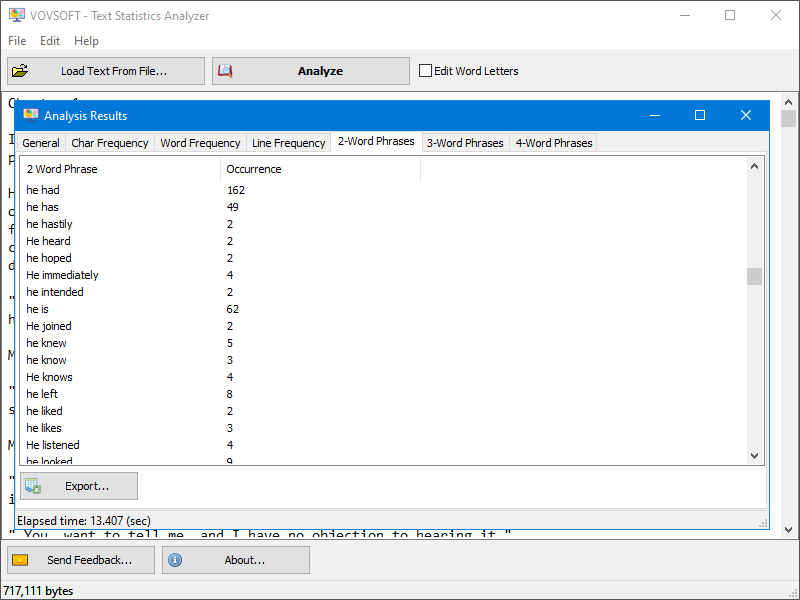
The 2-Word Phrases tab: "he had" 162 times, "he is" 62 times, and so on.
Character and line frequency, with pie charts
Text Statistics Analyzer's Char Frequency tab counts every letter, digit and symbol, accented letters included, which is useful for language study, cryptography puzzles or checking a dataset. Line Frequency finds repeated lines, for spotting duplicates in lists and logs. With a license, the Pie Chart button turns a tab into a chart.
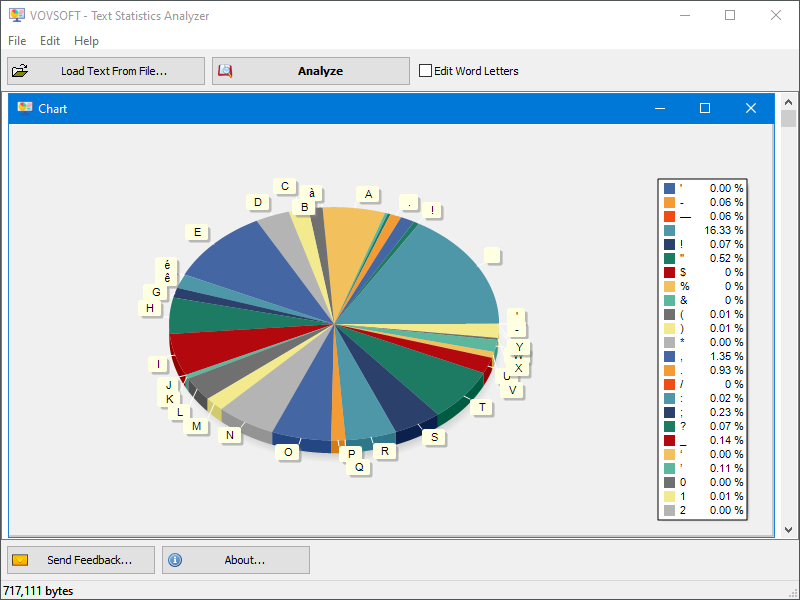
A pie chart of character frequency, with a legend of each character's share.
Control what counts as a word
Text Statistics Analyzer's Edit Word Letters option shows the characters it treats as part of a word, which you can change, with presets for English, French, Turkish, Russian and Hebrew. That decides whether "don't" is one word or two, and lets it count words correctly in other alphabets.
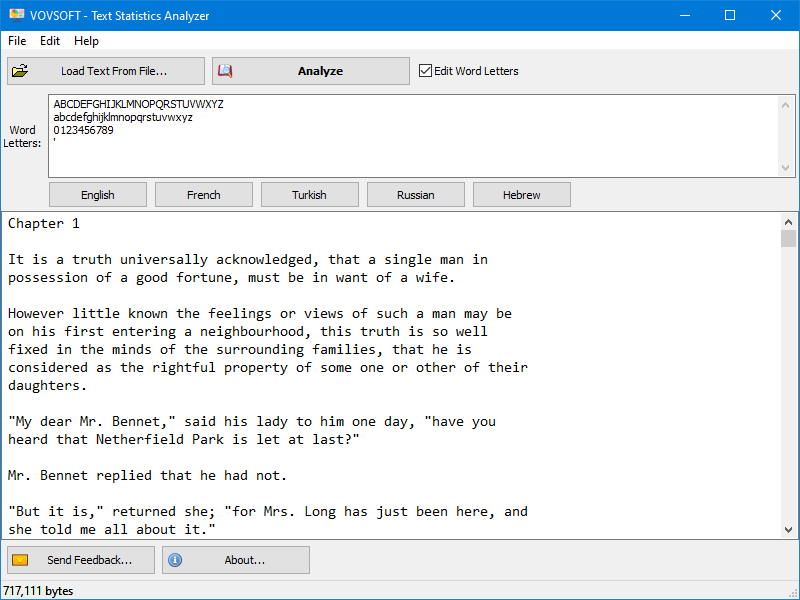
Edit Word Letters: the letters, digits and apostrophe counted as word characters, with English, French, Turkish, Russian and Hebrew presets.
PDFs, batches and CSV export
Text Statistics Analyzer reads PDF files directly and can process a batch of files, opening a results window for each. With a license, Export writes any tab to a CSV file for Excel or further analysis.
Benefits
Word counts tell you how long a text is; frequencies tell you how it's written. Seeing your top 50 words and phrases in a list is a fast, honest edit for any writer, and the same numbers serve a teacher showing students how repetition works, or a researcher comparing two texts. All of it runs offline on your PC, so drafts and confidential documents stay there.
Real-World Uses
- A novelist finds the 20 words and phrases they repeat most in a manuscript and trims them.
- A teacher shows a class the word frequencies of a classic novel against their own essays.
- An SEO writer checks how often the target phrase and its variants appear in an article.
- A linguistics student compares letter frequencies across languages.
- A data clerk finds duplicate lines in a long exported list.
Who It's For, and Who Should Skip It
Text Statistics Analyzer suits writers, teachers, students and content people who want frequency numbers for whole texts, offline, without coding.
Skip it if a word count is all you need, since Word and Google Docs give that free. Researchers who need lemmatization, part-of-speech tags, keyword-in-context views or comparisons against a reference corpus should look at a dedicated corpus tool such as the free AntConc. And there's no version for 32-bit Windows or Mac.
Usage Guide
- Download the installer or the portable edition and start Text Statistics Analyzer.
- Paste your text, or click Load Text From File to open a text file or PDF.
- If needed, tick Edit Word Letters and pick a language preset.
- Click Analyze.
- Browse the tabs, and right-click a word for synonyms.
- With a license, click Export for CSV or Pie Chart for a chart.
Before you buy
The trial runs the full analysis, so you can see every statistic before paying, but it can't export to CSV or draw pie charts, shows a nag screen, and is for personal use only. One license covers one person on any number of their own computers. Vovsoft's general policy is no refunds, since the trial comes first (it may refund an accidental order at its discretion, and PayPro Global has the final say on its orders).
Where it falls short
- Common words like "the" and "and" top the word list, with no option shown to hide them.
- The phrase lists keep capital letters ("He heard" sits next to "he hastily"), so the same phrase at the start of a sentence may be counted separately.
- No readability scores, sentence-length statistics or comparison between two texts.
- Large texts take a moment: a full novel took about 13 seconds in the vendor's screenshot.
- 64-bit Windows only.
What Users Say
On Vovsoft's site
Text Statistics Analyzer's product page shows 4.7 out of 5 from 3 ratings, with these comments:
"Hello, Vovsoft Folks. Wow, this is a neat program! I just picked it up from SwOS and it's really neat! I do work with some text stats from time to time. I even wrote a program that was supposed to give you counts for text selected in any program, but it didn't work quite right... (I wrote the analytics codes myself, too). Anyway, thank you for sharing your nice program!" Brother Gabriel Marie
"Thank you for this app. Your site is necessary..." Jacques Prada
"Linguistic habits do characterize each and every one of us, and while in conversations this is a little harder to spot, written text is irrefutable proof of this tendency. Text Statistics Analyzer is a program that offers to take a look at precisely these characteristics of the written speech, without being a tool addressing strictly professionals." Anca Roman
The feedback is friendly and points to the same strength: it's approachable for non-specialists. There are only three ratings, though, and none of the comments goes into detail about accuracy or speed.
Comparisons
Text Statistics Analyzer vs online word-frequency counters
Free web counters are fine for a paragraph. Text Statistics Analyzer handles a whole book, PDFs and batches, adds phrase and line counts, and never uploads your text.
Text Statistics Analyzer vs AntConc
AntConc is a free academic corpus tool with concordances, collocations and keyword lists, and a steeper learning curve. Text Statistics Analyzer gives the basic frequencies in two clicks, which is all most writers and teachers need.
Editions and Pricing
| Option | Price | License | What you get |
|---|
| Trial | Free | Personal, non-commercial use | All statistics, no CSV export or pie charts, nag screen |
| Text Statistics Analyzer license | $19 one time | Lifetime, commercial use allowed | CSV export, pie charts, no nag screen, all future updates |
| Vovsoft Universal License | $99 one time | Lifetime | All 115+ Vovsoft programs |
The license key arrives by email right after payment. Prices include tax.
FAQs
Can Text Statistics Analyzer read Word documents?
Text Statistics Analyzer loads text files and PDFs, and you can paste text from any program, including Word, into its window. For a .docx, copy the text in or save it as plain text or PDF first.
Does Text Statistics Analyzer work with non-English text?
Yes. Text Statistics Analyzer counts accented characters and lets you define which letters form words, with presets for French, Turkish, Russian and Hebrew. Its interface is also translated into about 30 languages.
Can I export the results to Excel?
Yes, with a license. Text Statistics Analyzer exports any results tab to CSV, which Excel opens directly. The trial shows the results but doesn't export them.
Does Text Statistics Analyzer upload my text?
No. Text Statistics Analyzer analyzes text on your computer, so drafts and confidential documents stay local.
Is the $19 a subscription?
No. Text Statistics Analyzer's $19 is a one-time payment for a lifetime license with future updates. Nothing renews.
Will Text Statistics Analyzer run on 32-bit Windows?
No. Text Statistics Analyzer has been a 64-bit program since version 3.2, so it needs 64-bit Windows.
System Requirements
- Windows 11, 10, 8/8.1, 7 or Vista, 64-bit
- About 6.6 MB for the installer, or 6.7 MB for the portable edition
Conclusion
Text Statistics Analyzer is worth $19 if you want word, phrase and character frequencies for whole texts and PDFs, offline, and you'll use the CSV export or charts. Its phrase counts are the reason to buy it over a free online counter. The reason not to: it's a counter, not a linguistics suite, with no way to hide common words and no readability scores, and a writer who wants a one-time look at a single draft can get that from a free web tool. Since the trial shows every statistic, try it on your own text first.
Download Free TrialBuy Now