Vovsoft Picture Downloader: Bulk-Download Images from Image Search or Whole Websites
Picture Downloader is a $19 Windows program from Vovsoft that downloads images in bulk, two ways: type a keyword and it saves the results of an image search on Bing, Google, Yandex, DuckDuckGo, Brave, Yahoo or AOL, or give it a web address and it collects every image on that page, optionally crawling on through the site's links. The $19 is a one-time lifetime license, and there's a free trial.
It's for people who need lots of pictures on disk rather than in a browser tab: reference photos for a project, every product shot on your own shop, or the images of a site you're migrating.
Quick facts
- Version: 3.4, released May 7, 2026
- Developer: Vovsoft
- Platform: Windows 11, 10, 8/8.1, 7 and Vista, 32-bit and 64-bit. No Mac version
- Two modes: Download by Query (search engines) and Download by URL (one or more start pages, with optional recursive crawl)
- Image types: JPG, PNG, TIFF, BMP, SVG, WEBP and more
- Filters: extensions, minimum file size, image limit, ignored URL patterns
- Editions: installer (5.46 MB) and portable (5.09 MB), one license for both
- Price: $19, one-time payment, lifetime license with free updates
- Trial: downloads images, but can't export the URL or image lists, has a nag screen and is for non-commercial use
- What we checked: installer file version 3.4.0.0 (5,734,576 bytes) with a valid code signature, downloaded from the vendor on November 11, 2026, and $19.00 on the order page with no auto-renewal on November 11, 2026. We didn't run a crawl ourselves
Download Free TrialBuy Now
Overview
Picture Downloader has two tabs. Download by Query takes a search phrase and a search engine; Download by URL takes start addresses. Both share the same settings: a download folder, connection and response timeouts, the browser user agent, and filters. While it runs, the window lists the pages it's loading on the left and the images it has found on the right, with running totals at the bottom, and the files land in your folder as it goes.

A "Red Shoes" search on Yandex: 167 images found so far, saved into the folder in the background (an earlier version's window, without the tab icons added in version 3.2).
Features
Download a whole image search
Picture Downloader's Download by Query tab runs your keyword on the image search of AOL, Bing, Brave, DuckDuckGo, Google, Yahoo or Yandex and saves what it finds. For Google there's a Creative Commons license option (since version 3.0), which narrows results to images marked for reuse, the sensible choice if you plan to publish them.
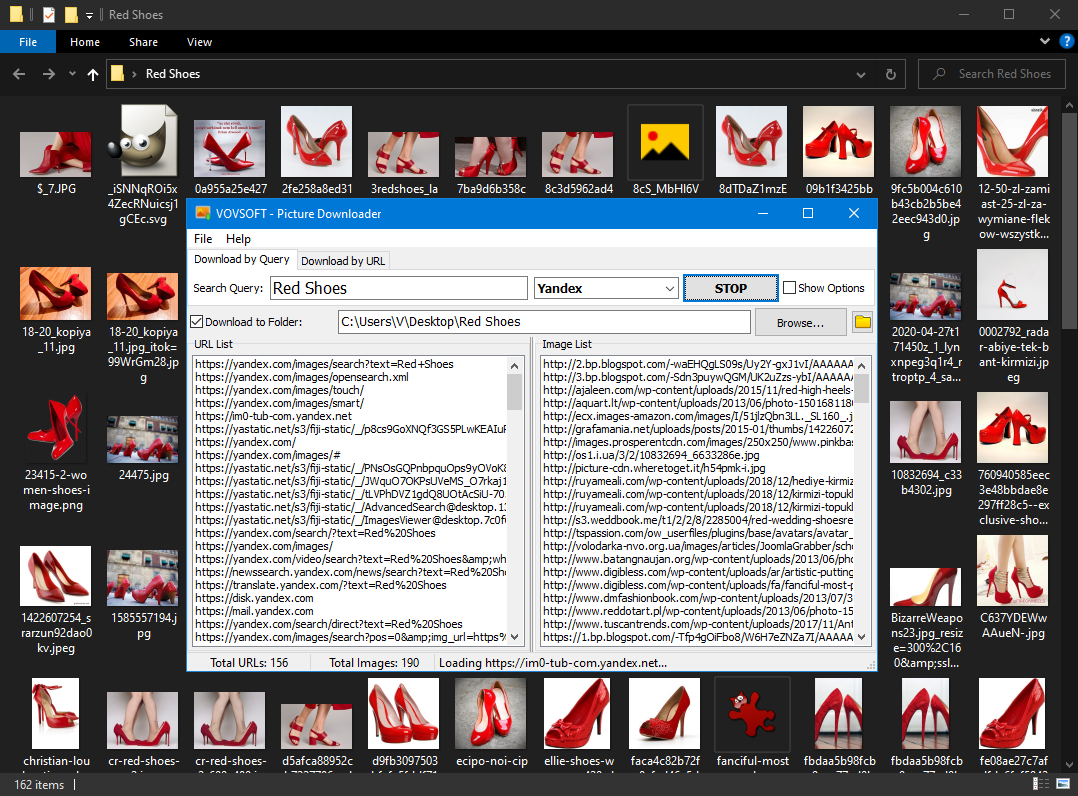
The same search further along: 156 URLs visited and 190 images found, with both lists shown.
Grab every image from a website
Picture Downloader's Download by URL tab starts from one or more addresses (multiple start URLs arrived in version 3.0) and saves the images on those pages. Turn on Recursive URL Scan and it follows the links it finds and keeps going, which is how you collect the images of a whole site rather than one page.
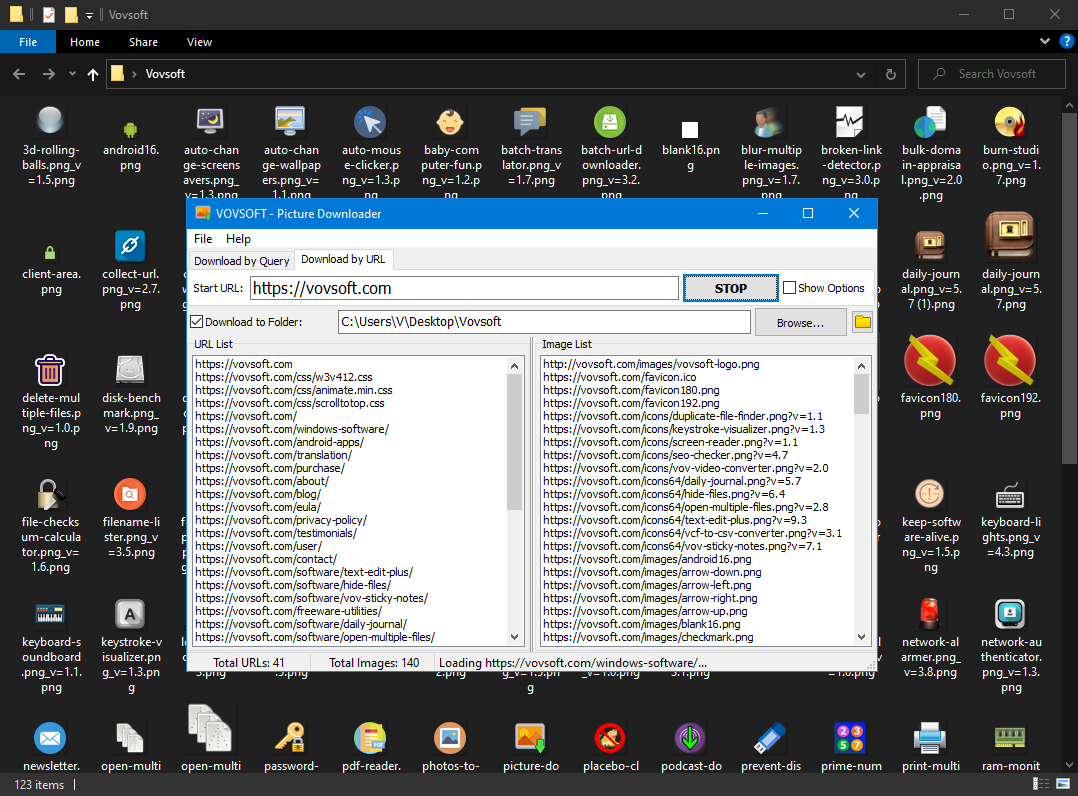
Download by URL on vovsoft.com: 41 pages visited and 140 images found, the site's icons saved in the folder behind.
Filters that keep the junk out
Picture Downloader can stick to the image extensions you want, skip files under a minimum file size (so icons and spacer GIFs stay out), stop at an image limit, and ignore URLs that match your own patterns, wildcards included. Filters also make a crawl faster, since it doesn't parse pages it doesn't need.
A real browser engine for modern sites
Picture Downloader 3.3 added a Browser Engine setting that loads pages through Microsoft Edge WebView2, which helps on sites that build their pages with JavaScript, along with TLS 1.3 support. You can also set any user agent string and the timeouts.
Export the lists (licensed)
With a license, Picture Downloader exports the list of visited URLs and the list of image addresses to text files, useful for auditing a site's images or feeding the addresses to another tool.
Benefits
Saving images one right-click at a time is fine for five and miserable for five hundred. Picture Downloader turns that into a background job: set the folder and filters, start it, and come back to a folder full of files. For a site owner it's also a quick way to back up or inventory every image a site uses.
Real-World Uses
- A designer gathers a few hundred reference photos for a mood board from one keyword search.
- A shop owner downloads all product photos from their own old store before moving platforms.
- A teacher collects Creative Commons images on a topic for class slides.
- A web developer crawls a client's site to list and save every image before a redesign.
- A researcher builds an image set for a project from several search engines.
Who It's For, and Who Should Skip It
Picture Downloader suits Windows users who need many images at once from search results or websites, and like a set-and-forget tool over browser extensions.
Skip it if you only need the images of one page now and then: free browser extensions save a page's images in a click. It's also not a tool for logged-in social media galleries or streaming sites, and it doesn't make the images yours to use. Pictures you download are still under their owners' copyright, so for anything you'll publish, use the Creative Commons option or your own sites.
Usage Guide
- Download the installer or the portable edition and start Picture Downloader.
- For a search, open Download by Query, type the keyword and pick the search engine.
- For a website, open Download by URL, enter the start address, and turn on Recursive URL Scan to follow links.
- Tick Download to Folder and choose the folder.
- Click Show Options to set extensions, minimum size, image limit, ignored URLs, timeouts or the browser engine.
- Click Start, and Stop when you have enough.
Before you buy
The trial downloads images but can't export the URL and image lists, shows a nag screen and is for personal use; work use needs the license. One license covers one person on any number of their own computers. Vovsoft's general policy is no refunds, since the trial comes first (it may refund an accidental order at its discretion, and PayPro Global has the final say on its orders). Search engines change their pages often, so try the engine you plan to use in the trial before you pay.
Where it falls short
- Search results depend on the engines' own pages, which change; several updates exist just to keep the engine list working.
- Images are saved under their original file names, which are often meaningless strings.
- The help is thin: one user asked for simple examples of what to enter for a numbered set of images.
- A recursive crawl of a big site can run long and pull in far more than you wanted unless you set filters and an image limit.
What Users Say
On Vovsoft's site
Picture Downloader's product page shows 4.3 out of 5 from 7 ratings, with these comments:
"After trying a lot of freeware pic downloader, I found this to be the most successful picture ripper." Anonymous User
"Software did what I needed it to do" Stephen Rose
"I was looking for a photo downloader just like this. Thanks..." Anonymous User
"Looking for images on the Internet doesn't take too much effort and downloading photos usually just takes a few clicks. However, if you want to grab images in batch, that's a whole other story. Vov Picture Downloader aims to solve this issue and help you find interesting images on the Internet." Mihaela Teodorovici
A request for better help
Under Vovsoft's How to Batch Download Images guide, a user named Stephen wrote in January 2025: "This help page for Picture Downloader really needs a couple of simple examples. e.g. what to write to download a set of pictures www.xyz.com/fred1.jpg, www.xyz.com/fred2.jpg, www.xyz.com/fred3.jpg etc."
The comments agree that it does the job and beats the free downloaders some had tried. The complaint is about documentation, not results. With seven ratings in all, it's a small sample.
Comparisons
Picture Downloader vs browser image-download extensions
Extensions are free and grab the images of the page you're on. Picture Downloader works across many pages and search results unattended, with size filters and an image limit, and keeps going without the browser.
Picture Downloader vs Vovsoft Batch URL Downloader
Vovsoft's Batch URL Downloader downloads a list of file addresses you already have. Picture Downloader finds the image addresses for you, from a search or a crawl. If you have a numbered list of image links, the URL downloader is the simpler fit.
Editions and Pricing
| Option | Price | License | What you get |
|---|
| Trial | Free | Personal, non-commercial use | Image downloads, no list export, nag screen |
| Picture Downloader license | $19 one time | Lifetime, commercial use allowed | URL and image list export, no nag screen, all future updates |
| Vovsoft Universal License | $99 one time | Lifetime | All 115+ Vovsoft programs |
The license key arrives by email right after payment. Prices include tax.
FAQs
Is it legal to use Picture Downloader?
Picture Downloader itself is a normal download tool, but the images keep their owners' copyright. Downloading for private reference is generally fine; publishing or selling someone else's pictures needs their permission, so use the Creative Commons option or your own sites for that.
Can Picture Downloader download full-size images, not thumbnails?
Picture Downloader saves the image files it finds linked or embedded on the pages it reads. Where a search page or site links only small previews, that's what you get, so use the minimum file size filter to skip thumbnails.
Does Picture Downloader work on Instagram or Facebook?
Picture Downloader is built for public web pages and search engines. Sites that need you to log in aren't its target, and their terms usually forbid scraping.
Can I limit how many images Picture Downloader saves?
Yes. Picture Downloader has an Image Limit setting, plus a minimum file size, extension filters and ignored URL patterns.
Is the $19 a subscription?
No. Picture Downloader's $19 is a one-time payment for a lifetime license with future updates. Nothing renews.
Do I need Microsoft Edge installed?
Not for the normal mode. Picture Downloader's optional Browser Engine setting uses Microsoft Edge WebView2, which Windows 10 and 11 normally already include.
System Requirements
- Windows 11, 10, 8/8.1, 7 or Vista, 32-bit or 64-bit
- Internet connection
- About 5.5 MB for the installer, or 5.1 MB for the portable edition
- Optional: Microsoft Edge WebView2 for the Browser Engine setting
Conclusion
Picture Downloader is worth $19 if you regularly need hundreds of images from searches or from websites, especially your own: it runs unattended, filters out the small stuff and saves straight to a folder. The reason to buy it is the two modes in one tool, search and crawl. The reason not to: occasional page-by-page saving is free with a browser extension, and its search mode depends on engines that keep changing. Test your usual searches and sites in the trial first.
Download Free TrialBuy Now