Vovsoft Podcast Downloader: Save Podcast Episodes from RSS Feeds, Then Transcribe Them
Podcast Downloader is a $19 Windows program from Vovsoft that reads podcast RSS feeds, lists every episode with its title and date, and downloads the ones you pick as audio files (mostly MP3) to a folder on your PC. With your own OpenAI API key it can also transcribe an episode to text and summarize it. The $19 is a one-time lifetime license, and there's a free trial.
It suits people who want podcast files on their own drive, for offline listening, archiving or a player that doesn't do podcasts, without installing a full podcast app.
Quick facts
- Version: 3.5, released March 17, 2026
- Developer: Vovsoft
- Platform: Windows 11, 10, 8/8.1, 7 and Vista, 32-bit and 64-bit. No Mac version
- Sources: any public podcast RSS feed you add, plus a starter list of feeds
- Downloads: episode audio files named by title, to a folder you choose
- AI extras: Transcribe and Summarize through the OpenAI API, with your own key and usage billed by OpenAI
- Editions: installer (4.45 MB) and portable (3.64 MB), one license for both
- Price: $19, one-time payment, lifetime license with free updates
- Trial: free to try, with limited downloads, for personal, non-commercial use
- What we checked: installer file version 3.5.0.0 (4,667,496 bytes) with a valid code signature, downloaded from the vendor on November 11, 2026, and $19.00 on the order page with no auto-renewal on November 11, 2026. We didn't try the transcription
Download Free TrialBuy Now
Overview
The top of the window lists your RSS feeds. Click one, and the Downloadable Episodes list below fills with each episode's title, URL, date and status. Select episodes and click Download, or double-click one, and they're saved to the Download Location, with Explore to open the folder.

Five RSS feeds at the top, and the TED Talks feed's episodes below with title, URL, date and Downloaded status.
Features
Any public RSS feed
Podcast Downloader takes any podcast's public RSS feed address. Add it with Add RSS, delete feeds you don't want, and sort the episode columns by title or date. Files are saved under the episode title.
Transcribe and summarize with OpenAI
Podcast Downloader's Transcribe window sends a downloaded episode to OpenAI's speech-to-text with your API key, shows the transcript, saves it, and can summarize it with a model such as gpt-4o-mini. The API usage is billed to your OpenAI account.
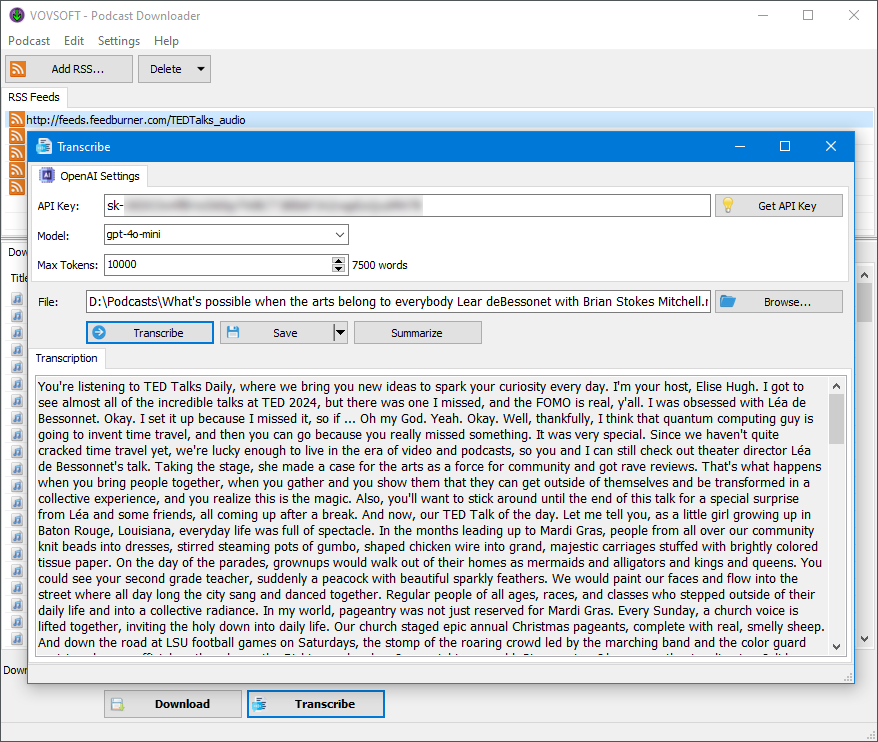
The Transcribe window: API key, model and token limit, a downloaded episode, and its transcript with Save and Summarize buttons.
Real-World Uses
- Downloading a season of episodes before a long flight, to play on any MP3 player.
- Archiving a small podcast's back catalogue in case the show disappears.
- A researcher downloads interviews and turns them into searchable transcripts.
- A busy listener reads AI summaries to decide which episodes are worth an hour.
Who It's For, and Who Should Skip It
It suits Windows users who want podcast episodes as plain files on their own PC, and those who want transcripts without a separate service.
Skip it if you just want to listen and follow shows: free podcast apps on your phone, or players like VLC and MusicBee, subscribe, download and play episodes. It can't search a podcast directory, so you need each show's RSS address, and it has no player of its own.
Usage Guide
- Download the installer or the portable edition and start Podcast Downloader.
- Copy a podcast's RSS feed address from its website or hosting page, and click Add RSS.
- Click the feed to list its episodes.
- Choose a Download Location, select episodes and click Download.
- For a transcript, click Transcribe, enter your OpenAI API key, pick the downloaded file and click Transcribe, then Save or Summarize.
Before you buy
Feeds are public and outside Vovsoft's control, so a show that moves or blocks downloads can stop working, as one user found with an example feed. The transcription costs extra through your OpenAI account. One license covers one person on any number of their own computers. Vovsoft's general policy is no refunds once the key is delivered, since a free trial comes first (accidental orders are generally refunded, at its discretion, and PayPro Global has the final say on its orders).
Where it falls short
- No podcast search: you paste RSS addresses yourself.
- No built-in player and no automatic download of new episodes.
- Feeds that need a username and password aren't supported.
- Saved files get today's date rather than the episode's publish date, and naming files by release date is an open request.
What Users Say
On Vovsoft's site
Podcast Downloader's page shows 4.5 out of 5 from 6 ratings, with these comments among others.
"Vov Podcast Downloader is a well designed program that works just as advertised." Martin Brinkmann
"Nice little program! I am sure there are others out there that do the same thing and maybe better, but this one is fine. One of the example podcasts urls didn't work, but I checked out the others and some were of interest to me." John
"Works great!!!!" Stephen Howe
"Very cute and simple (good) program" Anonymous User
Vovsoft as a company has a TrustScore of about 4.6 out of 5 from 411 reviews on Trustpilot, read through a summarizer. Users find it simple and dependable. The caveat that comes up is feeds that don't work.
Comparisons
Podcast Downloader vs a podcast app
Podcast apps are free, search directories, follow shows and download new episodes automatically, but keep files inside the app. Podcast Downloader gives you plain audio files in a folder you choose, plus OpenAI transcription.
Podcast Downloader vs Vovsoft Speech to Text Converter
Speech to Text Converter transcribes any audio file with several speech services. Podcast Downloader adds transcription to downloading, for podcasts specifically.
Editions and Pricing
| Edition | Price | License | What you get |
|---|
| Trial | Free | Personal, non-commercial use | Limited downloads |
| Licensed | $19 one-time | Lifetime | Unlimited downloads, commercial use, no nag screen or ads, lifetime free updates |
The installer and portable editions use the same key, sent by email right after payment. Vovsoft's $99 Universal License covers all of its desktop programs.
FAQs
Where do I find a podcast's RSS feed for Podcast Downloader?
Look on the podcast's website or its hosting page for an RSS link, and paste that address into Podcast Downloader's Add RSS box.
Does Podcast Downloader transcribe podcasts for free?
No. Podcast Downloader's transcription and summaries use the OpenAI API with your own key, and OpenAI charges for that usage.
Can Podcast Downloader download every episode at once?
You can select several episodes and download them, and they're fetched one after another rather than all at the same time.
Can Podcast Downloader download from Spotify?
No. Podcast Downloader works with public RSS feeds, not with streaming apps' own catalogs.
Is the Podcast Downloader license a subscription?
No. The $19 license is a one-time payment that never expires and includes future updates.
System Requirements
- Windows 11, 10, 8/8.1, 7 or Vista, 32-bit or 64-bit
- About 5 MB for the program, plus space for episodes
- An internet connection, and an OpenAI API key for transcription
Conclusion
Podcast Downloader is worth $19 if you want podcast episodes saved as files on your PC and, now and then, a transcript or summary of one. The reason to buy it is a simple downloader with AI transcription built in. The reason not to: free podcast apps already download episodes for listening, and you have to find each show's RSS address yourself.
Download Free TrialBuy Now