Coolmuster iPhone WhatsApp Recovery for Mac: Save iPhone WhatsApp Chats and Media From the Phone or a Finder Backup
Coolmuster iPhone WhatsApp Recovery for Mac is a $35.95-a-year macOS app that reads WhatsApp chats and attachments from an iPhone or iPad over USB, or from an iTunes or Finder backup on your Mac, and saves the conversations and files you pick to a folder. It copies what still exists on the phone or in the backup; it can't undelete a chat from the phone.
Where it earns its price is the old Finder backup. If a conversation was deleted after the backup was made, the app can lift that one chat out of the backup without restoring your phone to last month's state.
Quick facts
- Version: 2.0.8 for Mac, released December 23, 2025
- Developer: Coolmuster
- Runs on: macOS 10.10 or later. Intel build, so Apple silicon Macs run it through Rosetta 2
- Sources: iPhone or iPad over USB, iTunes and Finder backups on the Mac
- Price: $35.95 for one year (1 Mac, 3 devices), $45.95 lifetime
- Trial: free download that scans and previews. Saving needs a license
- What we checked: Mac version 2.0.8 in the vendor release notes and inside the downloaded app's Info.plist, the 5.9 MB disk image from the vendor (file dated December 23, 2025) with Intel-only program files, checkout price $35.95 on November 11, 2026. We didn't scan a phone with it; the screens below are from the vendor's Mac manual.
Before you buy
- The scan screen says "Existing Data Only (Unable to recover deleted data)", for the phone and for backups alike.
- WhatsApp's own iCloud chat backup isn't read.
- Coolmuster iPhone Backup Extractor for Mac ($19.95 a year) also exports WhatsApp from Finder backups, together with messages and contacts.
- Coolmuster says refund requests for recovery products, this one included, will not be approved. The yearly plan renews automatically.
Download Free Trial Buy Now
Overview
The Mac app follows Coolmuster's standard layout: a blue sidebar with Recover from iOS Device, Recover from iTunes Backup File and Toolkit, and a two-item checklist, WhatsApp and WhatsApp Attachments. The December 2025 Mac release notes list WhatsApp recovery from iOS devices and iTunes/Finder backups, and fourteen interface languages from Chinese to Dutch.
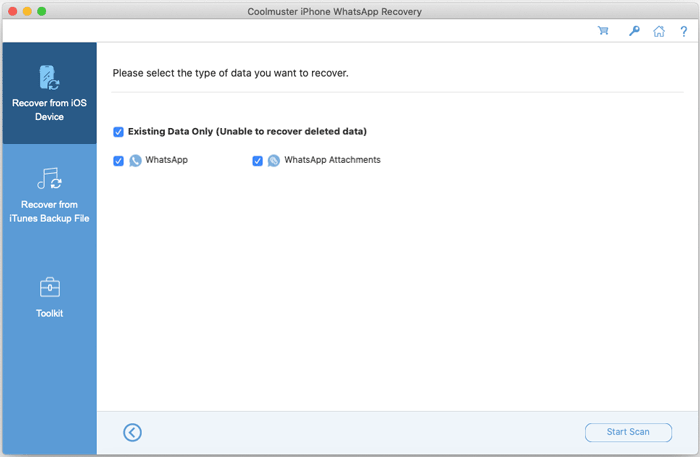
The Mac scan screen: WhatsApp and WhatsApp Attachments, marked existing data only.
Features
Coolmuster iPhone WhatsApp Recovery for Mac reads the phone over USB
Coolmuster iPhone WhatsApp Recovery for Mac asks you to trust the Mac and then to enter the passcode on the iPhone before it reads WhatsApp. Conversations load as a list with message counts and the latest message time, and the selected chat shows in full on the right.
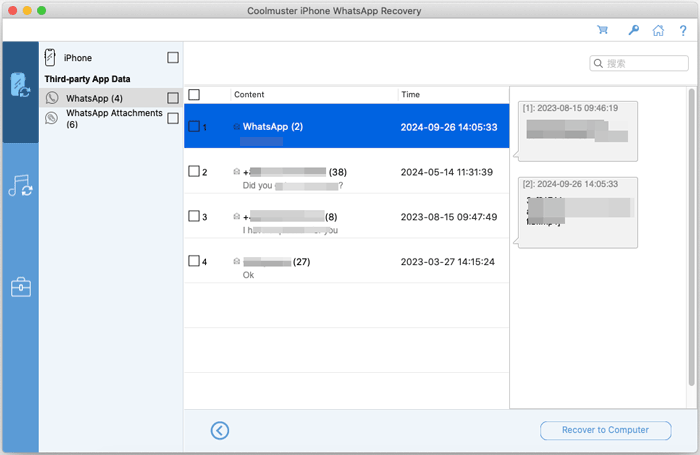
Four chats from an iPhone, spanning 2023 and 2024, with the selected thread on the right.
Finds iTunes and Finder backups automatically
Coolmuster iPhone WhatsApp Recovery for Mac shows the iTunes and Finder backups stored on the Mac, and a Select button opens one kept elsewhere. Chats and attachments inside the backup are listed just as they are from a live phone.
Lists every attachment with size and date
Coolmuster iPhone WhatsApp Recovery for Mac shows WhatsApp attachments in a table with file name, size, format and creation date, so you can tick just the photos from one week rather than saving hundreds of files.
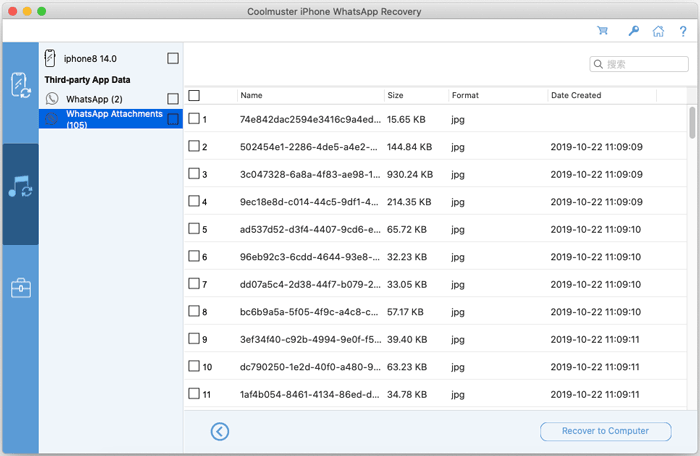
105 WhatsApp attachments from an iOS 14 backup, listed by size, format and date.
Benefits
- Your WhatsApp history becomes ordinary files on the Mac that you can keep after the phone is gone.
- One old chat can come out of a backup without rolling the phone back.
- The base license covers three iPhones or iPads.
Real-World Uses
- You cleared a group chat by mistake, and your MacBook made a Finder backup the week before.
- You need a business conversation on file as evidence for a client dispute.
- You're handing down an old iPhone and want its WhatsApp photos and voice notes kept on the Mac first.
Who It's For, and Who Should Skip It
It's for Mac owners who want WhatsApp chats and media from an iPhone or a Finder backup kept as files on the Mac.
Skip it if you need more than WhatsApp from the same backup: Backup Extractor for Mac costs less and covers messages, contacts and photos too, and iPhone Data Recovery for Mac covers everything including iCloud. Skip it if your only copy is WhatsApp's iCloud backup. Windows users need the Windows edition.
Usage Guide
- Open the .dmg, drag the app into Applications and launch it (Rosetta 2 may install first on Apple silicon).
- For a phone: choose Recover from iOS Device, connect by USB, tap Trust, tick the two data types and click Start Scan. Enter the passcode on the phone when asked.
- For a backup: choose Recover from iTunes Backup File, pick the backup or click Select, and click Start Scan.
- Read through the chats and attachments and tick what you want.
- Click Recover to Computer. Saving needs a license.
Where it falls short
- No undelete from the phone, and no iCloud WhatsApp backup.
- Intel-only code; Apple silicon Macs translate it with Rosetta 2.
- Buyers on Coolmuster's review page mention slow results and exports, chats out of order, and the price.
- Saved chats can't be put back into WhatsApp on the phone.
What Users Say
We found no independent review of the Mac edition. Coolmuster's review page (53 reviews) covers the Windows and Mac editions together; the company gives free licenses for reviews, so expect a friendly tilt.
What worked
"I was relieved to find some old messages I thought were gone for good."
Sophie Turner, October 19, 2026
"Found my lost WhatsApp photos and messages without much trouble."
James Anderson, July 31, 2026
"A reliable tool for retrieving my WhatsApp data from my old iTunes backups."
.Values, Coolmuster product page (excerpt)
What didn't
"Worked for my backup, but I had to wait quite a while before seeing results."
Andrew Wilson, September 4, 2026
"Can this tool recover WhatsApp voice messages separately?"
Hannah Bailey, May 29, 2026
"Some chats out of order..."
Chris Anderson, April 3, 2026
Coolmuster as a company has 4.6 out of 5 from 223 Trustpilot reviews (read through a page summarizer), praised mostly for support. The sum: it does well with an older backup, and patience helps.
Comparisons
WhatsApp Recovery for Mac vs Backup Extractor for Mac
Backup Extractor for Mac ($19.95 a year) reads the same backups and exports WhatsApp plus a dozen other types, but can't scan the phone.
WhatsApp Recovery for Mac vs iPhone Data Recovery for Mac
iPhone Data Recovery for Mac ($49.95 a year) scans the phone, backups and iCloud for all data types, WhatsApp included, and can recover deleted texts and contacts. It's $14 more and much broader.
Editions and Pricing
| Covers | 1 Year (renews) | Lifetime |
|---|
| 1 Mac, 3 devices | $35.95 | $45.95 |
| 3 Macs, 9 devices | $65.95 | $75.95 |
| 1 Mac, 30 devices | $189.95 | $289.95 |
For a single rescue, the yearly plan with renewal cancelled is enough; lifetime adds only $10.
FAQs
Can Coolmuster iPhone WhatsApp Recovery for Mac recover chats deleted from the iPhone?
Only through a backup. Coolmuster iPhone WhatsApp Recovery for Mac reads existing data only, so a deleted chat has to be in an iTunes or Finder backup made before it was deleted.
Does Coolmuster iPhone WhatsApp Recovery for Mac need the iPhone passcode?
Yes. Coolmuster iPhone WhatsApp Recovery for Mac asks you to enter the passcode on the iPhone before it can read WhatsApp from the device.
Is Coolmuster iPhone WhatsApp Recovery for Mac native on Apple silicon?
No. Version 2.0.8 is Intel code only, so M-series Macs run it through Rosetta 2.
Does the Mac license of Coolmuster iPhone WhatsApp Recovery cover Windows?
No. The Windows edition is a separate product with its own license at the same prices.
System Requirements
- macOS 10.10 or later (Intel, or Apple silicon with Rosetta 2)
- Intel Core 1 GHz or faster, 1 GB RAM, 1 GB free disk space
- USB cable, iPhone or iPad with WhatsApp on iOS 5 through iOS 27
Conclusion
Worth it if WhatsApp is all you need and you want it off the iPhone, or out of an older Finder backup, as files on your Mac. The free scan shows every chat before you pay.
The reason not to buy: it isn't an undelete tool, and Coolmuster's own Backup Extractor for Mac does the backup half of this job for less.
Download Free Trial Buy Now