Vovsoft VCF Editor: Clean Up, Edit and Convert vCard Contacts on Windows
VCF Editor is a $19 Windows program from Vovsoft that opens VCF (vCard) contact files from an iPhone, Android phone or email program, lets you edit each contact in a form, removes duplicates, and saves the result as VCF or as CSV for Excel, Outlook, Google or Yahoo. It works offline. The $19 is a one-time lifetime license, and there's a free trial.
Phone contact lists get messy over the years. This gives you a desktop address book editor to fix them before they go back onto a phone or into Outlook.
Quick facts
- Version: 3.4, released October 26, 2026
- Developer: Vovsoft
- Platform: Windows 11, 10, 8/8.1, 7 and Vista, 32-bit and 64-bit. No Mac version
- Opens: .vcf and .vcard files, single or multi-contact, or a whole folder of them
- Fields: names, prefix and suffix, birthday (with age), home, work and other addresses, organization, several phone numbers and emails, website, notes and photo
- Saves as: one VCF file, separate VCF files per contact, or CSV in default, Excel, Google, Outlook and Yahoo layouts
- Editions: installer (5.4 MB) and portable (4.93 MB), one license for both
- Price: $19, one-time payment, lifetime license with free updates
- Trial: free to try. Saving contacts and CSV export are licensed features, and the trial is for personal, non-commercial use
- What we checked: installer file version 3.4.0.0 (5,670,616 bytes) with a valid code signature, downloaded from the vendor on November 11, 2026, and $19.00 on the order page with no auto-renewal on November 11, 2026. We didn't edit a real phone export
Download Free TrialBuy Now
Overview
Click Load vCards and the contacts appear in an alphabetical list on the left, with letter buttons to jump through it and a search box. Select one and its details fill a form on the right, photo included. Change what you need and click Save, or add a New Contact. The status bar counts the contacts loaded.
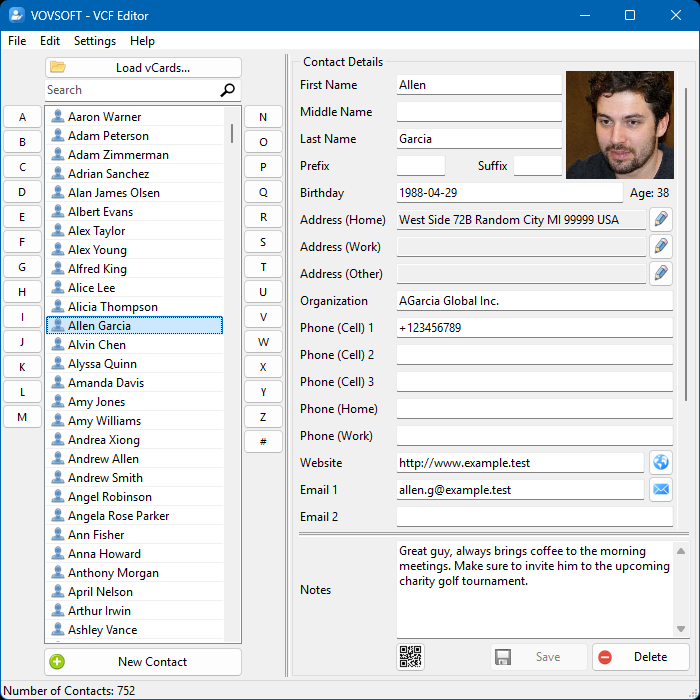
752 contacts loaded: the alphabetical list with letter buttons on the left, and one contact's details, photo and notes on the right.
Features
Edit every field in a form
VCF Editor shows each vCard as a form with names, birthday, three addresses, organization, cell, home and work phones, emails, website, notes and a photo. Since version 3.3 it can also swap first and last names for selected contacts, which fixes imports that put the surname first.
Delete duplicates and export a selection
VCF Editor's right-click menu deletes duplicate contacts, deletes or duplicates a selection, and exports only the selected contacts to VCF or to CSV in the Outlook, Google, Yahoo, Excel or default layout.
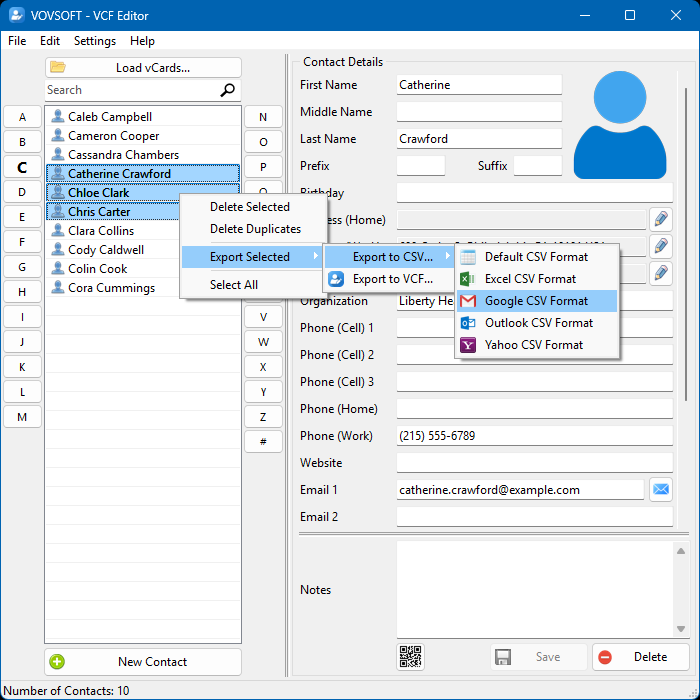
The right-click menu: Delete Selected, Delete Duplicates, and Export Selected to CSV (Default, Excel, Google, Outlook or Yahoo format) or VCF.
QR codes and printing
VCF Editor makes a vCard QR code for a contact that a phone camera can scan to save the details, at a size you choose, saved as PNG, JPG, GIF or BMP. It also prints one contact's details or the full contact list.
Split and merge vCard files
VCF Editor loads every vCard in a folder at once and can export each contact as its own VCF file, so you can merge a folder of single cards into one file or split one big file into single cards.
Real-World Uses
- Cleaning an iPhone's exported contacts of duplicates and old numbers before importing them into a new phone.
- Fixing contacts where first and last names came in swapped after a migration.
- Turning a folder of business-card VCFs from a trade show into one CSV for the company's CRM.
- Handing a client your details as a QR code they scan with their phone.
Who It's For, and Who Should Skip It
It suits people and small offices that keep contacts in VCF files and want to edit and tidy them on a PC, privately, in bulk.
Skip it if your contacts live in Google Contacts or Outlook and stay there: both can edit and merge duplicates in place for free. If you only need to turn a VCF into a spreadsheet once, Vovsoft's VCF to CSV Converter is simpler. Custom labels such as X-Work or X-Billing aren't supported yet.
Usage Guide
- Export your contacts as a VCF file from your phone, iCloud or email program.
- Download the installer or the portable edition and start VCF Editor.
- Click Load vCards, or drag the file or a folder of VCFs onto the window.
- Select contacts to edit, then click Save. Right-click to delete duplicates or swap names.
- Use Export (or Export Selected) to save as VCF or as CSV for Outlook, Google, Yahoo or Excel.
Before you buy
Keep a copy of the original VCF before you start deleting duplicates. One license covers one person on any number of their own computers. Vovsoft's general policy is no refunds once the key is delivered, since a free trial comes first (accidental orders are generally refunded, at its discretion, and PayPro Global has the final say on its orders).
Where it falls short
- Custom vCard labels (X-Work, X-Cell, X-Billing) aren't supported, the top feature request.
- It edits files, not live accounts. Changes reach your phone only when you import the saved file.
- Some non-English contact files needed a fix from Vovsoft, as one Japanese iPhone user describes below.
What Users Say
On Vovsoft's site
VCF Editor's page shows 4.7 out of 5 from 9 ratings, with these comments among others.
"The application does everything needed to easily edit names, numbers, remove duplicates and more. It's simple to use and doesn't cost much." Andrew M (he posted the same review on Trustpilot)
"I purchased VCF Editor, but it didn't work properly because I was using Japanese iPhone contacts. However, after several email exchanges, they even updated the software for me, which was excellent support. Thank you very much. There are absolutely no problems now." masakazu m
"Best vcf manager I have come across." Ket
"Great product. Great price. Sensitive to trust issues, no sales pressure." Charles Wood
Elsewhere
Vovsoft's testimonials page adds: "Appeared to install and run without issue. Fairly simplistic, but also a clean interface." (Rollie). Vovsoft as a company has a TrustScore of about 4.6 out of 5 from 411 reviews on Trustpilot, read through a summarizer, where a reviewer also praised Vovsoft for adding a requested Print contacts option the same day.
Users like the duplicate removal and the price. The one recurring problem is unusual contact formats, which Vovsoft has fixed when told.
Comparisons
VCF Editor vs Google Contacts
Google Contacts edits and merges duplicates free in your browser, and syncs to Android. VCF Editor works offline on files, which suits iPhone exports, privacy-minded users and contacts that aren't in a Google account.
VCF Editor vs Vovsoft VCF to CSV Converter
VCF to CSV Converter does one job, conversion. VCF Editor also edits, de-duplicates, prints and makes QR codes, and exports the same CSV layouts.
Editions and Pricing
| Edition | Price | License | What you get |
|---|
| Trial | Free | Personal, non-commercial use | Load, view and edit contacts, VCF export |
| Licensed | $19 one-time | Lifetime | Saving contacts, CSV export, commercial use, no nag screen or ads, lifetime free updates |
The installer and portable editions use the same key, sent by email right after payment. Vovsoft's $99 Universal License covers all of its desktop programs.
FAQs
Can VCF Editor remove duplicate contacts?
Yes. VCF Editor has a Delete Duplicates command in its right-click menu.
Can VCF Editor open an iPhone or Android contacts export?
Yes. VCF Editor opens .vcf and .vcard files from iPhone, Android and other sources, including files with many contacts.
Can VCF Editor export contacts to Outlook?
Yes. VCF Editor exports to CSV in Outlook's layout, as well as Google, Yahoo, Excel and a default layout.
Does VCF Editor upload my contacts?
No. VCF Editor runs entirely offline on your PC.
Can VCF Editor split one VCF file into separate contacts?
Yes. Since version 3.4, VCF Editor exports each contact as a separate VCF file, and it can load a whole folder of VCFs into one list.
Is the VCF Editor license a subscription?
No. The $19 license is a one-time payment that never expires and includes future updates.
System Requirements
- Windows 11, 10, 8/8.1, 7 or Vista, 32-bit or 64-bit
- About 6 MB of disk space
Conclusion
VCF Editor is worth $19 if you manage contacts as VCF files and want to clean, fix and convert them in bulk on your PC without uploading them anywhere. The reason to buy it is the combination of a proper edit form, duplicate removal and every common CSV layout in one small tool. The reason not to: contacts that already live in Google or Outlook can be cleaned there for free.
Download Free TrialBuy Now