Vovsoft Desktop Diary: A Private, Password-Locked Journal That Stays on Your PC
Desktop Diary is a $19 Windows journal program from Vovsoft: a calendar on top, a formatted entry for each day below, and a password on each user account, with everything kept offline on your own computer. The $19 is a one-time lifetime license, and there's a free trial.
It's for people who want to keep a daily diary or log on the computer without handing their private thoughts to an online journaling service.
Quick facts
- Version: 3.3, released July 27, 2026
- Developer: Vovsoft
- Platform: Windows 11, 10, 8/8.1, 7 and Vista, 32-bit and 64-bit. No Mac or mobile version
- Accounts: several user accounts, each with its own password
- Entries: one rich-text entry per day, with pictures, lists, fonts, colors and highlighting
- Backup: encrypted backup files you can export and import, for a new PC or a restore
- Edition: installer only (9.17 MB), no portable edition
- Price: $19, one-time payment, lifetime license with free updates
- Trial: free to try, for personal, non-commercial use, with a nag screen
- What we checked: installer file version 3.3.0.0 (9,624,968 bytes) with a valid code signature, downloaded from the vendor on November 11, 2026, and $19.00 on the order page with no auto-renewal on November 11, 2026. We didn't test the encrypted backups
Download Free TrialBuy Now
Overview
Log in to your account and you see three months of calendar across the top, with days that have entries in bold. Click a day and write in the editor below, with a toolbar for alignment, lists, bold, italic, underline, strikeout, colors, highlighting and pictures. A search box finds old entries, and Print sends an entry to the printer. The status bar shows who's logged in and the date you're writing for.

A diary entry with a heading, a picture and text on a patterned dark theme, under a three-month calendar with filled days in bold.
Features
Password-protected accounts
Desktop Diary keeps each person's diary behind their own password, so several people can share a PC without reading each other's entries. Nothing is ever sent online.
A calendar that doubles as an index
Desktop Diary's calendar shows which days have entries, lets you jump to any date, and works as a place to note appointments as well as memories.
Formatting, pictures and themes
Desktop Diary formats text like a small word processor and inserts pictures into an entry. Its many color themes and background images (JPEG, PNG, GIF or BMP) change the look, and any installed font can be used. Entries can be loaded from DOCX, RTF or TXT files.
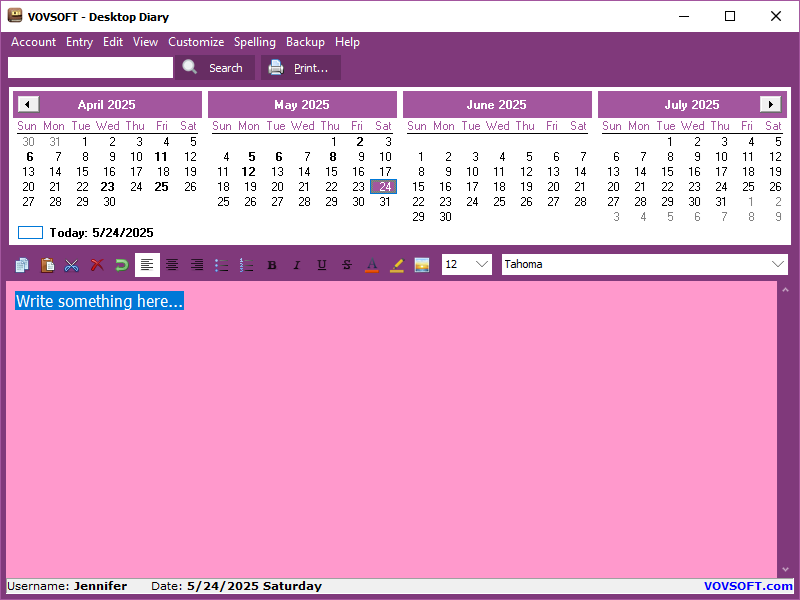
One of the color themes, with an empty entry ready for the day.
Encrypted backups
Desktop Diary exports your diary to an encrypted backup file and imports it again, which is how you move it to a new computer or recover after a crash.
Real-World Uses
- Keeping a private daily journal that nobody else in the house can open.
- A health log for symptoms, medication and doctor visits, searchable when the doctor asks when something started.
- A work log of what you did each day, ready for a performance review.
- A gratitude or travel diary with photos pasted into each day.
Who It's For, and Who Should Skip It
It suits Windows users who want a simple, private, calendar-based diary on one computer, including people who miss old desktop journals like Parsons' Daily Journal.
Skip it if you want to write on your phone or have the diary sync between devices: it's Windows-only and offline. It also has no reminders or alarms, no time slots for appointments and no journal groups, so it's not a substitute for a calendar app.
Usage Guide
- Download and run the installer, then start Desktop Diary.
- Create a user account and set a password.
- Click a day on the calendar and write your entry. Use the toolbar for formatting and pictures.
- Pick a theme or background under Customize.
- Export an encrypted backup from the Backup menu regularly, and keep it somewhere safe.
Before you buy
The password locks the account in the program, and backups are encrypted, but users have asked for the diary's own database to be encrypted too, which it isn't yet. Keep your exported backups, since forgetting the password or losing the PC are the real risks. One license covers one person on any number of their own computers. Vovsoft's general policy is no refunds once the key is delivered, since a free trial comes first (accidental orders are generally refunded, at its discretion, and PayPro Global has the final say on its orders).
Where it falls short
- No search by date, journal groups (home, work) or spell checker. These are the most requested features.
- No reminders or alarms, and no time column for appointments.
- No portable edition, no mobile app and no sync.
- The calendar opens with the current month on the right, which some users find backwards.
What Users Say
On Vovsoft's site
Desktop Diary's page shows 4.8 out of 5 from 9 ratings, with these comments among others.
"I love the program because it allows me to keep my thoughts and activities in one place and searchable above that!" Tim
"Functional and truly stand alone PRIVATE-NO ONLINE. Read small print, online 'journaling' and diaries, cannot promise privacy even if you delete account" Faith
"I used Parsons Technology Daily Journal years ago. Vovsoft works on Windows 10. It seems to be working without license key. Good and easy to use software." Arief Bruce
More comments
Vovsoft's testimonials page adds: "I used Parsons Daily Journal for years. I am now using your product. I really like it." (Tom M.), "I love this application. The only suggestion I have is could you please add dividers between the months on the calendar." (Anonymous User) and "I think the interface could be improved a bit, but otherwise good." (Anonymous User).
Vovsoft as a company has a TrustScore of about 4.6 out of 5 from 411 reviews on Trustpilot, read through a summarizer. People value the privacy and simplicity. The criticism is about the interface and the calendar layout.
Comparisons
Desktop Diary vs online journaling apps
Apps like Day One sync to your phone and add maps and weather, usually with a subscription and your entries on their servers. Desktop Diary is offline and one-time $19, but stays on one Windows PC.
Desktop Diary vs Vovsoft Tree Notes
Tree Notes organizes notes by topic in a folder tree. Desktop Diary organizes entries by date on a calendar, with password-locked accounts. Both come under Vovsoft's $99 Universal License.
Editions and Pricing
| Edition | Price | License | What you get |
|---|
| Trial | Free | Personal, non-commercial use | The full program, with a nag screen |
| Licensed | $19 one-time | Lifetime | Commercial use, no nag screen or ads, lifetime free updates |
The key is sent by email right after payment. Vovsoft's $99 Universal License covers all of its desktop programs.
FAQs
Is Desktop Diary private?
Yes. Desktop Diary stores entries only on your computer, never online, and each account needs its password to open.
Can I move Desktop Diary to a new computer?
Yes. Export an encrypted backup file from Desktop Diary on the old PC and import it on the new one.
Can several people use one Desktop Diary?
Yes. Desktop Diary supports multiple user accounts, each with its own password and entries.
Can I add photos to Desktop Diary entries?
Yes. Desktop Diary inserts pictures into entries, and you can also use JPEG, PNG, GIF or BMP images as the background.
Does Desktop Diary have a phone app?
No. Desktop Diary is a Windows program only, with no mobile app or sync.
Is the Desktop Diary license a subscription?
No. The $19 license is a one-time payment that never expires and includes future updates.
System Requirements
- Windows 11, 10, 8/8.1, 7 or Vista, 32-bit or 64-bit
- About 10 MB of disk space, plus your diary
Conclusion
Desktop Diary is worth $19 if you want a private, calendar-based journal on your Windows PC that nobody else can open and no company can read. The reason to buy it is the simplicity and privacy, with password-locked accounts and encrypted backups. The reason not to: no phone app, no sync and no reminders, so anyone who writes on the go needs a different app.
Download Free TrialBuy Now