Vovsoft VCF to CSV Converter: Contacts from a vCard File into a Spreadsheet, Offline
VCF to CSV Converter is a $19 Windows program from Vovsoft that turns a VCF (vCard) contacts file from an iPhone, Android phone, iCloud, Google Contacts or Outlook into a CSV, Excel or text file, ready for Outlook, Gmail, Yahoo Mail or a spreadsheet. It works offline. The $19 is a one-time lifetime license, and the free trial converts only the first 50 contacts.
It's the tool for that one awkward afternoon when a phone's contacts need to go into Outlook, or an address book needs to become an Excel list.
Quick facts
- Version: 4.7, released September 10, 2026
- Developer: Vovsoft
- Platform: Windows 11, 10, 8/8.1, 7 and Vista, 32-bit and 64-bit. No Mac version
- Input: VCF files with one or many vCards, from iCloud, Android, Google Contacts, Outlook and others
- Output: CSV in default, Excel, Google (Gmail), Outlook and Yahoo layouts, Excel XLS, or plain text
- Fields: name, phone numbers, emails, address (also split into separate fields), organization, website, birthdate, revision and notes
- Encodings: ANSI, UTF-8 and UTF-16
- Editions: installer (3.97 MB) and portable (2.96 MB), one license for both
- Price: $19, one-time payment, lifetime license with free updates
- Trial: free, limited to the first 50 contacts, for personal, non-commercial use
- What we checked: installer file version 4.7.0.0 (4,162,888 bytes) with a valid code signature, downloaded from the vendor on November 11, 2026, and $19.00 on the order page with no auto-renewal on November 11, 2026. We didn't convert a real phone backup
Download Free TrialBuy Now
Overview
It's a single small window. Click Load vCards from VCF file, and the button shows how many contacts it found. Pick the encoding, leave Sort and Headers ticked, then click Export to File and choose the format your target program wants.
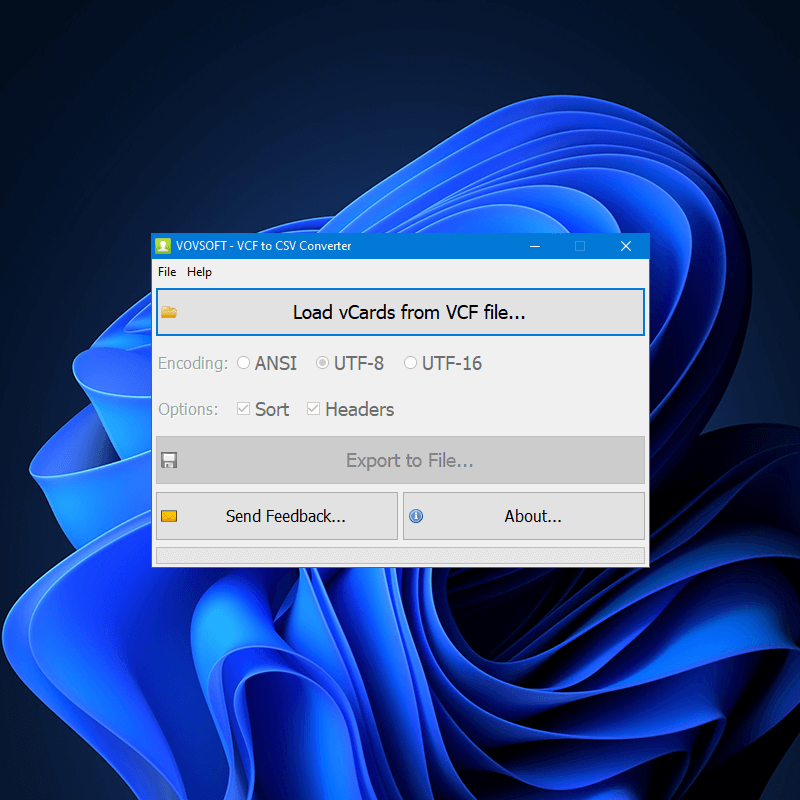
The whole program: load the VCF file, pick ANSI, UTF-8 or UTF-16, keep sorting and headers on, and export.
Features
CSV laid out for the program you're importing into
VCF to CSV Converter writes CSV in the column layout Outlook, Gmail or Yahoo Mail expects, or a plain Excel-friendly CSV, so the import maps names and numbers to the right fields. Version 4.6 added the German Outlook layout too.
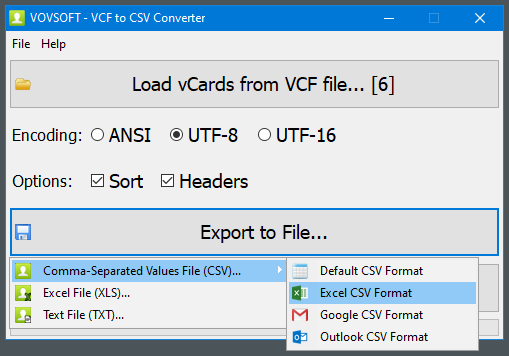
Export to File: CSV (Default, Excel, Google or Outlook format), Excel XLS or a text file. Six vCards are loaded here.
All the usual contact fields
VCF to CSV Converter exports names (split into first and last name), every phone number and email, addresses, split into separate fields, organization, website, birthdate and notes, including multi-line notes in the Outlook format.
Big files, done offline
VCF to CSV Converter runs on your PC with multi-threaded processing and never sends contacts online, unlike upload-based converter websites with size limits. One user reports 7,243 vCards converted in 10 seconds.
Real-World Uses
- Moving an iPhone's contacts, exported from iCloud as one VCF file, into desktop Outlook.
- Turning an Android backup into an Excel list to clean up duplicates and old numbers.
- Importing an old Windows Live Mail address book into Outlook, which only takes CSV.
- Building a customer list for a mail-merge from a folder of exported business cards.
Who It's For, and Who Should Skip It
It suits anyone with more than a handful of contacts in a VCF file who wants them in Outlook, Gmail, Yahoo or Excel without uploading them to a website.
Skip it if you have under 50 contacts (the free trial already handles that) or if your contacts already live in Google Contacts, which can export CSV for free. If you need to edit or clean the vCards themselves rather than convert them, Vovsoft's VCF Editor is the better fit.
Usage Guide
- Export your contacts as a VCF file from your phone, iCloud, Google Contacts or Outlook.
- Download the installer or the portable edition and start VCF to CSV Converter.
- Click Load vCards from VCF file and select the file.
- Choose the encoding (UTF-8 suits most names with accents or non-Latin letters).
- Click Export to File and pick the CSV format for Outlook, Google, Yahoo or Excel, or XLS or TXT, then import that file in the target program.
Before you buy
Run the free version first: it converts the first 50 contacts, enough to check that your target program imports the fields correctly. One license covers one person on any number of their own computers. Vovsoft's general policy is no refunds once the key is delivered, since a free trial comes first (accidental orders are generally refunded, at its discretion, and PayPro Global has the final say on its orders).
Where it falls short
- It only converts one way, VCF to CSV, XLS or TXT. Going back from CSV to VCF is a separate Vovsoft program.
- It can't read the Windows Contacts folder directly, an open request.
- The trial's 50 contacts are taken in sorted order, so names starting with symbols or digits come first, as one user pointed out.
What Users Say
On Vovsoft's site
VCF to CSV Converter's page shows 4.8 out of 5 from 12 ratings, with these comments among others.
"BUY! Simply, the app works as advertised. It converted a 7243 card VCard to CSV in 10 seconds" Ken
"Perfect transaction. The utility worked great. Got my 158 contacts converted over to Outlook." Butch Bridges
"I about went nuts trying to find a way to convert my Windows Live Mail address books to the ONLY format desktop OUTLOOK would recognize. After trying the trial version of Vovsoft I was sold." cahartley
"Program worked as expected. Accurate, easy to use. Fair price. No viruses." Anonymous User
Elsewhere
Vovsoft's testimonials page adds more short comments, such as "The app is great for converting .vcf email contacts file to .cvs or Excel. Works better than I expected." (Jwelte) and "It works as advertised. Quick and accurate." (Roland). Vovsoft as a company has a TrustScore of about 4.6 out of 5 from 411 reviews on Trustpilot, read through a summarizer.
Users praise speed and getting contacts into Outlook. The complaints are about the trial's limit rather than the conversions.
Comparisons
VCF to CSV Converter vs online converters
Online converters are free but upload your whole address book and often cap the file size. VCF to CSV Converter costs $19 once, works offline and handles thousands of vCards.
VCF to CSV Converter vs VCF to XLS Converter
Vovsoft also sells a separate VCF to XLS Converter. VCF to CSV Converter already exports XLS as well as the email-program CSV layouts, so for most people it covers both.
Editions and Pricing
| Edition | Price | License | What you get |
|---|
| Trial | Free | Personal, non-commercial use | Converts the first 50 contacts |
| Licensed | $19 one-time | Lifetime | Unlimited contacts, commercial use, no nag screen or ads, lifetime free updates |
The installer and portable editions use the same key, sent by email right after payment. Vovsoft's $99 Universal License covers all of its desktop programs.
FAQs
How do I get my iPhone contacts into Outlook with VCF to CSV Converter?
Export the contacts from iCloud as a VCF file, load it in VCF to CSV Converter, export with the Outlook CSV format, and import that CSV in Outlook.
Does VCF to CSV Converter keep accented or non-Latin names intact?
Yes, if you choose the right encoding. VCF to CSV Converter supports ANSI, UTF-8 and UTF-16, and UTF-8 suits most international names.
Does VCF to CSV Converter upload my contacts anywhere?
No. VCF to CSV Converter works entirely offline on your PC.
How many contacts can the free VCF to CSV Converter convert?
The free trial converts the first 50 contacts. The $19 license removes the limit.
Can VCF to CSV Converter handle a VCF file with thousands of contacts?
Yes. VCF to CSV Converter reads files holding many vCards, and one user converted 7,243 in about 10 seconds.
Is the VCF to CSV Converter license a subscription?
No. The $19 license is a one-time payment that never expires and includes future updates.
System Requirements
- Windows 11, 10, 8/8.1, 7 or Vista, 32-bit or 64-bit
- About 4 MB of disk space
Conclusion
VCF to CSV Converter is worth $19 if you have more than 50 contacts to move into Outlook, Gmail, Yahoo or Excel and want it done offline in a few clicks. The reason to buy it is the ready-made layouts for each email program, which save fiddling with column mapping. The reason not to: small jobs fit in the free trial, and contacts already in Google can be exported as CSV for free.
Download Free TrialBuy Now