Vovsoft Compare Two Texts: Spot What Changed Between Two Versions
Compare Two Texts is a $19 Windows program from Vovsoft that shows two texts side by side and color-codes every addition, deletion and change. It reads TXT, DOC and DOCX files or pasted text. The $19 is a one-time lifetime license, and there's a free trial.
Plenty of free tools already compare text, so this one has to win on being simple and on opening Word files directly.
Quick facts
- Version: 1.5, released September 24, 2026
- Developer: Vovsoft
- Platform: Windows 11, 10, 8/8.1, 7 and Vista, 64-bit only. No Mac or Linux version
- Input: Pasted text, or TXT, DOC and DOCX files
- Options: Ignore case, ignore whitespace, choice of comparison algorithm
- Summary: Counts of matches, modifications, additions and deletions
- Editions: installer (4.21 MB) and portable (3.43 MB), one license for both
- Price: $19, one-time payment, lifetime license with free updates
- Trial: free to try. Compares texts in full, with a nag screen. It isn't allowed for commercial use
- Refunds: Vovsoft's general policy is no refunds, since a free trial comes first. An order placed by accident is generally refunded, at the company's discretion, and PayPro Global has the final say on orders placed through it
- What we checked: installer file version 1.5.0.0 (4,416,024 bytes) with a valid code signature, downloaded from the vendor on November 10, 2026, and $19.00 total on the order page with no auto-renewal on November 10, 2026. We didn't compare documents ourselves
Download Free TrialBuy Now
Overview
Paste or load a text into each pane and press Compare. A second window lines the two up and highlights differing lines, with the changed words themselves marked since version 1.5.

The result window: changed words highlighted, Previous and Next buttons, and a status bar reading Matches 24, Modifies 14, Adds 3, Deletes 2.
Features
Line and word-level highlighting
Compare Two Texts colors whole lines that were added, deleted or modified, and since version 1.5 also marks the exact words that changed inside a line.
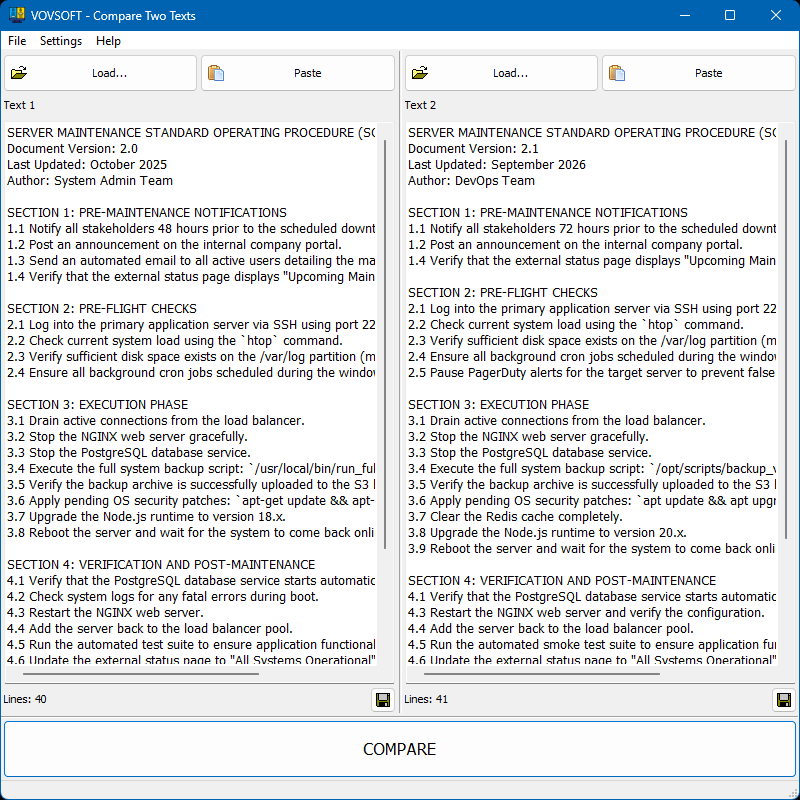
The input window with two versions of a document loaded, ready to compare.
Word documents as well as plain text
Compare Two Texts loads DOC and DOCX as well as TXT, comparing their text content in the same two-pane view.
Ignore the noise
Compare Two Texts can ignore case and whitespace with a single tick, and offers different comparison algorithms from a dropdown.
Fast navigation and a tally
Compare Two Texts jumps between differences with Previous and Next, and its status bar totals the matches, modifications, additions and deletions.
Who It's For, and Who Should Skip It
It suits writers, editors and office staff comparing two drafts, who want a plain window and not a developer's tool.
Skip it if you already have a free option: Word's own Review > Compare handles Word documents with tracked changes, and developers get the same side-by-side view free in Visual Studio Code. Windows even includes the command-line fc tool for a quick check.
Usage Guide
- Download the installer or the portable edition and start the program.
- Paste, load or drag a text into each pane.
- Press Compare.
- Tick Ignore Case or Ignore Whitespace if needed.
- Use Previous and Next to step through the differences.
Before you buy
One license covers one person on as many of their own computers as they use, or one shared workstation used by several people in turn. Using a key on too many computers at the same time can get it revoked.
Where it falls short
- It's 64-bit only, so it won't run on 32-bit Windows.
- You can't export the comparison to PDF or Excel. That's an open request.
- It doesn't load LibreOffice documents, another open request.
- It compares exactly two texts.
What Users Say
What reviewers say
Vovsoft's product page shows a rating of 4.5 out of 5 from 4 reviews. No written comments are published on the page, and four reviews don't say much.
Editions and Pricing
| Edition | Price | License | What you get |
|---|
| Trial | Free | Personal, non-commercial use | Compares texts in full, with a nag screen |
| Licensed | $19 one-time | Lifetime | Commercial use, no nag screen, lifetime free updates, all features |
The installer and portable editions use the same license key, and the key is delivered right after payment.
FAQs
Can Compare Two Texts compare Word documents?
Compare Two Texts can load DOC and DOCX files, and compares their text side by side.
Does Compare Two Texts work on 32-bit Windows?
Compare Two Texts is 64-bit only, on Windows Vista through Windows 11.
Is Compare Two Texts a subscription?
Compare Two Texts is a one-time purchase, with a license that doesn't expire and free updates.
System Requirements
- Windows 11, 10, 8/8.1, 7 and Vista, 64-bit only
- 4.21 MB for the installer, 3.43 MB for the portable edition
Conclusion
Worth $19 only if you want a simple diff window and don't already have one. The reason to buy it is an easy two-pane view that opens Word files. The main reason not to is that Word's Compare and free editors already do this, and results can't be exported.
Download Free TrialBuy Now