Vovsoft Website Watcher: Alerts When a Web Page Changes
Website Watcher is a $19 Windows program from Vovsoft that checks web pages and RSS feeds at set intervals and alerts you when they change. The $19 is a one-time lifetime license. The free trial has no Auto Check, so it only checks when you click.
Exam results, a restock, a price drop on one product page: this is for waiting on something. It's not the similarly named WebSite-Watcher, which is a different company's product.
Quick facts
- Version: 2.3, released May 2, 2026
- Developer: Vovsoft
- Platform: Windows 11, 10, 8/8.1, 7 and Vista, 32-bit and 64-bit. No Mac or Linux version
- Watches: Web pages and RSS or Atom feeds
- Filters: Strip HTML, line range, keyword, XPath, RegEx, exclusions
- Alerts: Sound, popup, or opening the URL in a browser you choose
- Editions: installer (5.69 MB) and portable (5.28 MB), one license for both
- Price: $19, one-time payment, lifetime license with free updates
- Trial: free to try. Manual checks only, with a nag screen. It isn't allowed for commercial use
- Refunds: Vovsoft's general policy is no refunds, since a free trial comes first. An order placed by accident is generally refunded, at the company's discretion, and PayPro Global has the final say on orders placed through it
- What we checked: installer file version 2.3.0.0 (5,972,520 bytes) with a valid code signature, downloaded from the vendor on November 10, 2026, and $19.00 total on the order page with no auto-renewal on November 10, 2026. We didn't monitor a site ourselves
Download Free TrialBuy Now
Overview
You add URLs, and each one shows when it last changed and its status. Auto Check repeats the check every set number of seconds. Each URL can have its own filter, and the Action and Log tabs set what happens and record what did.
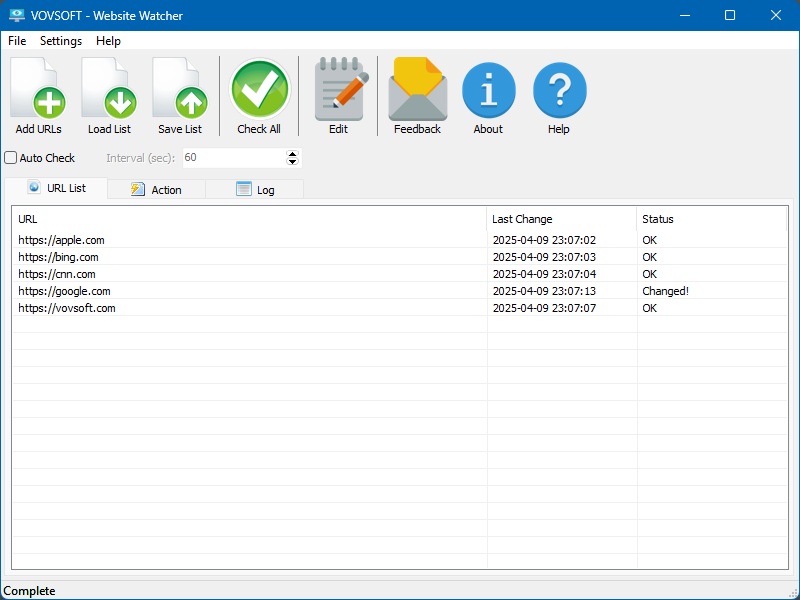
The URL list, with a last-change time and status per site, one of them showing Changed.
Features
Filters that stop false alarms
Website Watcher compares only the part of a page you care about: stripped text, a line range, a keyword, an XPath target or a regular expression. The Exclusions setting ignores lines that change on every load, such as a clock.

The per-URL Edit window, with Strip HTML, Line Range, Keyword, XPath and RegEx filters.
Down-site detection
Website Watcher also shows when a site can't be reached, so it doubles as a very basic uptime check.
RSS and Atom feeds
Website Watcher can watch feeds as well as ordinary pages, from the same list.
Local data
Website Watcher runs as a client on your own PC and keeps its copies in an embedded database, so no outside service sees your list.
Who It's For, and Who Should Skip It
It suits people waiting on a few specific pages, such as prices, stock or announcements, who keep a Windows PC running.
Skip it if the PC isn't on all day, since checks stop when it's off. Free browser extensions can watch a handful of pages, and an online monitoring service keeps working while your computer sleeps.
Usage Guide
- Download the installer or the portable edition and start the program.
- Click Add URLs and enter the pages.
- Use Edit on a URL to set a filter, such as a keyword or XPath.
- Choose alerts on the Action tab.
- Tick Auto Check and set the interval. This needs a license.
Before you buy
One license covers one person on as many of their own computers as they use, or one shared workstation used by several people in turn. Using a key on too many computers at the same time can get it revoked.
Where it falls short
- It can't send an email when something changes. That's an open request, so you have to be at the PC.
- It can't log in to a site, so it can't watch pages behind a password.
- Requests for a WebView browser mode are still open, so content drawn by JavaScript may not be seen.
- The check interval is global rather than per website, and it doesn't show the old and new versions side by side.
- The interface is English only, and alert sounds can't be MP3 files.
What Users Say
What reviewers say
Vovsoft's product page shows a rating of 4.1 out of 5 from 9 reviews. No written comments are published on the page, so that score is all there is to go on.
Editions and Pricing
| Edition | Price | License | What you get |
|---|
| Trial | Free | Personal, non-commercial use | Manual checks only, with a nag screen |
| Licensed | $19 one-time | Lifetime | Commercial use, no nag screen, lifetime free updates, all features |
The installer and portable editions use the same license key, and the key is delivered right after payment.
FAQs
Does the Website Watcher trial check automatically?
Website Watcher's trial doesn't include Auto Check, so scheduled monitoring needs the $19 license.
Can Website Watcher monitor only part of a page?
Website Watcher can limit a check to a line range, a keyword, an XPath target or a regular expression.
Does Website Watcher email me when a page changes?
Website Watcher alerts with a sound, a popup or by opening the URL. Email isn't supported yet.
Is Website Watcher a subscription?
Website Watcher is a one-time purchase, with a license that doesn't expire and free updates.
System Requirements
- Windows 11, 10, 8/8.1, 7 and Vista, 32-bit or 64-bit
- 5.69 MB for the installer, 5.28 MB for the portable edition
Conclusion
Worth $19 if you keep a PC on and want to watch a few pages closely. The reason to buy it is precise filters with no monthly fee. The main reason not to is the lack of email alerts or logins, so it only helps while you're at the computer.
Download Free TrialBuy Now