DU Meter: See Where Your Internet Data Goes, and Get Warned Before You Hit the Cap
DU Meter is a $24.95 Windows bandwidth monitor from Hagel Technologies that graphs your PC's download and upload speed live, keeps hourly-to-monthly usage reports, and warns you (or cuts the connection) when you pass a data limit you set. It's a one-time purchase per PC, with a 30-day fully working trial, for anyone on a capped or metered connection who wants to know exactly what their computer is using.
If your ISP, mobile hotspot or satellite plan has ever sent a "you've used 90% of your data" message out of nowhere, DU Meter answers the question that follows: what used it, and when?
Quick facts
- Version: 9.50, released August 4, 2026. A DU Meter 10 beta is open to everyone
- Developer: Hagel Technologies Ltd., which has sold DU Meter since the late 1990s
- Platform: Windows 11 and 10, Windows Server 2025, 2022 and 2019, on 64-bit Intel or AMD processors only. No ARM, Mac or Linux version
- Price: $24.95 for one PC; Family Pack $49.95 for up to 5 PCs in one household (personal use). One-time payment, no subscription
- Updates: free to every 9.x version; a license bought in 2026 also registers the DU Meter 10 beta
- Trial: 30 days, every feature working
- Guarantee: 30-day money-back guarantee
- What we checked: the installer we downloaded from hageltech.com is version 9.50, 12.3 MB, digitally signed by Hagel Technologies Ltd; the order page showed DU Meter at $24.95 ("One license per PC, no subscription") and the Family Pack at $49.95 on November 8, 2026. We didn't install DU Meter or measure its accuracy against an ISP meter.
Buy NowDownload Free Trial
Overview
DU Meter installs a network driver and a Windows service, then sits in the background counting every byte your computer sends and receives. A small floating window shows the current download and upload rates as a graph or as plain numbers, and everything is saved to a database you can report on later.
It separates Internet traffic from local network (LAN) traffic, so copying files to your NAS doesn't eat into what you think you've used from your data plan. Because the service starts with Windows, it keeps counting even when nobody is logged in, which is exactly when Windows Update and cloud backups like to run.

DU Meter's display styles: numbers only, split download and upload graphs, a bar graph, a running cost display, and the Internet / LAN / Programs tabs. All screenshots on this page are from DU Meter 7; version 9 has a refreshed color palette and dark and light schemes, so it looks slightly different.
Features
Usage reports by hour, day, week and month
DU Meter's Totals and Reports window shows today's traffic, running totals with projections, a traffic volume chart, and hourly, daily, weekly and monthly reports split into received, sent and total. Reports can be exported or generated automatically on a schedule. A year of monthly figures is one click away, which makes it easy to spot the month a new backup job doubled your usage.
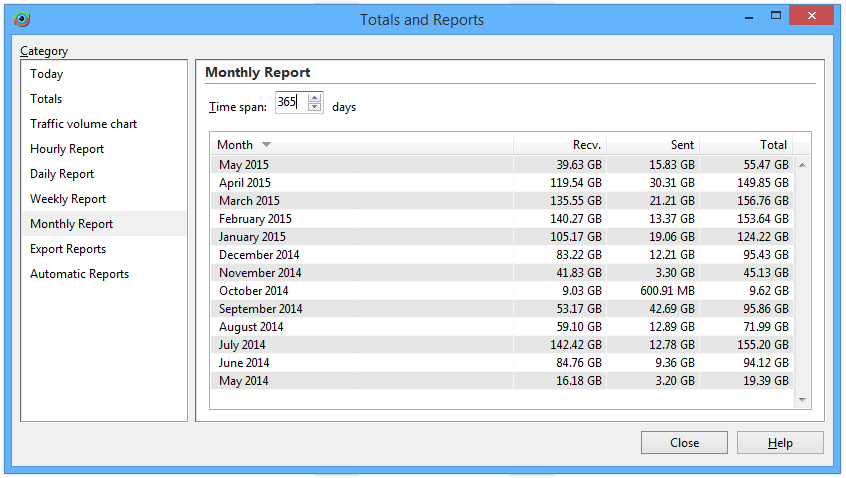
The Monthly Report over a 365-day span, with received, sent and total traffic per month.
Data cap alerts that can cut the connection
DU Meter can watch a short-period limit and a long-period limit (such as your monthly allowance from the day your ISP resets it) and warn you as you approach and pass them. An alert can pop up, email you, or block all incoming and outgoing network traffic after a countdown, unless you abort or snooze it. Email alerts arrive even when nobody is logged in, and since version 9.20 they say exactly what triggered them.
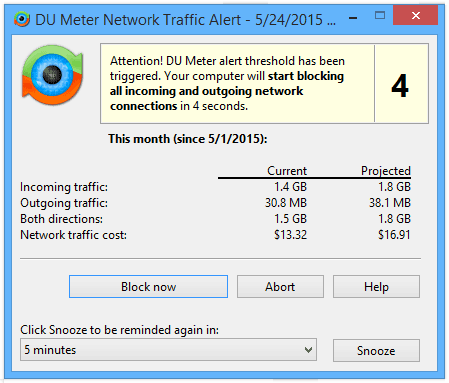
A traffic alert about to block all network connections, with this month's current and projected traffic and cost.
Which programs are using your bandwidth
DU Meter's Network Connections Viewer lists each program with its Internet and LAN traffic sent and received, plus tabs for open TCP connections and listening TCP and UDP ports. When a browser, sync client or updater is quietly pulling gigabytes, this is where you see it, and DU Meter can also block network connections.

The Programs tab of the Network Connections Viewer, with per-program Internet and LAN traffic.
What your data actually costs
DU Meter calculates data transfer costs from your plan: billing period, free allowance, the price per megabyte, and a cheaper off-peak or weekend rate laid out on an hour-by-weekday grid. The running cost can sit in the main window, so a metered connection shows money, not just megabytes.
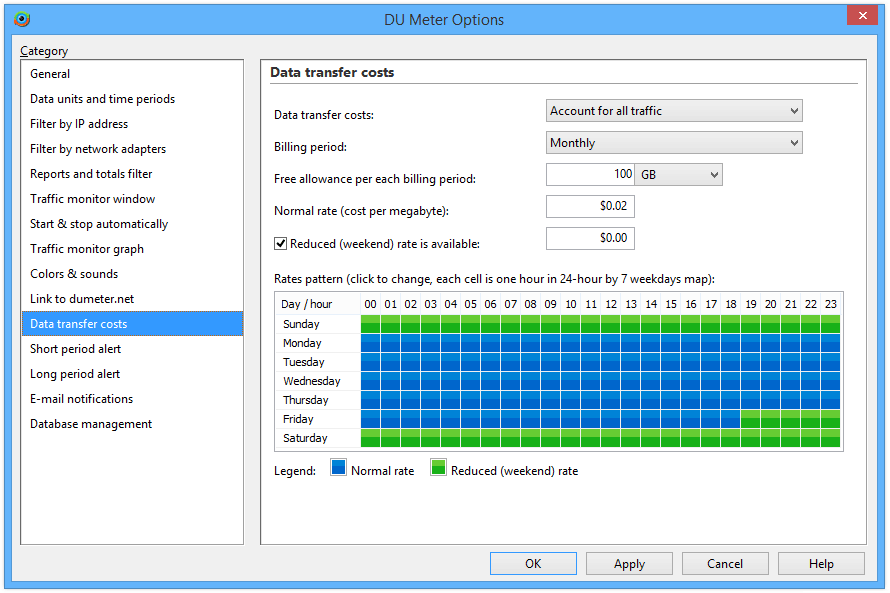
The Data transfer costs options: monthly billing, a 100 GB allowance, per-megabyte rates and the weekend rate pattern.
A stopwatch for timing downloads and connections
DU Meter's Stopwatch measures one transfer or test period: elapsed time, data transferred, maximum, average and current rates in each direction, and the minimum and average Wi-Fi signal quality. It's a quick way to check whether a slow download is your Wi-Fi or the server.
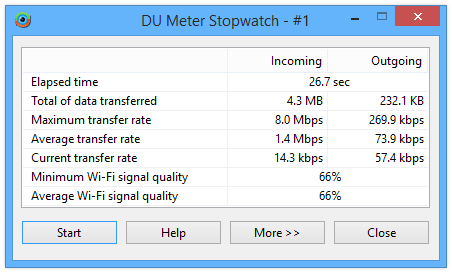
The Stopwatch after a 26.7-second test, showing incoming and outgoing rates and Wi-Fi signal quality.
Filters and fine control
- Monitor all network adapters combined or pick specific ones (useful for VPN adapters)
- Filter traffic by IP address and choose what reports and totals count
- Dark and light color schemes, high-DPI and multi-monitor scaling, and a click-through mode for the graph window
- Start and stop automatically, colors and sounds, and database management
Real-World Uses
- Capped home broadband or satellite: set the allowance and reset day, and get an email at 80% instead of a surprise overage charge.
- Working from a phone hotspot: have DU Meter cut the connection when the daily budget is spent, before a cloud sync burns the rest of the month's data.
- "Why is my Internet slow?": open the connections viewer and find the updater or torrent client using the bandwidth.
- A teenager's PC: DU Meter can email you when weekly or monthly traffic passes a threshold you set.
- Office PCs: companies buy volume licenses to log each machine's usage; five or more licenses get automatic discounts.
Who It's For, and Who Should Skip It
DU Meter fits Windows users on metered or capped connections who want accurate per-PC history, alerts and cost tracking, and who prefer paying once over a subscription.
Skip it if you want to see your whole household's usage: DU Meter only counts the PC it's installed on, not phones, TVs or other computers, so a router with traffic monitoring is the right tool. Skip it too on an ARM laptop (Surface Pro X, Snapdragon), a Mac or Linux, and if all you want is a speed readout in the Windows 11 taskbar, since DU Meter 9 can't put one there (see below), and a free taskbar meter may do.
Usage Guide
- Download and install DU Meter on a 64-bit Intel or AMD Windows PC. Upgrading from an older DU Meter? Install on top without uninstalling; your history and settings are kept.
- Place the window where you want it and pick a display style: graph, split graphs, or numbers only.
- Choose what to monitor in User Options: all network adapters combined, or a specific one. Pick "all" if you use a VPN.
- Set your data limit: enter your monthly cap, the day your billing cycle starts, and warning thresholds such as 80% and 90%.
- Add email notifications if you want alerts when you're away from the PC.
- Register with the serial number emailed to you after purchase; it arrives as soon as the payment goes through.
Before you buy
- No Windows 11 taskbar meter in version 9. Windows 11 removed the taskbar bands DU Meter used on Windows 10, so on Windows 11 you use the floating window, or restore the Windows 10 taskbar with StartAllBack or ExplorerPatcher. The DU Meter 10 beta brings the numbers back to the Windows 11 taskbar.
- Major upgrades aren't always free. Updates within 9.x are free. Moving to a new major version is free or discounted depending on when you bought; a license bought in 2026 already registers the version 10 beta.
- It won't match your ISP to the byte. Packets lost on the way or dropped by your router are counted by the ISP but not by DU Meter, while local broadcast and LAN traffic can make DU Meter's total higher.
- Family Pack is personal use only and covers up to 5 PCs in one household. For a business, buy single licenses; volume discounts start at five.
Where it falls short
- One PC at a time: no view of other devices on your network.
- Windows x64 only: DU Meter's kernel-mode network driver has no ARM build, and there's no Mac, Linux or phone version.
- Per-program history is new: in version 9 the per-program view is live connections; the DU Meter 10 beta is the first to record each program's traffic over time in Totals and Reports.
- VPNs need setup: VPN traffic can be missed until you monitor the VPN adapter or all adapters combined.
- Free competition: basic speed meters and usage counters are free, so DU Meter's case rests on its alerts, reports and cost tracking.
What Users Say
DU Meter has been around for decades, but recent independent reviews are scarce: most coverage is download-site write-ups and release notes. Here is what we could verify.
Downloadcrew
Downloadcrew's review (written for version 7.30) praised its flexibility: "The program is unusually smart. You don't have to monitor all network traffic, for instance, although that's one option: you can also have DU Meter track just your internet activities, or only your local LAN traffic."
Its verdict is the fairest one-line summary we found: "DU Meter is an excellent network monitor, there's no doubt, but all the free competition does leave it looking a little expensive".
FileHorse (8.2 out of 10)
FileHorse's review by Daniel Leblanc notes that "The app is lightweight and operates in the background without consuming significant system resources," and calls it "an excellent tool for users seeking an easy-to-use bandwidth monitoring solution." It marks down the lack of a mobile version.
PC World and users, as quoted by Hagel Technologies
Hagel's site quotes PC World Magazine: "With its ability to monitor and track both immediate bandwidth usage and longer-term usage trends, DU Meter can save you a lot of time and trouble, especially in a day and age when some broadband ISPs are cracking down on some customers for what the ISPs consider excessive downloading."
And user Keith Goode: "If, like me, you have a monthly usage limit, and you really want to know where it's going, get DU meter. It will reveal all. It tells me exactly what my system is up to and enables me to monitor my ISP's performance. The total usage logs and alerts are invaluable."
The common threads: reviewers agree DU Meter is accurate, light and flexible, with better alerts and reports than free meters, and that it costs more than those free meters. The sore point for current users is the Windows 11 taskbar: Hagel dropped its experimental Windows 11 taskbar band after a February 2023 Windows update broke it, and the version 10 beta is its fix. Hagel lists volume customers including Intel, Qualcomm, Reuters and the US Army.
Comparisons
DU Meter vs Windows' built-in data usage
Windows Settings shows per-app data use for the last 30 days and can set a simple data limit. DU Meter adds live graphs, years of history, hourly-to-monthly reports with export, cost calculation, email alerts and the option to block traffic automatically.
DU Meter vs a router's traffic monitor
A router (or firmware like OpenWrt) sees every device in the house; DU Meter sees one PC in much more detail. If your question is "which device", use the router; if it's "which program on this PC, and when", use DU Meter.
Editions and Pricing
| License |
PCs |
Price |
Use |
| Single license | 1 | $24.95, one-time | Home or work |
| Family Pack | Up to 5 in one household | $49.95, one-time | Personal use only |
| Volume, 5-9 licenses | 5-9 | $19.96 each (20% off) | Business |
| Volume, 10-19 licenses | 10-19 | $17.47 each (30% off) | Business |
Volume discounts apply automatically when you raise the quantity of the single license on the order page, going down to $9.98 a copy at 500-999 licenses.
Buy Single License ($24.95)Buy Family Pack ($49.95)
FAQs
Is DU Meter a subscription?
No. DU Meter is a one-time purchase per PC, and updates within the same major version (9.x) are free.
Can DU Meter monitor my phone or other computers on the network?
No. DU Meter counts only the traffic of the PC it's installed on. For every device in the house, use your router's traffic monitor, or install DU Meter on each Windows PC (the Family Pack covers five).
Does DU Meter work on a Snapdragon or Surface Pro X laptop?
No. DU Meter needs a 64-bit Intel or AMD processor because its kernel-mode network driver has no ARM version, and the installer stops on unsupported processors.
Does DU Meter count VPN traffic?
Yes, once it's monitoring the right adapter. DU Meter may miss VPN traffic while it watches only your physical adapter; choose "All network interfaces combined" in User Options, or select the VPN adapter.
Why doesn't DU Meter's total match my ISP's bill?
DU Meter and your ISP count at different points. Your ISP also counts packets lost or dropped by your router before they reach the PC, so DU Meter can read slightly lower; local broadcast and LAN traffic can make it read higher if you count all traffic.
Will I keep my history when I upgrade DU Meter?
Yes. DU Meter installs on top of the previous version without uninstalling, imports the accumulated statistics and keeps your options. If you try the version 10 beta and want to go back, installing DU Meter 9 over it keeps your history too.
Can I use the Family Pack in my home office?
No. The DU Meter Family Pack is for personal use in one household. Business use needs single licenses, which get volume discounts from five copies.
System Requirements
- Windows 11 or 10; Windows Server 2025, 2022 or 2019
- 64-bit Intel or AMD (x64) processor; ARM is not supported
- About 12.3 MB download
Conclusion
DU Meter is worth $24.95 if you live with a data cap or pay by the gigabyte on Windows: the alerts that can cut the connection, the long-term reports and the cost tracking go well beyond Windows' own counter and the free speed meters, and you pay once.
The reason to hold off is Windows 11's taskbar: if a speed readout next to the clock is what you want, version 9 can't do it, so try the free 30-day trial (or the version 10 beta) first. And if the question is your whole household, not this PC, a router-level monitor is the better tool.
Buy NowDownload Free Trial