Vovsoft Find And Replace Multiple Files: Change the Same Text Across a Whole Folder in One Click
Find And Replace Multiple Files is a $19 Windows program from Vovsoft that replaces a word, a phrase or a regular expression across a list of text files in one run. The $19 is a one-time lifetime license, and there's a free trial.
A company name changes, a server moves, or the same broken snippet turns up in thousands of pages. Opening each file by hand stops being an option quickly. This program takes the list of files and does the replacing for you.
Quick facts
- Version: 2.3, released October 18, 2024
- Developer: Vovsoft
- Platform: Windows 11, 10, 8/8.1, 7, Vista and XP, 32-bit and 64-bit. No Mac or Linux version
- Works on: text files. Word and Excel documents aren't supported
- Matching: plain text, case-sensitive, whole word, regular expressions
- Editions: installer (3.31 MB) and portable (1.99 MB), one license for both
- Price: $19, one-time payment, lifetime license with free updates
- Trial: free to try with replacing included. It has a nag screen and isn't allowed for commercial use
- Refunds: Vovsoft's general policy is no refunds, since a free trial comes first. An order placed by accident is generally refunded, at the company's discretion, and PayPro Global has the final say on orders placed through it
- What we checked: installer file version 2.3.0.0 (3,479,128 bytes) with a valid code signature, downloaded from the vendor on November 10, 2026, and $19.00 total on the order page with no auto-renewal on November 10, 2026. We didn't run a replace job on our own files
Download Free TrialBuy Now
Overview
The window has two halves. The top holds the file list and the bottom holds the Find and Replace boxes, both of which accept several lines of text. You drag in files or whole folders, fill in the two boxes, tick the options you want and press Replace All Files.
Version 2.2 added automatic encoding detection and support for larger files, and version 2.3 added regular expressions and folder drag and drop.
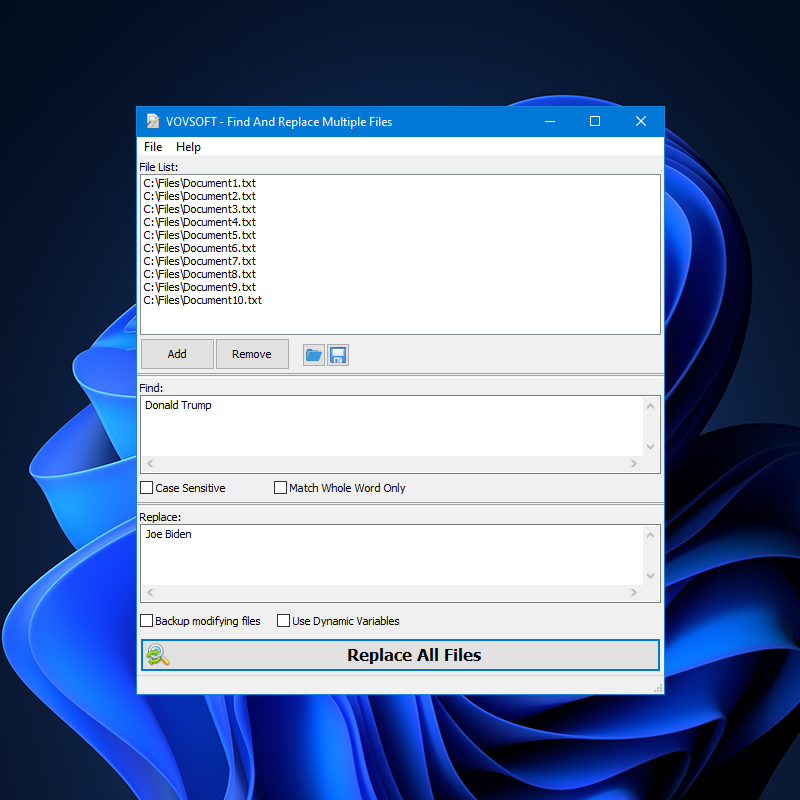
The main window with ten text files in the File List, the Find and Replace boxes, and the Replace All Files button.
Features
Replace across every file in the list
Find And Replace Multiple Files runs one search and replace over the whole file list, and you build that list by dragging in files and folders or through the Add button.
Regular expressions for pattern changes
Find And Replace Multiple Files has a Use RegEx option for replacing patterns instead of fixed text, such as dates, IDs or tags with changing contents.
Case and whole-word control
Find And Replace Multiple Files can match upper and lower case exactly, and Match Whole Word Only stops a search for "cat" from changing "category".
Backups before files change
Find And Replace Multiple Files has a Backup modifying files option that writes a copy before changing a file. Since version 2.2 it won't overwrite a backup that already exists, so a second run doesn't destroy your first safety copy.
Dynamic variables in the replacement
Find And Replace Multiple Files can insert placeholders such as the file name into the replacement text when Use Dynamic Variables is on, so each file can get its own value.
Command line for scripted jobs
Find And Replace Multiple Files can be run from a Windows command prompt through frmf.exe, with three arguments pointing at a file list, a text file holding the search string and a text file holding the replacement. Add -execute and the replacement runs straight away.
Benefits
- You make one decision once, instead of repeating it file by file and missing a few.
- Backups let you try a change on real files with a way back.
- The portable edition runs without installation and the program doesn't need administrator rights, which helps on a locked-down work PC.
Real-World Uses
- Cleaning up a hacked website: strip an injected script from every HTML or PHP file in a downloaded copy of the site.
- Moving a server: change an old host name or path across a folder of config files.
- Rebranding documentation: swap a product or company name across Markdown and text files.
- Fixing exported data: correct a repeated code or label across a batch of CSV files.
Who It's For, and Who Should Skip It
It suits webmasters, writers and admins who want a small dedicated tool for bulk text changes, and don't want to learn a code editor to do it.
Skip it if your files are Word or Excel documents, because it doesn't edit them. If you already work in a code editor, its built-in replace across a folder does the same job for free.
Usage Guide
- Download the installer or the portable edition and start the program.
- Drag your files or folders into File List, or click Add.
- Type the text to find and the replacement in the two boxes.
- Tick Backup modifying files, plus Case Sensitive, Match Whole Word Only, Use RegEx or Use Dynamic Variables if you need them.
- Click Replace All Files, then check the count of changed files in the result.
Before you buy
- One license covers one person on as many of their own computers as they use, or one shared workstation used by several people in turn. Using a key on too many computers at the same time can get it revoked.
- Replacing starts as soon as you click, so turn on backups or work on a copy of the folder.
- The latest release is from October 2024. The feature set is stable, but don't expect frequent updates.
Where it falls short
- It replaces one search term per run. Users have asked for a list of find-and-replace pairs, and it isn't there yet.
- The result reports how many files matched, not how many occurrences were changed, and users have asked for a list of which files were and weren't changed.
- Word and Excel support are the most requested features and remain unavailable.
What Users Say
On Vovsoft's own site
Vovsoft's product page shows a rating of 4.5 out of 5 from 4 reviews.
"the software worked wonderfully ...my 24 year old web sight was hacked causing 10’s of thousands of pages to be compromised i was in trouble !!! ... i used your software to find and replace !!! I was astounded for software found and replaced 100,s of thousands of script very very quickly and very very accurately." Theron
"EXCELLENT! Program worked GREAT for me, Thanks." Anonymous User
That's a small sample, and all of it comes from the vendor's site. The criticism shows up instead in the public feature-request list, where the top votes go to Office document support and better reporting of what changed.
Comparisons
Find And Replace Multiple Files vs a code editor
A code editor such as Visual Studio Code replaces across a folder for free and shows every match before you commit. Vovsoft's tool costs $19 but is a small single-purpose program with a backup option, a portable edition and a command line built around a file list.
Find And Replace Multiple Files vs Vovsoft Search Text In Files
Search Text In Files is the Vovsoft tool for finding where text appears. Find And Replace Multiple Files is the one that changes it. If you only need to locate a phrase, you don't need this one.
Editions and Pricing
| Edition | Price | License | What it adds |
|---|
| Trial | Free | Personal, non-commercial use | Replacing included, with a nag screen |
| Licensed | $19 one-time | Lifetime | Commercial use, no nag screen, lifetime free updates |
The installer and portable editions use the same license key, the key is delivered right after payment, and the order page offers a volume discount if you buy several.
FAQs
Does Find And Replace Multiple Files work on Word documents?
Find And Replace Multiple Files doesn't work on DOC, DOCX, XLS or XLSX files. It's for files stored as plain text, such as TXT, HTML, CSV, XML or source code.
How do I get my files back after a replacement in Find And Replace Multiple Files?
Find And Replace Multiple Files keeps a copy of each file it changes when Backup modifying files is ticked, so turn that option on before you run a replacement.
Do I have to install Find And Replace Multiple Files?
Find And Replace Multiple Files comes in a portable edition as well, and since version 1.7 it doesn't need administrator rights.
How do I move Find And Replace Multiple Files to a new PC?
Find And Replace Multiple Files activates on a new computer with the same license key, and you don't need to deactivate the old one first. Lost keys can be retrieved from the Vovsoft User Panel with your purchase email.
Is Find And Replace Multiple Files a subscription?
Find And Replace Multiple Files is a one-time purchase. Vovsoft license keys don't expire, and updates are free for the life of the license.
Can Find And Replace Multiple Files open the files it lists?
Find And Replace Multiple Files has menu items to open a listed file, open its location in Explorer, or open it in Notepad, which helps when you want to check a result.
System Requirements
- Windows 11, 10, 8/8.1, 7, Vista or XP, 32-bit or 64-bit
- 3.31 MB for the installer, 1.99 MB for the portable edition
- English interface
Conclusion
Worth $19 if bulk text changes are a recurring chore and you want a dedicated tool rather than a code editor. The one reason to buy it is how direct it is: a file list, two boxes, a backup checkbox, and regex and a command line when you need more. The main reason not to is that it only touches plain text, so anyone working in Word or Excel needs something else. Try it on a copy of the folder first.
Download Free TrialBuy Now