WinToUSB Professional: Run a Full Windows From a USB Drive
WinToUSB Professional is a $44.95 one-time Windows tool from Hasleo Software that installs a complete, portable Windows 11 or 10 on an external SSD, USB flash drive or Thunderbolt drive, so you can boot your own desktop on another PC. It suits technicians, travelers and anyone who wants a working Windows in their pocket.
The price includes lifetime free upgrades, and there's a free edition for home use. Pro matters when you need to clone your current system, encrypt the drive, or use it at work.
Quick facts
- Version: 10.9, installer dated September 10, 2026
- Developer: Hasleo Software
- Runs on: Windows 7 or later and Windows Server 2008 or later, x64, x86 and ARM64
- Price: $44.95 once for 2 PCs, lifetime free upgrades
- Free edition: yes, home use only
- Guarantee: up to 30 days, for the cases in Hasleo's refund policy
What we checked: installer version 10.9.0.2 (61 MB, digitally signed by Chengdu Hasile Technology Development Co.), and the order page, which showed $44.95 as a lifetime license with no renewal, on November 6, 2026. We didn't build a portable drive, so we can't say how fast one runs.
Download Free TrialBuy Now
Before you buy
- Your drive decides the experience. Hasleo warns that common flash drives are slow, and recommends an external SSD or a high-performance USB drive.
- You still need a Windows license for the copy you put on the drive.
- Try the free edition first. It builds Windows To Go from an ISO, and Hasleo's policy generally won't refund a purchase made without reading the description.
Overview
Microsoft's own Windows To Go feature was removed from Windows years ago, and it only ever worked on certain editions and certified drives. WinToUSB, available since 2014, fills that gap. It works with certified and uncertified drives, and the wizard takes three steps: choose a source, choose the destination drive, wait for it to finish.
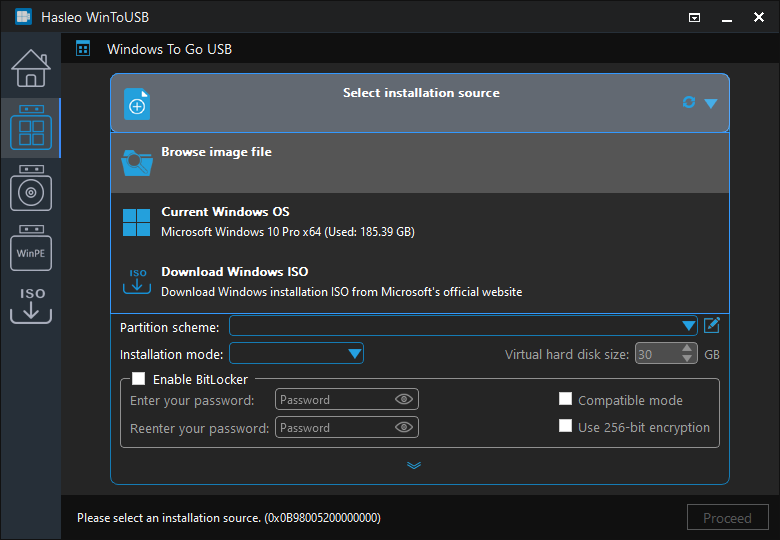
The first step: choosing the Windows source and edition.
Features
Portable Windows from an ISO or image file
WinToUSB Professional creates Windows To Go from ISO, WIM, ESD, SWM, VHD and VHDX files, a CD or DVD, or a Hasleo Backup Suite image. VHDX and backup images need Pro.
Clones your current Windows to a USB drive
WinToUSB Professional can copy the Windows you're running now to an external drive, so you take your programs and settings with you. Delta Clone later updates that drive without a full rebuild.
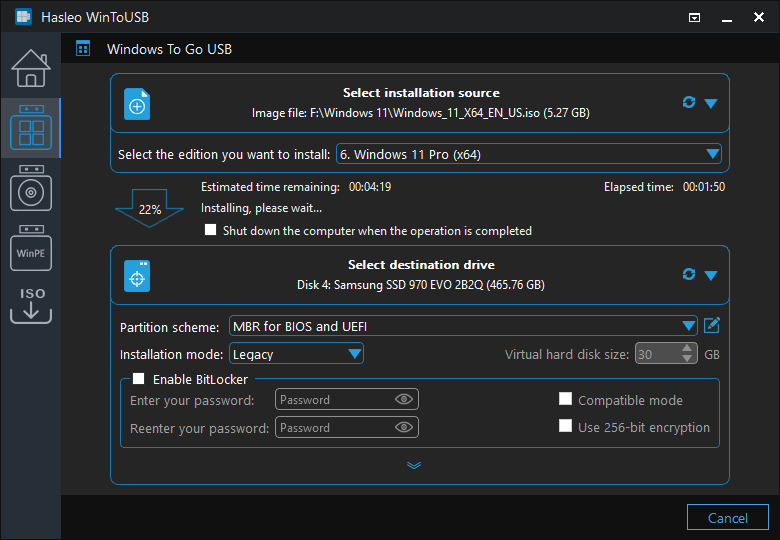
The wizard installing Windows to the drive.
BitLocker encryption for a drive you could lose
WinToUSB Professional can encrypt a portable Windows with BitLocker, which is important for a drive carrying your whole desktop.
Installation and rescue USBs
WinToUSB also builds a Windows installation USB that works on Legacy BIOS and UEFI PCs, and a bootable WinPE USB for recovery. It can download official ISO files from Microsoft. These tools are in the free edition as well.
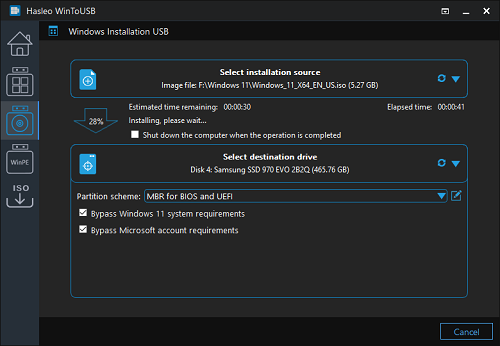
The Windows Installation USB Creator.
Windows for Mac computers and ARM
WinToUSB can create portable Windows for Mac computers, according to Hasleo, and it supports x64, x86 and ARM64 Windows.
Benefits
- Your desktop, on any PC. Same apps and same files, wherever you boot it.
- A safe space to test. Try software or a new Windows version without touching your main install.
- No yearly fee. Lifetime upgrades come with this license.
- A spare PC in your bag. If your main system fails, you can still boot and work.
Real-World Uses
- Carrying a work environment on an external SSD between home and a client site, on PCs you're allowed to use.
- Running Windows on a Mac for one app.
- Repairing PCs with a portable toolkit that boots anywhere.
- Trying a Windows 11 build on a spare drive.
Who It's For, and Who Should Skip It
WinToUSB Professional fits technicians, home-lab users and people who work on several computers. It's also the correct license for business use on up to 2 PCs, since the free edition is for home use only.
Skip Pro if you only need one portable Windows at home built from an ISO: the free edition does that. Skip it if you just want a Windows installer USB, which the free edition and Microsoft's Media Creation Tool both make. A company with many PCs needs the Enterprise edition. Your employer may also block booting from USB, so check first.
Usage Guide
- Install WinToUSB on a Windows PC and connect a fast external drive.
- Back up the drive, since it gets erased.
- Choose Windows To Go, then pick an ISO or the running system.
- Select the Windows edition and the destination drive.
- Let it finish, then boot the target PC from the drive and complete setup.
Where it falls short
- Slow on ordinary flash drives. Installation and daily use can both drag, as Hasleo itself says.
- Windows 7 isn't really portable. Hasleo warns of driver problems on different PCs, and it needs a USB 2.0 port to boot.
- Upgrades need a separate tool. Moving a portable drive to a newer Windows release uses Hasleo Windows To Go Upgrader.
- Security trade-offs. The installer feature that bypasses Windows 11 requirements can leave a PC outside Microsoft's supported hardware list.
- Windows only. The program itself runs on Windows, not macOS.
What Users Say
Independent reviews
We didn't find a full review from a major magazine. Neowin lists each new release, and Softpedia and Software Informer awards appear on Hasleo's page. A thread on the Eleven Forum tests the paid version, but it blocked our access, so we can't report its conclusions. Hasleo's own forum holds user questions, mostly on specific hardware. Comss.ru, a Russian site, has compared the editions, confirming that BitLocker and backup image support are paid features.
The pattern: WinToUSB has a long history and a steady release schedule, but little in-depth outside testing. Your own trial with your own drive will tell you more than reviews can.
Comparisons
WinToUSB Professional vs WinToUSB Free
Free builds Windows To Go from ISO, WIM, ESD, SWM and VHD files, for home use. Professional adds VHDX and backup images, cloning, Delta Clone, BitLocker, partition resizing, and business use on 2 PCs.
WinToUSB vs Rufus
Rufus is free and also offers a Windows To Go mode, and it's excellent for installer USBs. WinToUSB has more portable Windows options, such as cloning a running system, Delta Clone and BitLocker.
Editions and Pricing
| Edition | Price | License | Best for |
|---|
| Free | $0 | Home use | One portable Windows from an ISO |
| Professional | $29.95, or $44.95 with lifetime upgrades | 2 PCs, home office and business | Most paying users |
| Enterprise | $199.95, or $299.95 with lifetime upgrades | Unlimited PCs at one site | Companies |
Prices exclude VAT. The Lifetime Free Upgrades option on this page costs $15 more than the plain Professional license, and it means you never pay for a new major version.
FAQs
Is WinToUSB Professional a one-time purchase?
Yes. WinToUSB Professional + Lifetime Free Upgrades costs $44.95 once, and the order page confirmed a lifetime license with no renewal.
Does WinToUSB work with Windows 11?
Yes. WinToUSB creates portable Windows 11, 10, 8 and 7, including ARM64, and it runs on Windows 7 or later.
Can I use WinToUSB Free at work?
No. WinToUSB Free is for home use. Business use, including using a portable drive made with it, needs the Professional or Enterprise edition.
How many computers does a WinToUSB Professional license cover?
WinToUSB Professional can be activated on 2 PCs, and the license can't be moved to another PC once it's registered on one.
What size of drive do I need for WinToUSB?
WinToUSB needs enough room for Windows and your programs. A fast external SSD is the best choice, and Hasleo recommends high-performance drives.
Can I get a refund on WinToUSB?
WinToUSB has up to a 30-day money-back guarantee, for the accepted cases in Hasleo's refund policy. Not reading the description generally doesn't qualify, so try the free edition first.
System Requirements
- Windows 7 or later, or Windows Server 2008 or later (x64, x86 or ARM64)
- 1 GHz or faster processor
- 1 GB RAM, 2 GB recommended
- 1 GB free disk space
- A fast external drive for the portable Windows
Conclusion
Verdict: WinToUSB Professional is worth $44.95 if you need to clone your running Windows, encrypt a portable drive, or use it for work. With lifetime upgrades and regular releases, it's a good one-time buy.
The one reason to buy is a real, encrypted copy of your own Windows that boots from a drive. The main reason not to is that the free edition already handles a simple home portable Windows from an ISO, so start there.
Download Free TrialBuy Now