Macro Recorder Standard: Record a Task Once, Replay It Whenever You Like
Macro Recorder Standard is a $99.95 one-time license for a Windows and Mac tool that records your mouse and keyboard actions and plays them back on repeat, with no scripting. It suits people who need that at work, because a free edition already covers personal use.
If you spend your day pressing the same keys, clicking the same buttons and filling the same forms, this is a tape recorder for those motions: press Record, do the job once, press Stop, then set how many times it should run. It also doubles as an auto key presser, since a macro can press any key a set number of times, hold it down, or tap it at a timed interval.
Quick facts
- Version: 5.0.40 for Windows (September 25, 2026), 5.0.41 for Mac (September 28, 2026)
- Developer: Bartels Media GmbH, Trier, Germany
- Price: $99.95 once, not a subscription, 12 months of updates included
- Platforms: Windows and macOS, no Linux version. Portable builds run from a USB drive
- Free option: a free edition for personal users, and the same download works as the demo
- Refunds: none, so test before paying
- Languages: English and German
What we checked: the Windows installer identifies itself as version 5.0.40, is 40,732,296 bytes and is signed by Bartels Media GmbH, and the order page shows $99.95 with 1 year of maintenance and no auto-renewal, all on November 5, 2026. We read the manual and looked at the action dialogs in the vendor's screenshots, but we didn't run macros in a game or time the key repeat speed.
Before you buy
- There is no refund policy. Bartels Media asks you to test the free download first, so run your real task on it.
- One license, one person, one system. A key is tied to a user name and works on either Windows or Mac, not both at once. You can release it and move it.
- Activation needs the internet once. After that the program can stay offline.
- Support doesn't build macros for you. Bartels Media helps with the software, not with analyzing your individual automation.
- Keep your installer. The license never expires, but it only covers versions released during your maintenance period, and old installers aren't archived.
Download Free TrialBuy Now
Overview
Macro Recorder started life as Mouse Recorder, and the name changed when it grew from a mouse tool into general automation. The main window is a plain list of actions. Each recording becomes a readable script of clicks, moves, key presses, text and waits, which you can reorder, delete or edit without learning a language.
Standard sits at the bottom of three paid editions. It keeps the coordinate-based recording of the free edition, adds the license you need for work use and virtual machines, and adds the actions that turn a straight recording into a controlled loop: Goto, Repeat, Wait and Execute Program.
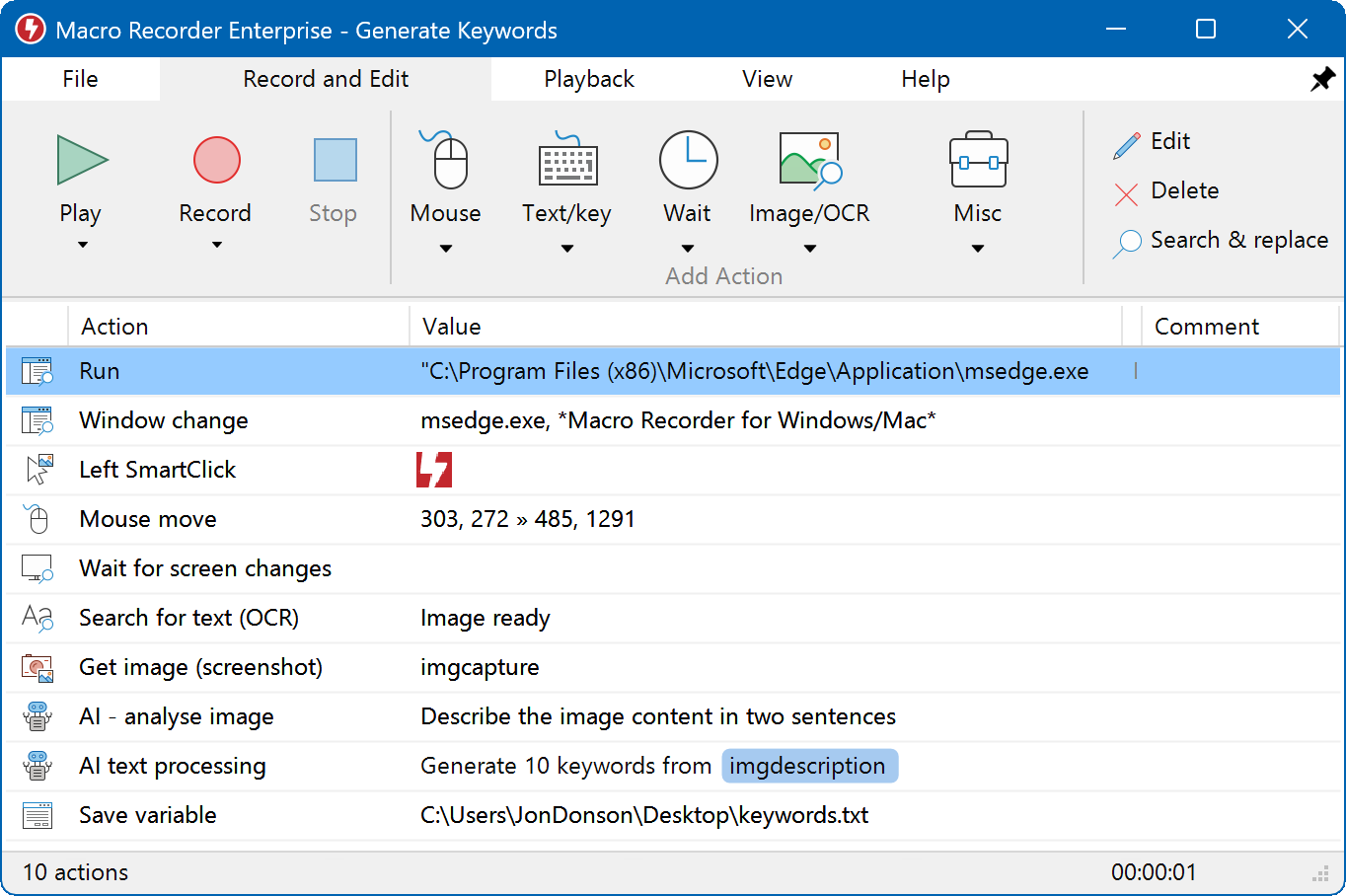
The main window on Windows: toolbar on top, the recorded actions as a list below. This sample macro is from the Enterprise edition, so it includes AI and OCR actions that Standard doesn't have.
Features
Record and edit without a coordinate dump
Macro Recorder Standard merges the mouse movement between two clicks into one action instead of filling your script with thousands of X/Y entries. You can change that movement's duration in one field, drag its end point, or delete it outright. Recorded paths also show as overlays on your desktop, so you can see which action moves where.
A recorded mouse path drawn as an overlay on the screen.
Auto key pressing and keystroke repeat
Macro Recorder Standard handles repeated keystrokes through its Keypress action. Pick a key, choose press and release, key down or key up, and enter a Count for how many presses you want. Add a Wait action in milliseconds between presses, with an optional random range, and wrap it all in a Repeat action to run for a set number of cycles, for a set duration, or until a specific time.

The Insert key press dialog: press option, key (Tab here) and count (3 here).
Hold a key down
Macro Recorder Standard can simulate a long press that keeps typing the same letter. Use a Keypress set to key down, repeat that key-down event with the Repeat action, then finish with a Keypress set to key up. Bartels Media has a short video of the method. Separate key-down and key-up events also let you do other things while a key stays held, such as clicking while Shift is pressed.
Hotkeys and human-paced typing
Macro Recorder Standard has a Hotkey action for combinations like Ctrl+Alt+D, and a Text output action for whole lines. Text goes in through the clipboard or key by key, and the Humanize option adds small random delays between keystrokes, which helps with forms that choke on instant input.

The Output text dialog with the key-by-key and Humanize options. The variable in the sample text needs the Enterprise edition.
Auto clicking with playback control
Macro Recorder Standard works as a mouse auto clicker too: add a click action, set the position and button, and optionally add a random wiggle. For playback you can change the speed, filter out mouse movement so only clicks run, or replace shaky recorded paths with linear, spline or natural curves. That last option is handy for tutorial screencasts.

The Mouse click action, with a random wiggle option. The window design is from an older version.
Windows put back where they were
Macro Recorder Standard stores the position and size of the program window you recorded in and restores them on playback, so clicks still land in the right place. A Window Focus action switches to the target program, and Execute Program launches it if it isn't running yet. You can also record relative coordinates, which follow the window if it moves.
Benefits
- You get your hands back. A repetitive job runs at the computer while you check the result instead of doing the typing.
- Nobody has to learn a script language. A coworker can read the action list and change a step.
- The cost is fixed. There's no monthly fee, and the software keeps working after the update period ends.
Real-World Uses
- Keeping a page fresh: press F5 in a browser every 30 seconds until a set time, using Keypress, a 30,000 ms Wait and Repeat.
- Data entry: press Tab three times, type a fixed value, press Enter, and loop that across a long form or an old program with no import function.
- Repeating a key in a program: tap a key at a slightly random pace by giving the Wait action a minimum and a maximum.
- Routine IT chores: launch a tool with Execute Program, click through its screens, and run the same steps on every machine, including inside a virtual machine, which Standard is licensed for.
- Clean screencasts: play a recorded mouse path back as a smooth curve while your screen recorder runs.
Who It's For, and Who Should Skip It
Buy Standard if you use a macro tool at work, in a virtual machine, over Remote Desktop or on a company-managed PC, and your screens stay put from run to run. It's also the right step up for a home user who needs timed loops with Wait and Repeat.
Skip it in three cases. If you only need the keys repeated at home, start with the free edition, because it may be all you need. If the buttons you click move around, as they do on web pages, Standard's fixed coordinates will miss, and the Pro edition's image recognition is the better buy. And if you just want a tiny utility that taps one key, a dedicated auto key presser is simpler and costs less than this.
Usage Guide
- Download and run the installer, or unzip the Portable Edition, then start Macro Recorder. Mac users must grant the Accessibility, Screen Recording and Full Disk Access permissions.
- Press Record, do the task, and press Stop. Your actions appear as a list.
- Tidy the list. Delete mistakes and add a Wait wherever the program needs time to respond.
- To repeat keystrokes without recording, add Text/key actions by hand: a Keypress, a Wait, and a Repeat that jumps back to a label on the first action.
- To loop the entire macro instead, enter a number of repetitions in the Playback tab.
- Click into the target program first. Macro Recorder doesn't switch input focus on its own unless your macro has a focus action or a click.
- Press Play. Press Esc to stop at any time, or set your own stop hotkey in the settings.
- Enter your license key under Help > Register license. It converts the installed copy, and your macros stay.
Where it falls short
- Your input focus is its input focus. Macro Recorder needs a visible desktop session and uses the real mouse and keyboard, so it can't run in the background, and only one macro runs at a time.
- Fixed coordinates are fragile. A changed resolution, browser zoom or banner ad can shift a target, and Standard has no image-based click to recover.
- Administrator windows ignore it. On Windows, a copy running with normal rights can't send input to a program started as administrator. Run Macro Recorder as administrator too.
- Games and protected apps can refuse it. Keystrokes may need the "virtual key" playback option, banking software can block automation, and an online game's rules may forbid it, so read them first.
- No per-macro hotkeys on their own. Starting different macros by different hotkeys needs PhraseExpress and the Enterprise edition of both programs. In Standard, the global hotkeys control recording and playback of the loaded macro.
- macOS needs attention after updates. You may have to confirm the security permissions again each time the app updates.
What Users Say
Independent feedback on Macro Recorder is thin, so read these as a small sample. Trustpilot showed a TrustScore of 4.0 from 3 reviews, and Techjockey showed 4.1 from 4 ratings with no written text.
Trustpilot
"Perfect recorder, only needs tweaks on how it reacts to mouse hold click with movement of the mouse"
Allen Cuanan, "Great Macro recorder", May 4, 2026, 5 stars
"Macro recorder save you a lot of useless work save time and money guys i tell you get that thing going support is great !"
Vincent Simard, "get that thing going", January 28, 2025, 5 stars
About its predecessor, on AlternativeTo
"Its very easy and simple to use comparitvely to other programs like Pulover's macro which I've tried as well"
Kagerjay, on Mouse Recorder Premium, June 21, 2017, 4 stars
FileHorse's editor also lists "Easy recording and playback" and "No programming skills required" as pros, with "Requires manual adjustment for precision" among the cons, in its entry for version 4.0.49.
The recurring theme is simple: people like how quickly a recording becomes a working macro, and the complaints center on what it costs to step up to the smarter click features. Expect to spend some time tuning a macro for precision.
Comparisons
Standard vs the free edition
Bartels' freeware page says the free edition has no limit on actions or repeats, but its manual still gives a maximum of 10 repetitions, so check this in your own copy. Playback also stops after a few repetitions if a macro uses a paid action such as Wait or Repeat. The free edition is for personal users. It shows license notices in a company environment, on a managed device, in a virtual machine or on a server OS, and if you use any paid feature. Income-related use calls for a license after 30 days. Standard removes those notices for work use and adds Execute Program, Goto, Repeat and Wait.
Standard vs a one-purpose key presser
A small key presser repeats one key and stops there. Macro Recorder Standard costs more and takes a little longer to set up, but it can mix several keys, mouse clicks, waits and window changes in a single loop and keep that sequence in a file.
Editions and Pricing
| Edition | Price | What it adds | Fits |
|---|
| Free | $0 | Recording and playback; repeat limit stated differently by the vendor (see above) | Personal use |
| Standard | $99.95 | Work and virtual machine use, Execute Program, Goto, Repeat, Wait | Stable screens at work |
| Pro | $149.95 | SmartClick, image and OCR search, pixel color wait, scheduler, command line | Web pages and changing screens |
| Enterprise | $249.95 | Variables, AI, screen capture, barcodes, PhraseExpress support | Data-driven and team macros |
Each paid edition includes the one below it, 12 months of updates and a lifetime license. Discounted maintenance renewals are available when the first year ends. If you buy the wrong edition, the shop lets you upgrade within the same month of purchase.
FAQs
Is Macro Recorder Standard a subscription?
No. Macro Recorder Standard is one payment with no recurring charge. The license stays valid for life for versions released during your 12 months of maintenance, and after that you can keep using the last version you were entitled to.
Can Macro Recorder press a key repeatedly on its own?
Yes. Macro Recorder can repeat a key through the Keypress action's Count field, a Repeat action around a Keypress, or the Playback tab's repetitions for the whole macro. Add a Wait action to set the gap between presses in milliseconds.
Can Macro Recorder Standard run on both my Windows PC and my Mac?
Not at the same time on one license. A Macro Recorder key works on either a Windows or a Mac installation, so you would remove it from one before registering it on the other, or buy a second license.
Does Macro Recorder work inside Remote Desktop?
Macro Recorder must run inside the Remote Desktop session itself. A copy on the host computer can't control programs in an RDP window, because the session doesn't pass the automation through. Standard includes the license for this kind of use.
Can Macro Recorder record only the keyboard?
Macro Recorder always captures both mouse and keyboard. You then use the playback filter to leave out the mouse actions, without deleting them from the macro.
Will Macro Recorder Standard work if I run it from a USB drive?
Yes. Macro Recorder has a Portable Edition you unzip onto a USB drive, and you can register your license to that drive. This is also the way to use it on a PC with no internet, by activating the stick on a connected computer first.
Is Macro Recorder a keylogger or spyware?
No. Macro Recorder has no stealth mode, and its icon in the task or menu bar shows when it's recording. Bartels Media states it never sends your files or your mouse and keyboard input over the internet.
System Requirements
- Windows: the vendor tests with Windows 11, and the installer is about 39 MB
- macOS: the vendor tests with macOS 27, and the installer is about 64 MB
- A logged-in desktop session while a macro runs
- An internet connection once, to register the license
- The Download Free Trial button below fetches the Windows installer. Mac users can get the disk image from the vendor's download page
Conclusion
Worth buying if you need a licensed, no-code macro tool for work and your screens don't change between runs. At $99.95 once, it pays for itself quickly on any job you repeat daily, and the key repeat tools are far more flexible than a single-purpose presser.
The best reason to buy is the combination of plain recording with Wait and Repeat control. The main reason not to is coordinate-based clicking: on web pages or anything that shifts, spend the extra $50 on Pro. Home users should try the free edition first.
Download Free TrialBuy Now