Short answer: to auto press a key on Windows for free, use Auto Keyboard Presser by Autosofted: set a Start/Stop hotkey and a Play hotkey, record the key once, choose the time between presses, and press Play. For work use, timed loops, or a key held for an exact number of seconds, use Macro Recorder Standard ($99.95 once): a Key press action, a Wait in milliseconds and a Repeat action do it without any scripting, and Esc stops it at any time.
At a glance
| What you want | Auto Keyboard Presser (Autosofted) | Macro Recorder free edition | Macro Recorder Standard |
|---|
| Repeat a key at a set interval | ✓ Time between presses, in ms | Partly: loop a recording, using your own pauses | ✓ Key press + Wait + Repeat |
| Hold a key down | ✓ Records held keys | ✗ Needs the Repeat action | ✓ Key down, Repeat, Key up |
| Press a key combination | ✓ Record it | ✓ Hotkey action | ✓ Hotkey action |
| Type text repeatedly | ✓ Record it, then repeat | ✓ Text action, then loop the macro | ✓ Text action + Wait + Repeat |
| Stop with a hotkey | ✓ Your Play hotkey | ✓ Esc, or your own hotkey | ✓ Esc, or your own hotkey |
| Price | Free to download, $5 Full Version | $0, personal use only | $99.95 once, 12 months of updates |
| Work use | Not stated | ✗ License notices | ✓ |
| Download size | 1 MB | 39 MB | 39 MB (same download) |
| Latest build | 1.9, file dated December 2017 | 5.0.40, September 25, 2026 | 5.0.40, September 25, 2026 |
How we built this guide
- Every Macro Recorder step below comes from Bartels Media's manual (keyboard, wait, control, playback, hotkey and troubleshooting chapters) and the captions of its video "Simulating a long key-press with key repeat".
- Every Auto Keyboard Presser step comes from Autosofted's product page, its FAQ and the captions of its own tutorial video.
- We compared what each vendor says is free against its license and upgrade pages, which is where the two free options turned out to have catches.
What we checked: the Macro Recorder Windows installer is version 5.0.40, 40,732,296 bytes and signed by Bartels Media GmbH, and the order page shows $99.95, on November 5, 2026. Autosofted's version 1.9 download is 1,068,032 bytes, dated December 10, 2017 on its server, and isn't digitally signed, also on November 5, 2026. We didn't run either program, so we haven't timed the key repeat speed, tried them in a game, or seen how the Autosofted download behaves after 30 days.
How to use Autosofted Auto Keyboard Presser (the free way)
- Price: free to download, with a $5 Full Version
- Platform: Windows
- Size: about 1 MB
- Best for: home users who want one key or a short key sequence repeated, with nothing to learn
Autosofted Auto Keyboard Presser works like a small tape recorder for keys: you record what you press, then it plays that back with a fixed gap between presses. The whole how-to fits on the screen below.
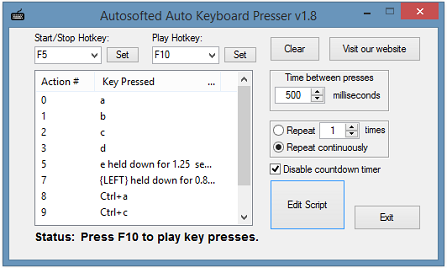
The window as shown on Autosofted's page, with 1.8 in its title bar: Start/Stop and Play hotkeys, the recorded actions, Time between presses, and Repeat times or continuously. The download is version 1.9.
- Pick a Start/Stop Hotkey and click Set. Autosofted's video uses F1.
- Pick a Play Hotkey and click Set. The video uses F2.
- Press your Start/Stop hotkey to start recording.
- Press the keys you want repeated. Each one appears in the action list.
- Press your Start/Stop hotkey again to stop recording.
- Press your Play hotkey to play the keys back. A short countdown runs first (three seconds in the video), so click into the window that should get the keys.
Repeat a key at an interval
Auto Keyboard Presser repeats a key once you record that key by itself and set Time between presses in milliseconds (1,000 ms is one second). Then choose Repeat a number of times, or Repeat continuously. Autosofted's page says it goes as low as 10 ms, but its older tutorial video says nothing under 200 ms is allowed, so check the low end in your own copy before you rely on it.
Hold a key down
Auto Keyboard Presser captures held keys: hold the key while you record, and the list shows it with its duration, like the "e held down for 1.25" entry in the screenshot. For Ctrl, Alt, Shift and the Windows keys, Edit Script also has hold codes such as {SHIFTDOWN} and {SHIFTUP}.
Press a key combination
Auto Keyboard Presser records combinations as you press them, and the screenshot shows Ctrl+a and Ctrl+c as single actions.
Type text repeatedly
Auto Keyboard Presser has no text box, so type your text during recording and set a repeat. For a key the recorder misses, record any placeholder letter, open Edit Script, replace the letter with a code such as {ENTER}, {TAB}, {ESC} or {F5}, and click Apply Changes.
Stop it with a hotkey
Auto Keyboard Presser stops playback when you press the Play hotkey again. The Start/Stop hotkey is for recording. If the hotkey lists come up blank, type the key into the empty box and click Set.
What we like
- Six steps and no manual
- Interval, repeat count and hotkeys all in one window
- Scripts can be saved and loaded
- About 1 MB
Watch out for
- Autosofted's $5 page sells "No 30 Day Trial! It's yours forever!", so the free download may be a 30-day trial, though the product page doesn't say so
- The last file dates from December 2017, and Windows 11 isn't mentioned
- The download isn't digitally signed, so Windows may warn you
- Keyboard only: as FileHippo's editors put it, "Lacks mouse click automation."
Download Auto Keyboard Presser
How to auto press a key with Macro Recorder Standard
- Price: $99.95 at checkout, one payment, 12 months of updates, no auto-renewal
- Platforms: Windows and macOS (one license covers one system at a time)
- Size: about 39 MB
- Best for: work use, and any job that mixes keys, waits and window changes
Macro Recorder Standard is built around a list of actions that runs from top to bottom. You can record that list, or build it by hand, which suits key pressing better: highlight the action you want the new one to appear under, then add from the Record and Edit tab or press the action's letter while the Macro Recorder window has focus. All the recipes below are short lists like that. Repeat and Wait need Standard or higher, and the free download lets you try them with license notices before you pay.

The Text/key menu on the Record and Edit tab, with each action's shortcut letter. This is the Enterprise edition, so the AI text entry doesn't apply to Standard.
Repeat a key at a set interval
- Click into the target program, or add a Window focus action as the first line. Macro Recorder doesn't switch focus by itself.
- Add Key press (K). Leave the option on Press & release, pick the key, and leave Count at 1.
- In the Label column, give that action a short name, such as
tap. "Start", "End" and "Next" are reserved.
- Add Wait (W) and enter the gap in milliseconds: 1,000 is a second, 60,000 a minute. Tick Randomize if you want it to vary between a minimum and a maximum.
- Add a Repeat action. Set Label to
tap, choose seconds, repetitions, Until a time or Infinite, and leave Go to on Next.
- Press Play.

The Insert key press dialog. Count 3 here means three presses in a row with no Wait between them, which suits something like tabbing across three fields.

The Repeat dialog. "Until last data list item" only applies to macros that use a data list.
Hold a key down
Macro Recorder Standard simulates a long press by repeating the key-down event, which is the method in Bartels Media's short video on the Macro Recorder page. The trap is the Count field: don't use it here, because Count presses and releases the key each time, which isn't a hold.
- Add a Window focus action for the target program.
- Add Key press, set the option to Key down, pick the key and leave Count alone.
- Give that action a label, such as
down.
- Add Repeat, set Label to
down, enter the time to hold (the video uses three seconds), and leave Go to on Next.
- Add another Key press with the same key, set to Key up, to release it.
For a key that only needs to stay down while something else happens, such as clicking with Shift held, put those actions between the Key down and Key up lines. The manual has the separate events for this reason.
Press a key combination
Macro Recorder Standard has a dedicated Hotkey action (H) for shortcuts. Press the combination in the dialog, and Macro Recorder writes it into the macro as individual key-down and key-up events. To repeat it, put a label on the first of those events, then add Wait and Repeat exactly as in the interval recipe.

The Hotkey press dialog with Ctrl-Alt-D entered.
Type text repeatedly
Macro Recorder Standard outputs whole lines with the Text action (T), so you don't need one Key press per letter.
- Add Text and enter your text.
- Choose Paste with clipboard or Insert key-by-key. Key-by-key has a Humanize option that adds small random delays between keystrokes.
- Add a Key press for Enter or Tab if each line must end with one.
- Label the Text action, then add Wait and Repeat as in the interval recipe.

The Output text dialog. The variable in the sample text needs the Enterprise edition.
Stop it with a hotkey
Macro Recorder always stops playback when you press Esc, even if you set a hotkey of your own. Clicking the tray icon stops it too, which helps if you'd rather not send Esc to the program you're automating.
To set your own, open the settings, choose Hotkeys and fill in Stop and Playback. A custom hotkey needs Shift, Alt or Ctrl with the key, such as Ctrl+Alt+F9. These work with the Macro Recorder window minimized, so it stays out of the way. They control the loaded macro: giving different macros their own hotkeys takes PhraseExpress, and the Enterprise edition of both programs to run without license notices.
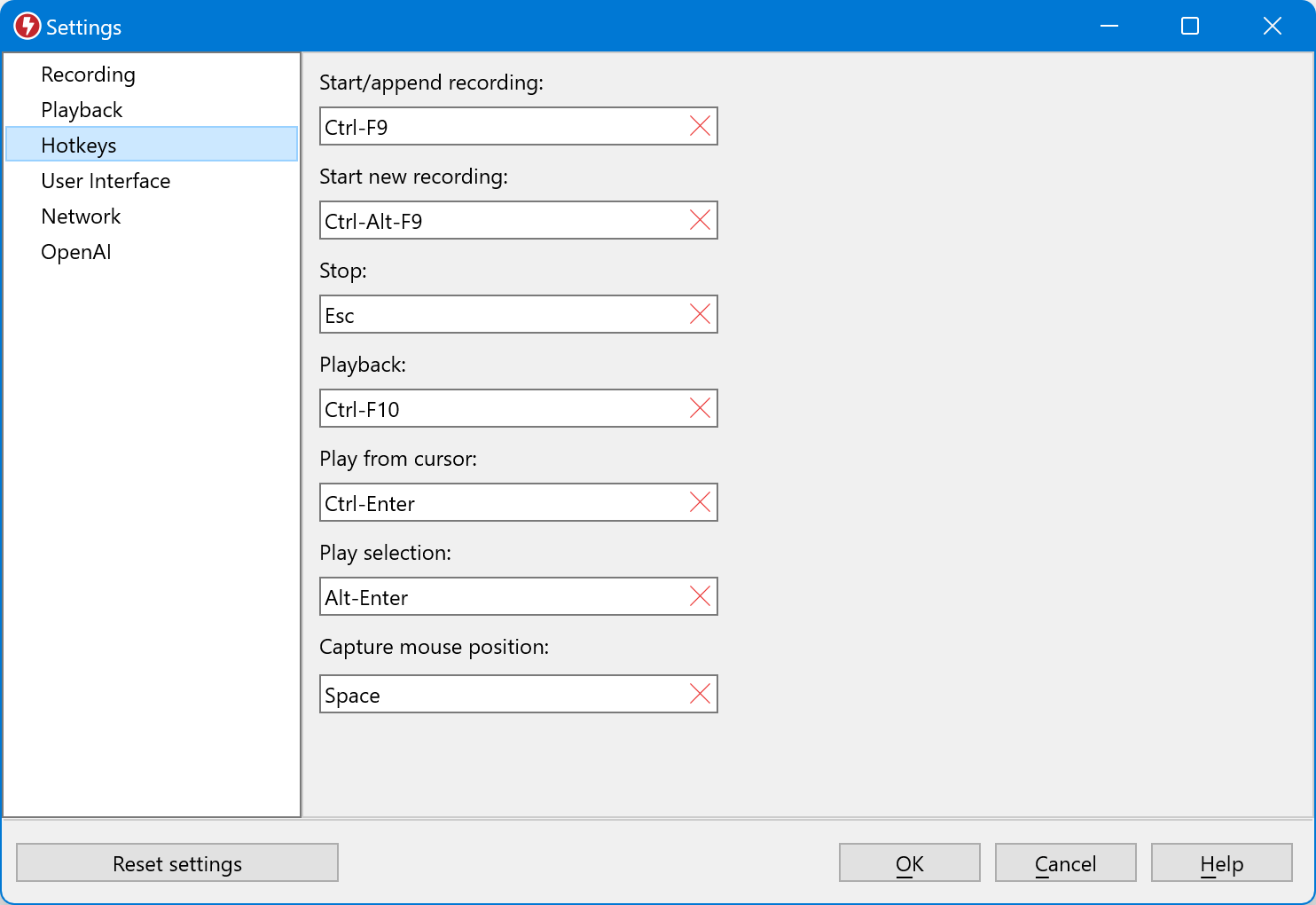
The Hotkeys settings in a version 5 build, with Esc as Stop and Alt-F10 as Playback in this example.
Can the free edition of Macro Recorder do this?
The free edition of Macro Recorder can repeat keys, with limits. It's for personal use: record the keys, stop, then enter a number in Repeat on the Playback tab to loop the whole macro. Recordings keep the pauses you made, so your own timing sets the interval.

The Playback tab, with the Repeat field for looping the whole macro. This screenshot is from an older version 3.
The catch
- Repeat and Wait actions are paid features. Bartels Media says playback is cancelled after a few repetitions by design when you use features above your license, so those recipes won't run to the end unlicensed.
- Check the repeat limit in your copy. The freeware page promises "No limitation in repeats", while the manual's playback chapter says the freeware stops at 10.
- Work use needs a license. You get license notices on managed work or school devices, in a virtual machine and on a server OS, and income-related use calls for a license after 30 days.
What Macro Recorder Standard does well, and where it falls short
What we like
- Interval, hold, combination and text recipes can live in one saved macro
- Repeat by count, duration or until a time
- Current: version 5.0.40 dates from September 25, 2026
- One payment, and the license never expires
Watch out for
- No refunds, so test your task first
- Needs a visible desktop session, so it can't run in the background
- Only one macro runs at a time
- Expensive if all you need is one repeating key
What users say
Independent feedback is thin: Trustpilot showed a TrustScore of 4.0 from just 3 reviews.
"Perfect recorder, only needs tweaks on how it reacts to mouse hold click with movement of the mouse"
Allen Cuanan, "Great Macro recorder", Trustpilot, May 4, 2026, 5 stars
"Macro recorder save you a lot of useless work save time and money guys i tell you get that thing going support is great !"
Vincent Simard, "get that thing going", Trustpilot, January 28, 2025, 5 stars
Download Macro RecorderBuy Macro Recorder Standard
What it costs to go past the free versions (USD, one payment)
Auto Keyboard Presser Full Version$5
Macro Recorder Standard$99.95
Macro Recorder Pro$149.95
Macro Recorder Enterprise$249.95
Prices checked on November 5, 2026.
Which should you choose?
| Your situation | Pick | Why |
|---|
| One key at home, now and then | Auto Keyboard Presser | Six steps, nothing to pay up front |
| Home use, and you want current software | Macro Recorder free edition | Updated in September 2026, and looping a recording is free |
| Anything for your job | Macro Recorder Standard | Work use is licensed, and Macro Recorder's free edition doesn't cover it |
| A key tapped every N seconds until a set time | Macro Recorder Standard | Repeat can run until a clock time |
| Buttons that move around on screen | Macro Recorder Pro ($149.95) | Image recognition finds them, where Standard uses fixed positions |
| Online games | Neither | See the note below |
Skip Macro Recorder Standard if you need one key repeated for personal use, because $99.95 buys far more than that job needs. Skip Auto Keyboard Presser if you can't accept a 2017 build with an unsigned download. Its $5 upgrade doesn't change either of those.
A plain word about games
Many online games ban key pressers and macros, so read the game's rules before you start. If the rules forbid it, don't use one. For a single-player game that ignores the keys, Autosofted suggests running its program as administrator, and Macro Recorder's playback settings have an option to use virtual key codes instead of scan codes. Those are compatibility settings, nothing more.
What commonly goes wrong
- The keys go to the wrong window. Bartels Media calls input focus the most common cause of problems. Use a Window focus action, or click into the program before you press Play.
- Nothing happens in one particular program. A program started as administrator ignores Macro Recorder when it runs with normal rights, and its tray icon shows a red warning. Run Macro Recorder as administrator too.
- You try to hold a key with Count. That gives you repeated tapping, not a hold.
- Playback stops early. Check the settings for aborting on a key press or mouse move: one user reported Windows notifications triggering a stop.
- Text comes out scrambled in a browser. Bartels Media blames security software, and web forms that process input can interfere as well. Test with those security functions turned off.
- A Repeat count is off by one, or a key feels stuck. We didn't test whether Repeat counts the first pass, or whether stopping between Key down and Key up releases the key. Try a short run first, and press that key once yourself if it seems stuck.
FAQs
Is Autosofted Auto Keyboard Presser really free?
Autosofted Auto Keyboard Presser is free to download, but it may not stay free. The product page says "FREE to download" and also "Just $5 to make it yours forever", and the upgrade page lists "No 30 Day Trial!" as a Full Version benefit. We didn't run it past 30 days, so treat the free copy as a possible trial.
Is Auto Keyboard Presser safe to download?
Auto Keyboard Presser's download page says "No Viruses, No surveys", but that's the vendor's word. The file isn't digitally signed, so Windows may warn before opening it. We didn't run it, so download it only from Autosofted and scan it first.
Does Auto Keyboard Presser work on Windows 11?
Autosofted doesn't say whether Auto Keyboard Presser works on Windows 11, and its last file dates from December 2017, before Windows 11 existed. Macro Recorder is the safer choice here, since Bartels Media tests it with Windows 11.
How fast can Macro Recorder press a key?
Macro Recorder takes a Wait time in milliseconds, but we found no published top speed and we didn't time it. The manual warns that Wait times must suit the slowest conditions, so if keys get lost, make the Wait longer.
Can Macro Recorder press keys while I use another program?
No. Macro Recorder controls the mouse and keyboard on a visible desktop and needs input focus in the target program, so it can't press keys in the background while you work elsewhere.
Can I use the free Macro Recorder at work?
Macro Recorder's free edition is for personal users. On a work-managed device, in a virtual machine or on a server OS it shows license notices, and any use that earns you money calls for a license after 30 days. Standard at $99.95 is the entry point for work.
Does Macro Recorder work over Remote Desktop?
Macro Recorder has to run inside the Remote Desktop session. A copy on the host computer can't control programs in the RDP window.
More tools like these are in our Automation Tools category.