Stop tapping the same key by hand
Some jobs need the same keystrokes again and again: a game action that has to be repeated, or a routine sequence you type all day. Auto Keyboard Presser from Autosofted records the keys you press and plays them back on a timer, so you don't have to do it yourself.
Quick facts
- Version: 1.9
- Platform: Windows PC
- Price: Free standard download; a premium upgrade is offered for $5
- Download size: about 1020 KB
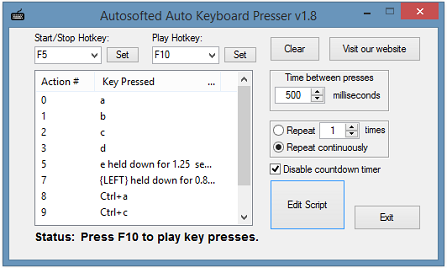
How it works
You choose a Start/Stop hotkey and a Play hotkey, then press Start/Stop and type the keys you want. Press Start/Stop again to finish recording. Pressing the Play hotkey repeats what you recorded.
Key features
Record your keys once and replay them
The program captures your key presses, including keys that are held down, and plays them back automatically. You can store an unlimited number of key presses.
Control the timing and the repeat count
You set the wait between key presses, as low as 10 milliseconds. You also set how many times the sequence repeats.
Edit, save and reload your scripts
An edit script feature gives you more control over a recording. You can save scripts and load them later. The program also remembers the hotkeys you set.
Who it's for
It suits anyone who repeats keystrokes and wants a small, simple tool for it. That includes gamers who need a repeated key press, and people with repetitive entry tasks.
Pros and cons
- Pro: The standard download is free.
- Pro: The download is small, and setup takes six steps.
- Pro: You can save scripts and edit them.
- Con: In some games the key presses won't register unless you run the program as administrator.
- Con: It is Windows only.
FAQs
Is it really free?
Yes. The standard version is free to download. A premium upgrade is available for $5.
Why don't the key presses work in my game?
Run the program as an administrator. That is the fix recommended for games.
Can I save what I record?
Yes. You can save and load scripts, and edit them.
How fast can it press keys?
As little as 10 milliseconds between presses.
System requirements
A Windows PC. Run the program as administrator if key presses don't reach a game.