Short answer: the best auto key presser for most people is a free or $5 one. For repeating a few keys at home, start with Auto Keyboard Presser by Autosofted, which is free to download. To hold down one key, Auto Keyboard Presser ($5) or Key Presser ($4.95) does that job in a single window.
Pay for Macro Recorder Standard ($99.95, one time) only when you need key presses mixed with mouse clicks, timed waits and repeats in one macro, when it is for work, or when you use a Mac. Its free edition is also worth trying first for personal tasks.
Best auto key presser software at a glance
| Product | Price | Free limit | Platforms | Best at |
|---|
| Macro Recorder Standard | $99.95 once, 12 months of updates | Free edition for personal use | Windows, macOS | Key presses mixed with clicks, waits and repeats |
| Auto Keyboard Presser by Autosofted | Free, $5 full version | Free download, 30-day trial implied by the $5 page | Windows | Recording a key sequence and looping it |
| Auto Keyboard Presser (AutoMacroRecorder) | $5 | Trial presses for 1 minute | Windows | Holding a key or key combination |
| Key Presser (Robot Soft) | $4.95 | Free trial, limit not published | Windows | Holding or tapping one key |
| AutoClickExtreme | $37 at checkout | Full features for 20 days | Windows | Long macros with on-screen checks |
| Product | Hold a key | Timed delay | Key sequence | Mouse clicks |
|---|
| Macro Recorder Standard | ✓ | ✓ | ✓ | ✓ |
| Auto Keyboard Presser by Autosofted | ✓ | ✓ | ✓ | ✗ |
| Auto Keyboard Presser (AutoMacroRecorder) | ✓ | ✓ | ✗ | ✗ |
| Key Presser (Robot Soft) | ✓ | ✓ | ✗ | ✗ |
| AutoClickExtreme | Not stated | ✓ | ✓ | ✓ |
How we picked
- We kept only tools with a working vendor site and a download that still responds.
- We read each vendor's product, purchase and help pages for prices, trial limits and supported Windows versions.
- We opened the order pages for the two products sold through a checkout, and looked at each vendor's screenshots.
- We compared what each tool can do with one key, a sequence of keys and the mouse, then matched them to real jobs.
What we checked: installer sizes for all five tools, file versions on Macro Recorder, AutoClickExtreme, Key Presser and the AutoMacroRecorder tool, digital signatures on the four smaller installers (none signed), and checkout totals of $99.95 for Macro Recorder Standard and $37.00 for AutoClickExtreme, all on November 5, 2026. We didn't install or run these tools, time their key repeat speed or try them in a game.
Macro Recorder Standard: the pick when a key presser isn't enough
Macro Recorder Standard by Bartels Media
- Price: $99.95 once, with 12 months of updates and no auto-renewal
- Version: 5.0.40 for Windows, September 25, 2026
- Platforms: Windows and macOS
- Best for: work tasks that mix keys, clicks, waits and repeats
Macro Recorder Standard is a full macro tool that also works as an auto key presser. The Keypress action has a Count field and three modes: press and release, key down, and key up. For timed tapping, put a Keypress inside a Repeat action with a Wait in milliseconds, with an optional random range. Repeat can run by count, for a set duration or until a set time. To hold a key, use key down, Repeat, then key up.

The Insert key press dialog: press option, key (Tab here) and count (3 here).
The real gap between this and a $5 tool is everything around the key. One macro can press keys, click the mouse, type whole lines and wait, and you keep that sequence as a file you can edit line by line. The Text output action can type key by key with a Humanize option, which suits forms that choke on instant input.
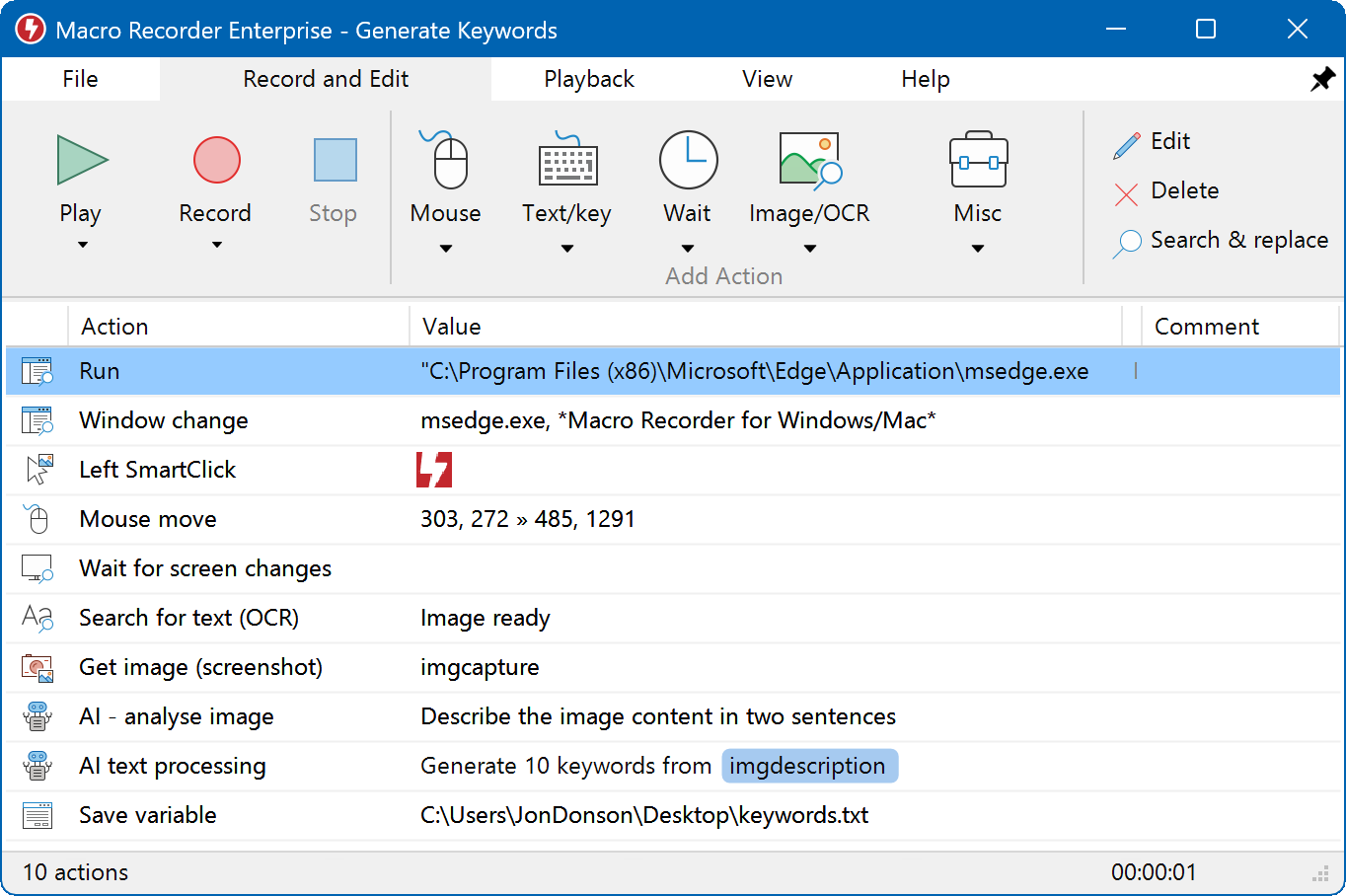
The main window on Windows, with the recorded actions as a list. This sample macro is from the Enterprise edition, so it includes actions Standard doesn't have.
The catch is that Repeat and Wait, the two actions that make it a timed presser, start at Standard. The free edition can loop a whole macro, for personal use only. Clicks in Standard use fixed screen positions, so anything that moves on the page needs image search, and that starts at Macro Recorder Pro ($149.95).
What we like
- Keys, clicks, text and waits in one editable macro
- Repeat by count, duration or until a set time
- Free edition for personal use
- Windows and Mac, signed installer, updated in September 2026
Watch out for
- About 20 times the price of a $5 presser
- No refunds, so test the free download first
- Repeat and Wait aren't in the free edition
- A 38.85 MB install for what can be a one-key job
What users say
Independent feedback is thin: Trustpilot showed a TrustScore of 4.0 from 3 reviews, and Techjockey 4.1 from 4 ratings.
"Perfect recorder, only needs tweaks on how it reacts to mouse hold click with movement of the mouse" Allen Cuanan, Trustpilot, May 4, 2026, 5 stars
Download Macro Recorder FreeBuy Macro Recorder Standard
Auto Keyboard Presser by Autosofted: the free option
Auto Keyboard Presser by Autosofted
- Price: free to download, $5 for the full version
- Version: 1.9, installer dated December 2017
- Platforms: Windows
- Best for: looping a short run of keys at no cost
Auto Keyboard Presser by Autosofted is the most capable of the small tools because it records instead of asking you to pick one key. Press your Start/Stop hotkey, type your keys, stop, and press the Play hotkey. You set the time between presses, down to 10 milliseconds, and repeat it a set number of times or continuously. It can capture keys that are held down, and an Edit Script button lets you adjust the result. Scripts can be saved and loaded.
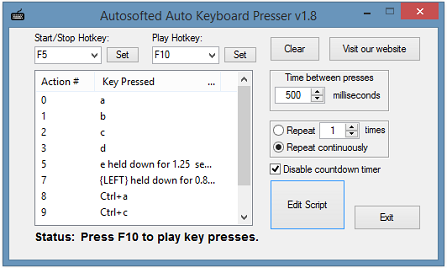
Version 1.8 in the vendor's screenshot: hotkeys at the top, the recorded key list, and the time between presses and repeat settings on the right.
Two things stop us calling it free with no strings. The vendor describes it as free to download, but its $5 full version page lists "No 30 Day Trial" as a benefit, which points to a time limit on the free build. That page also adds delays under 10 milliseconds and a year of support. And the current build dates from 2017, and the product page does not name Windows 11. If it works for your task, $5 is a small price to keep it.
What we like
- Free to download, about 1 MB
- Records several keys, including held keys
- Scripts you can edit, save and load
- Delays as low as 10 ms
Watch out for
- The $5 page implies a 30-day limit on the free build
- No new version since 2017
- Installer isn't digitally signed
- Keyboard only, no mouse
Download Auto Keyboard Presser by Autosofted
Auto Keyboard Presser (AutoMacroRecorder): hold a key for $5
Auto Keyboard Presser by AutoMacroRecorder
- Price: $5
- Version: 2.1.1.8, file dated September 2020
- Platforms: Windows 11 down to 2000, 32-bit and 64-bit
- Best for: holding one key or combination
Auto Keyboard Presser from AutoMacroRecorder does one thing: it holds a key continuously, or presses it after a fixed delay in milliseconds, seconds, minutes or hours. Pick the key, tick Alt, Ctrl or Shift if you need a combination, switch to your program and press Ctrl+F1. Ctrl+F2 stops it. There's nothing to learn, and at under half a megabyte there's very little to install.
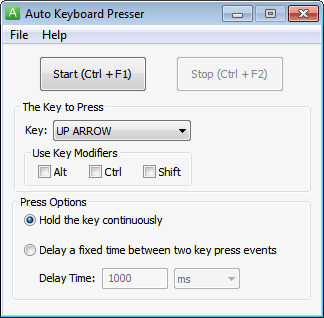
The whole program: Start and Stop buttons, the key, Alt, Ctrl and Shift boxes, and the two press options.
The trial is the tightest here at 1 minute of pressing, enough to confirm it reaches your program but not much more. It won't do a sequence of different keys. The vendor names Windows 11 on the page, which is more than the Autosofted tool does.
What we like
- One window, no setup
- Holds key combinations with Alt, Ctrl and Shift
- Delay units from milliseconds to hours
- Windows 11 named as supported
Watch out for
- Trial stops after 1 minute
- One key or combination only
- Installer isn't digitally signed
- Keyboard only, no mouse
Download Auto Keyboard Presser Trial
Key Presser (Robot Soft): the same idea, with a guarantee
Key Presser by Robot Soft
- Price: $4.95, 30-day money-back guarantee
- Version: 2.2.3.8, file dated November 2022
- Platforms: Windows 11 down to NT
- Best for: the newest build of the simple one-key design
Key Presser from Robot Soft looks almost identical to Auto Keyboard Presser from AutoMacroRecorder: same layout, same Ctrl+F1 and Ctrl+F2 buttons, same two press options, and nearly the same file size. For most people the choice comes down to the buying terms. Key Presser costs 5 cents less, has the newer file, and promises a 30-day money-back guarantee, free upgrades and free support. Its delay is shown in milliseconds, without the unit selector in the AutoMacroRecorder screenshot.
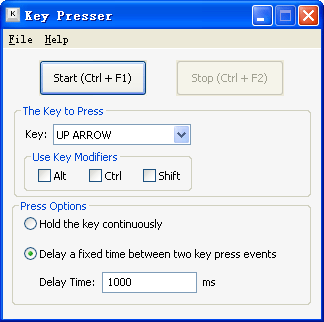
Key Presser set to tap the Up Arrow key with a 1000 ms delay between presses.
What we like
- 30-day money-back guarantee
- Free upgrades and support for registered users
- Newest build of the two look-alike tools
- Under half a megabyte
Watch out for
- Trial limit isn't published
- One key or combination only
- Installer isn't digitally signed
- Keyboard only, no mouse
Independent reviews of Key Presser and the two other small tools are scarce, so we have no user quotes worth repeating. They're cheap enough that the trial is your best evidence.
Download Key Presser Trial
AutoClickExtreme: a mid-priced macro tool
AutoClickExtreme by AutoClicker Lab
- Price: $37.00 at checkout, list price $49
- Version: 6.39, August 31, 2024
- Platforms: Windows, with no mention of Windows 10 or 11
- Best for: recorded macros that react to what's on screen
AutoClickExtreme records mouse movements and keystrokes with no programming, then replays them from a hotkey or on a schedule. Its Pixel Control can branch a replay depending on the image it finds on screen, and the Playlist runs tasks in order or at random, which is why the vendor sells it to software testers. That on-screen checking is a feature Macro Recorder only offers from Pro at $149.95, so AutoClickExtreme is the cheaper route if you need it on Windows.

The professional view: saved records on the left, recorded events on the right, and a Playlist dialog with replay options.
It's a poor fit if you only want a key tapped. The vendor's own download page calls it "in essence, a keylogger" because it collects your actions, and warns that many antivirus programs will flag it, while stating it sends nothing to the internet. A key works only on the computer it was generated for, with a second key for a work PC usually free. Free updates run up to two major versions above the one you buy. After 20 days the trial drops to the simple view.
What we like
- Records keys and mouse together
- Replay branches based on the screen
- Scheduler, per-task hotkeys and autotext
- Well under half the price of Macro Recorder Standard
Watch out for
- Antivirus warnings are expected
- Windows 10 and 11 aren't named
- License tied to one computer
- Overkill for a single key
Download AutoClickExtreme Trial
Price and download size compared
The price gap is the main story: the lead tool costs about 20 times a simple key presser, so it has to be doing work a simple presser can't.
Price for one license (USD)
Macro Recorder Standard$99.95
Auto Keyboard Presser (AutoMacroRecorder)$5.00
Auto Keyboard Presser by Autosofted$0, or $5 for the full version
Prices checked on November 5, 2026.
Installer size (MB)
Macro Recorder Standard38.85
Auto Keyboard Presser by Autosofted1.02
Auto Keyboard Presser (AutoMacroRecorder)0.45
File sizes checked on November 5, 2026.
Using an auto key presser for games
Many online games ban key pressers and macros, and using one can cost you your account. Read the rules of your game before you start. AutoMacroRecorder and Robot Soft both pitch their tools at games, but that says nothing about whether a given game allows them.
In a single-player game, or one whose rules allow it, a $5 presser is an easy way to rest a finger on a held key. If a game blocks simulated keys, take that as its answer. We don't recommend trying to get around detection or anti-cheat systems, and we left out tools sold for botting.
Which auto key presser should you choose?
| Your situation | Pick | Why |
|---|
| Repeat a few keys at home, no budget | Auto Keyboard Presser by Autosofted | Free to download, records a sequence and loops it |
| Personal task with keys and clicks together | Macro Recorder free edition | No limit on actions or macro repetitions, personal use only |
| Hold one key or combination | Auto Keyboard Presser (AutoMacroRecorder) | Simple, and its delay can be set up to hours |
| Hold one key, and you want a refund option | Key Presser | 30-day money-back guarantee at $4.95 |
| Work task on a stable screen | Macro Recorder Standard | Licensed for work, with Repeat and Wait |
| Any key macro on a Mac | Macro Recorder Standard | The only Mac option here |
| Macro that must react to the screen, tight budget | AutoClickExtreme | Image-based branching for $37 |
When Macro Recorder Standard is worth $99.95: when a task eats real working time each week, mixes keyboard and mouse, needs timed waits or repeats, and has to run on a licensed work PC. At that point the price is small against the hours saved. When it isn't: if you just need one key pressed, a $5 tool or the free Autosofted download does that job, and paying 20 times more buys features you won't touch.
Who should skip each one:
- Macro Recorder Standard: anyone repeating one key, and anyone clicking on web pages, who needs Pro's image search instead.
- Auto Keyboard Presser by Autosofted: anyone who wants an actively maintained tool.
- Auto Keyboard Presser and Key Presser: anyone with a sequence of different keys.
- AutoClickExtreme: anyone uneasy about a tool that describes itself as a keylogger, or who needs Windows 11 support stated in writing.
What commonly goes wrong
- Keys land in the wrong window. Pressers send keys to whatever has focus, so switch to the target program before you start, as the AutoMacroRecorder instructions say.
- You can't stop it easily. Learn the stop hotkey first. A presser typing into your open windows is hard to stop with the mouse.
- Keys don't reach a program. Autosofted's advice is to run the tool as administrator. Some programs block simulated input on purpose, and AutoClickExtreme's vendor says as much about software with keylogger protection.
- Two macro tools clash. AutoClickExtreme warns that different macro recorders block each other, so close one before running another.
- Antivirus or SmartScreen stops the download. That's common with small unsigned tools and with anything that simulates input. Check you're on the vendor's own site.
- Buying before testing. Macro Recorder has no refunds, so run your real task in the free download first.
FAQs
What is the best free auto key presser?
Auto Keyboard Presser by Autosofted is the best free auto key presser here for repeating keys, because it records what you press and replays it on a timer, down to 10 milliseconds between presses. If you want a tool with a current version and no doubts about a trial, use the free edition of Macro Recorder for personal tasks instead. It has no limit on actions or whole-macro repetitions, though the Repeat and Wait actions need a paid edition.
How do I hold a key down automatically?
Auto Keyboard Presser from AutoMacroRecorder and Key Presser from Robot Soft both have a "Hold the key continuously" option: pick the key, choose that option, and start it with Ctrl+F1. In Macro Recorder Standard you build the same thing from a key down action, a Repeat action and a key up action.
How fast can an auto keyboard presser press a key?
Auto Keyboard Presser by Autosofted goes as low as 10 milliseconds between presses, and its $5 full version advertises lower still. Macro Recorder Standard sets its Wait action in milliseconds, with an optional random range. Those are the figures the vendors give. We didn't time any of these tools, and the program receiving the keys may not keep up.
Is an auto key presser safe to install?
A key presser from the vendor's own site is a normal utility, but expect warnings. The installers for Auto Keyboard Presser by Autosofted, Auto Keyboard Presser from AutoMacroRecorder, Key Presser and AutoClickExtreme carry no digital signature, so Windows SmartScreen may stop them. Macro Recorder Standard is the exception, with an installer signed by Bartels Media GmbH. Avoid sites offering a "cracked" or "full version free" download of any of these.
Is there an auto key presser for Mac?
Macro Recorder Standard is the only tool in this list with a Mac version. The other four are Windows only.
Can an auto key presser run while my PC is locked?
No, Macro Recorder Standard needs a visible, logged-in desktop session, so a locked or disconnected screen stops it. The small key pressers send keys to whatever window is in front, so plan on leaving the PC signed in with the target window on top.
Can an auto button presser also click the mouse?
Macro Recorder Standard and AutoClickExtreme handle mouse clicks and keys in the same macro. The three small tools press keyboard keys only, so choose one of those two if your task needs both.
Do I have to buy Macro Recorder Standard for work?
Yes, if you use Macro Recorder at work, buy at least Standard. The free edition is for personal users and shows license notices in a company environment, on a managed device, in a virtual machine or on a server OS. Income-related use calls for a license after 30 days.