Some games ask you to keep a key held down for minutes at a time, or to tap the same key over and over. Your finger cramps, and you can't do anything else with that hand. Auto Keyboard Presser takes over that one job so the key keeps getting pressed without you.
Quick facts
- Version: 2.1.1.8
- Platforms: 64-bit and 32-bit Windows
- Price: $5.00
- Trial: the trial version presses the key for only 1 minute at a time
Key features
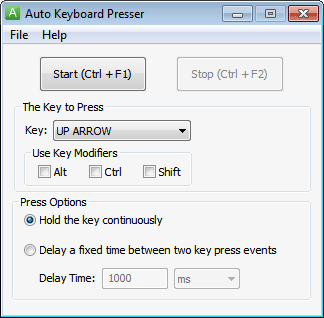
Hold a key or key combination continuously
Pick the key or combination you need, and the program keeps it held down. This suits games where you hold a movement or action key for a long time.
Repeat the press on a delay you set
If you would rather have repeated presses than a held key, set the delay between presses. The delay can be in milliseconds, seconds, minutes or hours.
Start and stop with hotkeys
You don't need to leave your game to control it. Press Ctrl + F1 to start and Ctrl + F2 to release the key.
Who it's for
It suits you if you play games that need a held or repeatedly pressed key and you want to rest that finger. It does one narrow job, so it isn't a full macro tool.
Pros and cons
- Pro: simple, with a single purpose.
- Pro: hotkeys work while you are in the game.
- Pro: works on very old and very new Windows versions.
- Con: the trial stops pressing after 1 minute.
- Con: Windows only.
FAQs
Can it hold a key combination?
Yes. It can hold a single key or a key combination continuously.
Can it press a key at intervals instead?
Yes. You set the delay between presses, from milliseconds up to hours.
How do I start and stop it?
Use Ctrl + F1 to start and Ctrl + F2 to stop.
What are the trial limits?
The trial can only press the key for 1 minute. The full version removes that limit.
System requirements
64-bit and 32-bit Windows 11, 10, 8, 7, Vista, XP, Server 2008 (R2), 2003 (R2) and 2000.