Short answer: pick by what you need repeated. In the auto clicker vs key presser vs macro recorder choice, an auto clicker repeats mouse clicks, a key presser repeats one key, and a macro recorder replays a whole task of clicks, keys and waits. For one click or one key, Auto Mouse Clicker and Auto Keyboard Presser cost $5 each. For anything with more than one step, choose Macro Recorder Standard ($99.95 once) for work use, or Macro Recorder Pro ($149.95 once) when the buttons move around on screen.
At a Glance
| Product | Tool type | What it repeats | Price | Runs on | Free to try |
|---|
| Macro Recorder Standard | Macro recorder | Whole tasks: clicks, keys, text, waits | $99.95 once | Windows, Mac | Free edition for personal use; the download also works as the demo |
| Macro Recorder Pro | Macro recorder | The same, plus clicks that find their target by image | $149.95 once | Windows, Mac | Same download as Standard |
| Auto Mouse Recorder | Simple macro recorder | A recorded run of mouse and keyboard actions | $20 | Windows | Repeats 5 times per run |
| Auto Mouse Clicker | Auto clicker | One kind of click | $5 | Windows | 10 clicks per run |
| Auto Clicker Asoftech | Auto clicker | Saved series of clicks | $14.95 | Windows | Free trial download |
| Auto Keyboard Presser | Key presser | One key or key combination | $5 | Windows | 1 minute of pressing |
How we picked
- We kept one or two tools of each type that are still sold and still download from the vendor.
- We read each vendor's product, order, help and trial pages, and listed what each tool can repeat and where it stops.
- We looked at each program's own windows in the vendor's screenshots to confirm the settings it offers.
- We set the price and trial limit of every product side by side.
What we checked: on November 5, 2026 we downloaded the Windows installers and read their version numbers without installing them: Macro Recorder 5.0.40 (signed by Bartels Media GmbH), Auto Mouse Recorder 3.2.2.8, Auto Mouse Clicker 2.2.5.8, Auto Keyboard Presser 2.1.1.8 and Auto Clicker Asoftech 2.00. Prices and trial limits are from the vendors' order and product pages on the same day.
We compared features, prices and trial limits. We didn't run these tools in a game or in a work program, and we didn't time how fast any of them clicks or presses.
Auto Clicker vs Key Presser vs Macro Recorder: The Real Difference
The three types of automation tools differ in how much of a job they can repeat. An auto clicker handles the mouse. A key presser handles the keyboard. A macro recorder handles both, in order, with pauses, and that's why it costs more and takes longer to set up.
| What you need | Auto clicker | Key presser | Macro recorder |
|---|
| Repeat a mouse click | ✓ | ✗ | ✓ |
| Repeat a key, or hold it down | ✗ | ✓ | ✓ |
| Mix clicks, keys and waits in one run | ✗ | ✗ | ✓ |
| Type a line of text | ✗ | ✗ | ✓ |
| Record what you do, then replay it | ✗ | ✗ | ✓ |
| Setup | One window of settings | One window of settings | Record a run, or build a list of steps |
| Price in this article | $5 to $14.95 | $5 | $20 to $149.95 |
What Is a Keyboard Auto Clicker?
A keyboard auto clicker, auto key clicker or automatic keyboard clicker is what vendors call a key presser. The name is borrowed from mouse clickers, but the job is pressing a keyboard key for you. Auto Keyboard Presser is that kind of tool: choose a key, hold it continuously or press it at a set delay, and start it with a hotkey.
The phrase "auto clicker keyboard" can also mean something else: a mouse clicker you start from the keyboard. Auto Mouse Clicker and Auto Clicker Asoftech both work that way, but neither presses keys for you. If you want a key repeated, a mouse auto clicker is the wrong purchase, whatever its hotkeys.
Macro Recorder Standard
Macro Recorder Standard by Bartels Media: $99.95 once, with 12 months of updates. Windows and Mac. Best for: repeating multi-step jobs at work on screens that stay put.
Macro Recorder Standard records your mouse and keyboard actions and turns them into a list of steps you can edit. It's a macro recorder that also covers the other two tool types. Press Record, do the job once, press Stop, and each click, key press and pause appears as a readable line you can reorder or delete.
Macro Recorder Standard works as a key presser through its Keypress action, which has press and release, key down and key up modes and a Count field. For timed tapping, you combine Keypress, a Wait in milliseconds (with an optional random range) and a Repeat that runs by count, for a duration or until a set time. To hold a key, you use key down, Repeat, then key up. A click action with a position and a button makes it an auto clicker too, and the Text output action types whole lines key by key, with a Humanize option.

The Insert key press dialog: press and release, the Tab key, and a count of 3.
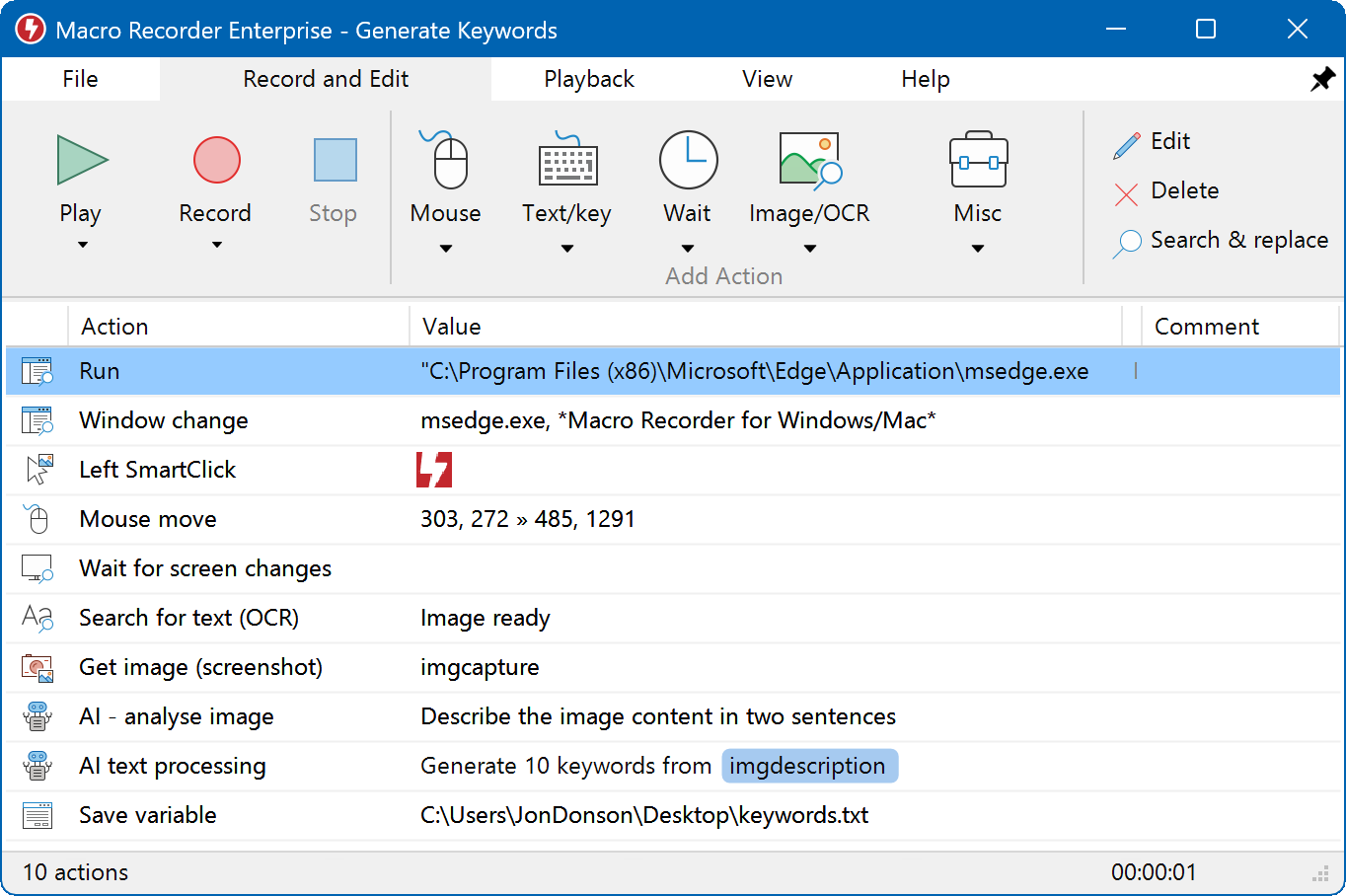
The main window: the toolbar on top and the macro as a list of actions below. This sample is from the Enterprise edition, so its AI and OCR steps aren't in Standard.
What we like
- One tool for clicks, keys, text and waits
- Steps stay editable, so a coworker can change a macro without learning a script language
- One payment, with no subscription
- Runs on Windows and Mac
Watch out for
- No refunds, so test your real task first
- Clicks use fixed coordinates, and a changed layout makes them miss
- Far more money than a $5 tool if you only need one key
- One license covers one user on either Windows or Mac
What users say
Independent feedback is thin: Trustpilot showed a TrustScore of 4.0 from 3 reviews, and Techjockey showed 4.1 from 4 ratings, so treat these as a small sample.
"Perfect recorder, only needs tweaks on how it reacts to mouse hold click with movement of the mouse"
Allen Cuanan, Trustpilot, May 4, 2026, 5 stars
"Macro recorder save you a lot of useless work save time and money guys i tell you get that thing going support is great !"
Vincent Simard, Trustpilot, January 28, 2025, 5 stars
Download Macro RecorderBuy Macro Recorder Standard
Macro Recorder Pro
Macro Recorder Pro by Bartels Media: $149.95 once, with 12 months of updates. Windows and Mac. Best for: web pages and programs where buttons change position.
Macro Recorder Pro is the edition to buy when fixed coordinates keep missing. Its SmartClick stores a small image of the click target and searches the desktop for it during playback, so the click still lands after an ad or banner pushes the button down the page. It also adds text search with OCR, pixel color waits, a scheduler and command-line control.
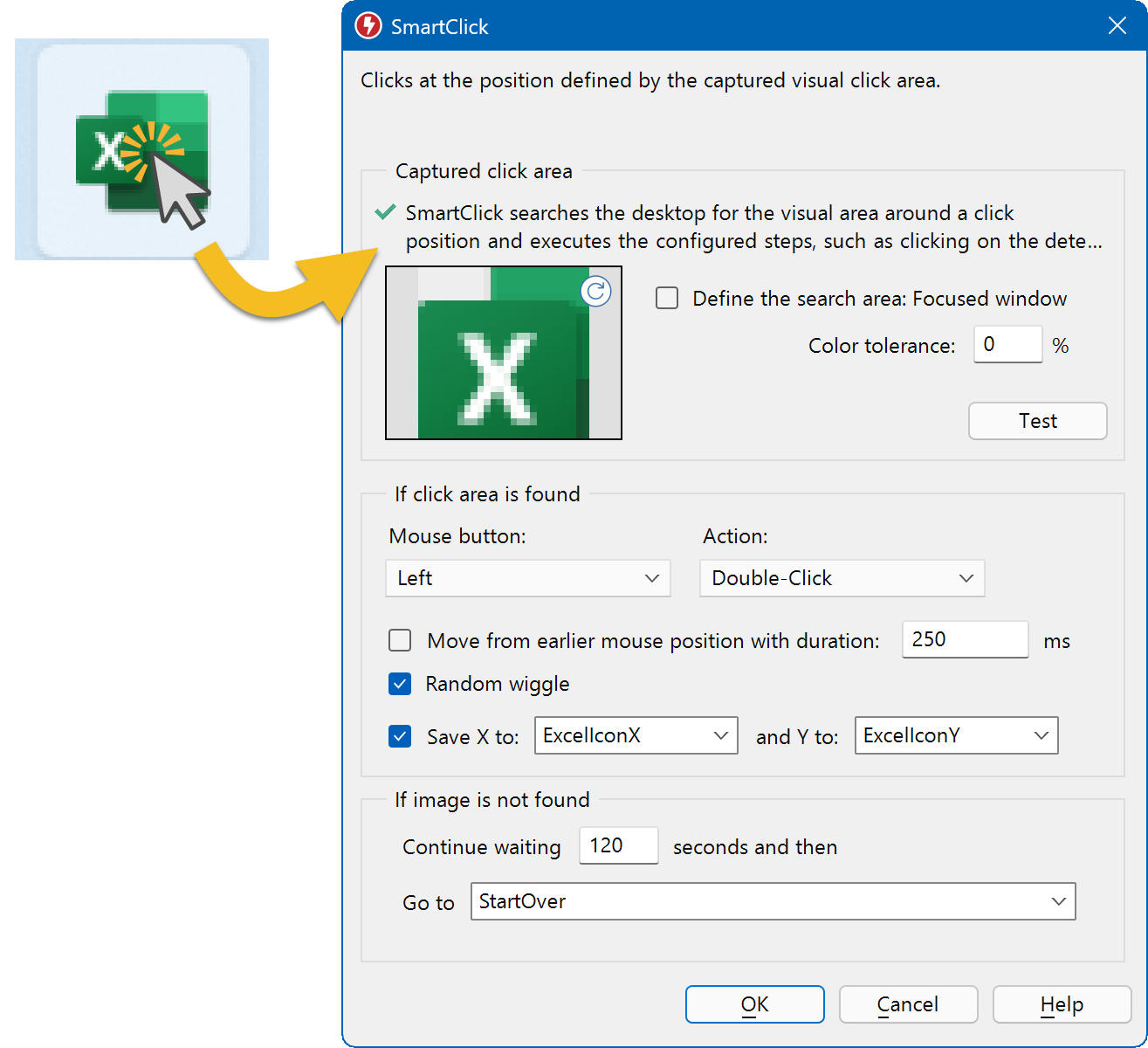
The SmartClick dialog: a captured Excel icon, a color tolerance, and what to do if the image isn't found. The picture on the left is the vendor's illustration.
What we like
- Clicks follow the target instead of a screen position
- You choose what happens when the target never appears
- Smart Record saves each click as a SmartClick while you record
Watch out for
- Costs $50 more than Standard, wasted if your screens never change
- Image matching can fail on a PC with different display scaling or fonts
- No variables, which need the $249.95 Enterprise edition
Download Macro RecorderBuy Macro Recorder Pro
Auto Mouse Recorder
Auto Mouse Recorder by AutoMacroRecorder: $20. Windows only. Best for: a cheap record-and-repeat tool at home.
Auto Mouse Recorder is the low-cost way to get all three tool types. It records your mouse and keyboard actions and repeats them a set number of times or for a set time, with a delay between runs, a speed slider and scheduled tasks. The vendor says it comes with Auto Mouse Clicker and Auto Keyboard Presser, which makes $20 a sensible price if you think you'll need more than one.
Auto Mouse Recorder is mostly record and repeat. Its window shows repeat settings and a list of saved records, not a list of steps to edit, so a mistake may mean recording again. The installer dates from August 2022 and isn't digitally signed, so Windows may warn you when you run it.
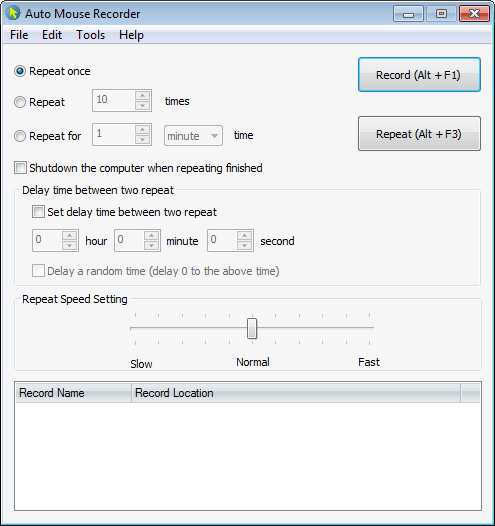
The Auto Mouse Recorder window: repeat options, delay between repeats, a speed slider and the list of saved records.
What we like
- $20 covers recording plus a clicker and a key presser
- A random delay option between repeats
- Can shut the computer down when repeating ends
Watch out for
- No editable step list in the main window
- Windows only
- The trial repeats only 5 times per run
Download Auto Mouse Recorder
Auto Mouse Clicker
Auto Mouse Clicker by AutoMacroRecorder: $5. Windows only. Best for: one click repeated at a steady pace.
Auto Mouse Clicker repeats one kind of mouse click, and that's all you need for many jobs. You set the click count or running time, the interval in milliseconds, the button, and single or double click, then choose the mouse position or a fixed point. Ctrl+F1 starts it and Ctrl+F2 stops it. The installer dates from April 2021, and it isn't digitally signed.
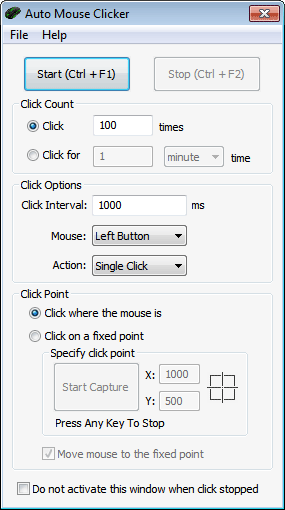
The whole program: click count, click interval, button, action and click point in one small window.
What we like
- $5, and every setting fits in one window
- Interval set in milliseconds
- Hotkeys start and stop it from inside another program
Watch out for
- One click setting at a time, so no sequences
- Mouse only, with no key pressing
- The trial clicks only 10 times per run
Download Auto Mouse Clicker
Auto Clicker Asoftech
Auto Clicker Asoftech by Asoftech: $14.95 (usual price $29.95), with a 30-day money-back guarantee. Windows only. Best for: several click routines you start by hotkey or on a schedule.
Auto Clicker Asoftech saves a series of clicks as a "robot", and that's the step up from a one-click tool. Each robot can hold several clicks at different positions, including right clicks, double clicks and click-hold for dragging, and gets its own start and stop hotkeys. You can run robots a set number of times, loop them until you press the stop key, or schedule them for a date and time. A background option lets you keep working in a document while it clicks.
Auto Clicker Asoftech hasn't had a new installer since March 2018, although the vendor lists Windows 11 support. It's mouse only, despite the keyboard shortcuts in its description.
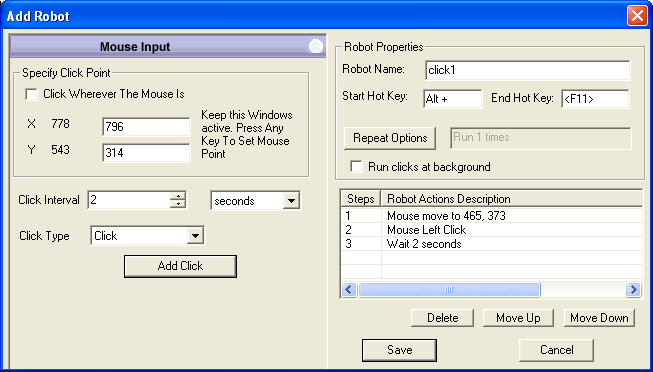
The Add Robot window: click point and interval on the left, hotkeys, repeat options and the steps of the robot on the right.
What we like
- Several clicks in one saved robot
- Scheduling and a background option
- 30-day money-back guarantee
Watch out for
- No key pressing or text typing
- Oldest installer in this article
- Windows only
Download Auto Clicker Asoftech
Auto Keyboard Presser
Auto Keyboard Presser by AutoMacroRecorder: $5. Windows only. Best for: holding or tapping one key without tying up a finger.
Auto Keyboard Presser presses one key, with or without Alt, Ctrl or Shift, and nothing more. You pick the key, then choose to hold it continuously or press it with a fixed delay in milliseconds, seconds, minutes or hours. Ctrl+F1 starts it and Ctrl+F2 stops it. For the narrow job of repeating a single key, it's the cheapest paid answer in this article.
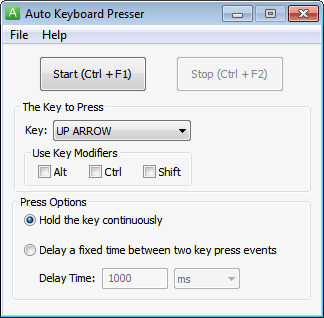
The whole program: the key, Alt, Ctrl and Shift modifiers, and the hold or fixed-delay options.
What we like
- $5, with one window of settings
- Hold or tap modes
- Delay can run from milliseconds to hours
Watch out for
- One key or combination, never a sequence
- Windows only, and the installer isn't digitally signed
- The trial presses for only 1 minute
Download Auto Keyboard Presser
Price: What the Extra Money Buys
Macro Recorder Standard costs twenty times as much as a $5 tool, and the difference pays for sequences, editing and a work license. If your job is one click or one key, none of that helps you. If your job has three steps, a $5 tool can't do it at any price.
Price for one license (USD)
Auto Keyboard Presser$5.00
Auto Clicker Asoftech$14.95
Auto Mouse Recorder$20.00
Macro Recorder Standard$99.95
Macro Recorder Pro$149.95
Prices on the vendors' order and product pages, checked on November 5, 2026. Macro Recorder is a one-time payment with 12 months of updates.
Macro Recorder vs Jitbit Macro Recorder
Macro Recorder Standard is the better choice for most buyers because it's actively updated and has a Mac version, while Jitbit Macro Recorder is the cheaper Windows option. Jitbit's last release is version 5.9.0, dated December 3, 2022. Macro Recorder 5.0.40 came out on September 25, 2026.
Jitbit Macro Recorder still has a real case. Its Pro plan is $69, against $99.95 for Macro Recorder Standard, and it includes business use, macro scheduling and compiling a macro to an EXE file, which doesn't appear in Macro Recorder's edition list. Jitbit's Basic plan at $39 doesn't include business use. Premium at $99 adds C# code snippets and debugging. If you work on Windows, want to hand a coworker a standalone EXE and don't mind older software, Jitbit Pro is the better fit.
Jitbit's own FAQ warns that some antivirus programs flag it, because compiled EXE files and simulated input resemble what viruses do. Check with your IT department before you roll it out.
Using these tools in games
Many online games ban key pressers, auto clickers and macros, and getting caught can cost you the account. Two of the vendors here pitch their tools at gamers, but that doesn't make them allowed. Read the game's rules before you use one.
We don't recommend trying to get around anti-cheat systems or a game's detection, and nothing in this article is meant for that.
Which Do You Need? Pick by Situation
| Your situation | Tool type | Our pick | Why |
|---|
| One button, clicked over and over | Auto clicker | Auto Mouse Clicker | $5, and nothing to learn |
| Several clicks in a fixed routine, started by hotkey or on a schedule | Auto clicker | Auto Clicker Asoftech | Saves click series as robots |
| One key held or tapped on a timer | Key presser | Auto Keyboard Presser | $5, with hold and delay modes |
| Clicks and keys together at home, on a small budget | Simple macro recorder | Auto Mouse Recorder | $20, with the clicker and presser included |
| Multi-step work task on screens that don't change | Macro recorder | Macro Recorder Standard | Editable steps, plus Wait and Repeat, licensed for work |
| Web pages or programs where buttons move | Macro recorder | Macro Recorder Pro | SmartClick finds the target by image |
| You use a Mac | Macro recorder | Macro Recorder Standard | The only tool in our picks with a Mac version |
| Windows, tight budget, need a standalone EXE | Macro recorder | Jitbit Macro Recorder | Pro plan at $69 compiles macros to EXE |
Who should skip each one
- Macro Recorder Standard: skip it if you repeat a single click or key, or if your targets move. The first case wants a $5 tool, the second wants Pro.
- Macro Recorder Pro: skip it if your screens never change, since Standard does that job for $50 less.
- Auto Mouse Recorder: skip it for work you'll need to adjust later, because a list of editable steps saves re-recording.
- Auto Mouse Clicker and Auto Clicker Asoftech: skip both if your job involves the keyboard at all.
- Auto Keyboard Presser: skip it if you need two different keys in turn. It presses one key or combination.
What commonly goes wrong
- Buying by name. A "keyboard auto clicker" search can land you on a mouse clicker with hotkeys. Check that the product page says it presses keys.
- Keys going to the wrong window. Simulated keys go to whichever window has focus. Macro Recorder doesn't switch focus unless the macro has a click or a focus action, so click into the target first.
- Clicks missing after a layout change. A new resolution, a different browser zoom or a banner ad can shift a fixed click point. This affects every tool here except Pro's image-based clicks.
- Administrator windows ignoring input. On Windows, a tool running with normal rights can't send input to a program started as administrator. Run Macro Recorder as administrator too.
- No stop plan. Learn the stop key before a long run: Esc in Macro Recorder and Ctrl+F2 in Auto Mouse Clicker and Auto Keyboard Presser.
FAQs
Is there one auto clicker and keyboard presser in a single program?
Yes. Macro Recorder Standard does both in one macro, with waits between steps. Auto Mouse Recorder is the budget route, since the vendor includes Auto Mouse Clicker and Auto Keyboard Presser with it.
Is there a free auto clicker for keyboard keys?
Macro Recorder has a free edition for personal use that can record, play back and loop a whole macro. Timed tapping needs the Repeat and Wait actions, which start at Standard. Auto Keyboard Presser's trial is limited to 1 minute of pressing.
Can I use the free Macro Recorder at work?
No. The free edition of Macro Recorder is for personal users and shows license notices in a company environment, on a managed device, in a virtual machine or on a server OS. Macro Recorder Standard is the edition for work use.
Which of these tools work on a Mac?
Only Macro Recorder runs on a Mac among the products we picked. Auto Mouse Recorder, Auto Mouse Clicker, Auto Keyboard Presser and Auto Clicker Asoftech are Windows only. On Macro Recorder Pro, the scheduler and command line are Windows features.
Can a key presser run while I use the PC for something else?
Usually not, because Macro Recorder and similar tools use the real keyboard and mouse. Macro Recorder needs a visible desktop session and can't run in the background. Auto Clicker Asoftech is the exception here for clicks, with a "run clicks at background" option.
Is a macro recorder a keylogger?
No. Macro Recorder has no stealth mode, its icon shows when it's recording, and Bartels Media states it never sends your input over the internet. A macro can still capture a password you type while recording, so don't record one.
Is Jitbit Macro Recorder still updated?
Jitbit Macro Recorder is still sold, but its last listed release is 5.9.0 from December 3, 2022. The license is perpetual, with one year of free upgrades.
How do I know a small tool is safe to install?
Download it only from the vendor. The Macro Recorder installer is signed by Bartels Media GmbH, while the AutoMacroRecorder installers aren't digitally signed, so Windows may show a warning for them. Asoftech's support page covers the "Windows protected your PC" message.