Macro Recorder Pro: Macros That Find the Button Instead of Guessing Where It Is
Macro Recorder Pro is a $149.95 one-time license that adds image recognition, on-screen text search, pixel-color waits, scheduling and command-line control to Bartels Media's Windows and Mac macro recorder. It's meant for web automation, GUI testing and any job where the screen doesn't hold still.
Most macros break for one reason: a button moved. A banner ad pushes a page down, a dialog takes three seconds longer today, and a recorded click lands on empty space. Pro answers that by looking at the screen the way you do, and waiting for what it expects to see.
Quick facts
- Release: v5.0.40 on Windows, v5.0.41 on macOS, both from September 2026
- Maker: Bartels Media GmbH
- Cost: $149.95 paid once, with a year of maintenance
- Runs on: Windows and macOS
- Key additions: SmartClick, Smart Record, image and OCR search, pixel color detection, macro embedding
- Try it: the free download lets you test every feature, with license notices
What we checked: the order page shows Macro Recorder Pro Edition at $149.95, including 1 year of maintenance and with no auto-renewal, and the vendor's installer reports version 5.0.40, both on November 5, 2026. We compared the edition table and manual, but we didn't build a test macro against a live site.
Before you buy
- Test your hardest step on the demo. Bartels Media gives no refunds, and it warns that playback cancels after a few repetitions when you use a feature above your license, so the demo shows whether detection works, not a full production run.
- Mac buyers, read this. Scheduling goes through the Windows Task Scheduler and the command-line control is documented for Windows. Don't count on either on a Mac.
- Automation help isn't included. Support covers the product, and tuning your image detection is on you. The manual and its video tutorials are good, so plan a learning session.
Download Free TrialBuy Now
Overview
Pro keeps the recorder and action list of the lower editions and changes what a click means. In Standard, a click is a coordinate. In Pro, a click can be a small picture of the target, and the macro pauses until that picture appears, then clicks it. Those two changes remove most of the guesswork about positions and timing.
Version 5 rebuilt the matching engine. Bartels Media says the new SmartClick and image detection tolerate anti-aliasing, DPI and interface scaling, distortion and rotated elements better than before.
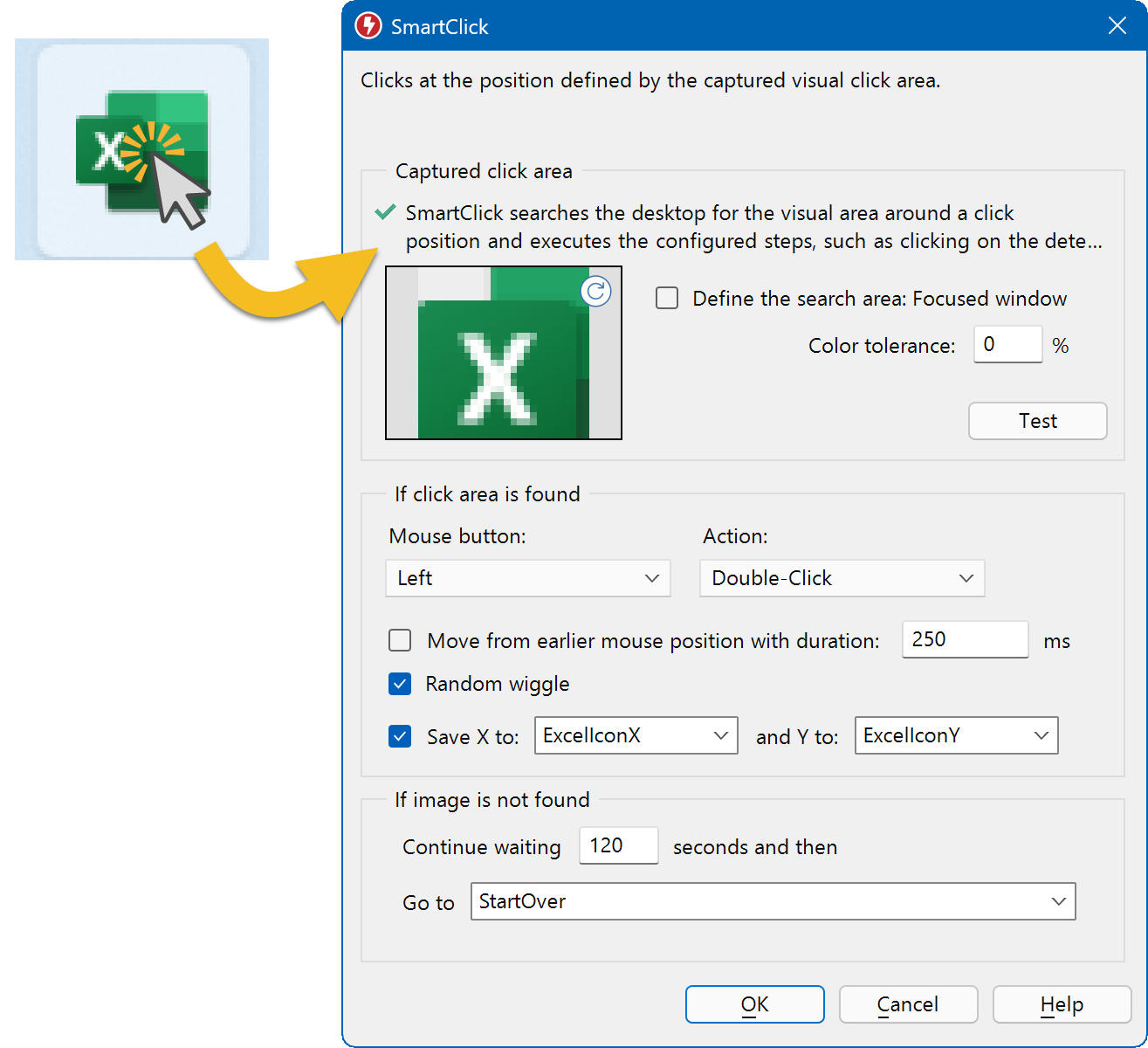
SmartClick stores a small image of the click target, here an Excel icon, and sets what happens if it can't be found. The picture on the left is the vendor's illustration.
Features
SmartClick follows the target, not the coordinate
Macro Recorder Pro's SmartClick captures the area around a click and scans the desktop for it on playback. It works even after the target has shifted, for example after an ad loads above it. You choose the color tolerance, the search area, and where the macro jumps if the image never appears, and a Test button shows the match before you run anything.
Smart Record builds those clicks for you
Macro Recorder Pro's Smart Record is a recording mode that saves each click as a SmartClick. Do the task once and you get a macro with no fixed wait times, because each step waits for its own visual clue. It suits browser work, where every click changes the page.
Image search on any part of the screen
Macro Recorder Pro can look for any image, not just a click target, and then move the mouse there, save the position or jump to another part of the macro. You set the comparison method, including feature matching, plus the precision. Narrowing the search area speeds it up.

The Search image dialog, with comparison method, precision and separate paths for found and not found. The Save X/Y fields need the Enterprise edition's variables.
Text search with OCR
Macro Recorder Pro can scan a window or the whole desktop for specific words and click on them or branch to another section. It handles regular expressions, multiple languages and a contrast-boost option for hard-to-read text. Decorative and handwritten fonts are beyond it, so use image search for those.

The Find text dialog. The window design is from version 3.
Pixel color waits
Macro Recorder Pro can pause until one chosen pixel turns a chosen color, then carry on the moment that happens. A page's favicon area is a typical trigger for "finished loading". This replaces long safety waits, which is where most macro time goes, and a timeout sends the macro to a retry routine if the color never shows up.

The Wait for pixel color action, with color tolerance and a 120-second timeout.
Scheduling and command-line control
Macro Recorder Pro for Windows can hand a saved macro to the Task Scheduler through File > Schedule macro. It can also be started by other programs with parameters such as -play, -startat, -minimized and -shutdown. That lets a build server or batch file start a test run.
Macro libraries and post-run actions
Macro Recorder Pro can embed one macro file inside another, so a shared login sequence lives in one place and every script reuses it. When a run ends, it can shut down, restart, log out, lock or sleep the computer, after a countdown you can cancel.
Benefits
- Macros that last. A web redesign may still break a macro, but a moved button or slow page no longer does.
- Faster runs. Waiting for a visual clue finishes the instant the app is ready, instead of sitting out a worst-case timer.
- Runs that don't need you. Scheduled macros can start before you arrive, as long as the session is logged in.
Real-World Uses
- Web form workflows: log in, wait for the dashboard image, click Export, and wait for the download button, regardless of page layout shifts.
- GUI regression checks: have a test macro open each dialog of your application and jump to a failure routine when an expected image is missing.
- Overnight jobs: schedule a report run for 2 a.m. on a logged-in PC, then shut it down afterwards.
- Legacy desktop apps: drive an old program with no API by matching its buttons and reading its status text.
Who It's For, and Who Should Skip It
Pro fits QA testers, IT staff and office users who automate browsers or programs that change between runs. If your macro has ever failed because something loaded late, this is the edition to look at.
Skip it if your screens never change, because Standard does that job for $50 less. It's also the wrong pick if you need your macro to remember, calculate or compare values: variables are Enterprise-only, so Pro can't store a found position for later or read a list of inputs. Developers comfortable with code may prefer a scripted framework, which gives them full control and version-friendly test files.
Usage Guide
- Install from the vendor's download page, and on a Mac allow the three system permissions it asks for.
- Start Smart Record rather than plain Record.
- Click through the task slowly, choosing distinctive spots. A click in the middle of a plain white area can't be recognized.
- Stop, then open each SmartClick and press Test to confirm a match.
- Set the "if not found" branch so a miss jumps to a retry label instead of ending the run.
- Replay on the same zoom and display scale you recorded with, and press Ctrl+0 in a browser first to reset zoom.
- Save the macro, then use File > Schedule macro on Windows if it should run by itself.
Where it falls short
- Appearance changes still fool it. Dark mode switching, a night-light color filter, a visited link's new color, different fonts or a different DPI setting can all stop a match, and Bartels Media's troubleshooting list for this is long.
- Scheduling doesn't mean unattended servers. The desktop must be present and the account logged in at run time. A logged-out session won't run the macro.
- It isn't a full test framework. Macro Recorder can drive GUI checks, but pass and fail handling is yours to build with labels and notifications.
- Remote windows are out of reach. Run it inside the RDP session, not from the host.
What Users Say
There isn't much independent commentary on the paid features, and what exists is split. The most specific comes from AlternativeTo and dates from 2021 and 2022, when the price was lower.
Praise and a price complaint
"Macro Recorder has a unique feature - the user can define an image that the Macro Recorder will search on the screen and click on that image."
Peter, AlternativeTo, November 27, 2021, 5 stars
"What I dislike is that feature costs 140 USD."
Peter, same review
"It is full of unique technologies"
OnlyHardOfficial, AlternativeTo, July 4, 2022, 5 stars
A trial problem
"True, I saw the "Smart Click" option demonstrated on a video, and tried it myself, only to get an error window saying that a license is needed."
TBayAreaPat, AlternativeTo, January 20, 2022
The same user said Macro Recorder gave him trouble with focused windows, which matches the manual's advice that most playback problems come from input focus. Both later moved to the free Pulover's Macro Creator, and Peter noted that it lacks good documentation.
Two themes stand out. People value the image-based click as the reason to pay, and they question paying for it when free tools exist. The trial experience has changed since those comments, since Bartels Media now says the demo lets you test everything, but do check how a higher-edition action behaves in the current build.
Comparisons
Pro vs Standard
Standard clicks at stored positions and waits for fixed times. Pro clicks on what it sees and waits for the right moment, and it can start itself on a schedule. Anything that changes between runs is worth the $50 difference.
Pro vs Pulover's Macro Creator
AlternativeTo users recommend Pulover's as a free tool with image recognition, at the cost of weaker documentation. Pro costs money but has a current manual with video tutorials, a Mac version and a vendor still shipping major releases.
Editions and Pricing
| Edition | Price | What it adds | Fits |
|---|
| Standard | $99.95 | Licensed work use, Goto, Repeat, Wait, Execute Program | Fixed screens |
| Pro | $149.95 | Visual clicks, OCR search, pixel waits, scheduling, command line, macro embedding | Changing screens, testing |
| Enterprise | $249.95 | Variables, AI, capture, QR and barcode reading, PhraseExpress support | Macros that use data |
All three are perpetual licenses with 12 months of maintenance. Buying 5 to 24 Pro licenses brings the price to $142.45 each, 25 to 49 to $119.96, and 50 to 99 to $112.46, applied when you raise the quantity at checkout.
FAQs
Does Macro Recorder Pro work with any browser?
Macro Recorder Pro doesn't hook into browsers at all. It works from what's on screen, so it can drive Edge, Chrome or Firefox the same way, and any other program too, with no plug-in. Page zoom and layout changes are what you need to control.
Can Macro Recorder Pro run while I use my PC?
No. Macro Recorder Pro takes over the real mouse and keyboard, so it needs the desktop to itself while it runs. Use a separate PC or a virtual machine if you want to keep working.
Can Macro Recorder Pro run several macros at once?
No. Macro Recorder Pro runs one macro at a time in one session, because a computer has one mouse pointer and one input focus. You can chain work by embedding macro files in one another.
Why does a SmartClick work on my PC but not on a colleague's?
A SmartClick compares images, so a different display scaling, font set or font smoothing setting can defeat it. Macro Recorder Pro macros travel best between machines with the same display settings.
Can Macro Recorder Pro restart a macro when it fails?
Yes. Each image, text and pixel action in Macro Recorder Pro has a timeout and a Go to field, so a miss can jump to a retry label or restart from the top instead of ending.
Is an upgrade to Enterprise possible later?
Macro Recorder upgrades to a higher edition are offered within the same month as your purchase through the shop's upgrade page. For multiple licenses, the vendor handles upgrades by email.
System Requirements
- Windows or macOS, tested by the vendor on Windows 11 and macOS 27
- A visible desktop session, plus the same display scale as your recording
- For scheduling: the Windows Task Scheduler and a logged-in account
- The Download Free Trial button below is the Windows build
Conclusion
Macro Recorder Pro is the edition most people automating real work should buy, as long as they test detection on their own screens first. At $149.95 once, there's no recurring bill to justify.
The reason to buy is SmartClick with Smart Record, which removes the fixed coordinates and timers that kill ordinary macros. The reason not to is the no-refund policy combined with detection that depends on display settings. Mac users should note that the scheduler and command line are Windows features.
Download Free TrialBuy Now