PhraseExpress Enterprise: AI, Documents and Outlook on Top of a Text Expander
PhraseExpress Enterprise is the top edition of the Windows text expander, at $249.95 per user, for people whose templates need to think. It rewrites and translates text with AI, assembles complete Word documents from chosen clauses, and answers Outlook mail with a personal greeting. Those extras are what you pay the additional $100 over Pro for.
A contract, a surgery report and a customer letter in three languages have something in common: most of the words already exist somewhere, and the hard part is picking the right ones and getting them into shape. That's the job this edition takes on.
Quick facts
- Version: 18.0.84, released October 9, 2026
- Developer: Bartels Media GmbH, Trier, Germany
- Platform: Windows 10 and 11. The Mac edition has a shorter feature list
- Price: $249.95 per user, paid once, with a year of updates
- AI engines: OpenAI and OpenRouter online, Ollama and GPT4All on your own PC
- Trial: 30 days, and the demo includes every Enterprise feature
- What we checked: installer version 18.0.84 (56.4 MB) downloaded from the vendor, and order page prices of $249.95 for one license and $3,562.50 for the ten-seat floating pack, on November 5, 2026. The AI, Outlook and Document Generator details come from the vendor's documentation and we didn't test them ourselves
Before you buy
- AI isn't included in the price. A license doesn't cover OpenAI or other online services, so you pay them separately. Self-hosted engines are free but need your own PC to do the work.
- The Outlook add-in needs classic Outlook. It requires a local Outlook installation, and the "new Outlook" isn't supported.
- Document Generator needs Microsoft Word installed on the same PC.
- Macro Recorder costs extra. Running recorded mouse and keyboard macros from PhraseExpress needs a separate Macro Recorder Enterprise Edition license.
- All sales are final. Bartels Media offers its demo instead of a refund, so test each of these features on your own setup first.
Download Free Trial
Buy Now
Overview
Enterprise has everything in PhraseExpress Pro, including SQL Server sharing and input forms, and turns a phrase library into something closer to a document system. It connects your phrases to the outside world: AI engines, your databases, Azure Entra accounts and Outlook. Forms get smarter too, as a field can appear or change depending on an earlier answer.
You don't need a team to justify it. One lawyer or doctor who assembles long documents every day may get more from Enterprise than a ten-person office gets from Pro. A SQL Server stays optional, and Word is the piece that really matters.
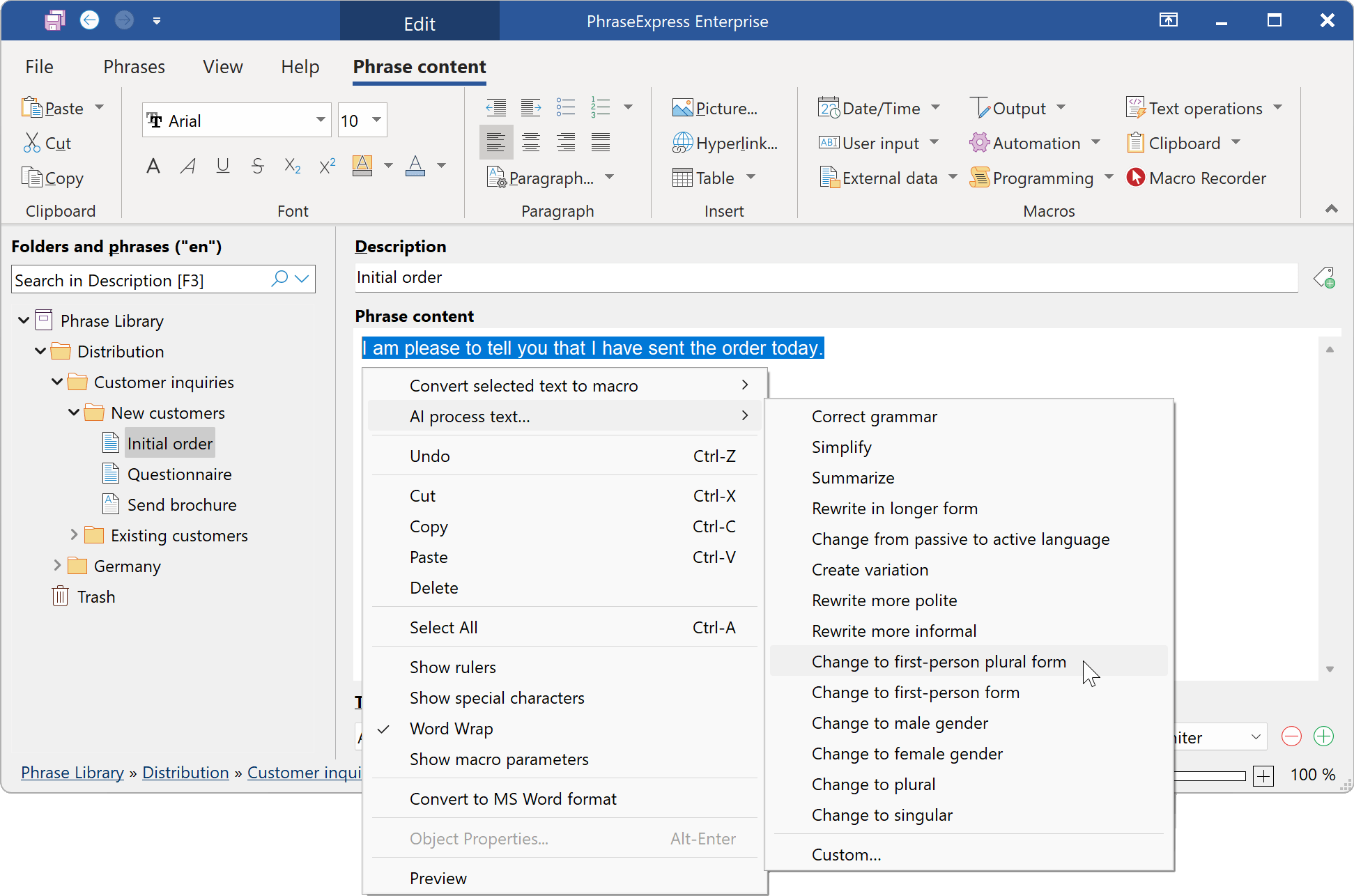
The AI menu in the phrase editor: simplify, summarize, rewrite more politely, change person or gender, or write your own instruction. The ribbon also shows the Macro Recorder button.
Features
AI in any program
PhraseExpress Enterprise lets you select text anywhere, in Word, Outlook or a browser, and send it to an AI engine for a grammar check, a shorter version, a different tone or a translation. You can define your own instructions and tie them to a hotkey.
Your choice of AI engine
PhraseExpress Enterprise works with OpenAI, and version 18 adds OpenRouter, a single access point to hundreds of models. If your text mustn't leave the building, the self-hosted Ollama and GPT4All engines run locally, and the vendor states that no data leaves your computer that way.
Pay for AI once, reuse forever
PhraseExpress Enterprise stores what the AI writes as ordinary phrases, so a generated template costs nothing the next time and appears instantly. A version 18 feature does the opposite, producing natural variations of a template so that repeated emails don't all read alike.
Document Generator
PhraseExpress Enterprise can build a whole document from a list. You drag clauses from your library into the order you want, press OK, and it renders them into your own Word template, ready to save or paste. Checkboxes make it quick to pick several clauses at once.
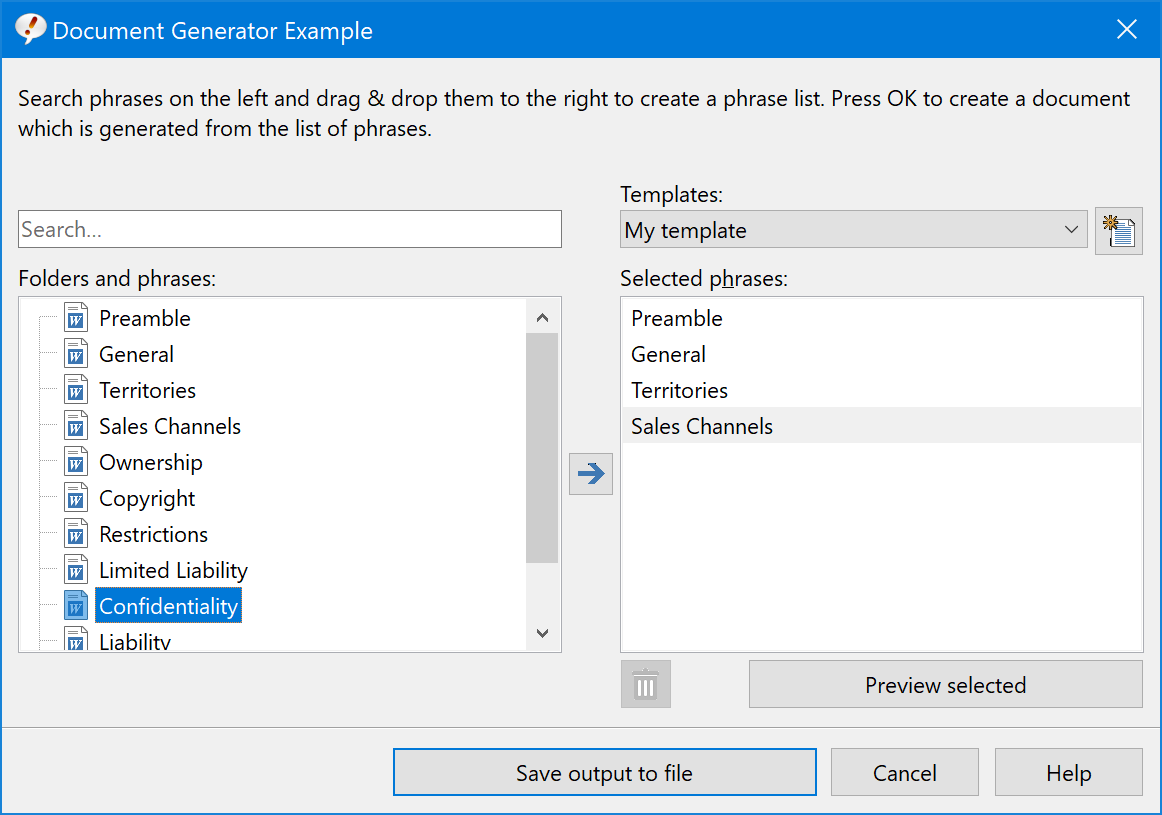
The Document Generator: contract clauses on the left, the ones you picked on the right.
Multi-language phrases
PhraseExpress Enterprise keeps one phrase in several languages under one folder structure. Small language buttons in the popup menu switch versions per insertion, each language can have its own triggers, and AI or DeepL can translate an entire library.

Version 18's language buttons in the phrase popup, with the vendor's sample text.
Outlook add-in
PhraseExpress Enterprise reads the email you're answering, fills in a greeting with the correct name, and detects gender from the first name for formal letters such as "Mr." or "Ms.". It can also analyze the subject and body, then suggest only the phrases that match.
Live data from your databases
PhraseExpress Enterprise can run a database query and put the result in a phrase, or build a whole phrase folder from query results. A customer service template can therefore show today's product list rather than one someone typed in last spring.
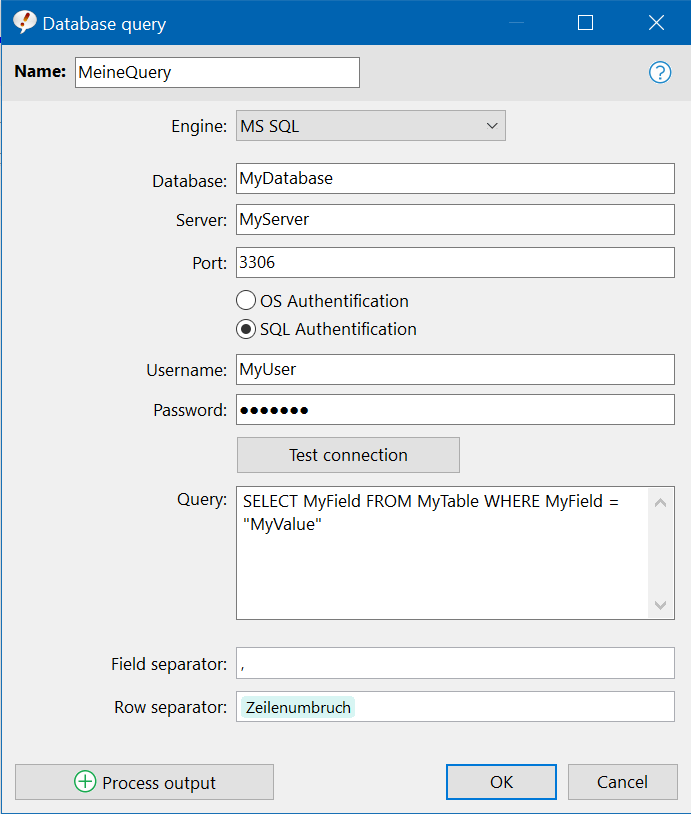
Setting up a database query. The vendor's shot comes from a German system, so one field reads in German.
Dynamic forms and Azure Entra sign-in
PhraseExpress Enterprise forms can change their fields based on what's been entered so far, so a long questionnaire only asks what applies. Staff can sign in with Azure Entra, and access to phrase libraries can follow those accounts.
Benefits
Enterprise moves the work from typing to choosing. A professional picks clauses and answers a few questions, and the document comes out in house style with less proofreading. Translating a library in one action also opens up support in other languages without hiring for each one. And because you can pick a local AI engine, firms with client confidentiality duties get to use AI at all, which many cloud-only tools can't offer them.
Real-World Uses
- A law firm selects the terms for a contract and gets a Word file on the desktop, while a local AI engine keeps client text in-house.
- A hospital doctor ticks the procedures performed and produces a tailored surgery report.
- A technical writer reuses common sections to create a variant of an existing manual.
- A multinational support team answers in English, German or French from a single phrase, with a language button per reply.
- A sales rep opens a customer mail in Outlook and sees the greeting ready, along with only the phrases about that product.
Who It's For, and Who Should Skip It
Buy Enterprise if you'll really use at least one of its big extras: AI, the Document Generator, the Outlook add-in, multi-language phrases or database queries. Lawyers, medical staff, translators and support teams working across languages get the clearest return.
Skip it if your interest in AI is casual, since a browser chat window may be enough and PhraseExpress Pro is $100 cheaper per person. Teams on the new Outlook lose the add-in, and PCs without Word lose the Document Generator.
Usage Guide
- Run the same installer as every edition. The 30-day demo already includes Enterprise features.
- For AI, add your online service's API key, or install Ollama or GPT4All and point PhraseExpress at it.
- For documents, put your clauses in a phrase folder as Word-formatted phrases and choose a Word template.
- For Outlook, set up the add-in in classic Outlook and answer a test email to check the greeting.
- For languages, add a language to the library, then let AI draft the translations and have someone read them.
- Enter your Enterprise license key when you're ready. Nothing needs reinstalling, and your phrases stay put.
Where it falls short
- Heavy features, light hand-holding. G2 reviewers fault the documentation and support, and these are the features where you'll want help most. The vendor also sells consulting services if you need hands-on help.
- Self-hosted AI is slower. The vendor itself says these engines take a little time, which is another reason to store good results as phrases.
- AI output needs a human. Translation of a legal or medical library still needs someone who can check it.
- Mac users get less. The Mac shop lists fewer Enterprise items, so the Document Generator, database queries and Outlook add-in shouldn't be assumed there.
What Users Say
Very few public reviews mention Enterprise by name, so these come from professionals using PhraseExpress for the kind of work this edition targets, plus the general ratings. The first group appears on the vendor's own page, so expect it to be favorable.
Professional users
Law firm Sauerborn: "Next to my lawyer software, PhraseExpress is the most important program on my computer."
Dr. med. Thierer, RADIO-LOG MVZ: "I use PhraseExpress daily in our RADIO-LOG practice for documentation in the Oncology Information System and for writing patient letters."
Intuit: "We are using PhraseExpress for a long time to help customers exponentially faster."
D. Kalamorz, Räderwerk: "PhraseExpress significantly shortens mail processing time, saving us more than an hour of paperwork every day."
Independent sites
A PhraseExpress user on SourceForge (April 2024, an agent at a company of 20,000+): "I've found PhraseExpress to be a fantastic tool for boosting my productivity, in particular the macro functions." And on price: "None so far. Not on the cheap side though but worth it."
Theodore on Trustpilot (September 2024): "I have used Phrase Express for over ten years, and it is one of my critical programs."
G2 shows 3.3 out of 5 from 14 reviews, with complaints about support, documentation and stability. FileHorse rates it 7 out of 10 and lists "Occasional Sync Issues" among its cons.
The recurring themes: people in document-heavy jobs depend on it for years and call the macros its strength. The price is noticed but accepted. The weak spots are support and documentation when a complex setup misbehaves.
Comparisons
Enterprise vs Pro
Both have SQL Server sharing, access rights and input forms. Enterprise adds AI, the Document Generator, multi-language phrases, dynamic forms, database queries, import with a dynamic link, the Outlook add-in, Azure Entra and Macro Recorder support. If none of those would change your week, PhraseExpress Pro is the better buy. Staff can try them all in the demo and decide with real work.
PhraseExpress AI vs a chat window
A browser chat means copying text across and back. PhraseExpress works on the text where it already is and stores the result for reuse, and the local engine option keeps it on your machine. A chat window costs nothing to set up, though, and it's fine for occasional use.
Editions and Pricing
| License |
Quantity |
Price at checkout |
Per seat |
| Enterprise (Named User) | 1 | $249.95 | $249.95 |
| Enterprise (Named User) | 5 | $1,187.26 | $237.45 |
| Enterprise (Named User) | 10 | $2,374.52 | $237.45 |
| ConcurrentUser Enterprise | 10 (minimum) | $3,562.50 | $356.25 |
All of these are one-time prices with a year of maintenance. Named licenses fall to $199.96 each from 25, $187.46 from 50 and $174.97 from 100. The ConcurrentUser pack is the same Enterprise program, with licenses that float between people on a SQL Server, and the order page starts at ten seats.
Buy Enterprise ($249.95)
Buy ConcurrentUser Enterprise, 10 floating licenses ($3,562.50)
FAQs
Does PhraseExpress Enterprise work without an internet connection?
PhraseExpress Enterprise works offline apart from license registration, and with Ollama or GPT4All even its AI runs on your own computer. Online engines such as OpenAI naturally need a connection.
Which AI models does PhraseExpress Enterprise support?
PhraseExpress Enterprise supports OpenAI, including GPT-5.2 and an auto-model option that uses the latest model by default, plus OpenRouter, Ollama with Llama 3, and GPT4All.
Can PhraseExpress Enterprise use my existing Word template?
PhraseExpress Enterprise's Document Generator saves its output based on a Microsoft Word template of your choice, or pastes it into whichever program you're using.
Can I upgrade from PhraseExpress Pro to Enterprise later?
PhraseExpress can be upgraded to a higher edition. Within 30 days of buying you can do so on the vendor's upgrade page with your key, and an upgrade is also offered when you renew maintenance.
Does PhraseExpress Enterprise include Macro Recorder?
PhraseExpress Enterprise doesn't include Macro Recorder. It can launch recorded macros from a hotkey or autotext and keep them with your phrases, but it needs a Macro Recorder Enterprise Edition license of its own.
Does PhraseExpress Enterprise include the Mac version?
A PhraseExpress license can be used on Windows or on a Mac, not both at once, and the Mac edition's Enterprise tier has a different feature set from the Windows one.
Do I need SQL Server for PhraseExpress Enterprise?
PhraseExpress Enterprise doesn't need SQL Server for one person. It only becomes necessary for central team management or floating licenses, and it isn't included in the price.
System Requirements
- Windows 10 or 11, about 200 MB of disk space plus phrase data
- Local Microsoft Word for the Document Generator and Word-formatted phrases
- Local classic Outlook for the add-in
- An account with an online AI service, or a PC able to run a local engine
- Optional SQL Server for team use
Conclusion
PhraseExpress Enterprise is worth $249.95 if you assemble long documents, work across languages, or want AI you can keep on your own PC. For that kind of work, one saved hour a week pays for it quickly, and there's no subscription.
The one reason to buy: AI, document assembly and Outlook integration all sit in the tool where your templates already live. The main reason not to: you're paying $100 more than Pro for features you must set up yourself, with uneven support and no refund, so prove them out in the demo.
Download Free Trial
Buy Now