PhraseExpress Pro: One Shared Set of Templates for the Whole Team
PhraseExpress Pro is a $149.95 per-user Windows text expander for teams that keep their templates on Microsoft SQL Server. A support desk, sales office or law firm can update a reply once and have it reach every desk, with read and edit rights set by user, workgroup or domain.
Most teams start with a shared Word file that nobody trusts. Someone edits a price, half the office keeps pasting the old one, and a customer gets two different answers. Pro replaces that file with one database and a manager's console.
Quick facts
- Version: client 18.0.84 (October 9, 2026), free SQL Client Manager 18.0.8 (March 11, 2026)
- Developer: Bartels Media GmbH, Germany
- Server: your own Microsoft SQL Server, including the free Express edition, or Azure SQL or Amazon SQL
- Clients: Windows 10 and 11, with Mac clients available on a separate license
- Price: $149.95 per user, one payment, with 12 months of updates. Ten licenses came to $1,424.52
- Trial: 30 days with all features
- What we checked: product name and prices on the order page for one, five and ten licenses, the floating-license pack and its 10-seat minimum, and the vendor's licensing documentation, all on November 5, 2026. We didn't set up a SQL Server or test it with a live team
Before you buy
- Count connections, not computers. With SQL Server, every user connected to it needs a license. The one-person, three-PC allowance only applies to stand-alone use.
- The server isn't included. You supply SQL Server, and someone has to run it. Microsoft's free Express edition works.
- Test in the demo first. There's no money-back guarantee, so build your real setup during the 30 days.
- No AI, Outlook add-in or Document Generator here. Those are Enterprise features.
Download Free Trial
Buy Now
Overview
The program on each desk is the same PhraseExpress as the Standard edition: autotext, hotkeys and phrase menus. What changes in Pro is where the phrases live and who controls them. Instead of a file, they sit in a SQL database, and the free SQL Client Manager gives an administrator one window for licenses, clients, rights, settings and software updates.
Pro also makes the phrases themselves smarter. Staff can fill in a short form and get a finished reply, and templates can keep native Word formatting, down to embedded Excel spreadsheets.
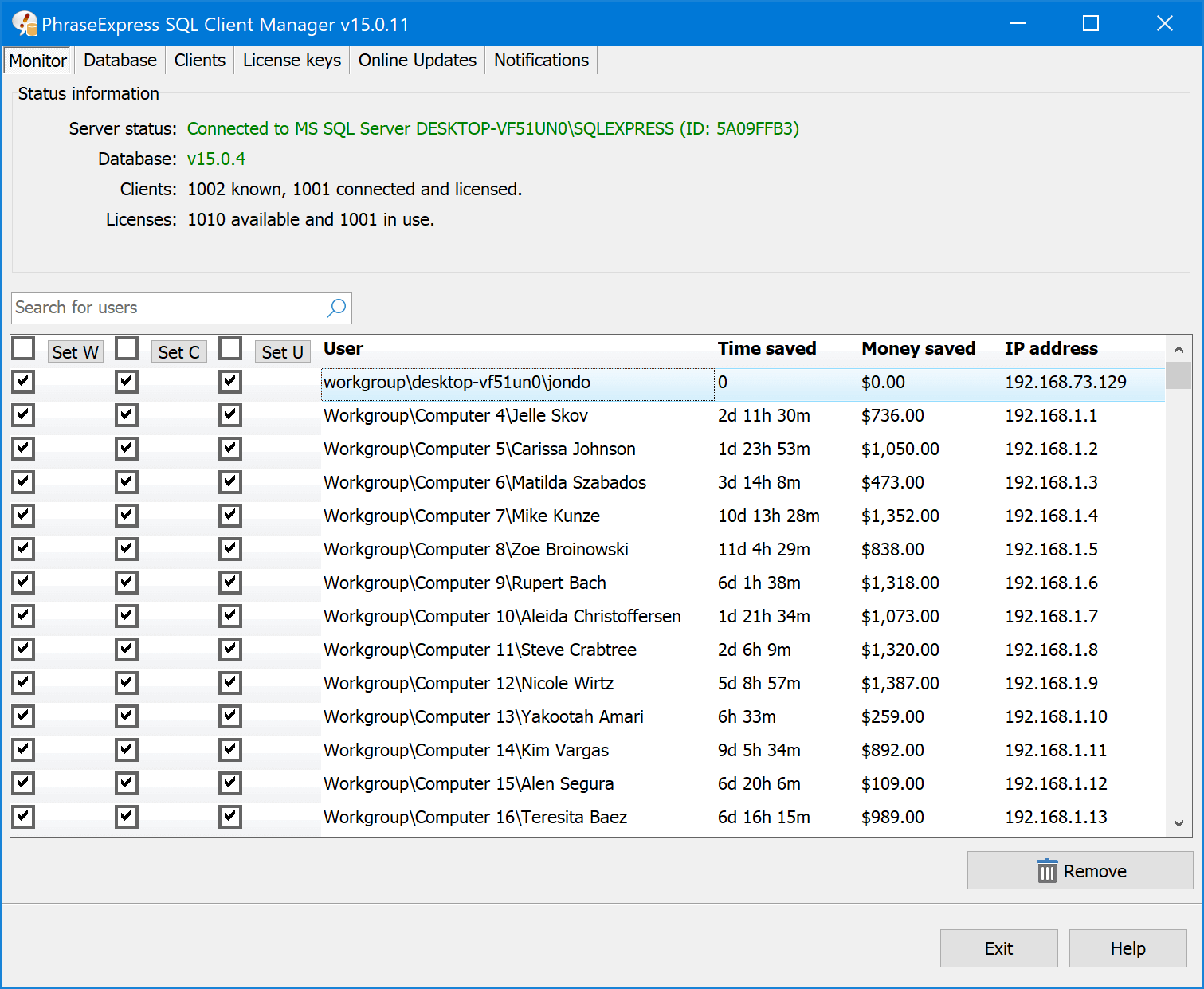
The SQL Client Manager's Monitor tab: connected clients, licenses in use and each user's time saved. The vendor's shot shows version 15, while the current manager is 18.0.8.
Features
Central phrases on SQL Server
PhraseExpress Pro stores shared phrases in Microsoft SQL Server, on your own hardware or on Azure or Amazon. Change a phrase and everyone connected gets it. Staff can still keep private phrases beside the shared ones, and a one-click offline copy keeps them working on the road.
Rights by user, workgroup or domain
PhraseExpress Pro lets you separate read and edit rights, so the sales templates stay with sales and support replies stay with support. Each person only sees what applies to them.
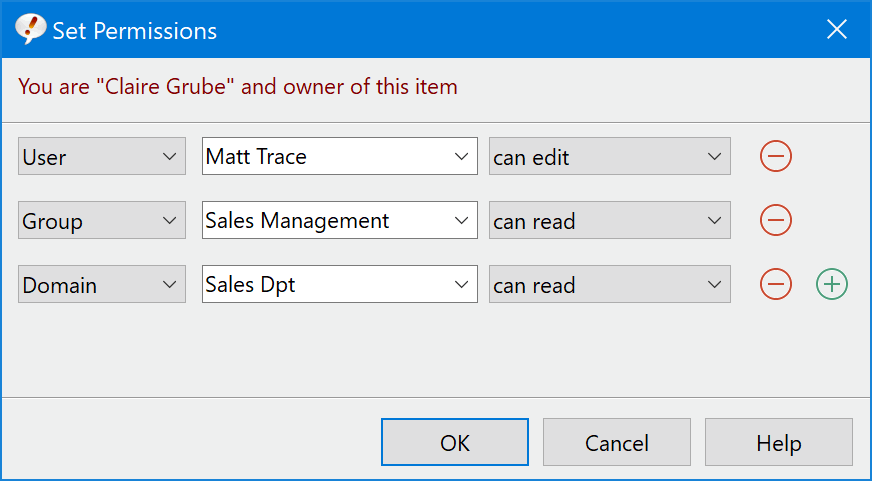
Setting who can read or edit an item, by user, group or domain.
One console for the administrator
PhraseExpress Pro's SQL Client Manager handles license keys, client settings, version information and usage statistics in one place, and can email server health notices. It can also download updates and hand them out to Windows clients. An administrator can hide menu items too, so nobody breaks a setting by accident.
Input forms that finish the sentence
PhraseExpress Pro adds forms with text boxes, checkboxes, drop-downs, date pickers and sliders. The answers flow into the template, and checkbox picks turn into a proper list such as "cough, congestion and rhinorrhea". Syntax checks catch a badly typed email address or number before it reaches a customer.
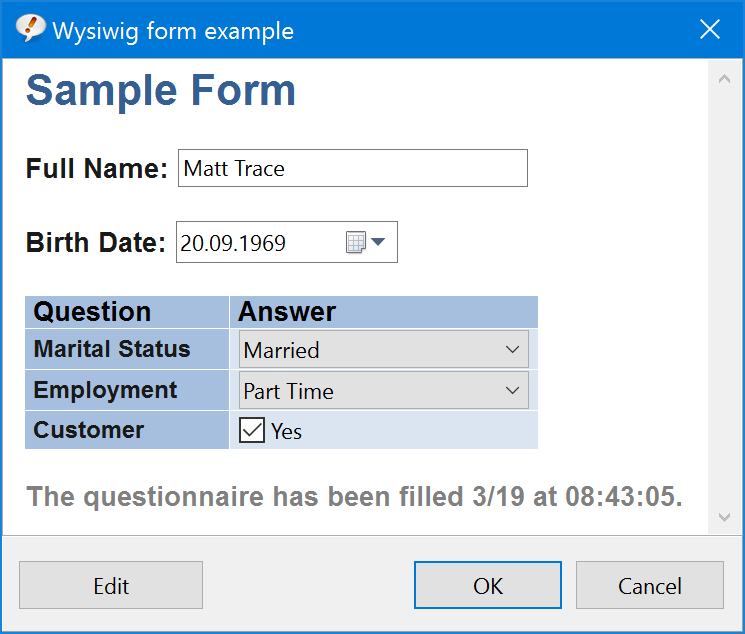
A form laid out in the visual editor, with text, date, drop-down and checkbox fields.
Word-formatted phrases and desktop menus
PhraseExpress Pro can keep a phrase in native Word format, including embedded Excel sheets, which suits firms with strict house styles. Desktop menus keep chosen phrase folders on screen, so a new employee can click instead of learning any abbreviations.
Comments and history on each phrase
PhraseExpress Pro's SQL setup gives every phrase a built-in chat for discussing the wording and a version history that records who changed what, so a bad edit can be rolled back.
Citrix and Terminal Server
PhraseExpress Pro runs under Citrix and Terminal Server. It marks Terminal Server sessions separately, so someone can use it inside a session and on the host PC at once.
Benefits
The biggest gain is that everyone quotes the same answer. A manager changes a sentence after a policy update and doesn't have to send an all-staff email asking people to fix their own copies. New hires are useful sooner because the team's best wording is on their screen from day one. And the usage statistics give you real figures on time saved per person when someone asks whether the license was worth it.
Real-World Uses
- A customer support desk keeps replies per product, each editable only by the team lead for that product.
- A sales office uses a form to collect the customer name and product, then produces the follow-up email with both filled in.
- A medical practice fills out a short form per patient and pastes the finished letter into its records system.
- An IT department rolls PhraseExpress out on a Terminal Server, locks the menus, and manages it all from one console.
- A shift-based call center buys floating licenses so that only the people currently online take a seat.
Who It's For, and Who Should Skip It
Buy Pro if several people need the same wording and someone can look after a SQL database. Teams of roughly ten or more get the most from it, since that's where floating licenses begin.
Skip it if you work alone and don't need forms: PhraseExpress Standard does the job for $50 less. A tiny team may also manage with Standard's cloud-folder sync, without a server to run. And if you're buying mainly for AI rewriting, whole-document assembly or Outlook integration, go straight to PhraseExpress Enterprise, because Pro has none of them.
Usage Guide
- Install the free PhraseExpress SQL Client Manager and let it create the phrase and license databases on your server.
- Register your license keys in the Client Manager, which keeps them in a pool.
- Install PhraseExpress on each client and connect it to the server. Each new user takes a key from the pool.
- Move your existing phrases into the database, then set rights per folder for each group.
- In the Monitor tab, set who may write and who may change configuration, and hide the menus staff don't need.
Where it falls short
- Documentation and support draw complaints. On G2, several reviewers criticize both. Others, on Trustpilot and SourceForge, praise fast support, so experiences clearly vary. Try the support channel during the demo.
- Setup takes real admin work. Client connection, database and performance problems each have their own troubleshooting chapter in the manual. This isn't a tool a non-technical office should expect to set up on its own.
- Named licenses stick to people. Unless you buy floating licenses, a key stays with its user even when they're away, until an administrator unbinds it by hand.
- Floating licenses lose features. They don't offer Network-Cache, and the per-user write and configuration flags aren't stored.
- Mac clients differ. The Mac edition has its own feature set, so check it if your team is mixed.
What Users Say
Public reviews of PhraseExpress rarely name the edition. These are the ones that speak to team and server use, which is what Pro is for.
Teams that run it
Jeff Grieger on Alternative.me (May 2019): "The SQL server support allows us to associate templates to specific work groups. The admin can also configure all remote client installation with a single key press. This alone is amazing."
A helpdesk user at a company of 20,000+ on SourceForge (August 2023): "SQL server support is pure gold." Their only complaint: "The only downside is that there is no Linux version."
Steinberg, on the vendor's page: "Its client-/server architecture is a great help to distribute text templates in the team."
TechSmith, on the vendor's page: "PhraseExpress makes it easy to ensure every employee is using the most up-to-date phrases"
Trustpilot: 4.0 out of 5 from 13 reviews
This score belongs to the maker, Bartels Media, across all its products. Most of the English reviews there are about PhraseExpress, and support comes up often.
Bill Treloar (October 2023): "I can't rave enough about both the product and the support."
Đào Minh Hải (March 2024): "Phrase Express has become an indispensable asset in our daily workflow."
Jamal Safiulla (November 2021), on a support problem: "things got sorted out in a matter of a few hours!"
G2: 3.3 out of 5 from 14 reviews
This is the harshest site for PhraseExpress. People there credit it with saving time, but the low ratings cite weak documentation, poor support and crashes where phrases stop working. One reviewer also objected to the lifetime license, because a lost installer can mean paying again. Capterra's score is 4.0, from only 3 reviews.
The recurring themes: teams love central control and SQL support, and long-time customers stay for a decade. The complaints are about documentation, about getting help when something breaks, and about reliability on some setups, so run your own pilot before rolling it out.
Comparisons
SQL Server vs a shared cloud folder
Every edition can share a phrase file through Dropbox, OneDrive or a NAS. That's simple and needs no server, and it merges changes from several people. Pro's SQL route adds what a growing company wants: central rights, license management, client settings, statistics and offline copies. Choose the folder for a handful of trusted people, and SQL once you need control.
Named vs Concurrent User licenses
A Named license belongs to one person until an administrator frees it, which suits regular staff. A Concurrent User license is borrowed from a pool while someone is connected and returned when they disconnect, which suits part-timers and shifts. You can mix both on one server by registering the named keys first. Concurrent costs about 50% more per seat, so it only pays off when many more people use the software than ever work at the same moment.
Editions and Pricing
| License |
Quantity |
Price at checkout |
Suits |
| Pro (Named User) | 1 | $149.95 | One regular user |
| Pro (Named User) | 5 | $712.26 | A small team, 5% off |
| Pro (Named User) | 10 | $1,424.52 | Fixed staff |
| ConcurrentUser Pro | 10 (minimum) | $2,137.50 | Shift or part-time staff sharing 10 seats |
Discounts on Pro Named User licenses grow with quantity: $119.96 each from 25, $112.46 from 50 and $104.97 from 100. All prices are one-time and include a year of maintenance. The floating pack is the same program with a different license type, and the order page starts at ten seats.
Buy Pro ($149.95)
Buy ConcurrentUser Pro, 10 floating licenses ($2,137.50)
FAQs
Does PhraseExpress Pro work with SQL Server Express?
PhraseExpress Pro works with Microsoft's free SQL Server Express edition, so a small team can avoid buying a server license. SQL Server itself isn't included in the purchase.
Can PhraseExpress Pro use Azure SQL?
PhraseExpress Pro connects to on-premise Microsoft SQL Server, Azure SQL and Amazon SQL. Licensing on Azure SQL needs SQL Client Manager 18.0.8, the version from March 2026.
Can staff use PhraseExpress Pro away from the office?
PhraseExpress Pro can download the SQL phrase database to a computer for offline use with one button, so a laptop keeps its phrases without a connection to the server.
How does PhraseExpress Pro identify a user?
PhraseExpress Pro identifies a user by user name, or by user name combined with workgroup, or with workgroup and computer name. Each identified user connection needs its own license.
Can a PhraseExpress Pro license move to a new employee?
A PhraseExpress Pro license can move. In the Client Manager, an administrator unbinds a user who isn't connected, and the key returns to the pool for the next person.
Does PhraseExpress Pro need an internet connection?
PhraseExpress Pro needs a short online connection to register a license. Companies with ten or more Pro licenses on SQL Server can ask the vendor for offline registration.
Can maintenance dates be aligned across PhraseExpress licenses?
Bartels Media can align maintenance dates for existing licenses when you order at least 10 new Pro or Enterprise licenses directly, not through the online shop.
System Requirements
- Clients: Windows 10 or 11, about 200 MB of disk space plus phrase data
- Server: Microsoft SQL Server (any edition, including Express), Azure SQL or Amazon SQL
- SQL Client Manager 18.0.8, a free download from the vendor
- Microsoft Word on the client for Word-formatted phrases and file export
Conclusion
PhraseExpress Pro is worth it for a team that has outgrown a shared document and can run a small SQL database. At about $142 per seat for ten people, paid once, there's no yearly fee, and the server and the data stay yours.
The one reason to buy: central phrases with real access rights and a proper admin console. The main reason not to: mixed feedback on documentation and support, with no refund, so pilot it with a few staff during the 30 days before you license everyone.
Download Free Trial
Buy Now