PhraseExpress Standard: Stop Retyping the Same Sentences
PhraseExpress Standard is a $99.95 one-time Windows text expander for one professional user. Type a short abbreviation or press a hotkey, and it writes out your saved sentence, signature or template in whatever program you have open. If you only use it at home, you may not need to pay at all: the same download is free for personal use.
Think of the replies you send every week: the same order update, the same directions, the same polite no. Saving them once and calling them up with "psw" or Ctrl+Alt+P takes a second where typing takes half a minute, and the saved version has no typos.
Quick facts
- Version: 18.0.84, released October 9, 2026
- Developer: Bartels Media GmbH, Trier, Germany
- Platform: Windows 10 and 11. Separate Mac and iPhone/iPad versions exist
- Price: $99.95 once, with 12 months of updates included
- License: one person on up to three computers under the same user name, or one USB stick
- Trial: 30 days with every feature, from one installer that serves all editions
- Refunds: none as a policy, the long trial stands in for a guarantee
- What we checked: installer PhraseExpressSetup.exe, file version 18.0.84, 56.4 MB, digitally signed by Bartels Media GmbH, downloaded from the vendor on November 5, 2026, and a checkout price of $99.95 with one year of maintenance on November 5, 2026. We compared the editions from the vendor's shop table and didn't run the program day to day
Before you buy
- Check whether you qualify for the free version. Anything that earns you money, a work or school account, a managed PC, a virtual machine or Remote Desktop counts as professional use and needs a license after 30 days.
- Try it first, because you can't ask for your money back. Bartels Media says it doesn't want your money first and offers the demo in place of a money-back guarantee.
- "Lifetime" has a catch. The license never expires, but it covers only versions released during your 12 months of maintenance. Save the setup file, because the vendor keeps no archive of old installers.
- Standard has no input forms and no SQL Server support. Those start at Pro.
Download Free Trial
Buy Now
Overview
PhraseExpress has been in development for more than 20 years, and it shows in both directions: it does nearly anything a text expander can do, and its settings go deep. At its core sits a phrase library in a folder tree. Each phrase can be plain text, formatted text with pictures and tables, or a small macro that adds the date or a calculation. You trigger a phrase by typing its autotext, pressing its hotkey, or picking it from a popup menu.
The program works in anything that accepts typing, because it either simulates keystrokes or pastes through the clipboard, picking the method on its own. So Outlook, a browser form, a ticket system and an old in-house program all get the same phrases.
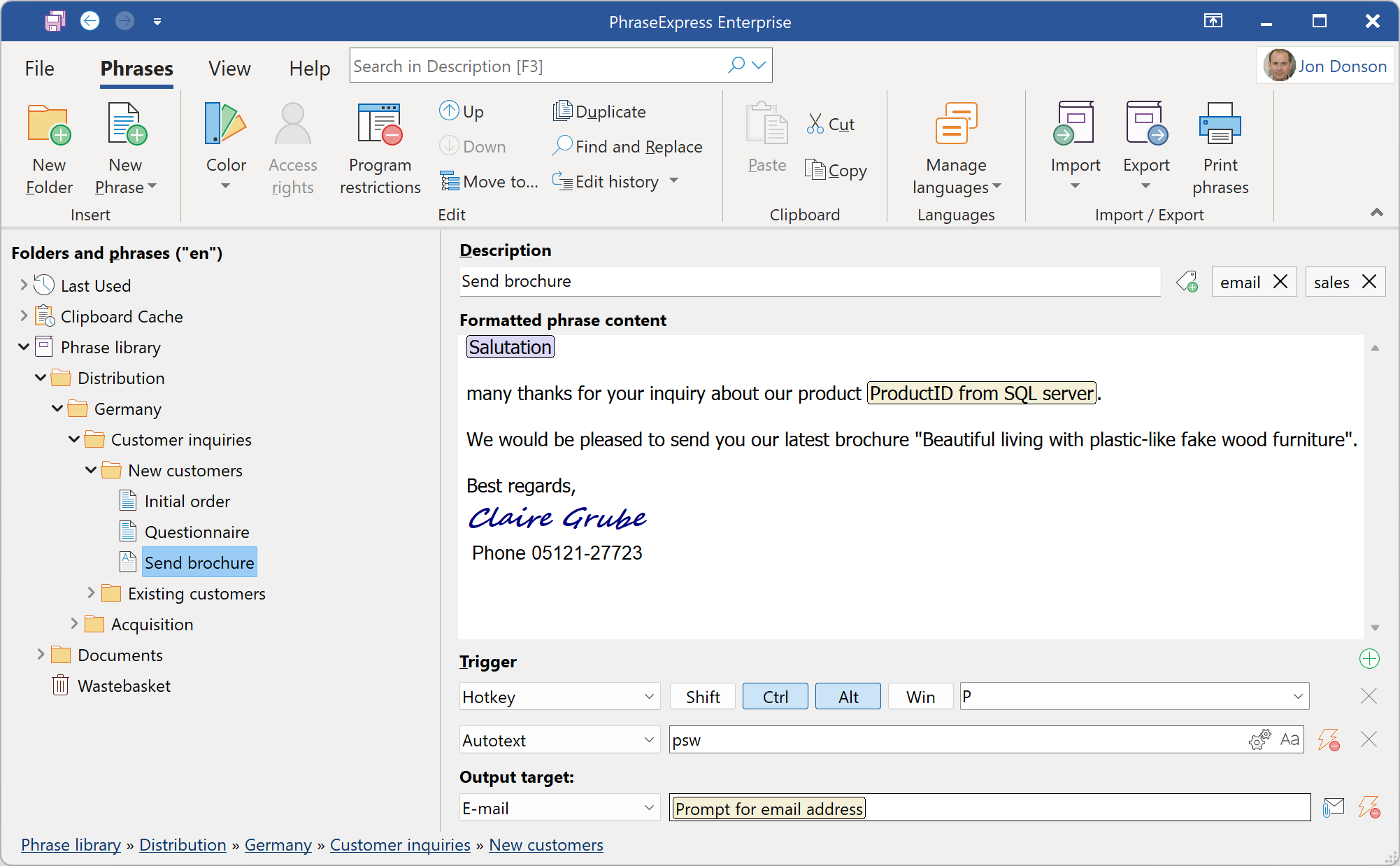
The main window: the folder tree on the left, the phrase and its hotkey, autotext and output target on the right. This shot comes from the vendor and its title bar reads Enterprise, so a few controls here go beyond Standard.
Features
Autotext that fits how you type
PhraseExpress Standard expands an abbreviation the moment you finish it, after a confirmation, or only when you pause. That last option, added in version 18, helps when an abbreviation is also the start of a word you type. One autotext can also point to several phrases, and a small menu lets you pick the right one.

The version 18 autotext menu: expand at once, after confirmation, when you pause, or when typing continues quickly.
Several ways to fire a phrase
PhraseExpress Standard can run a phrase from a hotkey, an autotext, a specific window appearing, a set time, or a pattern in the clipboard. Copy an email address, for example, and it can offer the actions you tied to email addresses.
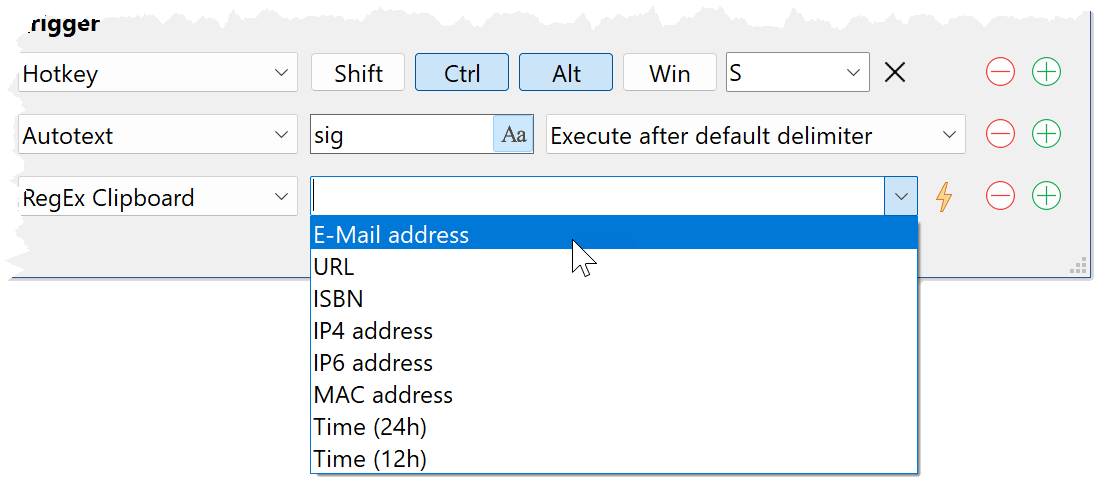
Trigger settings: a hotkey, an autotext and a clipboard pattern on one phrase.
Suggestions without memorizing anything
PhraseExpress Standard can watch what you type repeatedly and offer to save it, then finish words or whole sentences for you as you start them. You can also train it on existing Word documents or your sent Outlook mail, so it starts with your own wording.
Clipboard history and typo fixes
PhraseExpress Standard keeps a history of what you copied, can strip formatting when you paste, and turns any clipboard entry into a saved phrase. It also corrects typos in any program and learns the ones you personally make.
Sync through your own cloud folder
PhraseExpress Standard stores the phrase file wherever you like. Put it in Dropbox, OneDrive, Google Drive, OwnCloud or a NAS folder and your PCs stay in sync, with AES encryption applied before the file leaves your disk. Sharing through a cloud folder is included even at this level, so a two-person office can skip a server altogether.
A portable copy on a USB stick
PhraseExpress Standard has a portable build for PCs where you can't install software. The license binds to the stick instead of a user name, so it works on any computer you plug it into and leaves no data behind on that machine.
Benefits
The obvious gain is time, and the program counts it for you by showing what it has saved. The less obvious gain is consistency: a saved reply has the right price, the right link and no spelling slip, on your worst day as on your best. There's also no subscription to justify each year. You pay once, and you decide later whether another year of updates is worth buying.
Real-World Uses
- A freelance translator or writer keeps invoice wording, standard emails and client addresses behind short abbreviations.
- A solo consultant files reusable proposal paragraphs by client type and carries them between a desktop and a laptop.
- A receptionist answers the same appointment and directions questions from a popup menu instead of an old Word file.
- A developer stores code blocks and shell commands, and limits them to the programs where they belong.
Who It's For, and Who Should Skip It
Buy Standard if you work alone or in a very small office, type the same material every day, and earn money with that typing. It's the legal way to use PhraseExpress at work and the cheapest one.
Skip it if you only type at home, since the free version covers you. Skip it too if you want fill-in forms, because they start at PhraseExpress Pro, and Standard's only way to share is a synced file, so a company that wants central rights and user management needs Pro as well. If you just want a dozen abbreviations, a smaller free tool will feel lighter, as this one has a lot more settings than you'd use.
Usage Guide
- Download PhraseExpressSetup.exe from the vendor and run it. A speech bubble icon appears in the taskbar, though Windows may hide it under the small triangle, so drag it into view.
- Open the main window and create a folder for each kind of text, such as Sales or Signatures.
- Add a phrase, paste your text, and give it an autotext or a hotkey in the Trigger area.
- Type the autotext in any program to test it. If it fires too eagerly, switch it to expand on a pause.
- Before the 30 days end, buy the license and enter the key in the same installation. Your phrases stay where they are, and buying alone doesn't license the software until the key is registered.
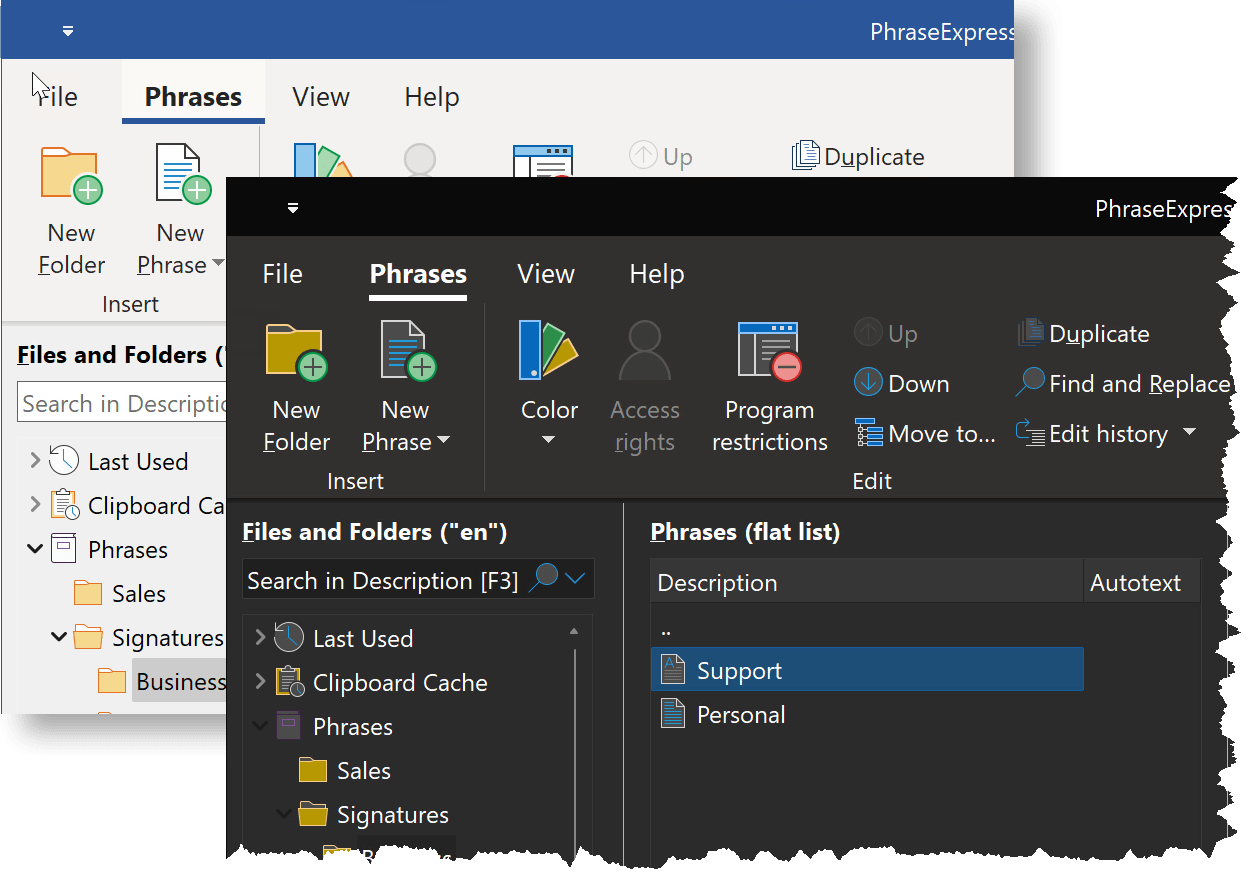
The interface follows the Windows dark mode with dimmed icons.
Where it falls short
- Reminders can catch you off guard. Even after you buy Standard, you can still use features of the higher editions, which brings occasional license reminders listing what triggered them. Stick to your edition's features, or turn the unpaid ones off in the settings, and they stop.
- Insertions into your text are part of that nag. After 30 days the unlicensed version occasionally inserts a license text into what you're writing, which is a poor surprise in a customer email.
- A long list of settings. Reviewers across many years call it hard to discover. Give yourself time to set it up properly.
- Every Windows user name counts. The license ties to the Windows user name, not your Microsoft account, and each person needs their own.
- No Linux version. Mac licenses aren't a second copy either: one license works on Windows or Mac, and the iPhone app comes through the App Store.
What Users Say
PhraseExpress draws sharper opinions than most small utilities, and its ratings differ by site. They cover PhraseExpress generally, across editions and versions, and the older ones say more about the free version than about Standard.
Press
Make Tech Easier (November 2020), listing it first among seven Windows tools: "No matter which application you're using, PhraseExpress does text expansion perfectly."
Tech Advisor (May 2018), as quoted by the vendor: "PhraseExpress is a clever text replacement tool that adds productivity-boosting features to almost every Windows application."
Lifehacker Australia (January 2019), as quoted by the vendor: "An App, Everyone Should Own - PhraseExpress is our go-to for folks new to text expansion."
PC World (March 2017), as quoted by the vendor: "With so many features and customization options, there is a bit of a learning curve with PhraseExpress, but the benefits are well worth the time investment."
SnapFiles: 4 out of 5 from 24 user reviews
This is the longest public record, running from 2006 to 2023, and it's split. Plenty of users simply call it a time saver: "it saves me lots of time" (OzBrad, December 2010, version 8). Tweetson (March 2011, version 8) wrote: "Great when you frequently type the same text over and over."
The complaints focus on home users hitting the license notices. RasTrent (June 2010, version 7, 2 stars): "it soon becomes very annoying when it starts harassing you with accusations of being used commercially". Abraxas (November 2014, version 10, 4 stars) liked that "It accepted new phrases easily" but warned "the program is TIME-BOMBED."
The last entry, from mikahel312 (March 2023, version 16, 3 stars), makes the point this page keeps coming back to: "The whole application seems to be designed for use in an office environment." and "Too complex to bother with for home use." One older reviewer, Manifly (August 2008), saw it differently: "Don't understand the nag screen complaints."
Alternative.me: 4.5 out of 5 from 2 reviews
grex (March 2018) listed these pros: "Offers one of the deepest and most expansive feature sets in the industry" and "Predictive learning means you won't have to spend ages entering snippets into the database".
The same reviewer's cons: "The wealth of features can be overwhelming and hard to discover" and "Long snippets require the use of the clipboard function".
Other sites
G2 shows 3.3 out of 5 from 14 reviews, the lowest score we found, and Capterra shows 4.0 from just 3. Trustpilot gives its maker, Bartels Media, 4.0 from 13 reviews. FileHorse's staff review lists "Overwhelming for Basic Users" and "Limited Free Version Features" among its cons.
The recurring themes: people who use it for work praise the hours it saves and stick with it for years. Home users and beginners are the ones who complain, about the license notices and about how much there is to learn.
Comparisons
Free version vs Standard
Both come from the same installer. The free version is for personal use and starts nagging after 30 days if it detects professional-looking use or paid features. PhraseExpress Standard removes that risk at work for $99.95 and gives you the right to use it for paid work.
PhraseExpress vs PhraseExpander
The names cause real confusion, and the reviews get mixed up too. PhraseExpander is a different program from a different company, aimed mainly at healthcare staff. PhraseExpress is a general tool from Bartels Media with Mac and iPhone versions. Check which one a review means before you trust it.
Editions and Pricing
| Edition |
Price at checkout |
Best for |
What it adds |
| Free | $0 | Personal use at home | Same program, with license notices if use looks professional |
| Standard | $99.95 | One professional user | Commercial use, cloud and NAS sync |
| Pro | $149.95 | Teams on a server | SQL Server, input forms, Word formatted phrases, desktop menus |
| Enterprise | $249.95 | Document-heavy work | AI, Document Generator, Outlook add-in, multi-language phrases |
Each paid price is a single payment with 12 months of maintenance. Buying five or more drops Standard to $94.95 each, and 25 or more to $79.96 each. If you need to move up within 30 days of buying, the vendor's upgrade page takes your license key.
FAQs
Is PhraseExpress Standard a subscription?
PhraseExpress Standard isn't a subscription. You pay once, there are no recurring charges, and renewing maintenance after the first year is optional and discounted.
What happens to PhraseExpress when maintenance ends?
PhraseExpress keeps working at the last version you could download during maintenance. You lose updates and support, and a later Windows change could leave you on software that no longer fits, which is why the renewal exists.
Can I use one PhraseExpress license on my desktop and laptop?
One PhraseExpress license covers one person on up to three computers, as long as you use the same Windows user name on each. A second person needs a second license.
Does one PhraseExpress license work on both Windows and Mac?
A PhraseExpress license works on Windows or Mac, not on both at the same time, and you can move it between them whenever you like. The Mac edition also has a different feature set.
Does PhraseExpress send my text anywhere?
Bartels Media states that PhraseExpress never sends your text input or saved phrases anywhere, and suggests blocking it in your firewall after you register the key if you'd like to confirm that.
Is the PhraseExpress iPhone app included?
The PhraseExpress iPhone and iPad app isn't part of the Windows purchase. It comes through Apple's App Store and syncs with the desktop versions.
Does PhraseExpress need Microsoft Office?
PhraseExpress runs without Office for ordinary phrases. Office only matters for functions that touch those programs, such as file export, importing from Word or Excel, and reading your Outlook mail.
System Requirements
- Windows 10 or 11. Older versions may work but the vendor no longer tests them
- About 200 MB of free disk space, plus room for your phrases
- A short online connection to register the license
- Microsoft Word, Excel or Outlook only for the functions that work with those programs
Conclusion
PhraseExpress Standard is worth $99.95 if you get paid to type the same things repeatedly. It pays back quickly, and no subscription keeps charging you afterward.
The one reason to buy: it's among the deepest text expanders available for Windows, and it works in every program. The main reason not to: at home the free version may be all you need, and if the depth puts you off, take that as a sign during the 30-day demo, because there's no refund afterward.
Download Free Trial
Buy Now