Macro Recorder Enterprise: Automation That Reads, Remembers and Decides
Macro Recorder Enterprise is the $249.95 top edition of Bartels Media's macro tool for Windows and Mac, adding variables, data lists, on-screen data capture, barcode reading, AI actions and PhraseExpress integration. It's for people whose macros need to work with changing data, and for teams sharing them.
A plain macro repeats the same motions. Enterprise can read an invoice number off the screen, check it against a value, feed a list of 500 names into a form one per loop, and ask an AI model what's in a picture. That's the difference between a recording and a small no-code program.
Quick facts
- Current build: 5.0.40 (Windows), 5.0.41 (macOS), from Bartels Media GmbH
- One-time price: $249.95, with a year of updates and major versions
- Volume pricing: $237.45 each from 5 licenses, $199.96 from 25, $187.46 from 50
- AI engines: OpenRouter, OpenAI, Anthropic and a local Ollama install, with your own account or setup
- Includes: every Pro feature
- Testing: the free download lets you try these features, with license notices
What we checked: the Enterprise Edition reads $249.95 on the order page, with 1 year of maintenance, volume prices as listed and no auto-renewal, and the Windows installer from the vendor is file version 5.0.40, as of November 5, 2026. We didn't connect an AI service or run the OCR and barcode actions ourselves.
Before you buy
- AI costs extra. Macro Recorder only connects to AI engines. Online services bill you separately, apart from Ollama, which runs free on your own PC. The ScreenGrasp object search is a paid service with the first 2,000 tokens free.
- AI is labeled experimental. Bartels Media provides these actions "as-is" and warns the output can be nonsensical, so check results before acting on them.
- PhraseExpress is a separate purchase. Hotkey triggers and team sharing need PhraseExpress Enterprise too, on the same computer.
- All sales are final. Run a full test in the demo, as there's no money-back option.
Download Free TrialBuy Now
Overview
Enterprise is the point where a macro stops being a straight line. Actions that produce data, such as a found position, recognized text or an AI answer, store it in a named variable. Later actions can type it, click at it, calculate with it or branch on it, all through dialogs with no script language.
The vendor's sample macro "Generate Keywords" shows the style: it opens a browser, captures part of the page, has an AI describe the image, turns that into 10 keywords and saves them to a text file.
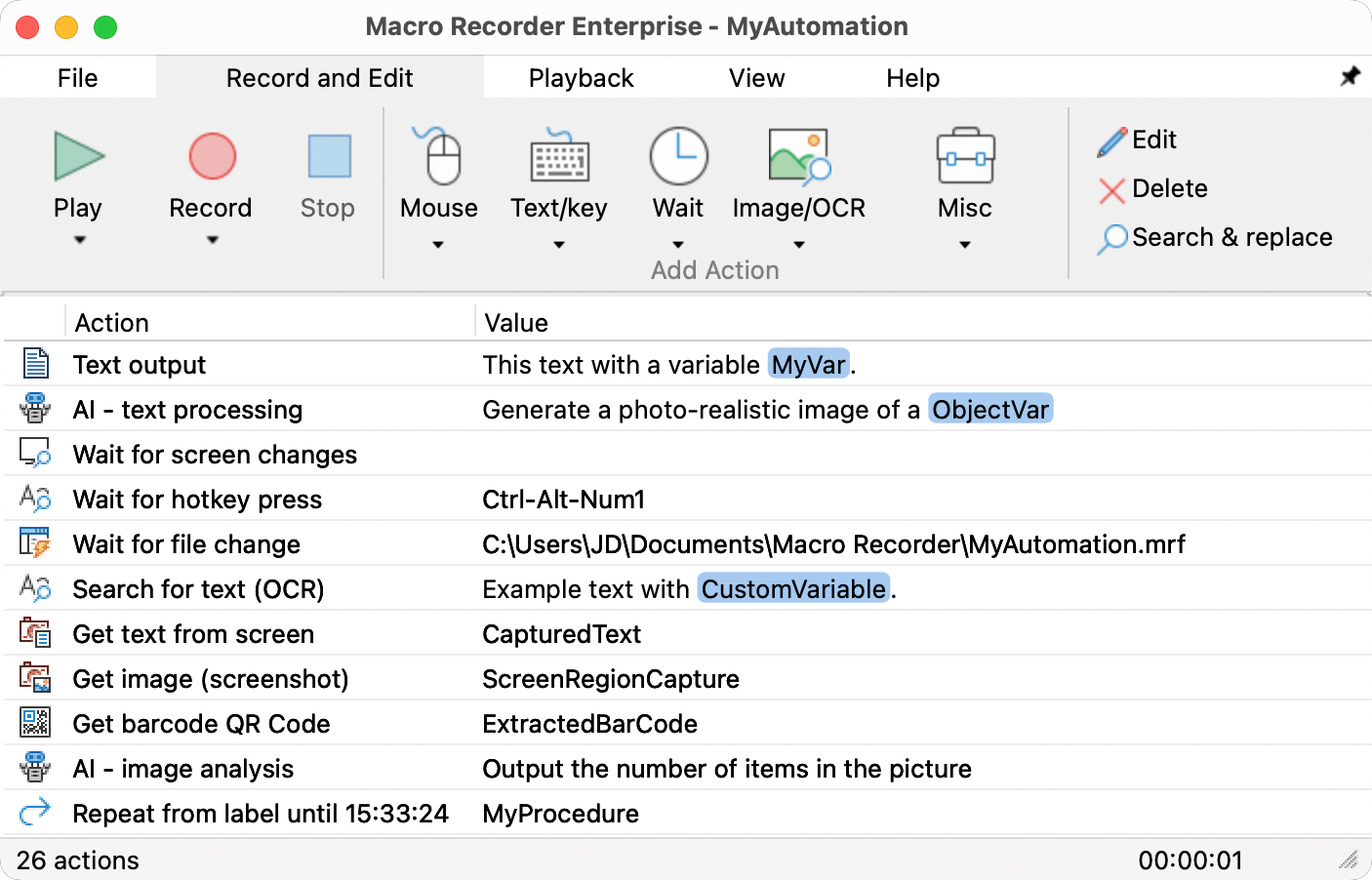
Macro Recorder Enterprise on a Mac, listing sample actions: AI text processing, OCR search, text, barcode and screenshot capture, and image analysis.
Features
Variables, math and branching
Macro Recorder Enterprise lets any action save its result under a name you pick, such as ImgX or OrderTotal. You can add to a counter with a math expression, output random numbers, compare values with If-Then-Else, and export a variable to a file or the clipboard. The Variable Explorer shows live contents while you debug. Variables reset when the program closes, so write anything you need to keep to a file.

A Calculate expression action adding 1 to a variable named counter. The arrow is the vendor's annotation.
Data lists for batch input
Macro Recorder Enterprise reads a text file or a pasted list line by line, or in random order, and puts each line into a variable for the current cycle. The Repeat action then has an "until last data item" option, so a macro runs exactly once per list entry. That covers the common job of pushing a list through a form that has no import.

The Set variable from data list action with sequential and random options.
Screen capture, OCR and web scraping
Macro Recorder Enterprise can take a screenshot of a chosen area into a variable, read the text in that area with OCR, and extract text from a web page with RegEx and XPath filters. The captured text is then ordinary data, ready to paste into another program or test with a condition.
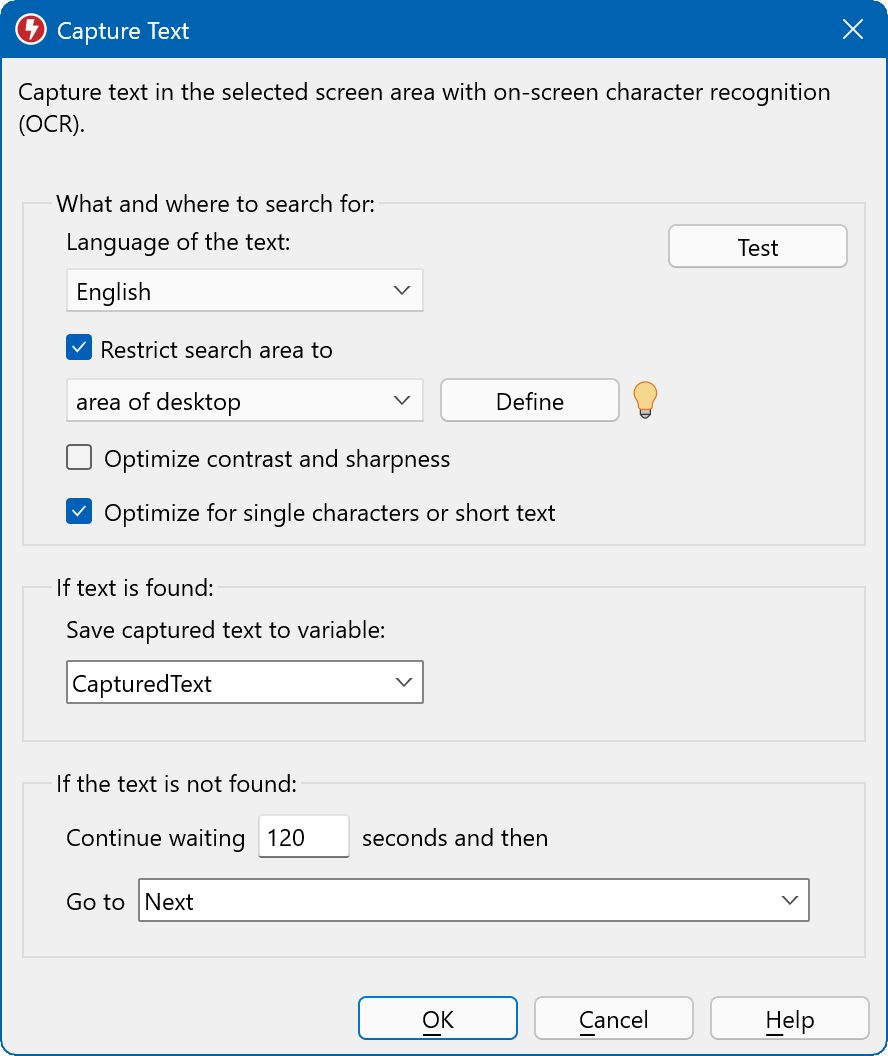
The Capture Text action saves recognized text to a variable named CapturedText.
Barcode and QR code reading
Macro Recorder Enterprise can decode a barcode or QR code visible anywhere on the screen and store the value in a variable. A timeout and Go to field handle the case where no code shows up. It suits stock and label workflows where codes appear in a viewer or on a web page.
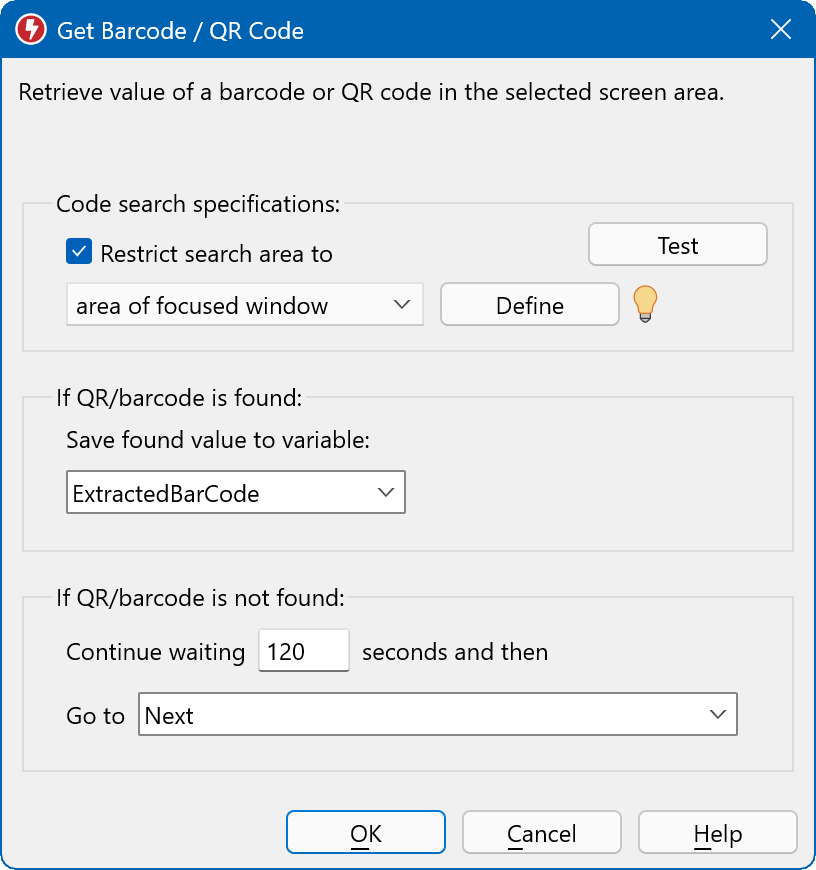
The Get Barcode / QR Code action.
AI actions for text and images
Macro Recorder Enterprise can send a prompt to an AI model and store the reply, send a screenshot and ask what's in it, or generate a picture from a description. OpenRouter gives one account for many models from Google, Anthropic, OpenAI, DeepSeek and others. With Ollama, models run on your own PC and no text leaves it.
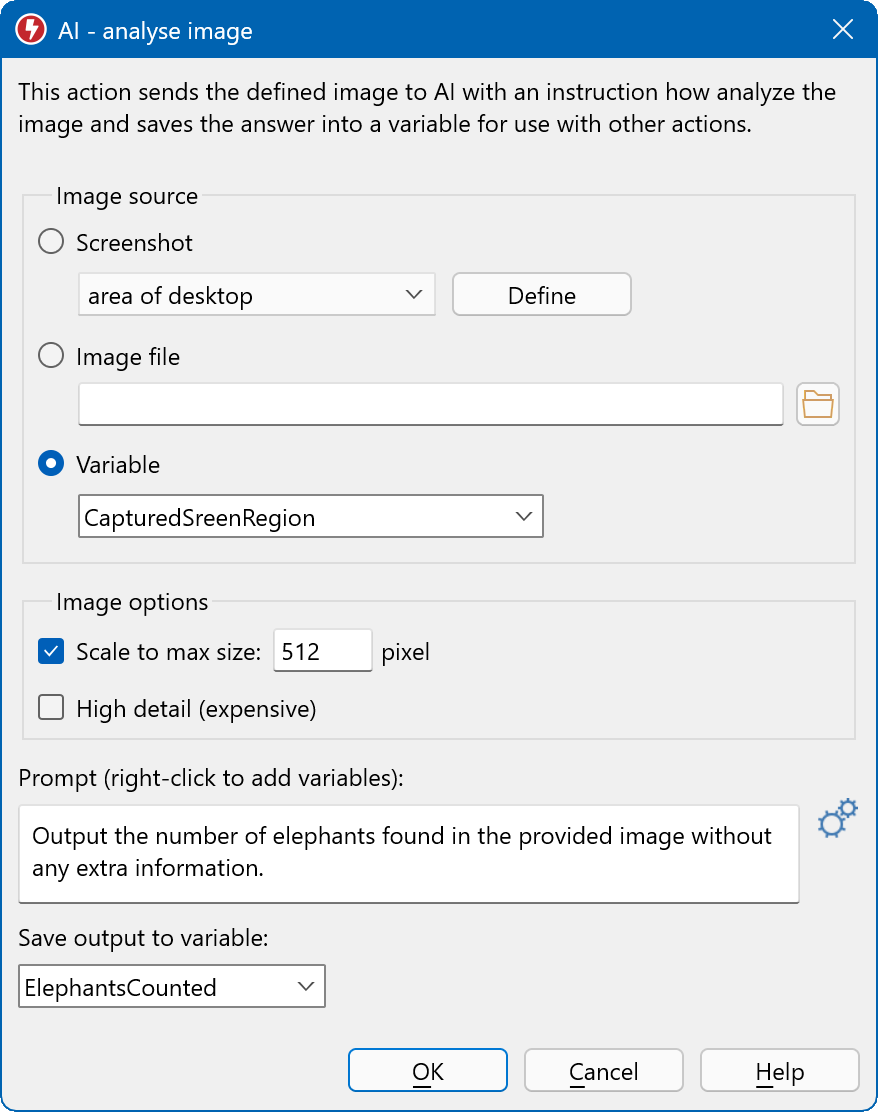
The AI image analysis action, here counting items in a picture and saving the answer to a variable.
Find objects by describing them
Macro Recorder Enterprise version 5 adds AI object search: type "green download button" and the ScreenGrasp service returns its position, so the macro can click it with no reference image. This helps where layouts change often enough to defeat image matching. It's new, marked experimental, and needs an online paid service.

The AI Object Search action.
PhraseExpress integration
Macro Recorder Enterprise connects with PhraseExpress, Bartels Media's text expander. Your macros go into its tree view, start from a hotkey or typed abbreviation, can be shared over a network with access rights, and can swap variables in both directions. PhraseExpress Enterprise v17 or later on Windows, or v6 or later on Mac, is required on the same computer.
Benefits
- One macro, many inputs. A single script handles a whole list, so you maintain one file rather than dozens.
- Decisions without you. The macro takes a different path based on what appears on screen.
- Automation you can hand out. With PhraseExpress, staff trigger a shared macro with a hotkey instead of learning the tool.
- A private AI option. Sensitive text can stay in-house with a local model.
Real-World Uses
- Bulk data entry: load a customer list and fill one record per cycle in a program without an import function.
- Screen monitoring: take a screenshot at intervals and have AI trigger an alert when it spots a certain object.
- Content work: capture a web page's text, have AI generate keywords, and write them to a file.
- Order lookups: read a QR code on screen, paste the value in a stock system, and branch on the result.
- Help desk teams: publish tested macros in PhraseExpress so agents can run them from a shortcut.
Who It's For, and Who Should Skip It
Enterprise suits automation builders, operations teams and anyone who keeps wishing a macro could remember something. It's also the only edition that works with PhraseExpress, so it's the default for team rollouts.
Skip it if your macro has no data to carry from step to step: Pro already does visual clicks at $100 less. Skip it too if you need unattended work on a server or in the background, since it drives a real desktop session. A full RPA platform or a scripting language is the better fit there, especially for complex logic that would become unwieldy in a list of dialogs.
Usage Guide
- Install, then register your key under Help > Register license. Keys start with "MRO".
- For AI, open the settings and add an OpenRouter, OpenAI or Anthropic API key, or point it at Ollama. This is a one-time setup.
- Build a small test macro: add Set variable from data list, then a Text output action, and right-click the text box to insert the variable.
- Add a label at the top and a Repeat at the end with until last data item.
- Run it while the Variable Explorer is open, and use breakpoints to step through trouble spots.
- To share it, click Send to PhraseExpress, name the macro and assign a hotkey or autotext.
Where it falls short
- Big macros get long. Grouping, colors and embedded files help, but heavy logic in dialogs is harder to review than code, and there's no scripting mode to fall back on.
- OCR has limits. It reads regular fonts, not stylized or handwritten text, and the language must match. If the search is restricted to one window, that window must have focus.
- PhraseExpress setup adds cost. The team features need a PhraseExpress Enterprise license as well, and portable use requires both programs in side-by-side folders.
- Older parameter features are going away. Parameter Change is deprecated in favor of variables, so write new macros with variables.
- It still needs one desktop per run. The higher price doesn't change the single-macro, visible-session limit of every edition.
What Users Say
Independent reviews of this edition or its AI actions are scarce, and the general feedback is small: Trustpilot lists 3 reviews with a TrustScore of 4.0, all 5 stars, and Techjockey shows 4.1 from 4 ratings.
On the vendor
"Nothing less than 5 stars. German software, German support. What more can a person ask for."
Neli Stoeva, Trustpilot, July 13, 2022, 5 stars
On working with PhraseExpress
An AlternativeTo reviewer of the earlier Mouse Recorder Premium, Kagerjay, noted in 2017 that it worked well with PhraseExpress. FileHorse's editor lists "Integrates with PhraseExpress" as a pro and "Lack of advanced scripting options" as a con. That con matters most at this edition's level, where you may start wanting code.
Comparisons
Enterprise vs Pro
Pro can see the screen, but it can't keep what it sees. Enterprise saves positions, text and codes, then uses them. If you need a found X/Y position later, or any list input, you need Enterprise, and the $100 gap is justified. If each step just reacts to what's visible, stay with Pro.
Enterprise vs RPA platforms
RPA suites add central orchestration and unattended robots, usually at subscription prices. Macro Recorder Enterprise is a perpetual desktop license at $249.95 that runs on the screen in front of you, which is plenty for a person or small team.
Editions and Pricing
| Edition | Single license | 5-24 each | 25-49 each | 50-99 each |
|---|
| Standard | $99.95 | $94.95 | $79.96 | $74.96 |
| Pro | $149.95 | $142.45 | $119.96 | $112.46 |
| Enterprise | $249.95 | $237.45 | $199.96 | $187.46 |
The discount applies automatically when you change the quantity on the order page. With 10 or more new Pro or Enterprise licenses, Bartels Media can also align the maintenance dates of existing licenses, by direct order. Central licensing is available through the PhraseExpress SQL Client Manager.
FAQs
Does Macro Recorder Enterprise include AI credits?
No, apart from a small starter allowance for ScreenGrasp object search. Macro Recorder Enterprise connects to AI services through your own API keys, and those services charge you directly. Ollama is the free, local alternative.
Does my data leave the PC when Macro Recorder Enterprise uses AI?
It depends on the engine. With online services, Macro Recorder Enterprise sends your prompts to that provider. With Ollama, processing stays on your computer. Macro Recorder itself doesn't transmit your files or input.
Do I need PhraseExpress to use Macro Recorder Enterprise?
No. Macro Recorder Enterprise works alone for variables, AI and capture. PhraseExpress is only needed for per-macro hotkeys and autotext, shared libraries and exchanging variables between the two programs.
Can each team member share one Macro Recorder Enterprise license?
No. A Macro Recorder license key is tied to one user name and must not be used by several people. Volume pricing is how a team gets cheaper seats.
Are Macro Recorder Enterprise variables saved between sessions?
No. Macro Recorder Enterprise variables are dismissed when the program shuts down. They do persist across playback cycles by default, and you can save their contents to a file, with an append option in version 5.
Can Macro Recorder Enterprise read text from an image file?
Macro Recorder Enterprise OCR works on what's displayed on screen, so open the image first. Its AI image analysis can take a bitmap file directly, which is another way to get a description or a count out of a picture.
System Requirements
- Windows or macOS on the vendor's tested versions: Windows 11 and macOS 27
- Optional: an API key for an online AI service, or Ollama with a local model and the hardware it needs
- Optional: PhraseExpress Enterprise v17+ for Windows or v6+ for Mac
- The Download Free Trial button below gets the Windows version
Conclusion
Macro Recorder Enterprise is worth $249.95 if your macros need to handle data or your team needs shared macros, and overkill otherwise. A one-time cost for variables, OCR capture and barcode reading is a fair price for that much capability.
The reason to buy is data lists and variables, which turn one macro into a batch tool. The main reason not to is that the AI features are experimental and billed separately, so don't pay for this edition on AI alone.
Download Free TrialBuy Now