FastKeys: Text Expander, Macros and Shortcuts for Windows in One $29 License
FastKeys is a Windows automation tool from Fast Technologies that turns short abbreviations into full text, records and replays keyboard and mouse macros, and adds shortcuts, mouse gestures, a pop-up Start Menu and clipboard history. The Personal license costs $29 once for up to 3 computers, with no subscription, and a 15-day fully working trial.
If you type the same address, signature, support reply or medical phrase twenty times a day, FastKeys is built for you: type sig and the whole signature appears. Under the hood it runs on AutoHotkey, so a single abbreviation can also open a program, fill in a form or run a script.
Quick facts
- Version: 6.08
- Developer: Fast Technologies
- Platform: Windows 11, 10, 8 and 7 (64-bit installer, plus 32-bit and portable versions)
- Price: $29 one-time for the Personal (Standard) license, up to 3 computers; $39 per computer for Professional
- Trial: 15 days, fully working, with occasional pop-up reminders
- Guarantee: 14-day money-back guarantee
- Data: phrases stay on your PC; no account, login or cloud server
- What we checked: installer FastKeys_Setup.exe downloaded from fastkeysautomation.com reports product version 6.08 (5.2 MB), and the order page charges $29.00 USD for the Standard Edition and $39.00 USD for the Professional Edition, both one-time payments, on November 19, 2026. We didn't test the Enterprise features.
Download Free TrialBuy Standard ($29)Buy Professional ($39)
Overview
FastKeys sits in the system tray and watches for triggers: an abbreviation you type, a key combination, a mouse gesture or the mouse touching the screen edge. Each trigger runs a command, which can be plain text, keystrokes, a program or web page to open, or an AutoHotkey script. Every module (Text Expander, Start Menu, Shortcuts, Auto Complete, Gestures) uses the same simple dialog, so once you've made one command you know how to make the rest.
It's a long-running product: BetaNews reviewed it in 2017, and the current 6.x line adds input forms, templates and the team features that the vendor now sells to healthcare, insurance and help-desk teams. It's also light: a 5 MB installer, 512 MB of RAM and 10 MB of disk space.
Features
Text Expander: a few letters become a paragraph
FastKeys' Text Expander replaces an abbreviation with whatever you've stored: a word, a signature, a standard reply, or keystrokes such as Tab and Enter to move through a form. Options decide whether it fires immediately or after a space, whether it's case sensitive, whether it asks for confirmation, and which windows it works in, so addr can expand in Outlook but not in your code editor. Phrase files hold whole sets of simple phrases, and date and time macros insert today's date in any format.

The Text Expander dialog: the signature text, the abbreviation "sig", a description, and options such as Trigger immediately, Case sensitive and Manual confirmation.
Fill-in forms and templates
FastKeys can pause a phrase and ask you for the variable parts. A Selection Form shows a list, drop-down, check boxes, radio buttons, a date picker or a slider, then drops your choice into the text. That's how a clinic note template asks which symptoms apply and writes "fever, headache and cough" into the sentence. Optional sections and condition macros include or skip whole paragraphs depending on your answers.
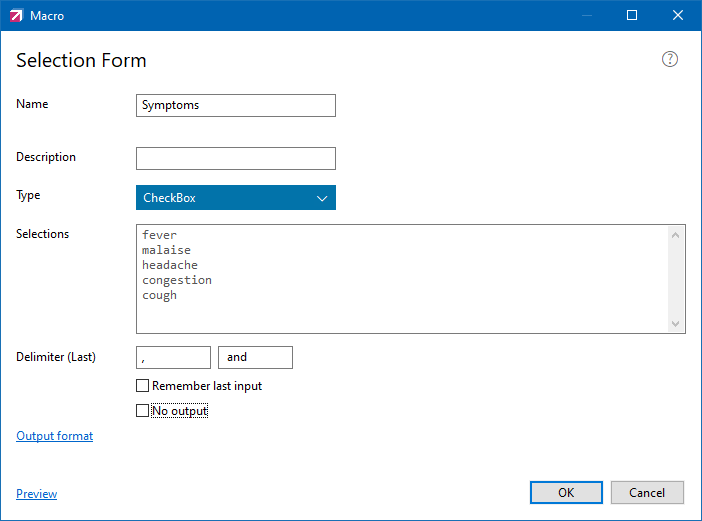
A Selection Form macro: a check-box list of symptoms joined with commas and "and" when it's inserted.
Macro Recorder
FastKeys' Macro Recorder captures your typing, mouse clicks and window actions: press F12 to start, do the task, press F12 to stop, and F11 plays it back. A recorded macro can be saved as a command in any module and then edited step by step, so a repetitive data-entry routine becomes one shortcut.
Your own Start Menu, shortcuts and mouse gestures
FastKeys' Start Menu pops up when the mouse touches the screen edge or you press a shortcut, and holds whatever you put in it: programs, folders, web pages or commands, with submenus, colors and icons. Global shortcuts and mouse gestures (hold the right button and draw up, down, left or right) run the same kinds of commands.

Adding a Start Menu item: the Run command opens google.com from a "Google" entry.
Auto Complete with learning
FastKeys' Auto Complete suggests the rest of a long word or phrase as you type, learns from what you write, and ships with word lists for many languages. Entries can also run commands, which turns it into a type-to-launch tool: type "Calculator" and pick it from the list to start the program.
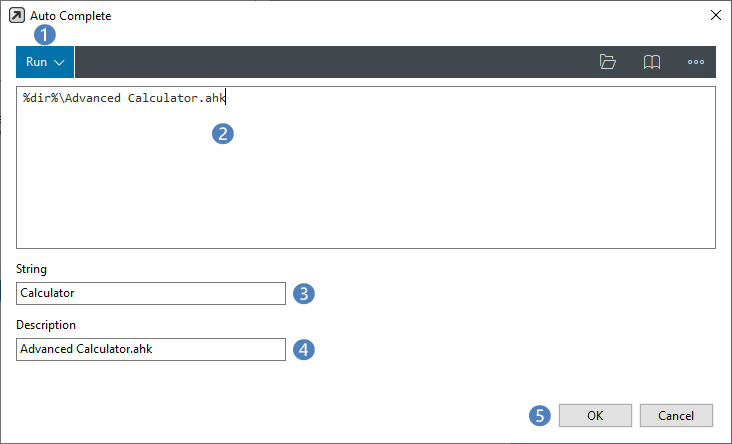
An Auto Complete entry used as a launcher: typing "Calculator" runs an AutoHotkey calculator script.
Clipboard Manager
FastKeys remembers everything you copy, text and images included, and Ctrl+Alt+V opens the history so you can paste an older item. You can keep the history between sessions and stop it from recording in chosen programs, such as a password manager, so sensitive data never lands in the cache.
Command Library and AutoHotkey scripting
FastKeys includes a library of ready-made commands: change text case, move a window to the next monitor, resize windows, turn the monitor off, volume controls, cursor movement and gaming macros. Every command is readable AutoHotkey code, so you can copy one, change a line and make it your own, or paste in a full script.
Benefits
- Fewer typos in repeated text. A stored phrase is spelled the same way every time, which matters for addresses, policy numbers and clinical wording.
- Paid once. Most text expanders are now subscriptions; FastKeys is a one-time license.
- Private by design. Nothing syncs to a vendor server, which suits workplaces that can't put customer text in the cloud.
- Grows with you. Start with ten abbreviations; add forms, macros and scripts when you're ready.
Real-World Uses
- Help desk: abbreviations for standard replies, with a drop-down for the product name and the agent's signature added automatically.
- Medical notes: a template that asks which symptoms and findings apply through check boxes, then writes the full sentence.
- Data entry: a recorded macro that tabs through a web form and fills the fixed fields, bound to one key.
- Multi-monitor desk: shortcuts and gestures that move and size windows, plus a screen-edge menu of the folders you use every day.
Who It's For, and Who Should Skip It
Good fit: Windows users who type a lot of repeated text and want one tool for snippets, shortcuts and simple macros, small teams that want shared phrase sets without a cloud service (Professional), and AutoHotkey fans who'd like a GUI on top.
Skip it if: you need the same snippets on a Mac, phone or in a browser on a Chromebook (FastKeys is Windows only, so a cross-platform cloud text expander fits better), or you already write AutoHotkey scripts and don't need menus and dialogs, in which case free AutoHotkey covers the same ground.
Usage Guide
- Download FastKeys_Setup.exe (5 MB) and install it, or use the portable version, which needs no administrator rights.
- FastKeys starts in the system tray. Open it from the tray icon and choose the Text Expander module.
- Click New, type the text to insert, enter a short abbreviation (for example
sig) and click OK.
- Type the abbreviation followed by a space in any program to expand it.
- Try the built-in shortcuts and the screen-edge Start Menu, then add your own in those modules.
- Press F12 to record a macro and F11 to play it back.
- Within 15 days, buy a license and enter the code with Register; your commands stay as they are.
Before you buy
- Personal vs Professional: the $29 Standard (Personal) license is for personal use on up to 3 computers. For business use, buy Professional at $39 per computer.
- Major upgrades may cost extra. The license is perpetual and includes support and bug-fix updates, but the vendor says future major versions with significant changes may need a new license. One AlternativeTo reviewer complained about being asked to pay for an upgrade.
- Refunds: a 14-day money-back guarantee applies, and the 15-day trial is fully working, so test it with your own programs first.
Where it falls short
- Windows only. There's no Mac, mobile or browser-extension version, so snippets don't follow you to other devices.
- A learning curve past the basics. Simple phrases are easy; forms, conditions and scripts take some reading of the manual.
- Keyboard hooks can misbehave. One long-time AutoHotkey user wrote that it disabled his keyboard a few times; abbreviations that clash with normal words also fire by accident until you tune the trigger options.
- A small vendor. Support is by email and a forum, and an AlternativeTo reviewer found the forum down in March 2026.
What Users Say
BetaNews (Mike Williams, 2017)
"It's a highly versatile Windows automation program with support for several time-saving technologies, but how these are used is very much up to you."
"Perhaps the best part of FastKeys, though, is that it caters for just about everyone. PC novices can use the Start Menu and global shortcuts right away. Experienced users will be trying out various preset commands within a few minutes."
AlternativeTo (3.8 of 5 from 9 ratings): praise
"Program with a good price, with many options to expand text, some of them very advanced." (Demerzel, January 2025)
"Fast, unobtrusive, full of features. Saves a lot of time." (Guest, 2021)
AlternativeTo: criticism
"As someone who is super enthuasitic about autohotkey applications and wrappers, fastKeys is just OK" and "Its pretty much disabled my keyboard a few times and I had to spend a good amount of time fixing it" (Kagerjay, 2017). He did like the mouse gestures and native AutoHotkey support.
"This is basically a fancy GUI wrapper for the AutoHotkey automation scripting language." (10basetom, 2014)
"Can't get company/developer info. Forum link hangs/gives 503 error. Not good signs." (TBayAreaPat, March 2026)
"The worst. Tried to install on 3 different operating systems and all three had a problem with Fastkeys" (Jon Dow, 2020). The developer replied: "User satisfaction is very important to us therefore we actively support all our users via our mail contacts" and asked for details by email.
The pattern: people who use it daily like the price, the depth of the text expansion options and how light it is. The criticism comes mostly from AutoHotkey users who see it as a paid wrapper around a free language, plus a few reports of install or keyboard problems and a thin vendor presence. There are few reviews in total, so the 15-day trial is the best test.
Comparisons
FastKeys vs AutoHotkey
FastKeys runs AutoHotkey code, so anything it does, AutoHotkey can do for free. The difference is effort: FastKeys gives you dialogs, a command library, forms and menus, while AutoHotkey means writing and maintaining scripts yourself. If you'd rather not script, FastKeys saves the time; if you already script, it adds little.
FastKeys vs cloud text expanders
Cloud text expanders sync snippets across Windows, Mac and the browser and are usually sold by subscription. FastKeys is Windows only and paid once, keeps everything on your PC, and adds macros, gestures and a launcher that snippet tools don't have.
Editions and Pricing
| Edition | Price | Computers | What it adds |
|---|
| Standard (Personal) | $29 one-time | Up to 3, one user, personal use | All modules: Text Expander, Start Menu, Shortcuts, Auto Complete, Gestures, Macro Recorder, Clipboard Manager, input forms, templates, Command Library |
| Professional | $39 one-time per computer | 1 per license, volume discounts | Business use, team settings sharing, Grid/Check and Table selection, Excel and text lookup, Calculation, Create Mail and Message macros |
| Enterprise | Quote | Open corporate license | Corporate Policy Manager, centralized deployment, usage statistics, admin settings, setup support |
Volume pricing at checkout: Standard drops to $26 each for 5-14 copies and $23 for 15 or more; Professional to $35 and $31. Each button below orders that edition.
Buy Standard ($29)Buy Professional ($39)
FAQs
Is FastKeys a subscription?
No, FastKeys is a one-time purchase. The license is perpetual and includes support and bug-fix updates; a future major version with significant changes may need a new license.
Can I use the FastKeys Personal license at work?
FastKeys' Personal (Standard) license is for personal use, though you can install it on your laptop, home and office computer. Businesses that deploy it for staff should buy Professional licenses.
Does FastKeys send my phrases to the cloud?
No, FastKeys has no servers, accounts or logins. Your phrases and settings stay on your computer.
Does FastKeys run without administrator rights?
Yes, the FastKeys Portable version copies its files to a folder you pick without a setup, so it runs where you can't install software.
Is there a Mac version of FastKeys?
No, FastKeys is Windows only (Windows 7 to 11).
What happens when the FastKeys trial ends?
The FastKeys trial runs for 15 days. After that you need to register it to keep using it; entering the code you receive by email keeps all the commands you made during the trial.
Do I need to know AutoHotkey to use FastKeys?
No, FastKeys' text expansion, menus, shortcuts and the Command Library work without any code. AutoHotkey only comes in when you want to write your own commands.
System Requirements
- Windows 11, 10, 8 or 7
- 512 MB of RAM
- 10 MB of free disk space
- 1024x768 screen resolution or higher
Conclusion
FastKeys is worth $29 if you type repeated text on Windows every day and want snippets, fill-in forms, shortcuts and a macro recorder in one light, one-time purchase that keeps your data local. The Professional edition is the one to get for business use or the Excel, mail and calculation macros. Skip it if you need your snippets on a Mac or phone, or if you're comfortable writing AutoHotkey scripts yourself. Use the 15-day trial with the programs you actually type in before you pay.
Download Free TrialBuy Standard ($29)Buy Professional ($39)