Hasleo Backup Suite Professional: Fast Windows Imaging and Cloning, Licensed for Work
Hasleo Backup Suite Professional is a $59.95 one-time license for a Windows backup, restore and disk cloning program, for one PC used for business, with free lifetime upgrades: it images Windows, disks, partitions and files, clones a system to a new SSD, and adds command-line control to everything the Home edition does.
Hasleo's free edition is already one of the best-regarded free imaging tools, but its license is for home use only. If the PC you need to protect belongs to your business, or you want to script backups from the command line, Professional is the edition that covers it.
Quick facts
- Version: 5.9.2.4, released October 9, 2026
- Developer: Hasleo Software (formerly the EasyUEFI Development Team)
- Runs on: Windows Vista through Windows 11, natively on x86, x64 and ARM64. Windows Server needs the Server edition.
- License: 1 PC, commercial use allowed, free lifetime upgrades
- Price: $59.95 one-time. Without lifetime upgrades, Professional costs $44.95.
- Backup types: system, disk, partition and file backups, full, incremental or differential
- Free trial: yes, and entering a license key turns the trial into the full version
- Refunds: within 30 days, for technical problems support can't fix
What we checked: Professional with lifetime upgrades at $59.95 on the order page, and the 40.1 MB trial installer from the vendor, file version 5.9.2.4 dated October 9, 2026, on October 26, 2026. We didn't run a backup or restore ourselves.
Download Free TrialBuy Now ($59.95)
Overview
Hasleo Backup Suite keeps things simple: five big buttons down the left (Home, Backup, Restore, Clone and Tools) and your backup tasks in the middle, each showing when it last ran and when it runs next. Every edition shares this interface. What changes between editions is the license and a handful of features.
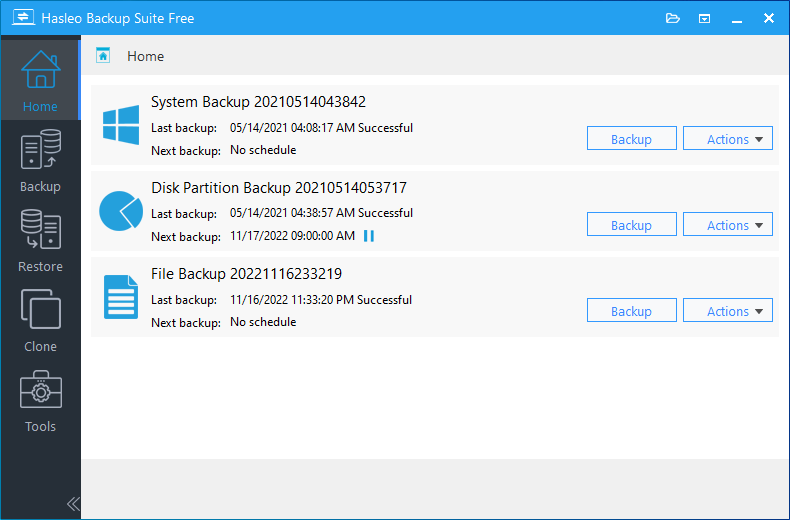
The Home screen with three backup tasks (system, disk partition and file), each with its last and next backup time and Backup and Actions buttons. The vendor's screenshot shows the Free edition, which has the same interface as Professional.
Features
Back up Windows, disks, partitions or just your files
Hasleo Backup Suite Professional's System Backup automatically selects every partition Windows needs to boot (system, boot and recovery), so a crashed PC can be restored in one go. Disk/Partition Backup images any drive, and File Backup saves chosen files and folders, with deduplication to save space. Backups can be full, incremental or differential, and go to any local, USB or network location.
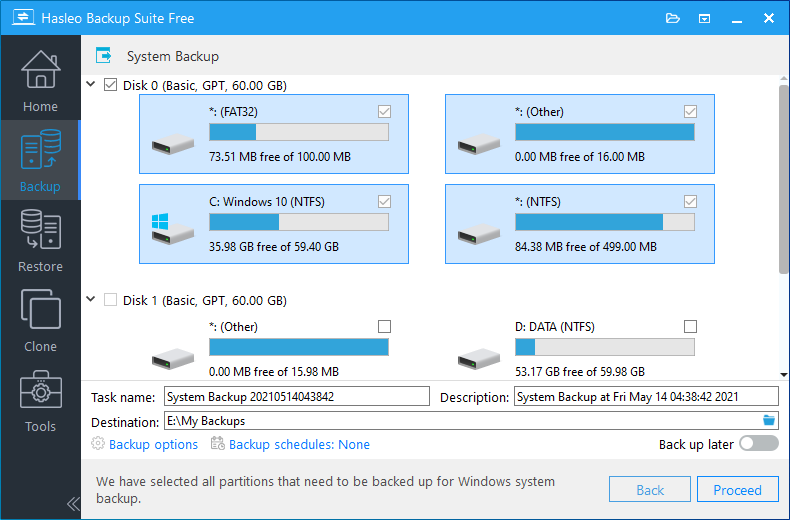
System Backup: Hasleo has ticked all four partitions on Disk 0 that Windows needs, with the task name, destination folder, backup options and schedule below.
Schedules, retention and image tools
Hasleo Backup Suite Professional runs backups one-time, daily, weekly, monthly or on events such as system start-up, a user logging on or a particular USB drive being plugged in. A retention policy merges older versions automatically, filters leave out files like the page file, and backup images can be compressed, encrypted with AES 128 or 256, split, merged, checked for integrity and mounted as a drive to pull out single files. Email notifications, now with Gmail and Microsoft OAuth, tell you when a job succeeds or fails.
Move Windows to a new SSD
Hasleo Backup Suite Professional clones the Windows system, a whole disk or a single partition to another drive without reinstalling Windows or your programs. Delta Clone copies only the blocks that changed on the destination, which makes repeat clones much faster, and cloning or restoring can convert between MBR and GPT. Unlike the free edition, it can clone the system disk.
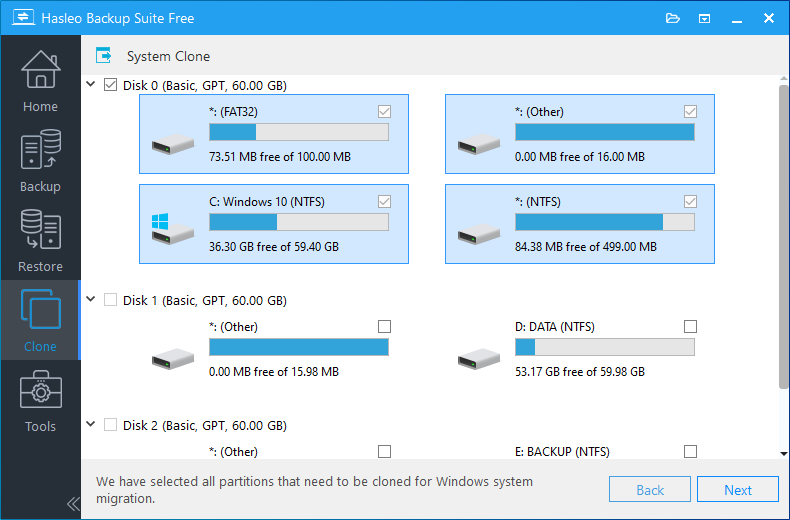
System Clone: the partitions needed for Windows system migration are selected automatically on Disk 0, ready to choose a target disk.
Restore to new hardware, keep BitLocker
Hasleo Backup Suite Professional's Universal Restore puts a Windows backup onto a computer with different hardware so it still boots, and it can restore BitLocker-encrypted partitions with their encryption intact. Delta Restore writes back only what changed. You can also restore or clone Windows to a USB drive, and keep other partitions on the destination disk untouched.
Command-line backups (Professional and up)
Hasleo Backup Suite Professional includes a command-line tool, BackupCmdUI.exe, so you can start backup tasks from scripts, Task Scheduler or remote management tools. This, along with the right to use it commercially, is what separates Professional from Home.
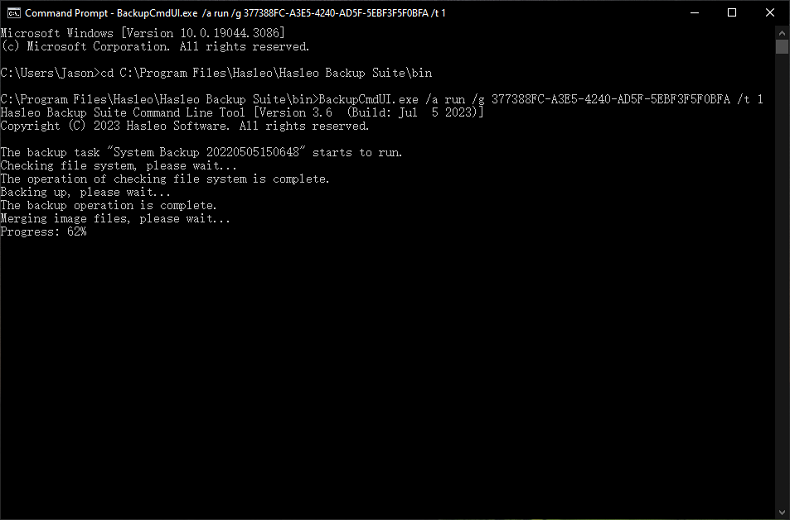
BackupCmdUI.exe running a saved System Backup task in Command Prompt, showing the file system check, backup and image merge progress. The screenshot comes from an older version (3.6) of the tool.
Emergency disk and extra tools
Hasleo Backup Suite Professional creates a bootable WinPE emergency disk (with UEFI CA 2023 certificate support and driver injection) so you can restore a PC that won't start, and the Tools section adds drive wiping, MBR repair, task import and export, and logs.
Benefits
The main benefit is price with no strings. Many imaging tools for business charge yearly per machine. Hasleo Professional is $59.95 once, and the lifetime-upgrades option means version 6, 7 and beyond are included. TechRadar's speed tests put Hasleo near the top of nearly twenty backup apps, so you're not trading speed for price. And because Windows on ARM is supported natively, it covers the newer Snapdragon laptops in an office too.
Real-World Uses
- A sole trader schedules a nightly incremental system backup of the work PC to a NAS, legally, since Professional allows business use.
- An office upgrade: clone a laptop's 256 GB drive to a 1 TB SSD without reinstalling Windows or the accounting software.
- Replacing a dead PC: restore last week's image onto new hardware with Universal Restore and keep working.
- An IT contractor triggers backups from a script with the command-line tool and gets an email when each one finishes.
- Ransomware insurance: keep encrypted images on a USB drive that's only plugged in for the weekly backup, triggered automatically when it's connected.
Who It's For, and Who Should Skip It
Hasleo Backup Suite Professional is for freelancers, sole traders and small businesses who want reliable Windows imaging on a work PC, and for anyone who needs command-line backups.
Skip it if the PC is for home use: Hasleo Backup Suite Home ($29.95) has the same backup, cloning and restore features, and the Free edition covers basic backups. Skip it for Windows Server, which needs the Server edition ($199.95), and if you need cloud storage, ReFS backups or central management of many machines, which TechRadar notes are missing. Mac and Linux users aren't covered at all.
Usage Guide
- Install and launch. Download the trial (about 40 MB) or the ARM64 version, install it and open Hasleo Backup Suite.
- Activate. Enter your license key in the trial to turn it into the full Professional version. There's no need to reinstall.
- Create a backup. Click Backup, choose System Backup, Disk/Partition Backup or File Backup, pick a destination and click Proceed.
- Set options. Under Backup options choose compression, encryption and splitting, and under Backup schedules set when it runs and how many versions to keep.
- Make an emergency disk. In Tools, create a WinPE emergency USB so you can restore if Windows won't boot.
- Clone or restore. Use Clone to move Windows to a new drive, or Restore to bring back a whole image or browse it for individual files.
Before you buy
- Refunds are limited. Hasleo's 30-day guarantee covers technical problems its support can't fix, not a change of mind, so test the trial on your own hardware, including a restore from the emergency disk.
- Lifetime upgrades are what you pay extra for. This license is $59.95 with free lifetime upgrades. Professional without them is $44.95.
- Prices exclude VAT on Hasleo's own store.
Where it falls short
- Limited support. Help is by email and a forum only, with no stated response time. TechRadar listed "Limited support" among its reasons to avoid it, though several Trustpilot reviewers say Hasleo answers quickly.
- Few high-end options. There's no cloud storage, no app-specific or phone backups, and no central console.
- Frequent fixes. The change log shows a bug-fix release every few weeks from July to October 2026, including file backup crashes and a WinPE restore problem fixed in 5.9.2.4. Keep it updated.
- Mixed reports on reliability. A few Trustpilot reviewers report heavy disk usage, an external USB drive that wouldn't work, and no warning when the target lacks space.
What Users Say
TechRadar: 3.5 out of 5
Mike Jennings tested Hasleo Backup Suite Free (September 2024) with document, spreadsheet, media and mixed folders backed up to three SSDs. Reasons to buy: "Free", "Good speeds" and "Solid features". Reasons to avoid: "Few high-end options", "Other apps are even faster" and "Limited support".
On speed: "Its Media file average time of six minutes and six seconds is one of the best we've recorded across this latest slate of backup apps – nearly twenty tools in all". On the interface: "While Hasleo does look a little archaic, it's easy to use, even for beginners."
His verdict: "Hasleo Backup Suite Free offers a rock-solid core range of backup features alongside good speed". He added that it suits "home users and sole traders who need core backup functionality".
gHacks
Martin Brinkmann has followed the program since its first release. Reviewing version 3.0 (November 2022), he wrote: "Hasleo Backup Suite has been improved significantly since the initial release in mid-2021. The program performed as expected on a test system; it backed up and restored the system partition and non-system partitions without issues."
Trustpilot: 4.1 out of 5 from 32 reviews
Hasleo Software's Trustpilot reviews cover all its products and are split: 69% give 5 stars and 19% give 1 star. These excerpts were read through a summarizer, so treat the wording as close but not guaranteed exact.
Alexander B. (5 stars, April 2026), "Hasleo Backup Suite - one of the best backup solutions I've tested so far": "This company is awesome, listens to their customers and the product has become extremely stable and major."
B.T. (5 stars, June 2026), "Hasleo Backup Suite": "So far, it has worked every single time."
Ian Stewart (5 stars, September 2026): "it is fast, straightforward to use and has several back-up options."
Dude Guyman (5 stars, January 2026): "It does the job perfectly, for a better price, is simple to use, and their support is top notch."
Clay Zaccaglini (4 stars, July 2026), "Fails to estimate sizes, not smart backup": "It does not estimate size of backup and verify that the target has enough space."
Akis Karorimakis (1 star, August 2026): "The free version does not work if you want to use an external usb drive."
Jonathan Frg (1 star, March 2026), "DON'T TRUST HASLEO WITH YOUR BACKUPS YOUR DATA WILL BE LOST": "This app is completely broken, full of bugs and unusable."
Reviewers keep coming back to the same strengths: Hasleo is fast, simple and dependable for imaging and cloning, and support is responsive. The criticism is louder but rarer: a handful of users hit bugs or drive problems serious enough to give up on it, which fits the steady stream of fix releases. As with any backup tool, test a restore before you rely on it.
Comparisons
Professional vs Home vs Free
Home and Professional share every backup, cloning and restore feature: Universal Restore, deduplication, backup filters, system disk cloning, Delta Clone, BitLocker-preserving restore, Windows to USB and MBR/GPT conversion, none of which the Free edition has. Professional adds command-line support and business use. Free and Home are for home use only.
Professional vs Server and Enterprise
Server ($199.95) adds Windows Server support, ReFS file system backup and a PXE server for network booting the recovery environment, and always includes lifetime upgrades. Enterprise ($799.95) adds the same for up to 500 PCs and servers at one site.
Editions and Pricing
| Edition |
Price |
Computers |
Use |
What it adds |
| Free |
$0 |
Any |
Home |
Backup and restore, no system disk cloning |
| Home |
$29.95, or $44.95 with lifetime upgrades |
1 PC (Family: 5 PCs for $89.95) |
Home |
All advanced backup, clone and restore features |
| Professional + Lifetime Free Upgrades (this license) |
$59.95 |
1 PC |
Business |
Command line, commercial use, lifetime upgrades |
| Server |
$199.95 |
1 server |
Business |
Windows Server, ReFS, PXE server |
| Enterprise |
$799.95 |
Up to 500 PCs and servers at one site |
Business |
Server features for a whole site |
Prices from Hasleo's store excluding VAT, shown there as discounts from higher list prices. The $59.95 for this license was confirmed on the order page on October 26, 2026.
FAQs
Can I use Hasleo Backup Suite Home at work?
No. Hasleo Backup Suite Free, Home and Home Family must not be used for commercial purposes. Business use needs Professional, Server or Enterprise.
Does Hasleo Backup Suite Professional work on Windows Server?
No. Hasleo Backup Suite Professional supports desktop Windows, including Education and Enterprise editions. Windows Server editions need Hasleo Backup Suite Server.
What does "Lifetime Free Upgrades" mean for Hasleo Backup Suite?
With lifetime free upgrades, every future version of Hasleo Backup Suite Professional is included at no extra charge. Without the option ($44.95), you'd pay to upgrade to a new major version.
Do I have to reinstall after buying Hasleo Backup Suite?
No. Enter your license key in the installed free or trial version of Hasleo Backup Suite and it becomes the full version immediately.
Does Hasleo Backup Suite run on Windows on ARM laptops?
Yes. Hasleo Backup Suite runs natively on ARM64 Windows as well as x86 and x64, with a separate ARM64 download.
Can Hasleo Backup Suite back up to a NAS or network share?
Yes. Hasleo Backup Suite saves backups to any location your PC can reach, including network shared folders, as well as internal, USB and Thunderbolt drives.
Can I get a refund on Hasleo Backup Suite?
Hasleo offers up to 30 days' money back, but only for technical problems its support team can't resolve. It doesn't refund for a change of mind or for features you didn't check before buying, so use the trial first.
System Requirements
- Operating system: Windows Vista or later, 32-bit or 64-bit, or ARM64 (Windows Server needs the Server edition)
- Processor: 1 GHz or faster Intel Pentium-compatible or ARM64
- Memory: 1 GB RAM, 2 GB recommended
- Disk: 500 MB free space, plus room for your backup images
- Devices: HDD, SSD, USB, Thunderbolt and dynamic disks
- File systems: FAT12/16/32, exFAT and NTFS, others in sector-by-sector mode
Conclusion
Hasleo Backup Suite Professional is worth $59.95 if you need fast, no-subscription Windows imaging on a work PC. It covers system, disk and file backups, SSD migration, restore to new hardware and BitLocker, adds command-line control, and the lifetime-upgrades license means you won't pay again. The reason to buy Professional rather than Home is simply the business license and the command line. The main reason not to is if the PC is personal, where Home does everything for half the price, or if you need cloud backup or a central console. Install the trial, make the emergency disk and test a restore before you buy.
Download Free TrialBuy Now ($59.95)