Tipard Blu-ray Player for Mac: Play Blu-ray Discs, ISO Files and 4K Video on a Mac
Tipard Blu-ray Player for Mac is a Mac app that plays Blu-ray discs through a USB Blu-ray drive, plus Blu-ray folders and ISO images, and works as an everyday player for MKV, AVI and 4K files. Our Buy Now button sells the lifetime license for one Mac at $45, a one-time payment.
Apple never added Blu-ray support to macOS. Plug in a Blu-ray drive and the disc mounts, but QuickTime and the TV app can't play it, and free players such as VLC can't open most commercial discs without extra key files. That leaves a small group of paid Mac players, and this is one of them.
Quick facts
- Version: 6.2.82 for Apple silicon (June 18, 2026) and 6.2.78 for Intel (June 17, 2026)
- Developer: Tipard Studio
- Runs on: macOS 10.12 or later per the purchase page (the spec page says 10.9), Intel or Apple silicon. A Windows edition is sold separately.
- Plays: Blu-ray discs, BDMV folders and Blu-ray ISO files; MP4, MKV, MOV, AVI, WMV, MTS/M2TS, WebM and more; FLAC, APE, ALAC and other audio
- You also need: an external Blu-ray drive for discs
- Price: $45 one-time on the order page (lifetime license for 1 Mac; $56.25 list with a 20% discount)
- What we checked: the 4.1 MB installer from Tipard's server and the app packages it downloads, whose Info.plist files show version 6.2.82 (Apple silicon) and 6.2.78 (Intel), and the order page, which charged $45.00 for the lifetime 1-Mac license with no renewal, all on November 4, 2026. We didn't play a Blu-ray disc with it.
Before you buy: try your own discs
Disc compatibility is the whole point of a Blu-ray player, and new releases change their protection, so download the free version and play the discs you actually own before paying. Tipard's FAQ even says the app "can serve as a free Blu-ray player for Mac", but it doesn't publish what the unregistered version holds back.
Tipard refunds within 30 days only for technical problems it can't fix, not a change of mind. If you buy on Tipard's own store instead of through our order page, its checkout adds a 7-day trial of Tipard Screen Capture that renews at $30 a month unless you cancel it.
Download Free TrialBuy Now
Overview
There's almost nothing to learn. The app opens to a dark window with two buttons, Open File and Open Disc, above a control bar with stop, play, snapshot, open-folder, eject, volume and full-screen buttons. Settings live in the macOS menu bar (Controls, Audio, Video, Tools). No library, no sign-in to watch, no conversion: it plays things.
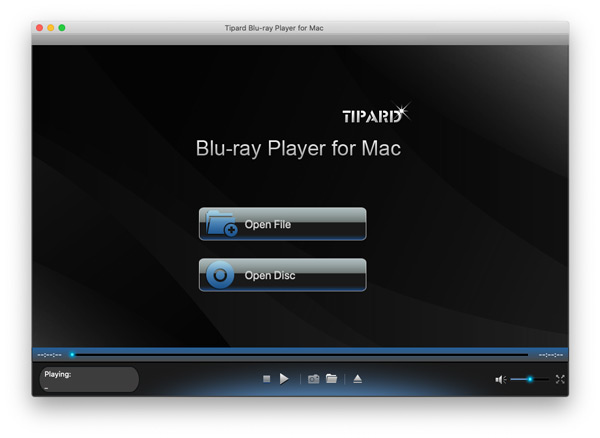
The start window: Open File and Open Disc, with the time bar and the stop, play, snapshot, folder, eject, volume and full-screen controls along the bottom.
Features
Blu-ray discs, folders and ISO images, region-free
Tipard Blu-ray Player for Mac plays a disc from a connected Blu-ray drive with Open Disc, and the same button opens a BDMV folder; Open File handles ISO images. Tipard says it plays discs from any region and handles disc encryption automatically, including recent releases. That folder and ISO support means backups on an external drive play with no disc at all.
Chapters, audio tracks and subtitles
Tipard Blu-ray Player for Mac shows a menu for the loaded disc where you choose the chapter, audio track and subtitle, or turn subtitles off, then press Play Movie. During playback the Audio and Video menus switch tracks, and you can load an external audio or subtitle file from your Mac.
Screen size, deinterlacing and snapshots
Tipard Blu-ray Player for Mac's Video menu switches between half, normal and double size, fit to screen and full screen (Command-F), picks the video and subtitle track, and deinterlaces older 1080i footage. The camera button saves the current frame as an image at full quality.
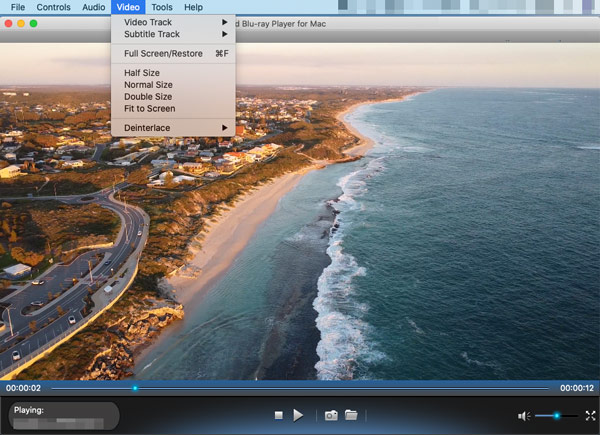
The Video menu open over a playing coastline clip: Video Track, Subtitle Track, Full Screen/Restore, Half, Normal and Double Size, Fit to Screen and Deinterlace.
A player for big 4K files and odd formats
Tipard Blu-ray Player for Mac opens MKV, AVI, WMV, FLV and camcorder MTS files that QuickTime refuses, up to 4K and 8K, and plays lossless FLAC, APE and ALAC music with automatic playlists. Tipard says it uses the Mac's hardware video decoding to keep 4K playback smooth and power use low, and supports HDR10 and Dolby Vision.
Keyboard control
Tipard Blu-ray Player for Mac maps play/pause, skip forward and back, and volume to the keyboard, so you can leave the trackpad alone on the sofa. Several of Tipard's testimonials single out the hotkeys.
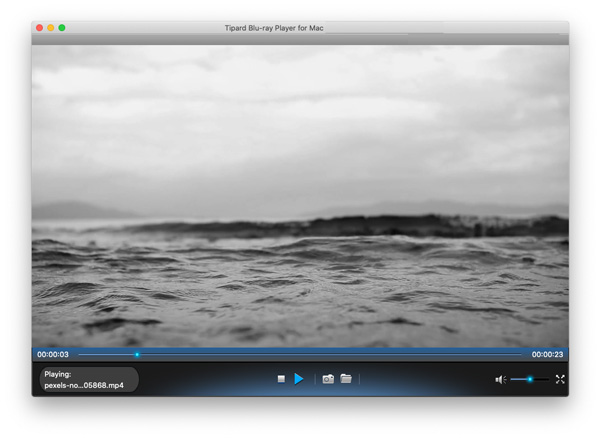
Playing a local MP4 file: the file name under "Playing:", the time bar and the playback controls.
Benefits
- Your Blu-ray shelf works again on a MacBook or a Mac mini connected to the TV.
- Disc backups without discs: ISO and BDMV copies play straight from a drive.
- Two buttons anyone in the household can use.
- One app for the files QuickTime won't open.
Real-World Uses
- Movie night from a Mac mini under the TV, with a USB Blu-ray drive and the keyboard as a remote.
- Imported discs from another region that a local player refuses.
- A trip with a MacBook and a few Blu-ray ISO files on an SSD instead of discs and a drive.
- Grabbing a still from a concert Blu-ray with the snapshot button.
Who It's For, and Who Should Skip It
It's for Mac owners with Blu-ray discs or Blu-ray backups who want the simplest way to watch them, without converting anything.
Skip it if:
- You need the studio's original disc menus. You get a simple chapter, audio and subtitle menu, not the disc's interactive Blu-ray menu.
- You only play files. IINA and VLC are free and handle MKV and AVI well; you only need this for Blu-ray.
- You want files on your iPhone. That's a ripper's job (Tipard Blu-ray Converter for Mac, or MakeMKV).
- You can't test first. With disc support varying between titles, buying blind is risky.
Usage Guide
- Connect a drive. Plug an external Blu-ray drive into your Mac and insert the disc.
- Install. Open the 4.1 MB disk image and run the installer, which downloads the app for your Mac's chip (keep the Mac online).
- Open the disc. Click Open Disc (also for a BDMV folder), or Open File for an ISO or a video file.
- Pick what to watch. Choose the chapter, audio track and subtitle, then Play Movie.
- Adjust. Use the Video and Audio menus for tracks, size and deinterlacing, and Command-F for full screen.
Where it falls short
- Licensing and refund complaints. A MacUpdate reviewer rated it 1 out of 5, citing reports that licenses are single-installation and refunds hard to get. Tipard's Account Center now has a Change Device button for moving a license, but its refund policy is strict.
- Contradictory system requirements: 10.12 on the purchase page, 10.9 on the spec page. Check the trial on your own macOS version.
- No original Blu-ray menus or BD-Live extras.
- An online installer. The small download fetches the app during setup.
What Users Say
There's no recent independent test of this player that we could find. Here's what's on record: glowing testimonials on Tipard's site, one blunt MacUpdate review, and Trustpilot's view of the company.
Reviews on Tipard's site (4.9 from 784 reviews)
The Mac player's reviews page shows 4.9 out of 5 from 784 reviews, hosted by the vendor.
Brooke (December 5, 2025), "Powerful than other players.": "This one feels more stable and well-designed on macOS."
Jasmine (August 14, 2025), "Simple and smooth.": "Doesn't hog system resources and launches fast."
Connor (September 30, 2025): "No annoying ads! I like it!"
Solis, on the product page: "I have a 70GB size 4K movie, and this player can play it smoothly with no lag."
MacUpdate (1.0 from 1 rating)
Derekcurrie (July 24, 2023, version 6.2.58) summed up what he'd read elsewhere rather than his own use: "Installations, even 'lifetime' licenses, are one-time installation only." "There are no refunds, despite marketing to the contrary." "'Support' is not responsive." His conclusion: "Buyer beware."
It's a single rating, based on other people's reviews, and some points conflict with recent Trustpilot reports of quick license resets, but it's the only independent review of the Mac player we found.
Trustpilot: Tipard Studio (4.5 from 91 reviews)
On Trustpilot, Tipard scores 4.5 out of 5 from 91 reviews (82% five-star, 10% one-star). Several five-star reviews are about support resetting licenses after a new computer, for example Kurt (February 2026), whose license reactivation after an SSD replacement was resolved. The one-star reviews concern refunds and subscriptions on other products.
Trustpilot blocks direct downloads, so these details were read through a summarizing tool.
The recurring themes
Users like the simplicity, smooth 4K playback and the hotkeys. The doubts are about the company rather than the player: license moves and refunds. Since the only real question for a Blu-ray player is whether it plays your discs, test before buying.
Comparisons
Tipard Blu-ray Player for Mac vs VLC and IINA
VLC and IINA are free and excellent for files, but neither plays commercial Blu-ray discs out of the box: VLC needs extra key files and setup, and IINA doesn't do Blu-ray menus. Tipard's player is built to open those discs directly.
Tipard vs other paid Mac Blu-ray players
Macgo, Leawo and Aiseesoft (a company closely connected to Tipard, with a near-identical player) sell similar two-button Mac players. Disc support is what separates them, so try two on the same disc before choosing.
Editions and Pricing
| License | Price | Term | Macs | Where |
|---|
| Lifetime License | $45.00 | One-time payment | 1 | Our Buy Now button and Tipard's store |
| 1 Month License | $24.00 a month | Renews monthly until cancelled | 1 | Tipard's store |
| Lifetime License, 3 Macs | $70.00 | One-time payment | 3 | Tipard's store |
| Blu-ray Converter + Blu-ray Player | $79.00 | One-time payment | 1 | Tipard's store |
US dollar prices as shown on November 4, 2026, before sales tax or VAT. At $24 a month, the monthly plan passes the lifetime price in the second month.
FAQs
Do I need a Blu-ray drive to use Tipard Blu-ray Player for Mac?
Only for discs. Tipard Blu-ray Player for Mac needs an external Blu-ray drive to read a disc, since no current Mac has one built in. Blu-ray ISO files, BDMV folders and ordinary video files play without one.
Does Tipard Blu-ray Player for Mac run natively on M-series Macs?
Yes. Tipard Blu-ray Player for Mac's installer downloads a separate Apple silicon build (version 6.2.82 when we checked), and Tipard lists M2 to M5 chips as supported alongside Intel Macs.
Is Tipard Blu-ray Player for Mac safe to install?
Tipard says the app is notarized by Apple, which means Apple's automated malware scan passed it and macOS will open it without a security override.
Does it play 4K UHD Blu-ray discs?
Tipard promises 4K video playback with HDR10 and Dolby Vision, but doesn't spell out support for encrypted 4K UHD Blu-ray discs, which also need a UHD-capable drive. Treat UHD discs as untested until the trial plays one.
Can I move the license to a new Mac?
Yes. Tipard Blu-ray Player for Mac's lifetime license covers one Mac at a time; the Change Device button in Tipard's Account Center releases the old Mac, or support can reset the code.
Can it play DVDs?
Tipard Blu-ray Player for Mac is built around Blu-ray: its spec page lists Blu-ray discs, folders and ISO files under disc input and doesn't name DVD discs separately. Try a DVD in the free version if that matters; otherwise VLC plays DVDs on a Mac for free.
System Requirements
- macOS: 10.12 or later (purchase page); the spec page lists 10.9 or later
- Processor: Intel or Apple silicon (M2 to M5 listed)
- RAM: 1 GB or more
- Drive: external (or internal) Blu-ray drive for discs
- Download: 4.1 MB installer that fetches a 44 MB (Intel) or 97 MB (Apple silicon) app
Conclusion
Tipard Blu-ray Player for Mac is simple, maintained (Apple silicon build from June 2026) and inexpensive as a one-time $45 purchase, covering discs, ISO files, BDMV folders and everyday video formats in one app. The one reason to buy it is watching Blu-rays on a Mac with nothing more than a USB drive. The main reason not to is that nobody independent has tested it recently, and the only outside review is a warning about licensing and refunds. Our verdict: worth it only if the free download plays your own discs smoothly; then the lifetime license is the sensible buy.
Download Free TrialBuy Now