Tipard DVD Creator: Make Menu-Driven DVDs and Blu-rays from Your Videos
Tipard DVD Creator is a Windows disc-authoring program that turns MP4, MOV, MKV and camcorder files into a DVD that plays in any living-room DVD player, and, despite the name, into a Blu-ray too. It's $45 for a lifetime license on one PC through our Buy Now button.
Plenty of people still want a disc: grandparents with a DVD player under the TV, a school that needs the concert video on something it can hand out, a wedding client who expects a boxed DVD. Copying an MP4 onto a blank won't do it, because a DVD player needs a VIDEO_TS structure in MPEG-2. DVD Creator does that conversion, adds a menu and chapters, and burns the result.
Quick facts
- Version: 5.3.32 (program package dated August 13, 2026)
- Developer: Tipard Studio
- Runs on: Windows 7, 8, 10 and 11. A separate Mac edition exists.
- Makes: DVD-5 and DVD-9 discs, BD-25, BD-50 and BD-100 Blu-rays, VIDEO_TS and Blu-ray folders, and ISO images
- Input: MP4, MOV, MKV, AVI, WMV, FLV, MPEG, MTS/M2TS, TOD, MOD and more, up to 4K
- Price: $45 one-time on the order page (lifetime license for 1 PC; $56.25 list with a 20% discount)
- Trial: 30 days, with a watermark on discs and a limit of 3 DVDs (as listed by FileHorse)
- What we checked: the 2.5 MB online installer and the 84 MB program package it downloads (version 5.3.32) from Tipard's servers, and the order page, which charged $45.00 for the lifetime 1-PC license with no renewal, all on November 4, 2026. We didn't burn a disc with it.
Before you buy
The trial puts a watermark on what it burns, so judge the menus and playback with it but don't hand out trial discs. Keep the computer online during setup: the small download fetches the full 84 MB program while it installs.
Tipard's 30-day guarantee covers technical problems it can't solve, not a change of mind. If you buy on Tipard's own store instead of our order page, its checkout adds a 7-day Blu-ray Player trial that becomes a $30-a-month subscription unless you cancel it.
Download Free TrialBuy Now
Overview
The program opens by asking one question: DVD Disc or Blu-ray Disc? Below the two buttons is your list of saved projects. Pick one and you land in the clip list, where each video shows its resolution, length, audio and subtitle choice, next to a panel of video and chapter tools. Then comes the menu designer and, last, a burn screen for disc, folder or ISO.

The start screen: DVD Disc or Blu-ray Disc, with an (empty) list of saved projects and a link to load a project from another folder.
Features
DVDs and Blu-rays from one program
Tipard DVD Creator's Disc Type list runs from DVD-5 (4.7 GB) and DVD-9 (8.5 GB) to BD-25, BD-50 and BD-100. The same project can go out as a DVD for an old player or a Blu-ray for a Full HD one, and either can be saved as a folder or ISO instead of burned.

The Disc Type drop-down open on a 4K clip: DVD-5 (4.7G), DVD-9 (8.5G), BD-25 (25GB), BD-50 (50GB) and BD-100 (100GB).
Fit to Disc does the conversion for you
Tipard DVD Creator converts each clip to the standard disc format during the burn, and its Fit to Disc quality setting picks the bitrate so everything fits the disc you chose. An Estimated Capacity bar shows how full the disc is as you add clips. One of Tipard's testimonials, from a student, credits it with compressing a recording so it fit "a small size DVD disc".
Menus you can rearrange
Tipard DVD Creator's menu screen offers themed templates (holiday, family, wedding, travel and more), and you can drag the Play and Scene buttons and the title anywhere on the page, rewrite their text, swap in your own background picture and music, set the chapter thumbnails, and add an opening film that plays before the menu. Tick No Menu for a disc that simply starts playing, and save a design you like as a custom template.
Chapters, extra audio and subtitles
Tipard DVD Creator splits a long video into chapters by duration or number, or at points you choose, and merges short clips into a single chapter. Audio Edit adds a second soundtrack with its own volume and delay, and Subtitle Edit sets the font, color, position, transparency and delay of an added subtitle file.
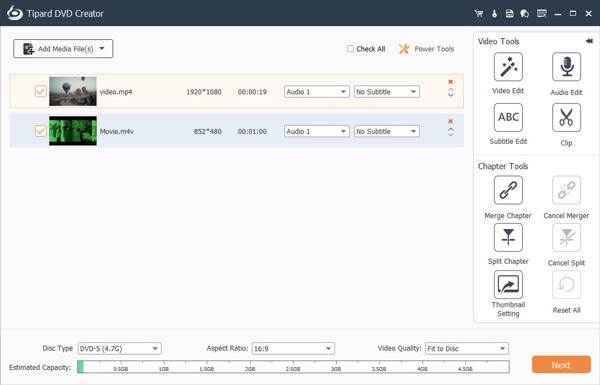
Two clips ready for a DVD-5: a 1080p MP4 and a 480p M4V, with the Video Tools (Video Edit, Audio Edit, Subtitle Edit, Clip) and Chapter Tools (merge, split, thumbnail) on the right.
A small editor for fixing clips
Tipard DVD Creator trims, rotates and crops clips, adjusts brightness and volume, adds visual effects such as blur, sketch and film grain, and stamps a text or image watermark. Batch Edit applies a change to every selected clip at once, which saves time on a stack of phone videos shot the same way.
Benefits
- It plays where streaming doesn't. A DVD works in nearly every player, game console and laptop drive made in the last twenty-five years.
- One purchase covers both formats, so you don't need a second program the day someone asks for a Blu-ray.
- A gift that looks finished, with a themed menu, chapter thumbnails and your own music.
- Projects you can reopen to make another batch of discs months later.
Real-World Uses
- A birthday or memorial DVD from phone videos, with an opening film and background music on the menu.
- School plays and recitals burned as DVDs for parents and as a Blu-ray for the school's archive, from one project.
- A small wedding business delivering a DVD and a Blu-ray version with matching menus.
- Training videos for an office with old DVD players in the meeting rooms, with chapters for each topic.
Who It's For, and Who Should Skip It
It's for Windows users who make discs from their own footage now and then and want menus and chapters without learning professional authoring software.
Skip it if:
- You want to copy an existing DVD. That's Tipard DVD Cloner's job; DVD Creator builds discs from video files.
- You want a photo slideshow or music disc. It's built around video files.
- You need professional DVD features. Multiple angles, scripting and precise bitrate control aren't here.
- A free burner is enough. If you don't need a menu, a free tool like DVDStyler or the burner in your operating system can do a basic job.
Usage Guide
- Install and launch. Run the 2.5 MB installer, let it download the program, then pick DVD Disc (or Blu-ray Disc) on the start screen.
- Add clips. Click Add Media File(s). Use Video Edit, Audio Edit, Subtitle Edit and the Chapter Tools on each clip as needed.
- Set the disc. Choose DVD-5 or DVD-9, the aspect ratio and Fit to Disc, and watch the capacity bar. Click Next.
- Make the menu. Pick a template, drag the buttons, add music or a background, and click Preview. Then click Burn.
- Burn or save. Choose a burner, a folder or Save as ISO, set the number of copies, and click Start.
Tip: DVD means standard definition
However sharp your 4K or 1080p footage is, a DVD stores 480p (NTSC) or 576p (PAL) video, so it will look softer on a big TV. That's the format, not the program. If the people watching have Blu-ray players, choose Blu-ray Disc at the start and keep the full HD picture. On DVD, about two hours of video fits a DVD-5 at reasonable quality; beyond that, use a DVD-9 or split the project over two discs.
Where it falls short
- Player quirks. Tipard itself notes that some players only accept certain blanks, such as DVD-R. Burn one test disc for the player that matters before making ten.
- Online installer. The download is a 2.5 MB stub that needs an internet connection to fetch the real program.
- Little independent testing. Most published reviews are giveaway or download-site summaries; we found no recent hands-on magazine review.
- One PC per license. Moving it means unbinding the old device in Tipard's Account Center or asking support.
What Users Say
Feedback comes mainly from Tipard's own testimonials and Trustpilot, with short press quotes that Tipard publishes.
Testimonials on Tipard's site (4.9 from 738 reviews)
Tipard's product page shows 4.9 out of 5 from 738 reviews; read these as testimonials, since the vendor hosts them.
Bytex, a student: "It burned my recording video to a DVD disc with decent video quality. It even helped me compress my video so I can burn the video to a small size DVD disc."
WittyDoc: "It's a fantastic DVD authoring software. I make a nice DVD menu with it. I sent a DVD to my guest and he's satisfied."
GeeVibe, a photographer: "I keep taking videos of my children's happy moments. One day, I found it must be moving to make a DVD from the videos."
Trustpilot: Tipard Studio (4.5 from 91 reviews)
Tipard holds 4.5 out of 5 from 91 Trustpilot reviews: 82% five-star, 10% one-star. Hoogendoorn (June 2025, 5 stars) ended up with DVD Creator after Blu-ray Creator "did not work for me": "Contacted the supportdesk and within 2 days it was converted to dvd creator. Now that is what I call a service".
Most other praise is for support that resets registration codes on new PCs. The one-star reviews are mostly about refunds and subscriptions on other products. Trustpilot blocks direct downloads, so these quotes were read through a summarizing tool and are excerpts.
Press quotes on Tipard's page
Tipard's page quotes TopTenReviews: "Tipard DVD Creator is an outstanding tool that can help you burn your videos into a DVD. Moreover, it also supports several file formats and offers many features." It quotes PCWorld: "Tipard DVD Creator is a powerful product that can not only enable users to create DVDs with videos but also let users edit videos and choose menus."
We couldn't locate the original articles, so we can't say how old they are.
The recurring themes
Buyers like the menus, the automatic fitting of long recordings onto a disc, and discs that make good gifts. Support earns credit for swapping a product that didn't suit. The thin spot is independent testing, so the trial is your real review.
Comparisons
Tipard DVD Creator vs Tipard Blu-ray Creator
Blu-ray Creator uses the same interface, templates and tools but only makes Blu-rays, and its order page price is $56.25. DVD Creator does DVDs and Blu-rays for $45, so it's the better buy unless you specifically want the Blu-ray-only edition.
Tipard DVD Creator vs DVDStyler
DVDStyler is free and open source and builds DVD menus too, but it makes DVDs only, its editing tools are minimal, and its interface takes more learning. Tipard adds Blu-ray output, the clip editor, Fit to Disc and polished templates for the price of the license.
Editions and Pricing
| License | Price | Term | PCs | Where |
|---|
| Lifetime License | $45.00 | One-time payment | 1 | Our Buy Now button and Tipard's store |
| 1 Month License | $24.00 a month | Renews monthly until cancelled | 1 | Tipard's store |
| Lifetime License, 3 PCs | $70.00 | One-time payment | 3 | Tipard's store |
| DVD Creator + DVD Cloner | $69.00 | One-time payment | 1 | Tipard's store |
US dollar prices as shown on November 4, 2026, before sales tax or VAT. At $24 a month, the monthly plan costs more than the lifetime license after two months.
FAQs
Can Tipard DVD Creator burn a Blu-ray as well as a DVD?
Yes. Tipard DVD Creator asks for DVD Disc or Blu-ray Disc when you start a project, and its disc types include BD-25, BD-50 and BD-100. Burning a Blu-ray disc needs a Blu-ray burner; a Blu-ray folder or ISO doesn't.
Will a DVD from Tipard DVD Creator play in an old DVD player?
Tipard says discs made with DVD Creator play in DVD and Blu-ray players, hardware or software, with the caveat that some players accept only certain blanks (a DVD-R-only player, for example). DVD-R blanks are the safest choice for older players.
Does the free trial of Tipard DVD Creator add a watermark?
Yes. According to FileHorse's listing, Tipard DVD Creator's 30-day trial puts a watermark on created discs and stops after 3 DVDs. Buying a license removes both limits.
Can Tipard DVD Creator remove black bars from my videos?
Yes. Tipard DVD Creator's crop tool trims black bars and offers Letterbox, Pan & Scan and Full zoom modes, and the disc's aspect ratio is set separately before the menu step.
Can I save a project and burn more copies later?
Yes. Tipard DVD Creator saves projects and lists them on its start screen. Saving the disc as an ISO image is another way to burn identical copies later.
Is there a Mac version?
Yes, Tipard sells DVD Creator for Mac separately. Windows and Mac licenses can't be swapped, so buy the edition for the computer you'll burn on.
System Requirements
- Windows: 11, 10, 8 or 7
- Processor: 1.2 GHz Intel or AMD CPU or faster
- RAM: 1 GB or more
- Drive: a DVD burner for DVDs, a Blu-ray burner for Blu-rays (not needed for folders and ISO files)
- Download: 2.5 MB online installer that fetches the 84 MB program
Conclusion
Tipard DVD Creator is the stronger of Tipard's two disc makers: the same templates, chapter tools and editor as Blu-ray Creator, plus DVDs, for a one-time $45. The one reason to buy it is turning a folder of everyday videos into a menu-driven disc that plays on whatever player your audience owns, DVD or Blu-ray. The main reason not to is that it's a paid tool for a shrinking job: if you burn a disc once a year and don't care about menus, a free burner will do. Our verdict: good value for anyone who regularly makes discs for family, clients or events; check the trial disc in your target player first.
Download Free TrialBuy Now