Tipard Blu-ray Converter for Mac: Rip Blu-rays to MOV, MP4, ProRes or Lossless MKV
Tipard Blu-ray Converter for Mac rips Blu-ray discs, Blu-ray folders and ISO images, and DVDs, into files a Mac, iPhone, iPad or Apple TV can play, or into lossless MKV for a media server. It runs natively on both Apple silicon and Intel Macs. Our Buy Now button sells a 1-month license for $40 that renews monthly; Tipard's store also sells a lifetime license.
macOS has never been able to play a Blu-ray, let alone convert one. The TV app and QuickTime won't touch a disc, and the free rippers that exist for the Mac mostly need pairing with a second tool to make small files. This app keeps it in one place: plug in a USB Blu-ray drive, load the disc, pick a preset and click Rip All.
Quick facts
- Version: 10.0.96 for Apple silicon (package dated June 17, 2026) and 10.0.92 for Intel (June 12, 2026)
- Developer: Tipard Studio
- Runs on: macOS 10.12 Sierra or later; 1 GHz Intel or Apple silicon; 2 GB RAM. A separate Windows edition exists.
- Reads: Blu-ray discs, BDMV folders and ISO files, DVDs (disc, VIDEO_TS, ISO) and AVCHD
- Writes: MOV, MP4, ProRes, MKV, WebM, AVI and more (H.264, HEVC, AV1), lossless MKV or MPG, audio files, Apple device presets
- Price on our order page: $40 for one month on one Mac, renewing monthly
- Trial: converts the first 5 minutes of each video
- What we checked: the 4 MB online installer and the app packages it downloads, read from their Info.plist files (10.0.96 Apple silicon, 10.0.92 Intel), and the order page, which charged $40.00 for "Tipard Blu-ray Converter for Mac - 1 Month" with a one-month renewal, all on November 4, 2026. We didn't rip a disc with it.
Before you buy
Our order page sells the monthly subscription ($40, then $40 every month until cancelled). For a weekend of ripping a collection, that's the cheaper start; cancel afterwards. If you'll use it for years, Tipard's store sells a lifetime Mac license for $60 with its store coupon. Monthly plans have a 7-day refund window, lifetime licenses 30 days, and refunds only cover technical problems Tipard can't fix.
Also budget for a USB Blu-ray drive: no Mac has one built in. Ripping protected discs is illegal in some countries even for personal use; Tipard says the app is for personal archiving of discs you own.
Download Free TrialBuy Now
Overview
The Mac app has three tabs across a blue toolbar: Ripper for discs, Converter for files already on your Mac, and Toolbox for extras. In the Ripper, Load Blu-ray and Load DVD sit top left (each with a menu for ISO files and folders), and a "High Speed Conversion" button sits top right. At the bottom you choose an output format and save folder, then click Rip All.
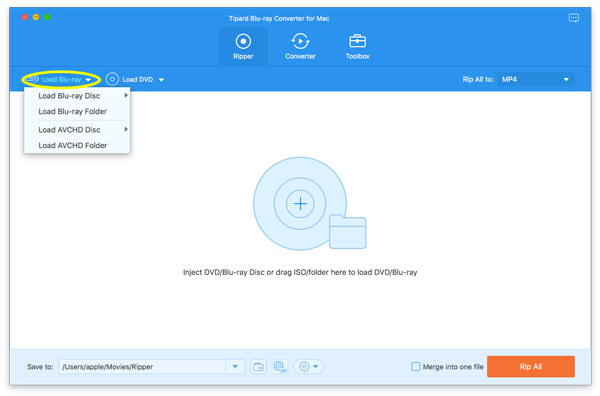
The unregistered Mac app's Ripper tab: Load Blu-ray (highlighted) and Load DVD, High Speed Conversion at the top right, and the output format (MKV 3D Left-Right here) and save folder at the bottom.
Features
Native on Apple silicon, accelerated by VideoToolbox
Tipard Blu-ray Converter for Mac ships separate builds for Apple silicon and Intel Macs; the installer fetches the right one (151 MB or 123 MB). Encoding uses Apple's VideoToolbox hardware engines, which matters most for HEVC: an M-series Mac encodes it in hardware instead of grinding through it on the CPU.
Remux to lossless MKV, or transcode
Tipard Blu-ray Converter for Mac offers two ways to rip. Remuxing to "MKV Lossless" (or lossless MPG for DVDs) copies the original video and audio streams without re-encoding, so the file looks exactly like the disc but stays large. Transcoding to MP4, MOV or MKV with H.264, HEVC or AV1 shrinks it for phones, laptops and iCloud.
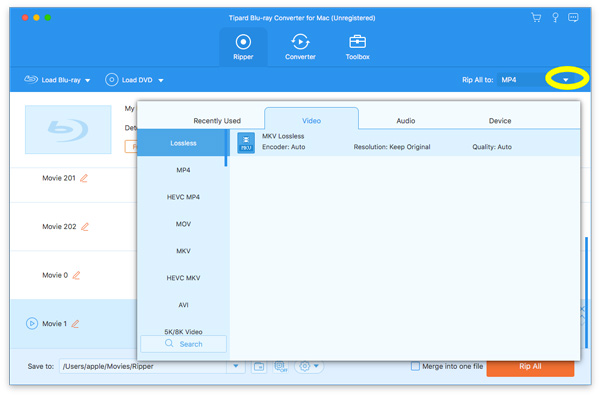
The Rip All to menu on the Lossless category: MKV Lossless with the original resolution. MP4, HEVC MP4, MOV, MKV, HEVC MKV, AVI and 5K/8K categories are listed on the left.
Presets for Apple devices, and ProRes for editing
Tipard Blu-ray Converter for Mac has one-click presets for iPhone, iPad and Apple TV, and can output Apple ProRes MOV files that Final Cut Pro and DaVinci Resolve edit smoothly. The Edit Profile window lets you choose the encoder (H.264, HEVC/H.265, XviD or AV1), resolution, frame rate, bitrate and audio settings, and save them as your own preset.
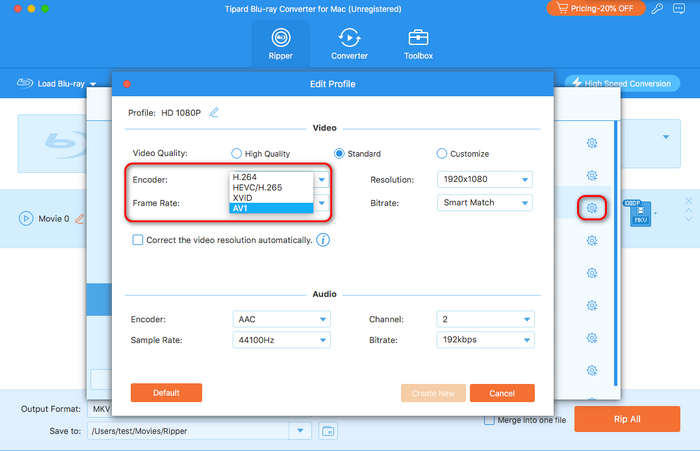
The Edit Profile window for an HD 1080P preset: the encoder list open on AV1, 1920x1080 resolution, Smart Match bitrate and AAC audio settings.
3D discs and 3D output
Tipard Blu-ray Converter for Mac rips 3D Blu-rays either without re-encoding (keeping the original M2TS or SSIF streams) or to side-by-side or red/cyan anaglyph 3D in MP4, MKV, MOV or AVI. It can also turn a regular 2D film into anaglyph 3D for viewing with cheap glasses.
Editing, filters and a toolbox
Tipard Blu-ray Converter for Mac's editor has Rotate & Crop, Effect & Filter, Watermark, Audio and Subtitle tabs, with side-by-side original and output previews, contrast, saturation, brightness and hue sliders, deinterlacing and a gallery of filters. The Toolbox adds a video compressor, a 4K/5K/8K upscaler, a GIF maker, a 3D maker and a metadata editor for titles, artists, covers and dates.
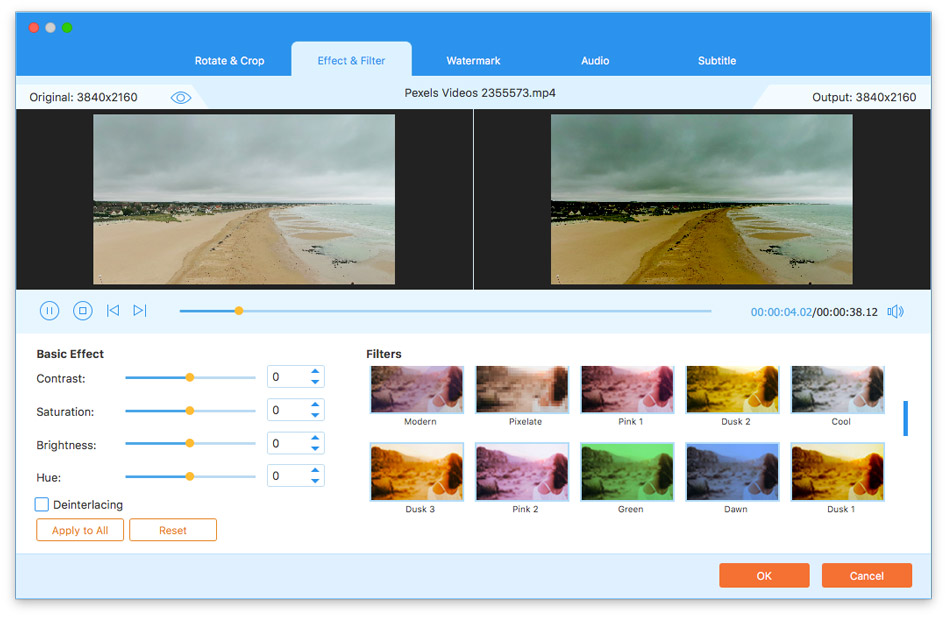
The Effect & Filter tab on a 4K beach clip: original and output previews, the four color sliders, Deinterlacing, and filters such as Modern, Pixelate, Dusk and Cool.
Benefits
- Your discs in the TV app. Ripped MP4 and MOV files go straight into the Apple TV app and sync to an iPhone or iPad.
- A Plex or Infuse library of lossless MKV files with every audio track and subtitle intact.
- Old camcorder discs rescued: AVCHD discs and folders convert to files you can edit.
- No Windows needed. The whole job runs natively on a current Mac.
Real-World Uses
- A MacBook movie library for flights, ripped to 1080p HEVC so a dozen films fit in the free space.
- Editing a clip for a presentation from a documentary you own, ripped to ProRes for Final Cut Pro.
- An Infuse or Plex server on a Mac mini fed with lossless MKV rips of a Blu-ray collection.
- Watching a 3D Blu-ray as a side-by-side file on a 3D-capable headset or TV.
Who It's For, and Who Should Skip It
It's for Mac owners with a USB Blu-ray drive who want their discs as files, in a native Mac app that handles both lossless backups and compact device copies.
Skip it if:
- You're happy with free tools. MakeMKV (free while in beta) remuxes Blu-rays on macOS, and HandBrake compresses the result.
- You want to watch, not rip. A Blu-ray player app plays discs without converting them; Tipard sells one for the Mac.
- You need 4K UHD discs ripped. Tipard's Mac page doesn't promise UHD disc ripping the way its Windows page does, and few USB drives read UHD discs on a Mac.
- You dislike subscriptions. The plan on our order page renews monthly.
Usage Guide
- Install. Open the 4 MB disk image and run the installer; it downloads the build for your Mac's chip. Keep the Mac online.
- Load the disc. Connect the Blu-ray drive, insert the disc and click Load Blu-ray (or choose an ISO or folder from its menu). Open the full movie list if the main movie isn't the one you want.
- Choose a format. Pick MKV Lossless for a perfect copy, or an MP4, HEVC MP4 or device preset from Rip All to. Set formats per title if you like.
- Check tracks. Choose the audio track and subtitle for each title; use the edit and cut buttons with a re-encoded format.
- Rip. Choose a save folder and click Rip All. In Preferences > Task Schedule you can have it open the folder or beep when done.
Where it falls short
- Not every disc. Tipard says the app decrypts discs automatically but, unlike its Windows page, doesn't list which protections the Mac edition handles. The 5-minute trial is the only way to know for your discs.
- Updates can misfire. A Trustpilot buyer reported Tipard Blu-ray Converter stopped working after an update for a while before support fixed it.
- Dated preset list. Device presets still include long-gone hardware (Zune, PSP, Windows Phone 7) alongside current iPhones.
- Licensing. One Mac per license, and Windows and Mac licenses aren't interchangeable.
What Users Say
We couldn't find an independent review of the Mac edition, so this section draws on Tipard's testimonials and Trustpilot.
Testimonials on Tipard's Mac page (4.9 from 441 reviews)
The Mac product page shows 4.9 out of 5 from 441 reviews. They're on the vendor's site, so read them as testimonials.
Jensen: "I can rip my Blu-ray to MP4 and upscale the video resolution to 4K! That means it will fit my Mac's 4K res screen."
Pino: "I could only watch my movie Blu-ray in a region-free Blu-ray player in the past, but now I can extract my Blu-ray to a digital video without worrying about the encryption."
Wonka: "The ripping speed is so crazy fast. My friends and brothers really enjoy my videos."
Trustpilot: Tipard Studio (4.5 from 91 reviews)
Tipard averages 4.5 out of 5 on Trustpilot from 91 reviews, with 82% five-star and 10% one-star. FDAbbott (4 stars) gave Tipard credit after a Blu-ray Converter license stopped working following an update: "to Tipard Studio's credit, they did finally fix the issue." Andrzej Zet (June 2025, 5 stars) wrote of Tipard's DVD Ripper for Mac: "The software is incredibly user-friendly".
The one-star reviews focus on refunds and subscriptions, such as "Just wanted the one month try-out, got an subscription instead." (Maarten Laurent). Trustpilot blocks direct downloads, so these quotes were read through a summarizing tool and are excerpts.
The recurring themes
Buyers praise speed, simplicity and getting around region locks. The cautions are the familiar ones for any ripper (disc compatibility and updates) plus Tipard's subscription and refund complaints, which matter here because our order page sells the monthly plan.
Comparisons
Tipard Blu-ray Converter for Mac vs MakeMKV and HandBrake
MakeMKV remuxes Blu-rays to MKV on a Mac for free (while in beta) and HandBrake compresses them, also free. Tipard combines both steps, adds Apple device and ProRes presets, an editor and 3D output, and uses VideoToolbox acceleration, in exchange for a license fee.
Mac edition vs Windows edition
Prices match ($40 monthly here, $60 lifetime on Tipard's store). The Windows edition advertises more: 4K UHD disc ripping with HDR, named protection schemes, and PGS subtitle OCR. The Mac edition has native Apple silicon builds and a metadata editor. Licenses don't transfer between them.
Editions and Pricing
| License | Price | Term | Macs | Where |
|---|
| 1 Month License | $40.00 a month | Renews monthly until cancelled | 1 | Our Buy Now button |
| 1 Month License | $32.00 a month with store coupon | Renews monthly until cancelled | 1 | Tipard's store |
| Lifetime License | $60.00 (list $75.00) | One-time payment | 1 | Tipard's store |
| Lifetime License, 3 Macs | $85.00 | One-time payment | 3 | Tipard's store |
US dollar prices from November 4, 2026, before sales tax or VAT. Tipard's store also sells the converter with its Mac Blu-ray Player as a $79 lifetime bundle, and adds a 7-day Blu-ray Player trial to orders that renews at $30 a month unless cancelled.
FAQs
Which Blu-ray drive works with Tipard Blu-ray Converter for Mac?
Any internal or USB Blu-ray drive macOS recognizes. Tipard Blu-ray Converter for Mac reads the disc through it; a plain Blu-ray reader is enough, since the app doesn't burn discs.
Can it rip directly for my iPhone or Apple TV?
Yes. Tipard Blu-ray Converter for Mac has presets for iPhone, iPad and Apple TV that output ready-to-play MP4 or MOV files, which you can add to the TV app or AirDrop to a device.
Does it run on the latest macOS?
Tipard says Blu-ray Converter for Mac keeps up with macOS releases and supports macOS 10.12 and later, including the newest version. Its Apple silicon build was updated in June 2026.
Can it make a Blu-ray ISO backup?
Tipard's Mac page describes ISO backup as well as ripping to video. For a perfect copy as a single file that plays in Infuse, Plex or VLC, MKV Lossless is the usual choice.
Do my ripped files stop working if I cancel the subscription?
No. Files made with Tipard Blu-ray Converter for Mac are ordinary MP4, MOV or MKV files with no copy protection, so they keep playing after you cancel. You only need an active license to rip more.
Can I use it to convert ordinary video files?
Yes. Tipard Blu-ray Converter for Mac's Converter tab batch-converts videos and audio (for example MKV to MP4 or FLAC to ALAC), with the same presets and codec settings as the Ripper.
System Requirements
- macOS: 10.12 Sierra or later
- Processor: 1 GHz Intel or Apple silicon (native builds for both)
- RAM: 2 GB or more
- Drive: internal or USB Blu-ray drive for Blu-ray discs
- Download: 4 MB installer that fetches a 123 MB (Intel) or 151 MB (Apple silicon) app
Conclusion
Tipard Blu-ray Converter for Mac is a current, native Mac ripper (Apple silicon build from June 2026) that covers lossless MKV, compact HEVC copies, ProRes for editing, Apple device presets and 3D, in a tidy three-tab app. The one reason to buy it is one program that takes a Blu-ray or DVD to any Apple-friendly file without a second tool. The main reason not to is cost versus free tools, especially on a subscription, plus uncertainty over which protected discs the Mac edition handles. Our verdict: worth it if your own discs rip cleanly in the 5-minute trial; take the monthly plan for a one-off ripping project and cancel when you're done.
Download Free TrialBuy Now