Tipard 3D Converter: Make 3D from 2D Video, Switch 3D Formats, or Flatten 3D to 2D
Tipard 3D Converter is a $36 Windows program with three jobs: turn an ordinary 2D video into 3D (anaglyph, side-by-side or top-and-bottom), convert a 3D video from one 3D layout to another, and turn a 3D movie back into normal 2D. Our Buy Now button sells the lifetime license for one PC, a one-time payment.
3D video comes in incompatible flavors. A side-by-side file from a 3D camera shows as two squashed pictures on a normal screen; a red/cyan anaglyph needs the cheap paper glasses; a 3D TV or VR headset wants yet another layout. This program converts between them, and can fake depth from a flat video for a bit of fun with anaglyph glasses.
Quick facts
- Version: 6.1.58 (installer dated February 27, 2026)
- Developer: Tipard Studio
- Runs on: Windows 7, 8, 10 and 11. A separate Mac edition exists.
- Modes: 2D to 3D, 3D to 3D, 3D to 2D
- 3D formats: anaglyph (ten variants), side-by-side (half-width or full), top-and-bottom (half-height or full)
- Input: MP4, MKV, AVI, MOV, WMV, FLV, VOB, TS, M2TS and other common video formats
- Price: $36 one-time on the order page (lifetime license for 1 PC; $45 list with a 20% discount)
- Trial: converts only the first 5 minutes of each video
- What we checked: the 39.8 MB installer from Tipard's download server, file version 6.1.58, and the order page, which charged $36.00 for a lifetime 1-PC license with no renewal, both on November 4, 2026. We didn't convert a video with it.
Before you buy: manage your expectations of 2D to 3D
Turning a flat video into 3D is an estimate: the software guesses depth, it doesn't recover the real thing. Results range from a pleasant pop to a mild shimmer, and a Mac App Store buyer called the output of the Mac edition's conversion "awful". Convert a 5-minute sample with the free trial and watch it on the screen and glasses you'll actually use.
Tipard refunds within 30 days only for technical problems it can't solve, not because you didn't like the effect. The program also doesn't read Blu-ray 3D discs directly; it converts video files.
Download Free TrialBuy Now
Overview
The program starts with a choice of three big buttons, 2D to 3D, 3D to 3D and 3D to 2D, each with a one-line description of the formats it handles. Pick one, add a file, and you get a large preview window above the settings for that mode: the output 3D format buttons, a depth control, output resolution and aspect ratio, audio track, subtitle, profile and output folder. Convert runs the job.

The start screen: 2D to 3D (anaglyph in ten types, side by side, top and bottom), 3D to 3D, and 3D to 2D, with Buy Now and Register in the top-right corner.
Features
2D to 3D with adjustable depth
Tipard 3D Converter's 2D to 3D mode outputs anaglyph (for colored glasses), side-by-side or top-and-bottom 3D, each in full or half size. A depth slider sets how strong the effect is, and "Switch L/R Image" swaps the left and right views if the depth looks inside-out on your display. The preview shows the result before you convert.
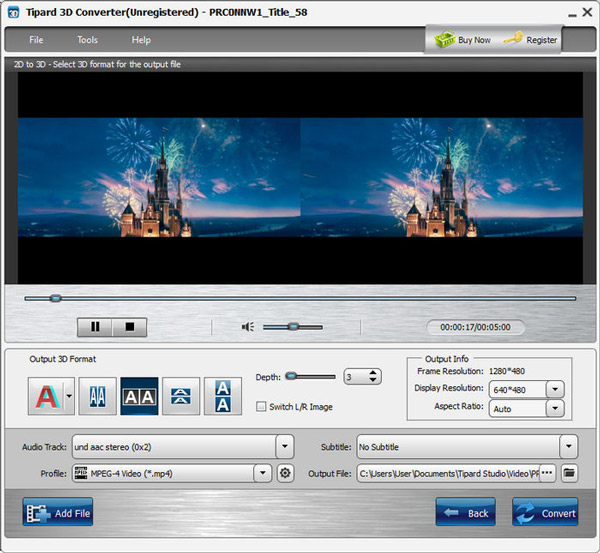
2D to 3D in the unregistered program: a side-by-side preview, the five output 3D format buttons, depth set to 3, Switch L/R Image, output resolution and aspect ratio, audio track, subtitle and MPEG-4 profile.
3D to 3D: make a video fit your screen or glasses
Tipard 3D Converter's 3D to 3D mode reads a side-by-side or top-and-bottom video, which you identify as the "Original 3D Format", and writes it in another 3D layout. That's how a side-by-side clip from a 3D camera becomes an anaglyph you can watch on a normal monitor with red/cyan glasses, or a full side-by-side file a 3D TV accepts.
3D to 2D: watch without glasses
Tipard 3D Converter's 3D to 2D mode keeps the left-eye or right-eye picture and outputs a normal 2D video at the resolution you set, so a 3D film plays properly on a phone, tablet or ordinary TV.
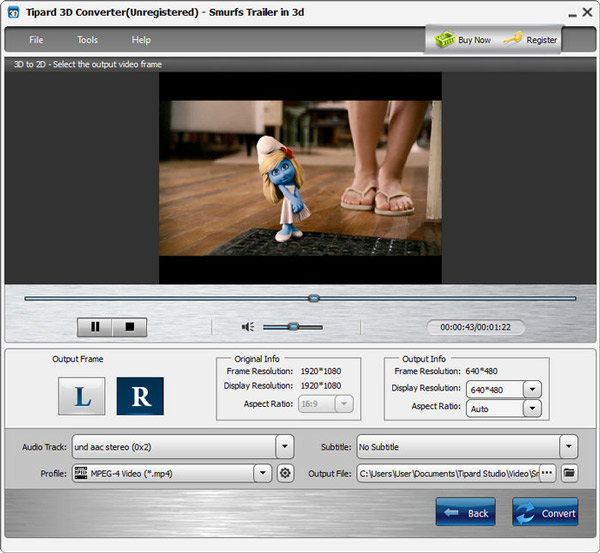
3D to 2D on a 1920x1080 3D trailer: the L and R output frame buttons, the original info, and the output resolution (640x480 here) and aspect ratio.
Profiles, resolution and tracks
Tipard 3D Converter outputs to MP4, MKV, AVI, WMV, MOV, FLV, VOB and device profiles, with a settings window for encoder, resolution, frame rate and bitrate. You choose the audio track and subtitle from the source, and type any output resolution in "width*height" form if the list doesn't have the one you need.
Benefits
- 3D files that actually play on the TV, projector or headset you own.
- 3D movies on everyday devices by flattening them to 2D.
- A cheap way to try 3D: anaglyph output plus paper glasses, no 3D TV needed.
- A one-time $36 rather than a subscription.
Real-World Uses
- Footage from a twin-lens or 3D camera (side-by-side) turned into anaglyph for a family viewing with paper glasses.
- A 3D movie file flattened to 2D for a tablet on a long flight.
- A top-and-bottom clip switched to side-by-side for a 3D TV that only accepts that layout.
- Holiday videos given a 2D to 3D treatment for a novelty screening.
Who It's For, and Who Should Skip It
It's for people who already have 3D content or 3D hardware and need to make the two match, and for hobbyists curious about anaglyph versions of their own videos.
Skip it if:
- You expect cinema-quality 3D from a 2D film. Depth from a flat source is synthetic.
- Your source is a 3D Blu-ray disc. You'd need a ripper first; Tipard's Blu-ray Converter rips 3D discs directly.
- You only need one conversion. The free StereoMovie Maker or ffmpeg's stereo3d filter can switch layouts if you don't mind a learning curve.
- You use a Mac. Buy the Mac edition; licenses don't cross platforms.
Usage Guide
- Install. Run the 39.8 MB installer and open Tipard 3D Converter.
- Choose a mode. Click 2D to 3D, 3D to 3D or 3D to 2D, then Add File.
- For 3D to 3D, tell it the source layout under Original 3D Format and click Next.
- Set the output. Pick the 3D format and depth (or L/R for 2D output), resolution, aspect ratio, audio and subtitle, and a profile.
- Convert. Choose the output folder and click Convert.
Where it falls short
- Synthetic depth can disappoint. The one independent buyer review we found (for the Mac App Store edition) said the converted video's quality was "awful".
- An old-fashioned program. The interface and device profiles date from the early-2010s 3D TV era, and a reviewer on Tipard's own site asked "Will it update?".
- Files only. It takes video files, not DVD or Blu-ray discs, so a 3D Blu-ray must be ripped first.
- Low default output size. The guide's examples output 640x480; set the resolution yourself to keep HD.
What Users Say
3D conversion is a niche, and there's no recent independent review of the Windows program. This is what's available.
Reviews on Tipard's site (4.9 from 711 reviews)
The reviews page shows 4.9 out of 5 from 711 reviews (the product page shows 4.6). These are hosted by the vendor.
LiamQuest (March 3, 2025), "Stable and powerful": "It has so many 3D effects and lets me customize the 3D effects. I can create greatly deep 3D effects with it."
Robby (March 27, 2019): "I don't have a 3D TV, I don't want to buy 3D glasses either. With the help of 3D Converter, many new 3D movies can be converted to 2D mode."
TomCraft (July 7, 2024), "Will it update?": "I hope more updates! ... I hope that this program can update regularly and check something new it can bring!"
Mac App Store (Tipard's Mac edition)
The App Store listing of Tipard's 3D Converter for Mac doesn't have enough ratings to show an average. Its one written review, "Not worth the money invested" by Joaopauloemt (February 24, 2018), reads: "It converted my 3D video in a 2D. The quality of the new video, however, is awful. I regret paying so much for this app." It's a different platform and an old version, but the same kind of conversion.
Trustpilot: Tipard Studio (4.5 from 91 reviews)
Tipard scores 4.5 out of 5 from 91 Trustpilot reviews, 82% of them five-star, mostly praising quick help with registration codes. The 10% one-star reviews are mainly about refunds and subscriptions on other products. Trustpilot blocks direct downloads, so these figures were read through a summarizing tool.
The recurring themes
Users like the range of 3D formats, the depth control and the simple three-mode layout, and several use it mainly to flatten 3D to 2D. Doubts center on output quality and the pace of updates.
Comparisons
Tipard 3D Converter vs Tipard Blu-ray Converter
Blu-ray Converter also outputs side-by-side, top-and-bottom and anaglyph 3D, and it rips 3D Blu-ray discs, but it's a $40-a-month (or $60 lifetime on Tipard's store) ripper. If your 3D content is already in video files, the $36 3D Converter is the focused, cheaper tool.
Tipard 3D Converter vs free tools
StereoMovie Maker (free, Windows) and ffmpeg can convert between 3D layouts with more control but far less convenience, and neither has a one-click 2D-to-3D mode with a live preview.
Editions and Pricing
| License | Price | Term | PCs | Where |
|---|
| Lifetime License | $36.00 (list $45.00) | One-time payment | 1 | Our Buy Now button and Tipard's store |
| 1 Month License | $12.00 a month | Renews monthly until cancelled | 1 | Tipard's store |
| Lifetime License, 3 PCs | $60.00 | One-time payment | 3 | Tipard's store |
| Video Converter Ultimate + 3D Converter | $69.00 | One-time payment | 1 | Tipard's store |
US dollar prices from November 4, 2026, before sales tax or VAT. Orders on Tipard's store include a 7-day Blu-ray Player trial that renews at $30 a month unless you cancel it.
FAQs
Which 3D format should I choose for my TV or headset?
Most 3D TVs and VR players accept side-by-side; half-width side-by-side keeps the normal file size, full side-by-side keeps full resolution per eye. Choose anaglyph only for a normal screen with red/cyan glasses. Tipard 3D Converter offers all three families.
Can Tipard 3D Converter play 3D video on VR headsets?
Tipard says Tipard 3D Converter's output works with 3D TVs from Samsung, LG and Sony, VR headsets such as Quest, HTC Vive and PSVR, and players like PowerDVD and VLC. The headset's own video player has to support side-by-side or top-and-bottom playback.
How long does a conversion take?
Tipard says a one-minute video usually converts in a few seconds, and larger files take proportionally longer. Its tech specs list NVIDIA, AMD and Intel GPU acceleration.
What does the trial limit?
Tipard 3D Converter's trial converts only the first 5 minutes of each video, which is enough to judge the 3D effect on your own screen before buying.
Is the license really a one-time payment?
Yes. The license sold on our order page is a lifetime license for one PC with no renewal. Tipard's store also sells a $12 monthly plan that does renew.
Does it work with 3D Blu-ray discs?
Not directly. Tipard 3D Converter converts video files. Rip the disc first (Tipard Blu-ray Converter outputs side-by-side or 2D files from 3D Blu-rays), then convert the file if you need another layout.
System Requirements
- Windows: 11, 10, 8 or 7
- Processor: 1.2 GHz Intel or AMD CPU or faster
- RAM: 1 GB or more
- Graphics: NVIDIA, AMD or Intel GPU acceleration supported; 1024x768 display or higher
- Disk space: 2 GB or more recommended
- Download: 39.8 MB installer
Conclusion
Tipard 3D Converter is a simple, inexpensive utility that does three useful 3D jobs in a clear three-button interface, and it was still being updated in 2026. The one reason to buy it is making 3D videos match your hardware, or flattening them to 2D, in a couple of clicks for a one-time $36. The main reason not to is the 2D-to-3D promise: synthetic depth rarely impresses, and the only outside review called the output quality awful. Our verdict: worth it for converting between 3D layouts or to 2D; treat 2D to 3D as a bonus and judge it with the 5-minute trial.
Download Free TrialBuy Now